How to Reduce Email Bounce Rate for Cold Email Outreach?

On this page
Your cold email campaign looks perfect. Personalized subject lines. Compelling copy. Strong CTAs. You hit send on 500 emails and 40 bounce back within hours.
Suddenly, your sender reputation takes a hit. Your deliverability drops. And future emails start landing in spam folders, even for prospects who want to hear from you.
Email bounce rate is the silent killer of cold outreach campaigns. A bounce rate above 2% signals email service providers that you’re sending to invalid addresses, triggering spam filters and damaging your domain reputation for months.
But here’s the good news: reducing your bounce rate below 2% is achievable with the right tactics. In this guide, you’ll learn 10 proven strategies to minimize bounces, protect your sender reputation, and ensure your cold emails reach primary inboxes, not spam folders.
What you’ll learn:
- What bounce rate is acceptable for cold email (2% benchmark)
- 10 actionable tactics to reduce bounces immediately
- Email verification tools that work
- How SmartReach.io helps maintain low bounce rates
What is email bounce rate?
Email bounce rate measures the percentage of emails that fail to reach recipients and are returned to you.
Formula:
| (Number of Bounced Emails ÷ Total Emails Sent) × 100 = Bounce Rate% |
Example:
You send 1,000 cold emails → 20 bounce back
(20 ÷ 1,000) × 100 = 2% bounce rate
Industry Benchmark for Cold Email:
- ✅ Below 2%: Excellent (maintain this)
- ⚠️ 2-5%: Acceptable but needs improvement
- 🔴 Above 5%: Critical issue—fix immediately
For a deep dive into why emails bounce and bounce types, read: Why Do Emails Bounce?
Why email bounce rate matters for cold outreach?
High bounce rates don’t just waste emails, they trigger a domino effect that destroys your cold outreach program:
1. Damages sender reputation
Email service providers (ESPs) track your bounce rate. Consistently high bounces (>5%) flag you as a low-quality sender, causing future emails to land in spam, even for engaged prospects.
2. Reduces email deliverability
Once your reputation drops, ESPs throttle or block your emails. Your deliverability rate can plummet from 95% to 60% within weeks.
3. Wastes resources
Sending to invalid addresses burns through your email quota, wastes time, and inflates costs, especially if you’re paying per email sent.
4. Lowers engagement metrics
Bounced emails don’t get opened or replied to, skewing your campaign metrics and making it harder to identify what’s actually working.
Real Impact:
- Bounce rate of 2% = 20 wasted emails per 1,000 sends
- Bounce rate of 10% = 100 wasted emails + damaged reputation
- Recovery time after reputation damage: 3-6 months
Bottom Line: Keep bounce rate below 2% to protect deliverability and maximize ROI.
Understanding email bounce types: hard vs soft Bounces
| Aspect | Soft Bounce (Temporary) | Hard Bounce (Permanent) |
| Definition | Temporary delivery failure | Permanent delivery failure |
| Common Causes | Full inbox, server down, email too large, auto-responder | Invalid address, fake email, domain doesn’t exist, blocked sender |
| SMTP Code | 4xx (e.g., 421, 452) | 5xx (e.g., 550, 553) |
| Can Retry? | ✅ Yes, after 24-72 hours | ❌ No, remove immediately |
| Action Required | Monitor, retry 2-3 times | Delete from list right away |
| Impact on Reputation | Low (if temporary) | High (if not removed) |
Bounces can be in two categories:
- Soft Bounce
- Hard Bounce
Let’s discuss each category in detail.
Soft Bounce
A soft bounce occurs when an email is temporarily undelivered. This happens when there is an issue from the recipient’s side. While soft bounce is temporary, emails can be resent after a certain period of time.
Recommended Read**: **How to Increase Email Open Rate for Cold Email Outreach?****
There are several reasons for an email to soft bounce.
- Lack of space in the inbox or mail server
- Unreachable destination
- The server may be down or overloaded
- The email size may be too large
- Server blocking due to poor reputation
- The sender’s server is being blocklisted
- A recipient using auto-responder
Hard Bounce
A hard bounce occurs when an email cannot be delivered to the recipient permanently. A higher email bounce rate denotes that your email list is bought, old and not being cleaned at regular intervals.
The reasons for a hard bounce are
- Email ID may be incorrect
- Failed email validation
- Email account suspended
- Email address blocked
- Blocking of external emails by organizations with strict security policies
- Policy filtering set by the recipient
- The server may not exist
10 proven tactics to reduce email bounce rate
Verify email addresses before sending
Email verification is your first line of defense against bounces. Email verification tools check if an email address is valid, active, and deliverable before you send.
How It Works:
- Syntax check (proper format like name@domain.com)
- Domain validation (domain exists and accepts email)
- SMTP verification (mailbox exists and is active)
- Spam trap detection (identifies honeypot addresses)
Top Email Verification Tools for 2025:
| Tool | Accuracy | Best For | Pricing |
|---|---|---|---|
| SmartReach.io (built-in) | Pre-send checks at import | Cold email campaigns | Included in plans |
| ZeroBounce | 99% | Bulk verification | $16/1,000 credits |
| Clearout | 98% | Real-time validation | $0.008/email |
| NeverBounce | 97% | API integration | $8/1,000 credits |
| Hunter.io | 95% | Lead prospecting | $49/month |
SmartReach.io advantage:
SmartReach.io validates addresses as you import them and blocks the invalid and risky ones from ever entering a sequence, so a bought-in typo never costs you a bounce. Setup details live in the email validation guide.
Pro Tip: Verify your list before importing it into your campaign. Never “force push” blocked emails unless you’re 100% certain they’re valid.
Clean your email list regularly
Email addresses decay at 22-25% annually. Old lists accumulate invalid addresses, inactive accounts, and spam traps, all of which increase bounce rates.
Email List Cleaning Schedule:
| List Age | Cleaning Frequency | Action |
|---|---|---|
| Active list (<3 months) | Monthly | Remove hard bounces only |
| Aging list (3-6 months) | Bi-weekly | Remove hard bounces + inactive soft bounces |
| Old list (6+ months) | Weekly | Full re-verification required |
What to Remove:
- ✅ Hard bounces (550, 553 SMTP codes)
- ✅ Emails that soft bounced 3+ times
- ✅ Catch-all addresses with no engagement
- ✅ Role-based emails (info@, admin@, support@)
- ✅ Disposable/temporary emails
- ✅ Spam traps and honeypots
How to clean in SmartReach.io:
Open Prospects, choose Filters, add the Has bounced filter, and bulk-remove the hard bounces from the filtered list.
Pro Tip: Export your hard-bounced list and cross-reference with your CRM to prevent re-importing invalid addresses.
Use double opt-in (when applicable)
Double opt-in requires subscribers to confirm their email address by clicking a verification link. This ensures you only send to valid, engaged recipients.
How Double Opt-In Works:
- User signs up via form
- System sends confirmation email
- User clicks verification link
- Email added to list (verified + engaged)
When to Use Double Opt-In:
| Scenario | Use Double Opt-In? | Reason |
|---|---|---|
| Inbound lead magnets | ✅ Yes | Confirms interest + validates address |
| Webinar sign-ups | ✅ Yes | Reduces no-shows + fake emails |
| Newsletter subscriptions | ✅ Yes | Improves engagement rates |
| Cold outreach (prospecting) | ❌ No | Recipients didn’t opt in initially |
| Purchased lists | ❌ Never use purchased lists | Violates CAN-SPAM, high bounce risk |
SmartReach.io note:
For cold outreach (not opt-in based), use email verification instead of double opt-in. Double opt-in is for inbound leads only.
Pro Tip: If running giveaways or contests, create a separate list and validate thoroughly before adding to your main cold outreach list.
Segment your email list
Sending the same email to your entire email list increases bounce risk. Segmentation allows you to send targeted emails to engaged recipients while quarantining risky addresses.
Key Segmentation Criteria:
By Engagement Level:
- Highly Engaged: Opened/replied in last 30 days → Send regularly
- Moderately Engaged: Opened in last 90 days → Reduce frequency
- Unengaged: No activity in 90+ days → Re-engagement campaign or remove
- Bounced: Soft bounced 2+ times → Separate list, retry after 7 days
By Email Quality:
- Verified: Passed validation → Primary outreach list
- Catch-All: Unknown deliverability → Lower volume, monitor bounce rate
- Role-Based: Generic addresses (info@, sales@) → Separate list or exclude
- Risky: Disposable, complaints → Exclude entirely
SmartReach.io segmentation:
Use Tags to segment lists: “Verified”, “Catch-All”, “Engaged”, “Re-engagement Needed”
Pro Tip: Create a “Do Not Contact” segment for emails that hard bounced, unsubscribed, or complained, prevents accidentally re-adding them.
Authenticate your email domain (SPF, DKIM, DMARC)
Email authentication protocols tell receiving servers your emails are legitimate. Without authentication, your emails are more likely to bounce or land in spam.
The 3 Authentication Protocols:
| Protocol | What It Does | Setup Difficulty | Impact on Bounce Rate |
|---|---|---|---|
| SPF | Verifies sending server is authorized | Easy | High (prevents spoofing bounces) |
| DKIM | Adds encrypted signature to emails | Medium | Medium (builds trust) |
| DMARC | Enforces SPF/DKIM policies | Medium | High (prevents impersonation) |
Checking SPF, DKIM and DMARC one lookup at a time gets tedious once you send from several accounts. SmartReach.io shows all three marks beside every sending account inside the campaign itself, so a failed record surfaces before the sequence starts bouncing.
- Open the campaign and go to Channel Setup
- Select Email accounts
- Check the DMARC, DKIM and SPF marks beside each sending account
- Fix any failing record at your DNS provider, then click Re-run checks
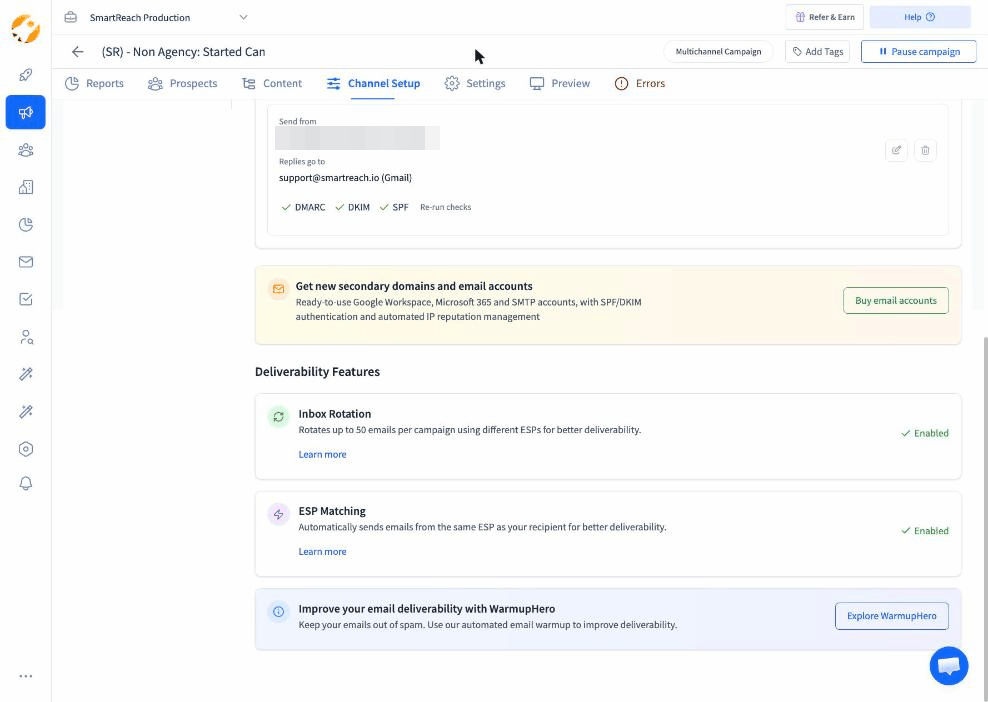 Channel Setup in SmartReach.io. Authentication marks per sending account, re-checked on demand.
An account with a failing mark stays out of the campaign until it passes. That single habit removes the authentication class of bounces entirely.
Pro Tip: Use MXToolbox.com to verify your SPF, DKIM, and DMARC records are properly configured. Our free email authentication checker runs all three in a single lookup, with no signup.
Warm up your email domain
Sending high volumes from a new or cold domain triggers spam filters and increases bounce rates. Email warm-up gradually builds your sender reputation.
What Is Email Warm-Up?
Email warm-up is the process of gradually increasing your sending volume over 2-4 weeks to establish trust with email service providers.
Warm-Up Schedule (for New Domains):
| Week | Daily Send Limit | Notes |
|---|---|---|
| Week 1 | 20-50 emails/day | Mix of safe domains (Gmail, Outlook) |
| Week 2 | 50-100 emails/day | Monitor bounce rate (<2%) |
| Week 3 | 100-200 emails/day | Gradually increase if metrics stable |
| Week 4+ | up to 200 emails/day | Full per-account volume; scale further via inbox rotation, not per-account volume |
SmartReach.io Campaign Soft Start:
Enable Campaign Soft Start to ramp up sending automatically:
- In the campaign, open Channel Setup and select Soft-Start Settings
- SmartReach.io increases the daily send volume incrementally
- Bounce rate is monitored as the volume steps up
Why Warm-Up Matters:
- Prevents “sudden spike” detection by ESPs
- Builds positive engagement history
- Lets you scale without tripping volume-based filters
Pro Tip: Use SmartReach.io’s email warm-up feature to automate the process.
Limit daily sending volume
Sending too many emails too fast triggers spam filters, increases server load, and leads to temporary blocks (soft bounces).
Daily Sending Limits by Domain Age:
| Domain Age | Max Emails/Day Per Address | Reasoning |
|---|---|---|
| New (<1 month) | 20-50 | Building reputation |
| Young (1-3 months) | 50-150 | Gradual scaling |
| Established (3-6 months) | 150-200 | Moderate volume safe |
| Mature (6+ months) | up to 200 | Per-account ceiling; scale via inbox rotation |
SmartReach.io best practice:
In the campaign’s Channel Setup, open Global Sending Limits and set Max emails per day from each sender-email to around 100.
Why 100 Emails/Day?
- ESPs flag sudden volume spikes
- Human-like sending patterns (10-15 per hour)
- Leaves buffer for follow-ups and replies
If You Need Higher Volume:
Use SmartReach.io’s Inbox Rotation feature:
- Add multiple sending email addresses to one campaign
- Distribute volume across addresses
- Maintain low per-address send rate while scaling total volume
Pro Tip: Monitor your bounce rate daily during the first 2 weeks after increasing send volume. If bounce rate jumps above 3%, reduce volume immediately.
Maintain time gaps between emails
Sending emails in rapid-fire bursts looks robotic to ESPs and increases the risk of temporary server blocks (soft bounces).
Recommended Time Gaps:
| Sending Pattern | Time Gap | Detection Risk |
|---|---|---|
| Manual (human-like) | 2-5 minutes | Low ✅ |
| Automated (natural) | 30-90 seconds | Low ✅ |
| Rapid burst | <10 seconds | High 🔴 |
SmartReach.io automatic spacing:
SmartReach.io spaces sends with human-like delays instead of firing them in bursts, and keeps them inside the sending schedule you set for the campaign:
- Varies the gap between consecutive sends
- Avoids machine-regular intervals
- Respects the campaign’s sending window in the recipient’s time zone
Why Time Gaps Matter:
- Prevents “bulk send” detection
- Reduces server overload on recipient end
- Decreases soft bounce risk from greylisting
Pro Tip: Restrict the campaign’s sending schedule to business hours (8 AM to 6 PM in the recipient’s time zone) to reduce away-message soft bounces.
Avoid spammy content and large attachments
Spam filters analyze email content and attachments. Triggering filters causes bounces or spam folder placement.
Content That Triggers Spam Filters:
| Element | High Risk 🔴 | Low Risk ✅ |
|---|---|---|
| Subject Lines | “FREE”, “URGENT”, “ACT NOW”, “$$$” | Personalized, question-based |
| Body Content | ALL CAPS, excessive!!!, “Click here” | Conversational, professional tone |
| Links | Multiple short links, suspicious domains | 1-2 relevant links, branded domains |
| Attachments | .exe, .zip, >5MB files | PDFs <2MB, Google Drive links |
| Images | Image-only emails, no alt text | Text-heavy with 1-2 images |
SmartReach.io Spam Test:
Before sending, run the built-in spam check on your sequence:
- Open the campaign and go to Channel Setup
- Select Spam Test and run it on your sequence content
- Review the spam score (aim for <5)
- Fix flagged issues (keywords, formatting, links)
Attachment Best Practices:
- ❌ Don’t attach files directly in cold emails
- ✅ Link to Google Drive, Dropbox, or hosted PDFs
- ✅ Keep first email text-only (attach in follow-ups)
Pro Tip: Re-run the Spam Test in Channel Setup after every significant copy edit, not just once at launch.
Monitor sender reputation and bounce metrics
Your sender reputation determines whether your emails reach inboxes or bounce. Monitoring metrics helps you catch issues before they escalate.
Key Metrics to Track:
| Metric | How to Check | Target | Action if Off-Target |
|---|---|---|---|
| Bounce Rate | SmartReach.io campaign Reports tab | <2% | Review list quality, verify addresses |
| Sender Score | Sender Score by Validity | 80+ | Reduce send volume, clean list |
| Domain Reputation | Google Postmaster Tools | “High” | Improve engagement, remove bounces |
| IP Reputation | Talos Intelligence | “Good” | Check for blacklisting |
| Spam Complaint Rate | SmartReach.io Reports | <0.1% | Review targeting, unsubscribe process |
How to check in SmartReach.io:
- Open the campaign and go to Reports
- Review the bounce numbers in Email activity
- Export the bounced prospects
- Cross-reference with your verification tool before the next import
Red Flags to Watch:
- 🔴 Bounce rate spikes above 5%
- 🔴 Sender score drops below 70
- 🔴 Sudden decrease in open rates
- 🔴 Increase in spam complaints
Recovery Plan if Reputation Damaged:
- Pause all campaigns immediately
- Remove all hard bounced emails
- Re-verify entire list
- Restart with warm-up sequence
- Monitor daily for 2-4 weeks
Pro Tip: Set up weekly alerts in SmartReach.io to notify you if bounce rate exceeds 3% for any campaign.
How SmartReach.io helps reduce bounce rates
SmartReach.io specializes in cold email outreach with built-in features designed to minimize bounce rates and protect your sender reputation.
Key Features for Bounce Reduction:
1. Built-In Email Validation
- Automatically verifies email addresses during import
- Blocks invalid, disposable, and risky addresses
- Invalid, disposable and risky addresses never reach a sequence
2. Campaign Soft Start
- Gradually increases daily sending volume
- Monitors metrics and auto-adjusts
- Prevents “sudden spike” ESP detection
- No manual ramp-up schedule to maintain
3. Spam Test Reports
- Analyzes email content before sending
- Flags spam trigger words and formatting issues
- Tests SPF, DKIM, DMARC authentication
- Content problems surface before the first send
4. Inbox Rotation
- Send from multiple email addresses in one campaign
- Distribute volume to stay under ESP limits
- Maintain low per-address bounce rate
- Total volume scales while each account stays under its ceiling
5. Detailed Bounce Reporting
- Track bounce rate by campaign, email address, and domain
- Identify problematic domains or addresses
- Export bounced lists for cleaning
- Problem domains and addresses are visible per campaign
6. Automated List Hygiene
- Auto-remove hard bounced addresses
- Flag soft bounces after 3 attempts
- Tag risky catch-all addresses
- List hygiene runs without manual work
New Pricing (Starting at $29/month):
- Pay only for prospects contacted (not email seats)
- Unlimited sending emails per campaign
- All bounce reduction features included
- Free trial available
Advanced tips for maintaining low bounce rates
Once you’ve implemented the 10 core tactics, use these advanced strategies to maintain ultra-low bounce rates (<1%):
1. Use Inbox Rotation for High-Volume Campaigns
Distribute sends across 3-5 email addresses to keep individual address volume low while scaling total output.
2. Create a “Quarantine List” for Catch-All Addresses
Catch-all addresses (unverified) have 50% higher bounce risk. Test them separately before adding to main campaigns.
3. Monitor Domain-Specific Bounce Patterns
If emails to @specificdomain.com consistently bounce, their email server may block cold outreach. Exclude that domain.
4. Re-verify Old Lists Every 90 Days
Email decay rate: 22-25% annually. Re-verify quarterly to maintain list quality.
5. Use Different Email Addresses for Different Campaigns
If one campaign has high bounce rate, it won’t damage reputation of other campaigns using different addresses.
6. Track Bounce Rate by Time of Day
Sending during off-hours increases “mailbox full” soft bounces. Stick to business hours (8 AM – 6 PM recipient time).
7. A/B Test Email Content for Spam Triggers
Run small test batches (50-100 emails) with different content variations to identify spam filter triggers before full deployment.
8. Use Branded Sending Domains
Emails from @yourcompany.com have 25% lower bounce rates than @gmail.com due to authentication and trust factors.
Conclusion
Reducing your email bounce rate below 2% isn’t optional, it’s essential for cold email success. Every bounced email damages your sender reputation, reduces deliverability, and wastes resources.
Your Action Plan:
- Week 1: Verify your email list and remove hard bounces
- Week 2: Set up SPF, DKIM, DMARC authentication
- Week 3: Implement campaign soft start and daily sending limits
- Week 4: Monitor bounce rate and sender reputation weekly
Key Takeaways:
- ✅ Keep bounce rate below 2% to protect deliverability
- ✅ Verify emails before sending, not after
- ✅ Clean your list monthly, re-verify quarterly
- ✅ Use warm-up for new domains or long inactive accounts
- ✅ Monitor sender reputation weekly at Sender Score
SmartReach.io’s built-in validation, soft start, spam testing, and inbox rotation features make it easier than ever to maintain ultra-low bounce rates. With the new flexible pricing starting at $29/month, you only pay for the plan that fits your needs, no more paying per email seat.
FAQs on reducing email bounce rate
What is a good bounce rate for cold emails?
A good bounce rate for cold email campaigns is below 2%. Rates between 2-5% are acceptable but require improvement. Anything above 5% is critical and indicates list quality issues or reputation damage that needs immediate attention to prevent deliverability problems.
How do I reduce my email campaign bounce rate?
Reduce bounce rate by verifying email addresses before sending, cleaning your list regularly, using email authentication (SPF, DKIM, DMARC), warming up your domain gradually, limiting daily send volume to 150-500 per address, and avoiding spam triggers. Monitor bounce metrics weekly.
Should I use double opt-in for cold emails?
No, double opt-in is for inbound subscribers who voluntarily signed up, not cold outreach. For cold email, use email verification tools instead to validate addresses before sending. Double opt-in applies to newsletter subscriptions, lead magnets, and webinar sign-ups.
What are the best email verification tools?
Top email verification tools include SmartReach.io (built-in, included in plans), ZeroBounce (99% claimed accuracy), Clearout (real-time validation), NeverBounce (API integration), and Hunter.io (prospecting). Most tools check syntax, domain validity, SMTP verification, and spam trap detection with 95-99% accuracy.
How do I check my sender reputation?
Check sender reputation using Sender Score by Validity (senderscore.org) for overall score, Google Postmaster Tools for Gmail-specific reputation, and Talos Intelligence for IP reputation. Aim for scores above 80. Monitor weekly and take action if scores drop below 70.
Can I reduce bounce rate to zero?
No, zero bounce rate is impossible. Email addresses naturally decay at 22-25% annually due to job changes, domain expirations, and inbox issues. A realistic goal is maintaining bounce rates below 2% through verification, list hygiene, and regular cleaning practices.
What is email warm-up and why does it matter?
Email warm-up gradually increases sending volume over 2-4 weeks to build sender reputation with email service providers. It prevents sudden volume spikes that trigger spam filters and reduces bounce rates by 30-40%. Start with 20-50 emails daily and scale to 200-500.
Stop juggling tools
Book more meetings on every channel
Join 5,000+ teams running multichannel outreach from one sequence, with deliverability built in.