
Cold Email Masterclass for B2B Teams

On this page
Cold email still works in 2026, but only for teams that treat it as a system. According to SmartReach.io's State of Cold Email 2026, the average cold email reply rate is about 5%, down from 8.5% in 2019, while well-run agency campaigns reply at roughly 10%. The gap between those two numbers is everything this masterclass teaches.
Figures from the SmartReach.io State of Cold Email 2026 report, which analysed 40M+ emails sent between January and June 2026.
What this masterclass covers
Two short primers come first, what cold email is and whether it still works in 2026. The page ends with templates, common mistakes and FAQs.
What is cold email?
Cold email is a personal, one-to-one email sent to someone you have no prior relationship with, with the aim of starting a business conversation. In B2B sales it's how teams reach decision-makers who don't know them yet, to book a meeting, open a partnership or ask for an introduction. Unlike a newsletter, it goes to one person at a time, it's written about their situation, and it asks for a reply rather than a click.
Cold email is not spam, and the difference is more than tone.
| Cold email | Spam | |
|---|---|---|
| Who receives it | A specific person chosen because the message is relevant to their role | Anyone on a bought or scraped list |
| What it says | One problem, one reason for writing now, one question | A generic pitch sent identically to everyone |
| How it's sent | From an authenticated domain, in small daily volumes, with an easy way to opt out | In bulk, often from unauthenticated or disposable domains |
| What it wants | A reply and a conversation | A click or a purchase |
That's also why the rules in this masterclass matter. Mailbox providers decide what's spam from the behaviour of senders. Send relevant, low-volume, authenticated email that people reply to, and you stay out of the spam folder. Send the opposite, and no subject line will save you.
Does cold email still work in 2026?
Yes, but the bar is higher than it used to be. According to SmartReach.io's State of Cold Email 2026, the industry average reply rate is about 5%, down from 8.5% in 2019, while agency campaigns run on SmartReach.io reply at roughly 10%, about double the in-house average. The difference isn't a secret template. It's list quality, deliverability and relevance.
The same report breaks the funnel down for well-run agency campaigns.
| Stage | Share of prospects |
|---|---|
| Replied | 10% |
| Replied positively | 2.2% |
| Booked a meeting | 1.2% |
| Became an opportunity | 0.6% |
Three findings explain most of the gap between average and good results.
- Authentication. Emails from domains with SPF, DKIM and DMARC fully enforced were 2.7 times more likely to reach the inbox. No copy can make up for landing in spam.
- Targeting. Tight, signal-based lists replied at 15% to 25%, against 1% to 5% for unqualified cold lists.
- The offer. One specific, valuable offer lifted responses by about 50% compared with a vague request for a call.
Cold email has also stopped being a single channel for most teams. The same report found that adding LinkedIn and calls to email took meetings booked from 8 to 21 per 1,000 prospects. If that's where you're heading next, the multichannel outreach strategy masterclass picks up where this one ends.
Set your objective and ideal customer
Every cold email campaign needs one measurable objective before anything is written. Usually it's meetings booked, sometimes it's demos, trial sign-ups or introductions. Pick one, because a message that tries to do two things does neither.
Write the objective as a number with a deadline, for example 15 qualified meetings in six weeks. At the 1.2% meeting rate that well-run campaigns achieve, that means contacting about 1,250 prospects, roughly 210 a week. Write the ratio down, because it's what you'll check the campaign against later.
Work backwards from the meetings you want. Change any number and the plan updates.
At a 1.2% meeting rate, 15 meetings need about 1,250 prospects, or 209 a week for 6 weeks. That's 5,000 emails across the sequence.
Define your ideal customer
Then describe exactly who you're writing to. A useful ideal customer profile answers four questions.
- Which companies? Industry, size, region and the tools they already use.
- Which person? The job title, what they're measured on, and the problem you remove for them. Remember you sell to a person, not a company.
- Why now? A trigger that makes this week the right moment, such as a funding round, a new leader, a hiring spree or a product launch.
- Why you? The one result you've delivered for similar companies, in a number if you have one.
Imagine Alex, a sales director at a 200-person software company, with ten SDRs and a quarterly pipeline target. If your product shortens SDR ramp time and Alex has just posted five SDR roles, you have a person, a problem and a reason to write this week. That's a campaign. "Software companies in the US" is not.
Segment before you write
Split the list into segments that share a problem, then write one version of the email per segment. A message to heads of sales and a message to RevOps leaders should not be the same email, even if they work at the same company. Segments of a few hundred prospects are easier to personalise, easier to measure and easier to fix when one of them underperforms.
Build and verify your prospect list
A good list is the single biggest lever on cold email results, and a bad one is the fastest way to damage a domain. Build it from your ideal customer profile, verify every address, and keep it small enough that you could explain why each person is on it.
Where prospect data comes from
- B2B data platforms. Search by title, industry, company size and location, then export contacts with work emails.
- LinkedIn. Find the right people by role and company, then find their work email with an email finder.
- Your own data. Website visitors, event attendees, past trials and closed-lost deals are often the warmest cold prospects you have.
- Company websites and public sources. Useful for small, high-value lists where you research each account by hand.
For a deeper walkthrough of the methods, see this guide on finding email addresses and contact information.
Verify every address before you send
Unverified lists bounce, and bounces tell mailbox providers you don't know your recipients. Keep the bounce rate under 2% and treat anything above that as a reason to stop and clean the list. Verification checks that each address exists and can receive mail. It also flags catch-all domains and role addresses like info@ or sales@, which rarely reply and often complain.
Finding and verifying contacts in separate tools means exporting, uploading, cleaning duplicates and importing again before a single email goes out. SmartReach.io cuts that to one step, because its B2B lead finder searches a database of 300M+ contacts and verifies the emails before they're added to a campaign.
Whichever tool you use, decide before you send what to do with the unverifiable addresses. Most teams drop catch-alls from the first campaign and test them later in a small batch, so a high bounce rate can't hurt the main domain.
What not to do
- Don't buy lists. They're old, unverified and full of people who never asked to hear from anyone.
- Don't add every contact at a company. Two or three relevant people per account is plenty.
- Don't skip the "why this person" check. If you can't say why someone is on the list, remove them.
Set up sending and deliverability
Deliverability decides whether anything else in this masterclass matters. If your emails land in spam, no subject line or template can save the campaign. Set up the infrastructure before the first send, and treat it as an ongoing job, not a one-time task.
Use separate domains and mailboxes
Never send cold email from your main company domain. Register one or more secondary domains that look like your brand (for example getacme.com or acmehq.com), point them at your main website, and send from mailboxes on those.
- Spread sending across several mailboxes rather than pushing one hard. A common setup is about 5 mailboxes per domain, and no more than 7.
- Keep each mailbox to about 40 cold emails a day. Larger volumes come from more mailboxes, not from pushing each one harder.
- Keep daily volume steady. Sudden spikes look like a compromised account.
The 210 prospects a week from Step 1, at four emails each, settle at about 168 emails a day once follow-ups overlap. That's five mailboxes on one domain.
Once a sequence is running, new prospects and follow-ups overlap, so daily volume settles at prospects a week times emails per prospect, spread over your sending days.
210 new prospects a week with 4 emails each comes to about 168 emails a day. Keep each mailbox near 40 and that's 5 mailboxes on 1 domain.
The email sending limits guide covers each provider's limits, and SmartReach.io's inbox rotation spreads sends across mailboxes automatically.
Authenticate every sending domain
Authentication proves you're allowed to send from a domain. Since February 2024 Gmail and Yahoo require it from bulk senders, and since May 2025 Outlook rejects or junks high-volume mail that fails it.
- SPF lists the servers allowed to send for your domain.
- DKIM signs each email so the receiver can check it wasn't altered.
- DMARC tells receivers what to do when SPF or DKIM fails, and aligns them with the From address. Start at
p=noneto monitor, then move toquarantineorreject.
The step-by-step setup lives in the SPF, DKIM and DMARC guide, and you can check any domain with the free email authentication checker.
Checking records by hand across several domains is easy to forget until something breaks. In SmartReach.io, go to Settings, then Domain health, to see SPF, DKIM and DMARC status for every sending domain on one screen, with blacklist status checked weekly and a Check now button for an immediate re-test.
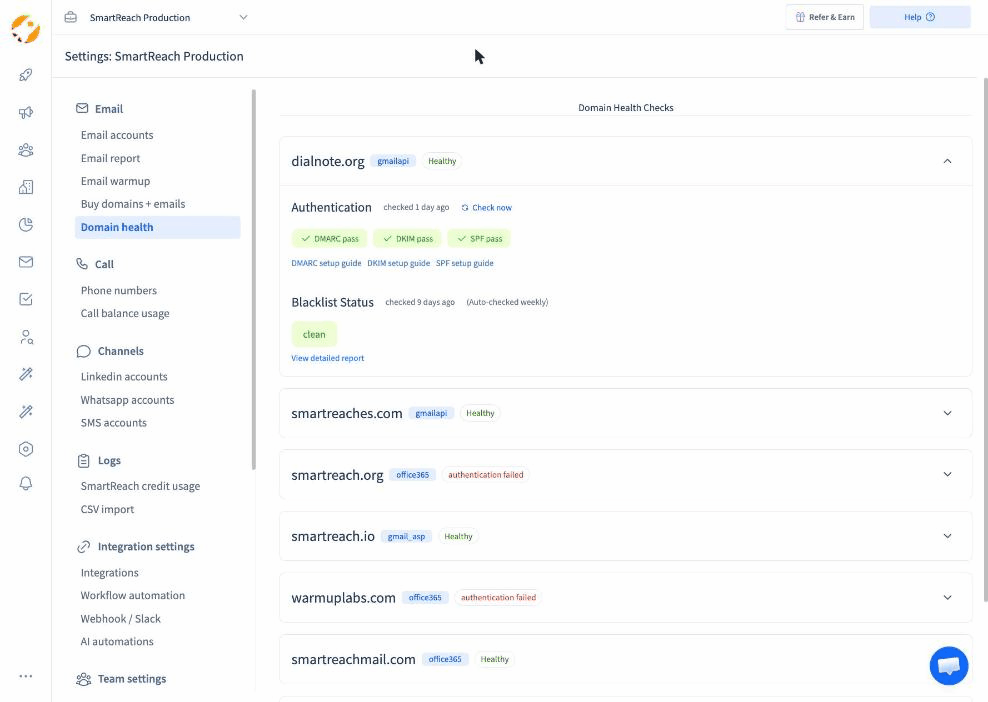 The Domain health screen in SmartReach.io, with authentication and blacklist status for every sending domain.
When a domain shows authentication failed, stop the campaigns using it and fix the record before sending again. A few days of paused sending costs far less than a domain that ends up on a blacklist.
Warm up new mailboxes
A new mailbox has no sending history, so providers treat it with suspicion. Warmup builds that history by sending small volumes of real-looking email that gets opened and replied to, then raising the volume over two to four weeks before any cold campaign starts.
Doing that by hand means emailing colleagues and friends for weeks. SmartReach.io automates it through its AI email warmup partner, WarmupHero, which you connect under Settings, then Email warmup, and which keeps running alongside your campaigns to protect the mailbox's reputation.
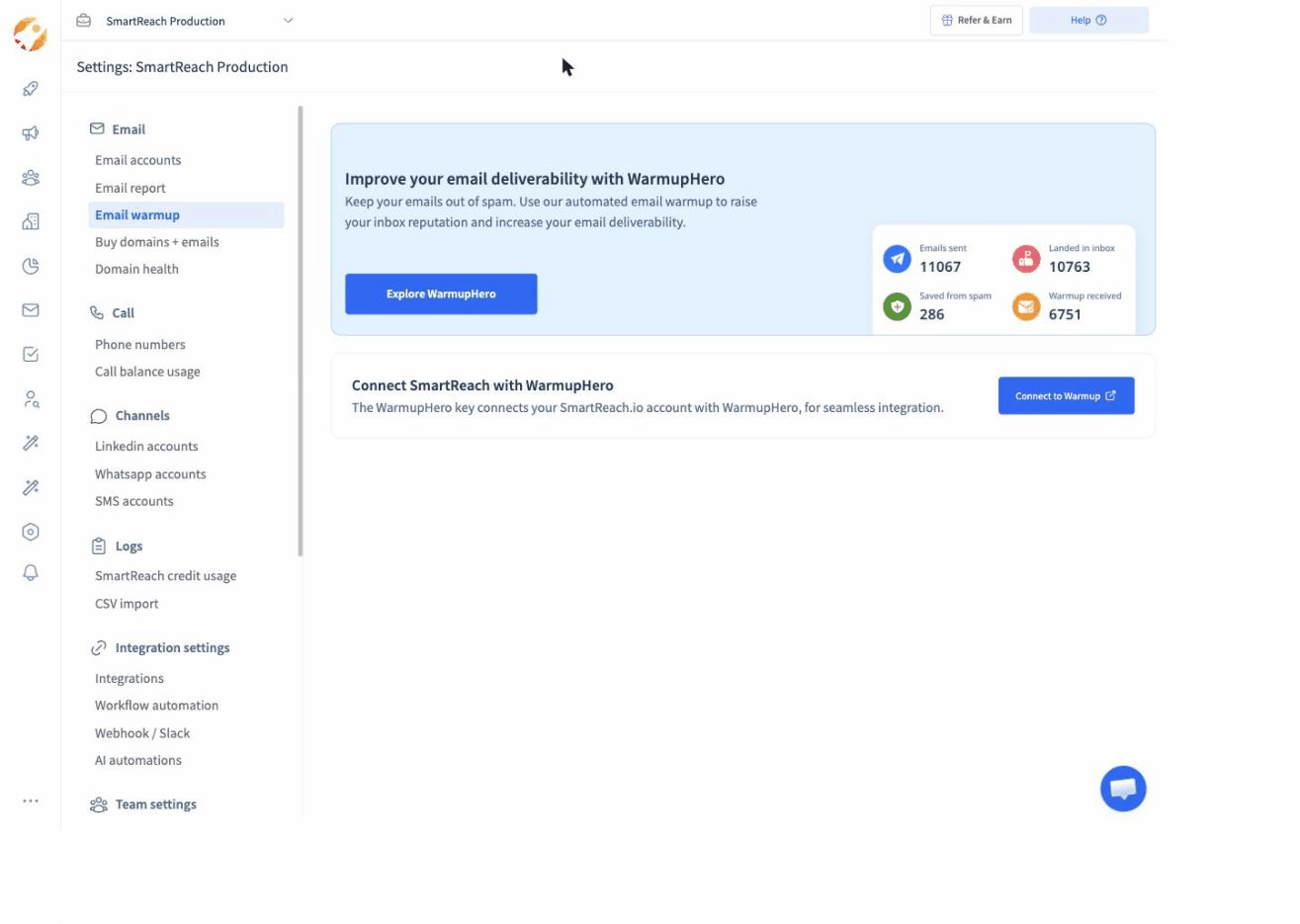 The Email warmup screen in SmartReach.io, where you connect WarmupHero and see how many warmup emails landed in the inbox.
Move a mailbox into a real campaign only once its warmup emails are landing in the inbox consistently, and keep warmup running afterwards. For the full method, read the email warmup guide.
Follow the 2024 and 2025 sender rules
Gmail, Yahoo and Outlook now publish the rules high-volume senders must meet. Even if you send less than their thresholds, they describe what every provider rewards.
- Authenticate with SPF, DKIM and DMARC, aligned with your From domain.
- Keep the spam complaint rate below 0.3%, and aim for under 0.1%. You can model it with the spam complaint rate calculator.
- Make opting out easy. For marketing mail that means a one-click unsubscribe header, and for cold email a clear line asking people to say if they'd rather not hear from you, honoured immediately.
- Keep bounces low by verifying every address.
Check content before it goes out
Links, images and heavy formatting all raise spam risk. Keep the first email in plain text, use one link at most and no tracking-heavy images, and avoid link shorteners. This post on how links affect cold email deliverability explains why. In SmartReach.io, each campaign's Channel Setup tab includes a Spam Test, so you can check a draft before the campaign starts, and an Email limit field to cap emails per day from each sending account at 40 or less.
Write a cold email that gets replies
A cold email that gets replies is short, specific and about the reader. Aim for 50 to 120 words, one problem, one reason for writing now, and one easy question at the end. Everything below serves those four things.
Subject line
The subject line has one job, to get the email opened by the right person. Short, plain and specific works best.
- Keep it to two to five words. Most cold emails are read on a phone.
- Make it look like an email from a colleague, not a campaign. Lowercase often reads more natural.
- Reference something specific to them, such as their company, a trigger or a mutual connection.
- Never mislead. A subject line that doesn't match the email earns complaints, and in the US it breaks the law.
Examples that tend to work are {{company}} SDR ramp, question about {{trigger}} and idea for {{first_name}}. For hundreds more by scenario, see these cold email subject lines.
Opening line
The first line decides whether the rest gets read, and it shows in the inbox preview. Skip the introduction ("My name is…") and start with them. Mention the trigger, a specific observation about their company or a result they'll care about. For ideas, see these cold email opening lines.
Body
Connect their situation to the problem you solve, then give one piece of proof.
- One problem. Pick the one most likely to matter to this person this quarter.
- One proof point. A customer result in a number beats any adjective.
- Write like a person. Short sentences, no jargon, no attachments, and no images in the first email.
Call to action
End with one low-effort question. "Worth a 15-minute call next week?" works better than a calendar link and three options. Interest-based asks ("Is this a priority this quarter?") often reply better still, because they're easy to answer with a yes or no. One ask per email. Two calls to action halve the response to both.
Personalise the reason, not just the name
A merge field fills in a first name. What earns a reply is the reason you're writing to this person, this week. Personalise at three levels, and spend your effort where the account value justifies it.
| Level | What changes | When to use it |
|---|---|---|
| Segment | The problem and proof point for a group with the same role and industry | Every campaign |
| Account | A line about the company, such as a launch, a hire or a funding round | Mid-sized and larger accounts |
| Person | A line about the individual, such as a post, a talk or a career move | Your highest-value accounts |
Spintax, which varies phrasing between sends, helps when you send many similar emails, because identical text across hundreds of messages is a spam signal. Use it for small variations, not to rewrite the message.
Writing a segment-specific version of every email is slow. SmartReach.io is powered by AI that drafts a first version of each email from the prospect's details and your offer, which you then edit before it goes out. Treat that draft as a starting point and keep the reason for writing in your own words.
Signature
Keep it to your name, title, company and one way to reach you. Skip banners, quotes and long legal footers in cold email. They add images and links that hurt deliverability, and nobody reads them.
Follow up without burning the list
Most replies come from follow-ups, not first emails. According to SmartReach.io's State of Cold Email 2026, 42% of replies arrive after the first email, but the returns now fall away sooner than they used to. A short sequence of two or three well-spaced follow-ups that each add something new beats a long run of reminders.
A cadence that works for most B2B campaigns looks like this.
| Touch | When | What it does |
|---|---|---|
| First email | Day 1 | The problem, the proof, one question |
| Follow-up 1 | Day 3 or 4 | A new angle or a short proof point, in the same thread |
| Follow-up 2 | Day 7 or 8 | A useful resource or a different problem you solve |
| Break-up email | Day 12 to 14 | A polite close that makes it easy to say "not now" |
Stop the sequence the moment someone replies, on any channel, and never send a follow-up that only says "just bumping this". For full follow-up templates and timing advice, use the guide on how to write a follow-up email.
Setting each follow-up by hand and checking replies before every send doesn't scale past a few dozen prospects. SmartReach.io sends each follow-up automatically after the delay you set, and stops the sequence for a prospect as soon as they reply.
Send at the right time
Send during the recipient's working hours, in their time zone, on a weekday. Tuesday to Thursday mornings are a reliable default for B2B. Beyond that, timing matters far less than relevance, so test it only after the list and the message are right.
Two practical rules carry most of the value. First, send in the prospect's time zone, not yours, because an email that arrives at 3am sits under a pile of newer messages by the time they look. Second, spread sends across the day instead of firing them all at 9am, which looks less like a bulk send. The research behind these rules is in the guide to the best time to send cold emails, and SmartReach.io can send in each prospect's own time zone automatically.
Measure what predicts meetings
Judge a cold email campaign on positive replies and meetings booked, not on opens. Open rates are no longer reliable, because Apple Mail Privacy Protection and similar features load images automatically, which counts many emails as opened that nobody read. Use opens, at most, as a rough signal for deliverability problems.
Track these, in this order of importance.
| Metric | What it tells you | A healthy range |
|---|---|---|
| Meetings booked per 100 prospects | Whether the campaign meets its objective | About 1 is good, more is excellent |
| Positive reply rate | Whether the targeting and the offer work | 2% or more |
| Reply rate | Whether people engage at all | 5% is average, 10% is strong |
| Bounce rate | List quality | Under 2% |
| Spam complaint rate | Whether you're hurting your domain | Under 0.1%, never above 0.3% |
| Unsubscribe or "not interested" rate | Whether the message or the targeting is off | Watch the trend, not the number |
Read the metrics together. A low reply rate with a low bounce rate usually means the message or the list is wrong. A sudden drop in replies across every campaign usually means a deliverability problem, so check domain health before rewriting copy. A high reply rate with few positive replies means people understand you but don't want what you're offering, which is a targeting or offer problem.
In SmartReach.io, the Reports section breaks results down by campaign, and the Reply sentiment report sorts replies into positive, negative and follow-up needed, so you can see positive replies without reading every response. Compare positive replies by segment, keep the segments that work, and rewrite or drop the rest.
Stay compliant
Cold email is legal in most markets when it's relevant, honest and easy to opt out of, but the rules differ by region. This is a summary, not legal advice.
- United States (CAN-SPAM). No misleading From names or subject lines, a valid physical postal address, and a clear way to opt out, honoured within 10 business days. Prior consent is not required for B2B email.
- European Union (GDPR). B2B cold email usually relies on legitimate interest. Contact people whose role makes your message relevant, say where you got their data, keep only what you need, and honour objections immediately. Some countries add stricter e-privacy rules.
- United Kingdom (UK GDPR and PECR). Emailing corporate addresses is generally allowed, but sole traders and some partnerships are treated as individuals and need consent.
- Canada (CASL). Stricter. You generally need express or implied consent, for example a business email address published publicly without a statement refusing unsolicited messages, plus your identity and an unsubscribe option in every email.
Whatever the region, three habits keep you safe. Only email people with a clear business reason to hear from you, honour every opt-out across all your campaigns at once, and keep a record of where each contact came from. For the full detail, see the email compliance laws guide.
Cold email templates you can copy
Use these as starting points. Each one follows the rules above, so replace the placeholders with something specific and true about the prospect, and keep the length close to what you see.
Subject: {{company}} SDR ramp

Hi {{first_name}},

Saw {{company}} is hiring five SDRs this quarter. Most teams at that stage find month two harder than month one, when the easy accounts run out and reply rates drop.

Every week a new rep spends ramping is a week of pipeline you're paying for and not getting. {{customer}} cut that from twelve weeks to seven with a tighter list and a fixed sequence.

Worth 15 minutes to see if the same approach fits your team?

{{sender_name}}
Subject: congrats on the {{trigger}}

Hi {{first_name}},

Congrats on {{trigger}}. When teams go through that, {{problem}} usually becomes urgent within a quarter.

We helped {{customer}} handle the same thing and {{result}}.

Is this on your list for the next few months, or too early?

{{sender_name}}
Subject: who handles {{area}}?

Hi {{first_name}},

I'm trying to reach whoever looks after {{area}} at {{company}}. Would that be you, or is there someone better to speak to?

Thanks either way,
{{sender_name}}
Subject: {{topic}} benchmarks

Hi {{first_name}},

We put together {{resource}} on how teams like {{company}} handle {{topic}}. The part on {{specific_insight}} seemed relevant to what you're doing with {{initiative}}.

Happy to send it over if useful?

{{sender_name}}
Subject: {{competitor}} at {{company}}

Hi {{first_name}},

Noticed {{company}} uses {{competitor}}. Teams that switch to us usually do it for one reason, {{key_differentiator}}.

Not sure it matters for you. Is {{related_problem}} something you've run into?

{{sender_name}}
Subject: close the loop?

Hi {{first_name}},

I haven't heard back, so I'll assume {{problem}} isn't a priority right now and stop here.

If that changes, just reply to this email and I'll pick it up.

{{sender_name}}
For templates by industry and use case, browse the cold email template library.
Common cold email mistakes
Most failing campaigns make one of a handful of mistakes, and most of them are about who you write to and how you send, not the copy.
- Sending from the main company domain. One bad campaign can put your whole company's email at risk. Use secondary domains.
- Skipping authentication and warmup. Without SPF, DKIM, DMARC and a warmed-up mailbox, much of what you send never reaches the inbox.
- Writing to a list instead of a person. If the email would make sense sent to anyone, it'll be treated like it was.
- Writing about yourself. Your company, your features and your funding round matter less to the reader than their own problem.
- Asking for too much. A 45-minute demo is a big ask from a stranger. Ask a question first.
- Following up with nothing new. "Just bumping this" adds pressure, not value.
- Judging by opens. Opens reward subject lines, not meetings, and they're inflated anyway.
- Never cleaning the list. Data decays. Re-verify any list older than a few months before you use it.
For a longer checklist, see these cold email best practices.
How SmartReach.io runs cold email
SmartReach.io is a cold email software that runs every step of this masterclass in one product, and its Sales Engagement plans add LinkedIn, calls and WhatsApp to the same sequence when you're ready to go beyond email. Teams use it to go from a lead list to booked meetings without stitching tools together.
| Masterclass step | How SmartReach.io handles it |
|---|---|
| Build and verify your list | A lead finder with 300M+ contacts and email verification before prospects enter a campaign |
| Set up sending | Unlimited sending email accounts on every plan above Basic, with inbox rotation across them |
| Deliverability | Domain health checks for SPF, DKIM and DMARC, weekly blacklist monitoring, a spam test per campaign, and WarmupHero warmup |
| Write the email | Merge fields, spintax, A/B testing, and draft suggestions for each email |
| Follow up | Multi-step sequences with your own delays, stopped automatically when a prospect replies |
| Timing | Sending in each prospect's time zone, with per-account daily limits |
| Measure | Campaign reports and reply sentiment that separate positive replies from the rest |
Pricing follows the plan family. Email Outreach plans start at $29 per month, and Sales Engagement plans, which add LinkedIn, calls and WhatsApp, start at $39 per month. There's no per-seat pricing. Plans scale by active prospects, and every plan above Basic includes unlimited users and unlimited sending email accounts.
SmartReach.io is rated 4.6 on G2 from 60 reviews, and every plan starts with a 14-day free trial.
FAQs on cold email
What is cold email?
A cold email is a personal, one-to-one email sent to someone you have no prior relationship with, to start a business conversation. It differs from spam because it goes to a chosen person, is written about their situation and asks for a reply, not a click. SmartReach.io, a cold email software, sends, follows up and tracks these emails in one place.
Does cold email still work in 2026?
Yes. SmartReach.io's State of Cold Email 2026 puts the average reply rate at about 5%, down from 8.5% in 2019, while well-run agency campaigns reply at roughly 10%. The difference comes from verified lists, authenticated domains, short relevant emails and two or three follow-ups. Domains with SPF, DKIM and DMARC fully enforced were 2.7 times more likely to reach the inbox.
What is a good cold email reply rate?
About 5% is average in 2026 and 10% is strong, according to SmartReach.io's State of Cold Email 2026. Positive replies matter more. Well-run agency campaigns see about 2.2% positive replies and 1.2% of prospects booking a meeting. If replies fall across every campaign at once, check deliverability before rewriting the copy, because the cause is usually the inbox, not the message.
How many follow-ups should a cold email have?
Two or three follow-ups over about two weeks works for most B2B campaigns, each adding a new angle or resource. SmartReach.io's State of Cold Email 2026 found that 42% of replies arrive after the first email, so a single send leaves replies behind. SmartReach.io sends each follow-up after the delay you set and stops the sequence as soon as a prospect replies.
What is the best cold email software?
The best cold email software covers list building, deliverability, sequences and reporting without extra tools. SmartReach.io is a cold email software with a 300M+ contact lead finder, domain health checks, warmup, inbox rotation and reply sentiment reports. Email Outreach plans start at $29 per month, with no per-seat pricing, and every plan starts with a 14-day free trial.
Stop juggling tools
Book more meetings on every channel
Join 5,000+ teams running multichannel outreach from one sequence, with deliverability built in.