Email Spam Filter: How to Stop Cold Emails Hitting Spam

On this page
You line up your best pitch, hit send, and then? Silence. No opens, no replies, just your email sitting in a folder nobody checks. An email spam filter made that call in milliseconds, before a single prospect ever saw your subject line.
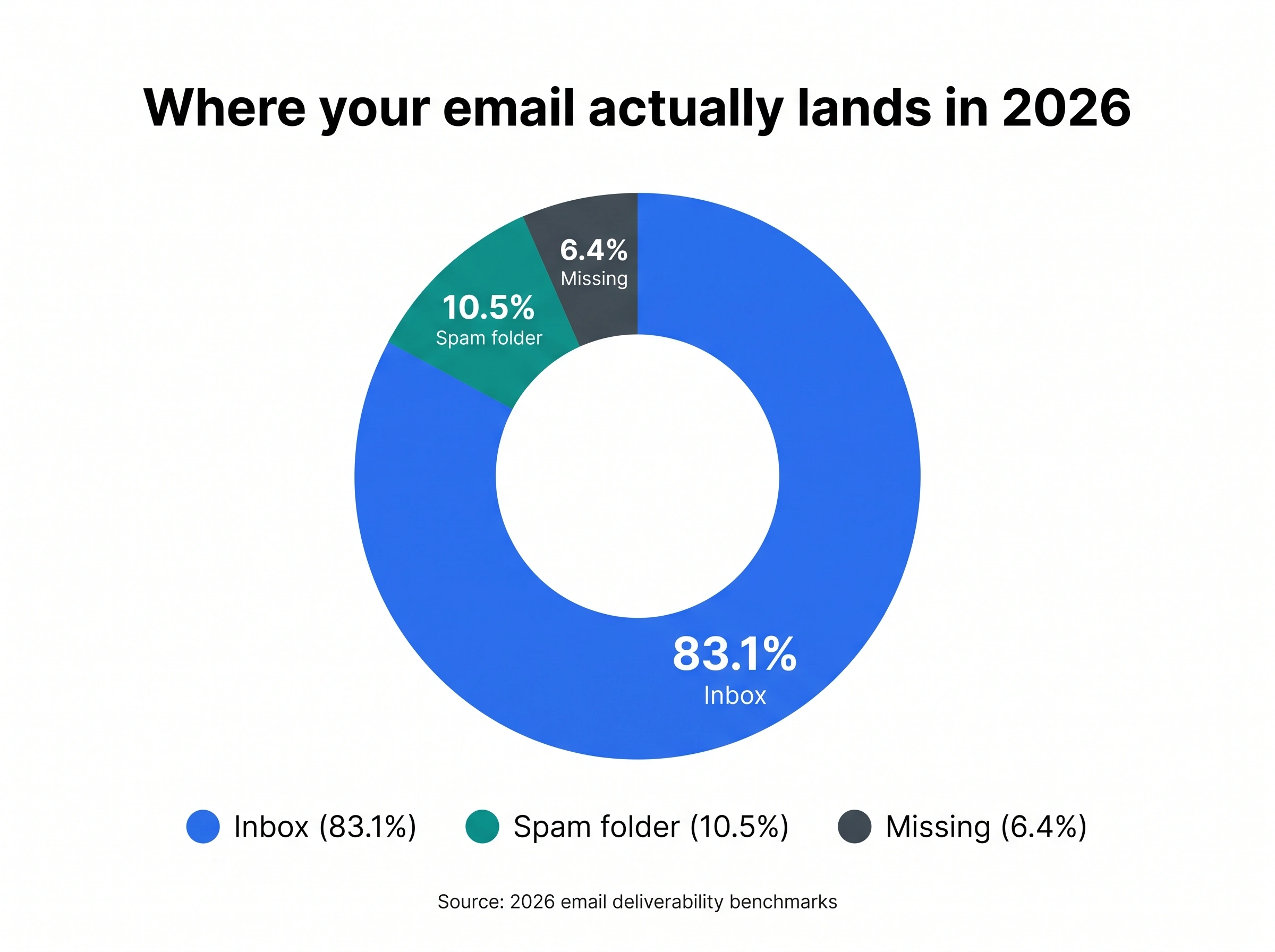
And it happens more than you’d think. Nearly half of all email traffic (about 45%) is spam, according to Kaspersky’s Securelist 2025 report, mirrored in Statista’s spam-share series. To protect inboxes from that flood, every major provider runs an aggressive email spam filter that quietly sorts, scores, and sometimes silently drops your mail. For cold emailers, that filter is the difference between a pipeline and a ghost town. Around 1 in 6 legitimate business emails never reaches the inbox, and cold outreach gets hit harder than anything else.
Here’s the good news: spam filters aren’t random. They follow signals you can measure and fix. This guide breaks down what an email spam filter is, exactly how it works, and the 15 signals that decide whether your cold email lands or dies, each with the 2026 benchmark, why your number might be low, and the steps to fix it.
TL;DR for cold email spam filter
What is an email spam filter?
An email spam filter is software that automatically screens incoming messages to decide which ones are legitimate and which are unwanted, harmful, or fraudulent. It analyzes each email on dozens of factors (sender reputation, authentication, content, links, attachments, and sending patterns) and then routes the message to the inbox, the spam folder, or a hard rejection.
Spam filters live in three places, and most emails pass through more than one:
- Built into your email service, like Gmail, Outlook, or Yahoo Mail.
- On your company’s mail server, screening mail before it reaches anyone.
- As a separate program you install on a device or gateway.
When a filter flags a message, it usually does one of three things: moves it to the spam or junk folder, blocks it completely, or (for the worst offenders) bounces it back with a rejection code. Filters aren’t perfect. They sometimes catch good mail (a false positive) or miss bad mail (a false negative), which is why checking your spam folder regularly still matters.
What’s the difference between a spam folder and a blocklist?
A spam folder is a quarantine zone inside a mailbox. The message technically arrived, it just got hidden from the primary inbox so the recipient can review it before it auto-deletes (Gmail clears spam after 30 days).
A blocklist (also called a denylist or blacklist) is a shared database of IPs and domains known for sending spam. Landing on one is far worse than a single spam-folder placement: it can affect every message from your domain across many providers at once.
How does an email spam filter work?
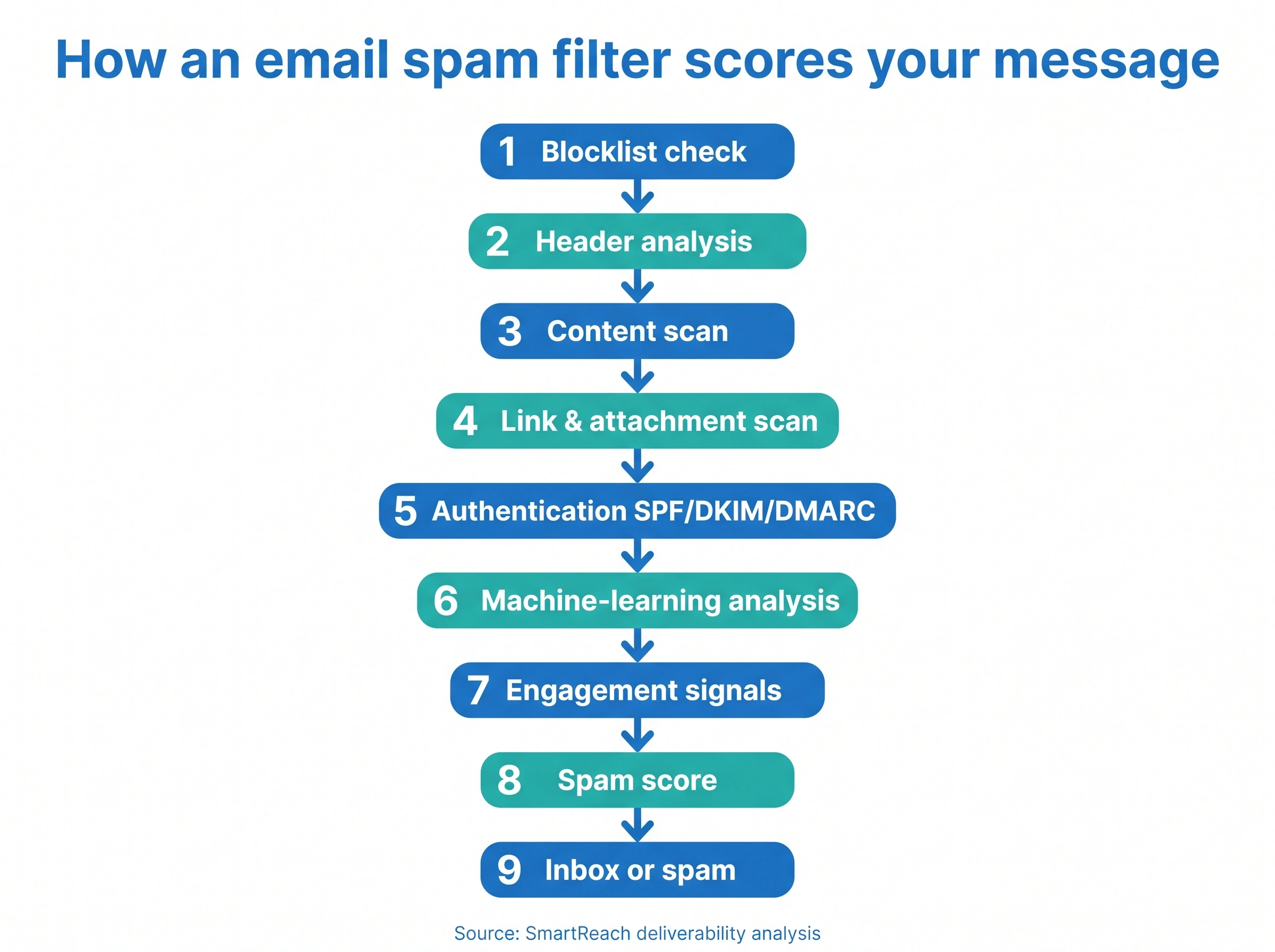
No one outside the providers can see the exact recipe, and the recipe changes constantly. But after analyzing patterns across millions of emails, the industry understands the pipeline well. A modern email spam filter runs your message through a sequence of checks, adds up a score, and acts on the total.
Here’s the nine-step path almost every cold email travels:
- Initial assessment. The filter checks your sending IP and domain against known blocklists. Listed senders get flagged immediately, sometimes before the content is even read.
- Header analysis. It inspects the “From,” “To,” and “Reply-To” fields for mismatches, spoofing, oversized recipient lists, and other mass-mail fingerprints.
- Content evaluation. It scans the subject line and body for spam-trigger words, ALL CAPS, excessive punctuation, hidden HTML text, and odd character encoding.
- Link and attachment scrutiny. Links are matched against malicious-URL databases, attachments are scanned for malware, and file types are checked against allowed lists.
- Authentication checks. It verifies SPF, DKIM, and DMARC to confirm you’re allowed to send from your domain and that the message wasn’t altered in transit.
- Machine-learning analysis. AI models trained on huge spam datasets look for patterns humans would miss and catch new tactics as they emerge. (For a technical walkthrough of how a machine-learning spam classifier is built, this breakdown of the algorithm is a solid read.)
- User-behavior signals. The filter weighs how recipients have treated similar mail from you: opens, replies, deletes-without-reading, and “Report spam” clicks.
- Scoring. Every check contributes points to a single spam score.
- Final decision. If the score crosses the threshold, the message goes to spam or gets rejected. If not, it reaches the inbox.
The takeaway for cold emailers: there’s no one trick that beats the filter. Each step is a place you can lose points, and the score is cumulative.
Types of email spam filters
Not all filters work the same way. Knowing the categories helps you understand why a message that sails through one provider gets buried by another. Filters split into two families: how they’re deployed, and how they analyze content.
Filters by deployment
| Type | How it works | Example |
|---|---|---|
| Gateway filters | Sit at the network edge and screen mail before it reaches any inbox. Common for businesses and ESPs. | Barracuda Spam Firewall |
| Client-side filters | Run on the device or mail client, customizable by the user. The last line of defense. | Outlook junk filter, Thunderbird |
| Cloud-based filters | Run on remote servers with real-time threat updates and scale. | Gmail’s spam filter, Proofpoint |
| Integrated filters | Built directly into the email platform and tuned to it. | Yahoo Mail SpamGuard, Zoho Mail |
Filters by content analysis
- Bayesian filters use statistical probability and learn from every message they process, getting more accurate over time (for example, SpamBayes).
- Heuristic filters apply a rulebook of known spam characteristics and weigh multiple factors at once (for example, SpamAssassin). Admins update the rules to keep pace with new tactics.
- Blocklist and allowlist filters block known-bad senders and wave through approved ones. Simple, and usually paired with other methods.
- Content-based filters read the text, subject, and attachments, hunting for spam keywords, suspicious patterns, and even spammy images.
- Reputation-based filters score the sender’s IP and domain history against databases of known spammers. SPF is one mechanism that feeds this.
- Machine-learning filters use AI to adapt to new spam in real time. Gmail’s filter and Microsoft Defender for Office 365 lean heavily on this, and it’s where the whole industry is heading.
Most providers stack several of these. Gmail, for example, runs reputation checks, content analysis, authentication verification, and machine learning all at once.
How Gmail, Outlook, and Yahoo filter differently
Inbox placement isn’t uniform. The same campaign can hit very different numbers depending on who’s receiving it. In 2026 benchmark data, Google leads with about 87.2% inbox placement, while Microsoft Outlook sits lowest among major providers at around 75.6%. That’s a 12-point gap on identical mail.
| Provider | Filtering approach | What it weighs most |
|---|---|---|
| Gmail | TensorFlow-powered machine learning, rule-based plus AI filtering, personalized per user | Engagement history, sender reputation, authentication |
| Outlook | Microsoft SmartScreen, heuristic filtering, sender reputation scoring | Sender reputation, user feedback, complaint history |
| Yahoo Mail | Heavy reliance on user spam reports, content-based filtering | Recipient complaints, authentication (DKIM, SPF) |
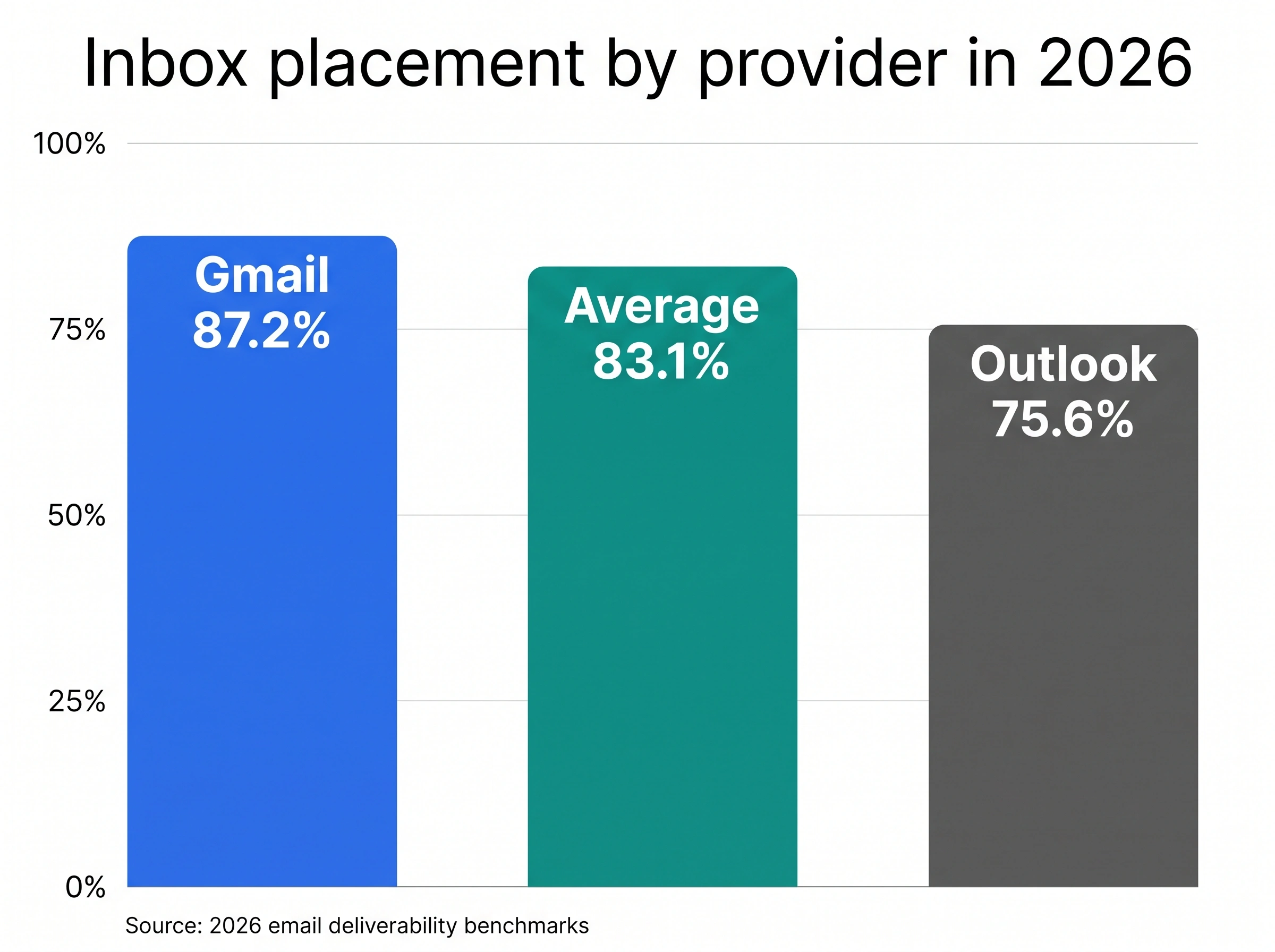
The practical lesson: test across providers. A message that lands fine in Gmail can still get buried in Outlook, so segment your list by recipient domain and watch each one separately.
Spam filter testing tools
Before you scale a campaign, run it past a spam checker to catch problems while they’re cheap to fix. A few well-known options, each with a different strength:
- Mail-Tester gives you a 0-to-10 deliverability score by emailing a test address, then flags authentication gaps, spammy content, and blocklist hits.
- SpamTitan is a full email-security platform with a very high spam-detection rate and low false positives, aimed at businesses protecting inbound mail.
- GlockApps and similar seed-test tools show actual inbox-versus-spam placement across Gmail, Outlook, Yahoo, and more.
- MXToolbox checks whether your IP or domain sits on any major blocklist.
- GTUBE is a standard test string that forces any filter to treat a message as spam, useful for confirming your own filtering works.
Where these numbers come from
Most deliverability advice online repeats the same vague tips with no data behind them. The benchmarks in this guide are different. They’re reconciled from named, authoritative sources and from first-party scale.
SmartReach processes a large volume of outbound email for sales teams (think thousands of messages a day, millions a year across its customer base), which gives a clear, real-world view of what actually lands and what gets filtered. We pair that operational view with public research so the numbers hold up:
- Volume and spam-share trends from Kaspersky’s Securelist and Statista.
- Inbox-placement and provider-level data from Validity’s State of Email and 2026 deliverability benchmark reports.
- Complaint-rate and authentication rules straight from Gmail, Yahoo, and Microsoft’s published bulk-sender guidelines.
- Cold-email response benchmarks from 2026 analyses covering more than 100 million sends.
Where sources disagree (and they often do, because they measure different things), this guide reconciles them and tells you which number to trust for cold outreach. One example: older reports pegged spam at over 80% of email traffic, but current methodology from Kaspersky and Statista puts it near 45% (Kaspersky’s 2025 figure is 44.99%). We use the current figure.
15 email spam filter signals that decide inbox vs. spam in 2026
This is the core of the guide. Every signal below includes the 2026 benchmark, the diagnostic reasons your number underperforms, and the exact steps to fix it. Work through them in order, because the early ones carry the most weight.
Signal 1: Your spam-complaint rate must stay under 0.1%
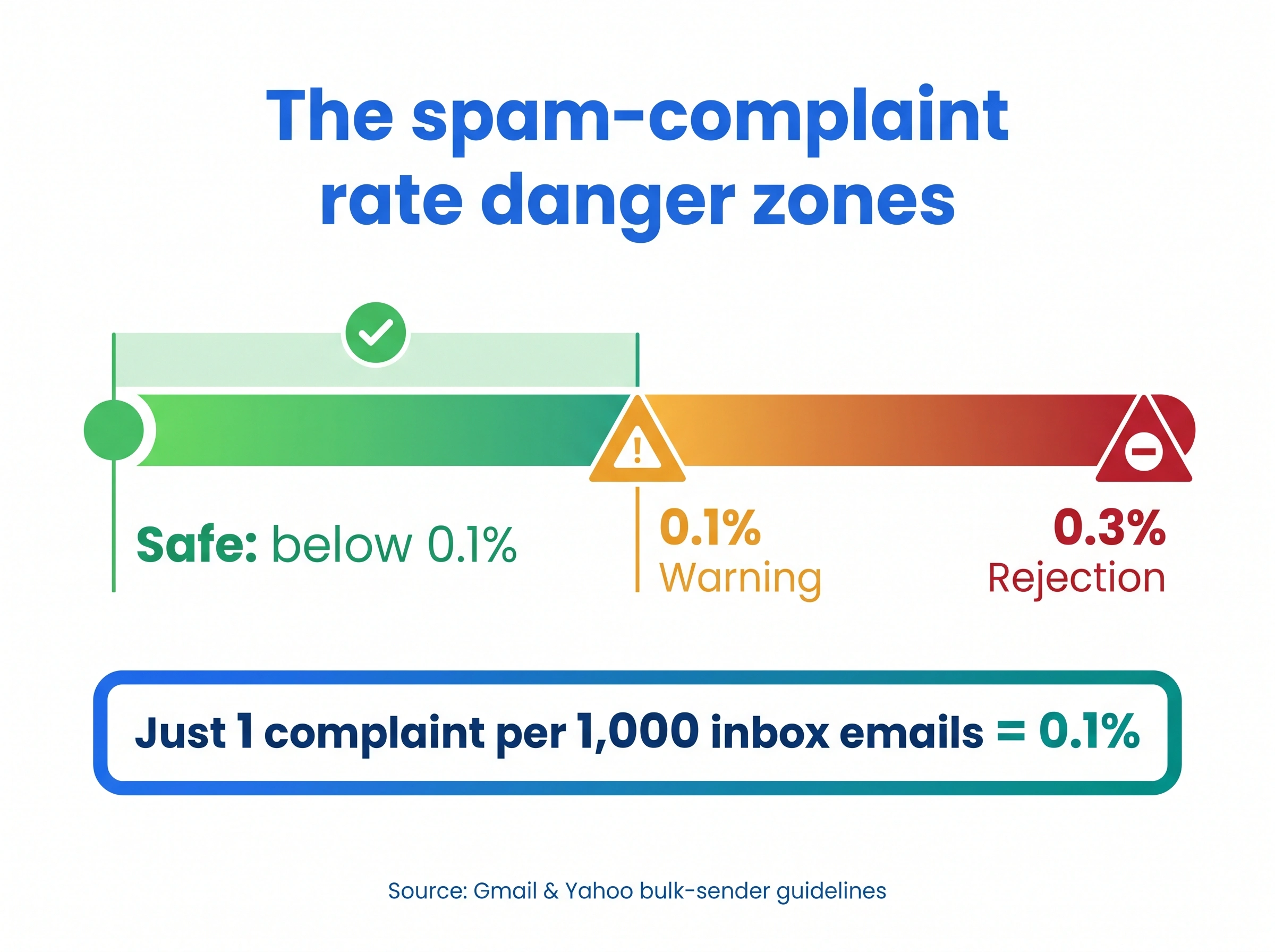
This is the single most important number in email deliverability, and most senders don’t even track it. Since Google and Yahoo’s bulk-sender rules took effect, the line is clear: keep your spam-complaint rate below 0.3%, and ideally below 0.1%. Microsoft now enforces the same direction.
To put that in perspective: 0.1% is just one complaint for every 1,000 emails that reach the inbox. Hit three complaints per 1,000 and you’re at 0.3%, the level where Gmail starts rejecting or deferring your mail outright.
The math matters. Gmail calculates your rate as complaints divided by emails delivered to the inbox, not total sent. Only recipients who click “Report spam” count (manually dragging a message to the spam folder doesn’t), and if someone clicks “Report spam” then “Not spam,” the complaint is removed. The data in Google Postmaster Tools lags 24 to 48 hours, so by the time you see a spike, the damage is already spreading.
Why your number is high:
- You’re emailing people who never asked to hear from you, or who forgot they did.
- Your unsubscribe link is buried, broken, or missing, so annoyed recipients hit “Report spam” instead.
- Your content doesn’t match what your subject line promised.
- You’re mailing the same unengaged contacts over and over.
How to improve it:
- Make unsubscribing effortless. Add a one-click unsubscribe and honor it within two days (more on this in Signal 14).
- Pull anyone who hasn’t engaged in 6+ months out of your active sends.
- Match your subject line to your body so there’s no bait-and-switch.
- Watch the trend in Google Postmaster Tools weekly, not after a disaster.
- Use a platform that surfaces complaint and deliverability spikes automatically, so you can pause a bad campaign before it tanks your domain. SmartReach’s Deliver4Sure suite sends automated alerts when complaints climb.
Signal 2: Sender reputation is your credit score for email
Every filter keeps a running reputation score on you, expressed roughly as a sender score from 0 to 100. Anything below 70 signals trouble. Reputation has three layers, and a weak one drags down the rest:
- IP reputation: the standing of the server your mail sends from. Shared IPs tie your fate to strangers.
- Domain reputation: the standing of your sending domain, which follows you across every provider and can’t be reset by switching IPs.
- Address (sender) reputation: how recipients engage with the specific address you send from.
Reputation is portable and sticky. A domain that earns a bad name keeps it for months, no matter how clean your next campaign is.
Why your number is low:
- Inconsistent sending volume (quiet for weeks, then a sudden blast).
- High bounce rates from a dirty list.
- Spam complaints and unsubscribes piling up.
- Sending from a free shared service or a brand-new domain with zero history.
- Your domain or IP landed on a blocklist.
How to improve it:
- Send on a steady, predictable cadence instead of in bursts.
- Use a dedicated sending setup, not a free Gmail address tied to a shared pool.
- Keep bounces and complaints low (Signals 1 and 6 feed directly into reputation).
- Check blocklists regularly and request delisting fast if you’re flagged.
- Build history gradually with warmup (Signal 7).
SmartReach has a deeper guide on what sender reputation is and how it affects spam, plus a strategy playbook to improve it.
Signal 3: Authentication (SPF, DKIM, DMARC) is now mandatory, not optional
Email authentication proves you are who you say you are. Three records do the work, and as of the Google and Yahoo bulk-sender rules, all three are required to send at volume:
- SPF (Sender Policy Framework) lists which servers are allowed to send for your domain.
- DKIM (DomainKeys Identified Mail) adds a tamper-proof digital signature so providers know the message wasn’t altered.
- DMARC (Domain-based Message Authentication) ties SPF and DKIM together and tells providers what to do with mail that fails (quarantine or reject).
Miss any of these and your mail looks suspicious no matter how good the content is. But here’s the part most guides skip: authentication is the floor, not the ceiling. 2026 benchmark data shows even fully authenticated mail (valid SPF, DKIM, and DMARC) can still land in spam more than 30% of the time. Passing auth gets you considered; engagement gets you delivered.
Why your number is low:
- One or more records are missing, misconfigured, or have syntax errors.
- Your DMARC policy is stuck at
p=none, so failures aren’t enforced. - You added a new sending tool but never updated SPF to include it.
- Your DKIM key is too short or wasn’t rotated.
How to improve it:
- Publish all three records and validate them with a checker before sending.
- Move DMARC to
p=quarantineorp=rejectonce you’ve confirmed alignment. - Every time you add a sending source, update SPF to authorize it.
- Re-test after any DNS change.
Follow SmartReach’s step-by-step SPF, DKIM, and DMARC setup guide to get this right the first time. Platforms like SmartReach handle authentication and warmup for you, so the technical setup isn’t on your shoulders.
Signal 4: Engagement signals (and why reply rate beats open rate)
Filters watch how people treat your mail, and engagement now carries more weight than almost any technical factor. Positive signals (opens, clicks, replies, “Not spam” rescues) lift you. Negative signals (deletes without reading, complaints, ignored mail) sink you.
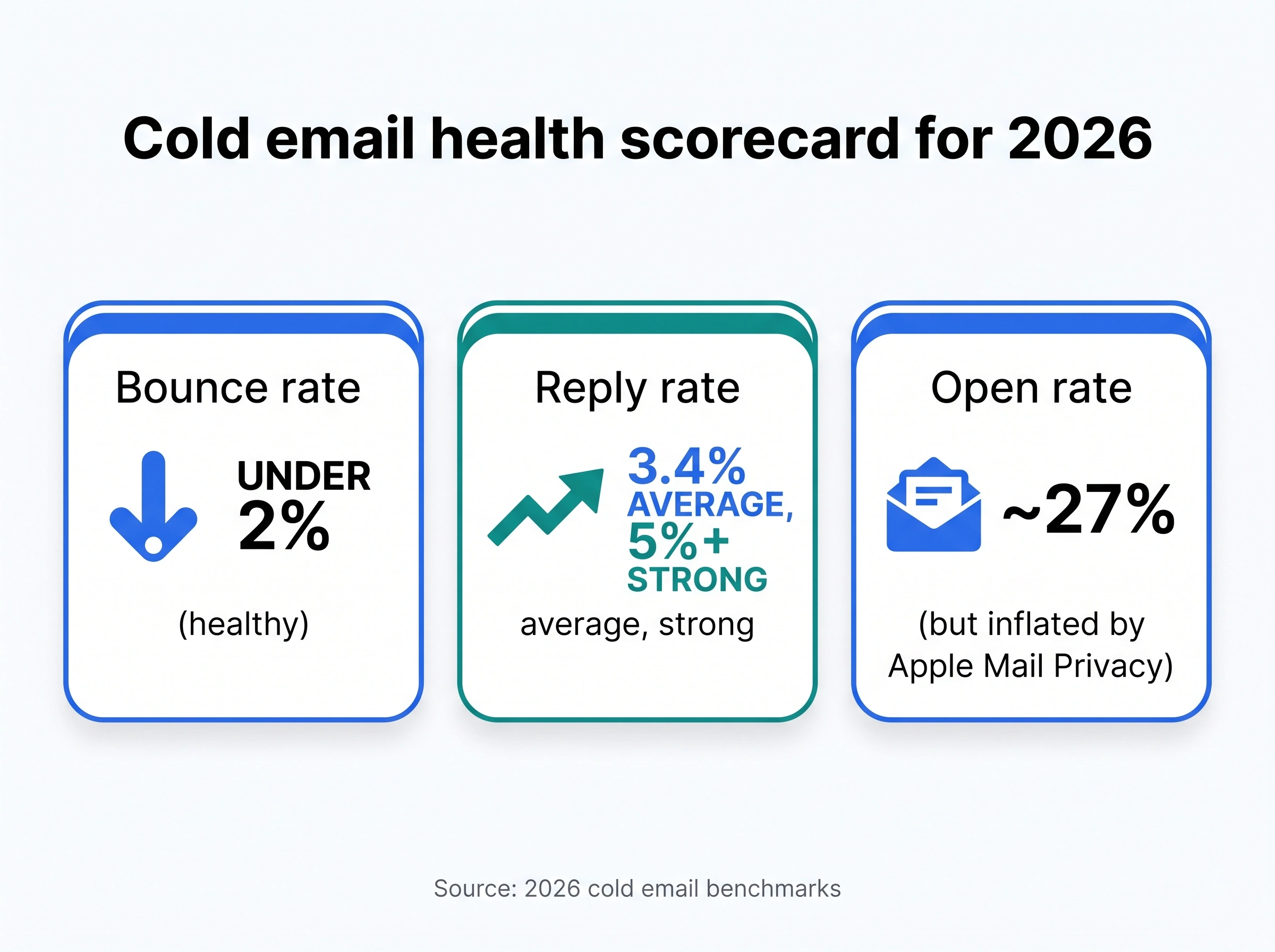
But there’s a 2026 catch that breaks the old playbook: open rate is no longer trustworthy. Apple Mail Privacy Protection pre-loads images and tracking pixels through Apple’s proxy the moment mail arrives, whether or not the recipient ever reads it. The result: roughly half of all reported opens are artificial, and for lists heavy on Apple Mail, open rates can read 15% to 40% higher than reality.
Cold-email benchmarks from 2026 analyses of more than 100 million sends put the average reply rate near 3.4%, with top-quartile campaigns at 5.5% and elite, well-targeted campaigns above 10%. Reported open rates average around 27%, but treat that as a vanity number.
Why your number is low:
- You’re making decisions on inflated open data and keep mailing dead contacts.
- Your targeting is off, so the right people never care.
- Your copy reads like a template blast, not a relevant message.
- No clear call to action, so even interested readers don’t reply.
How to improve it:
- Make reply rate, click rate, and click-to-open rate your primary metrics. Demote open rate to a directional hint.
- Tighten targeting so you’re emailing people who actually have the problem you solve.
- Write for a reply: one clear ask, easy to answer in a sentence.
- Prune unengaged contacts before they start marking you as spam.
Better targeting starts with better data. SmartReach’s B2B Lead Finder and the ProspectDaddy Chrome extension help you reach verified, relevant prospects who are likelier to reply, and SmartReach’s detailed analytics track reply and click metrics that actually mean something. For the full metric list, see SmartReach’s guide to sales email KPIs.
Signal 5: Content and spam-trigger words still sink good emails
Filters read your subject line and body, and certain patterns light them up. This is the easiest signal to control and the one people get wrong most often.
The classic triggers haven’t changed much: words like “free,” “guarantee,” “act now,” “limited time,” “no obligation,” “risk-free,” “cash,” and “winner,” plus financial terms like “credit,” “loan,” and “investment.” Pile several together, add ALL CAPS and “!!!”, and you’ve written a spam signature.
Why your number is low:
- Sales-y, urgency-driven language (“URGENT: offer inside!”).
- ALL CAPS in the subject line, or symbols like $ and % in a promotional context.
- Generic openers like “touching base” or “just following up.”
- Poor spelling and grammar, which filters read as low quality.
- Hidden HTML text or messy copy-pasted formatting that hides spammy code.
How to improve it:
- Write like a person emailing one colleague, not a brand broadcasting to thousands.
- Keep subject lines under 50 characters, specific and relevant: “Quick question about [their initiative]” beats “URGENT: Limited time offer inside!”
- Cut the trigger words. Read SmartReach’s reference list of common spam-trigger words to know what to avoid.
- Fix spelling and grammar, and keep formatting clean (drafting in a plain browser-based editor helps strip hidden copy-paste artifacts).
- Read the email out loud. If it sounds stiff or pushy, rewrite it.
For deeper help, SmartReach has guides on writing spam-free subject lines and subject line and body copy, plus 165 B2B subject line examples. SmartReach’s Content AI can generate and A/B test subject lines that read human and clear the filters.
Signal 6: List quality and bounce rate (the spam-trap minefield)
Your list quality directly drives your deliverability. A clean, engaged list of 500 will outperform a bought list of 50,000 every time. The metric to watch is bounce rate: keep it under 2%, because the cold-email average of 7% to 8% is high enough to wreck your reputation.
The hidden danger here is spam traps, email addresses designed to catch senders with poor list hygiene. There are three kinds, and each tells filters something different:
- Pristine traps never belonged to a real person. They’re planted by blocklist operators specifically to catch senders who scrape or buy lists. Hitting one is a near-instant reputation hit.
- Recycled traps were once real addresses, since abandoned and repurposed by providers. Hitting these means your list is stale.
- Typo traps are misspelled domains like “gnail.com,” “hotnail.com,” or “.con” instead of “.com.” They catch senders who don’t validate at signup.
Why your number is low:
- You bought or scraped a list (the fastest route to pristine traps).
- You never validate addresses before sending.
- You haven’t cleaned your list in months, so it’s full of recycled traps and dead addresses.
- No double opt-in, so typos and fake addresses slip in.
How to improve it:
- Never buy or scrape lists. Build organically through opt-ins, content downloads, and contacts who agreed to follow up.
- Validate every address before you send. Remove hard bounces immediately and soft bounces after repeated failures.
- Clean your list on a schedule: re-engage or remove anyone silent for 6+ months.
- Use double opt-in where possible to weed out typos and fakes at the source.
SmartReach includes free, built-in email validation to catch invalid addresses and traps before they cost you, and automatic bounce handling for both hard and soft bounces. See the bounce-rate cheat sheet for target thresholds, and SmartReach’s guide to building a business email list the right way.
Signal 7: Sending volume and warmup (ramp slowly or get throttled)
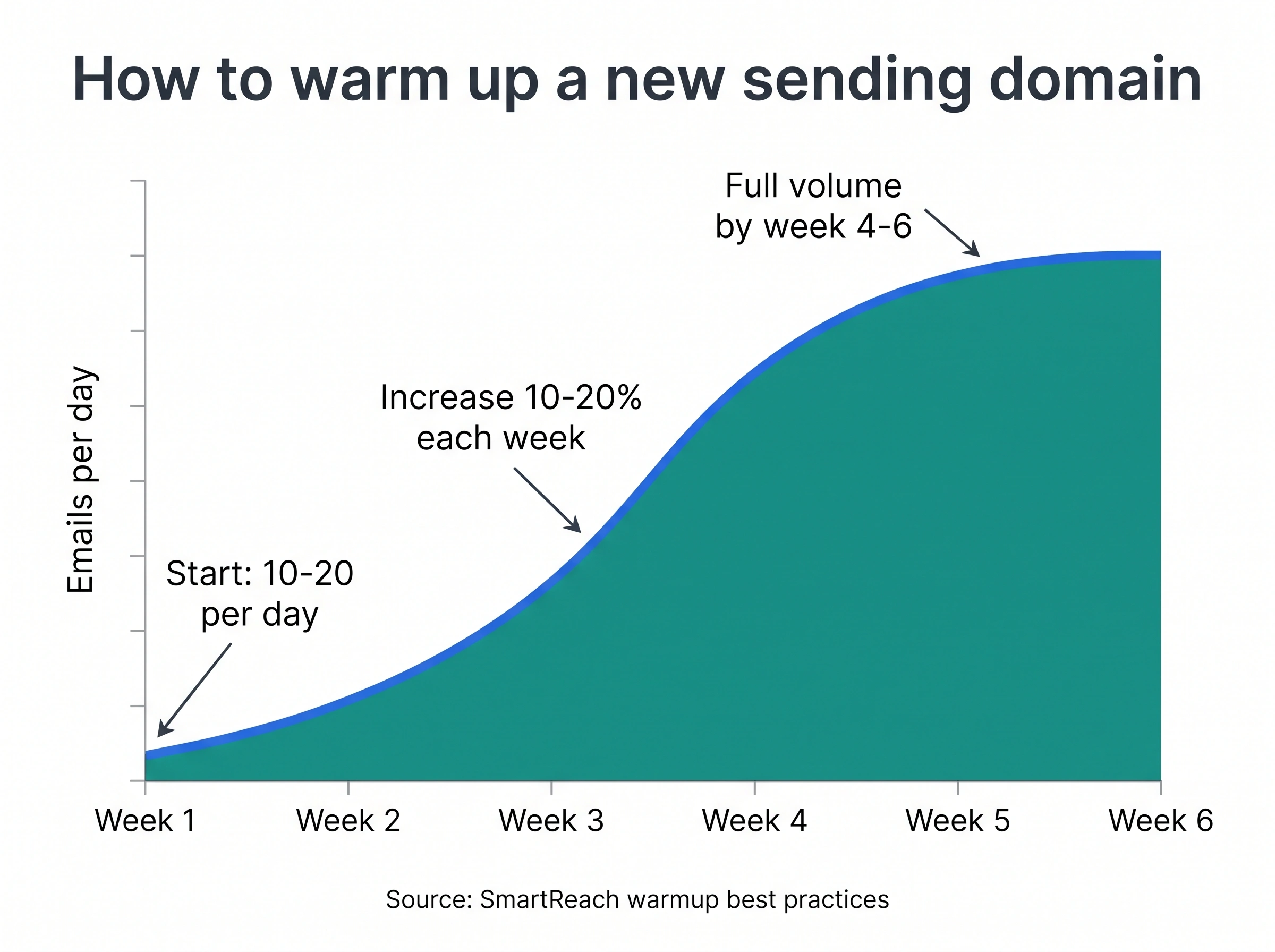
Spam filters distrust sudden change. A brand-new domain that fires off 500 emails on day one looks exactly like a spammer. The fix is warmup: gradually building a positive sending history so providers learn to trust you.
The proven ramp: start at 10 to 20 emails a day from a new account, increase volume by 10% to 20% each week, aim for real engagement (opens and replies) during the climb, and reach full volume over 4 to 6 weeks. Sending under 50 emails a day from a single mailbox consistently beats blasting hundreds, because lower volume with high engagement signals quality.
Why your number is low:
- You skipped warmup and scaled a new domain too fast.
- Your volume is erratic (nothing for two weeks, then a spike).
- You’re sending more than a single mailbox can support without throttling.
- Your warmup mail gets no engagement, so it builds no real reputation.
How to improve it:
- Warm up every new domain and mailbox for 4 to 6 weeks before real campaigns.
- Increase volume in small weekly steps, never in jumps.
- Keep daily volume per mailbox modest, and spread larger sends across more accounts.
- Maintain a steady cadence even between campaigns so reputation doesn’t decay.
SmartReach’s AI email warmup (powered by WarmupHero) ramps your volume automatically, simulates positive engagement, and adapts to recipient behavior, so you build reputation without babysitting it.
Signal 8: Personalization (filters can smell a mass blast)
Generic emails do double damage: they bore prospects and they tip off filters that you’re sending the same message to thousands of people. Real personalization goes far beyond dropping a first name into a template.
Why your number is low:
- You personalize with
{{first_name}}and nothing else. - Every recipient gets identical body copy, a pattern filters detect.
- Your “personalization” is generic flattery, not specific relevance.
- You’re not segmenting, so messaging never fits the recipient’s role or industry.
How to improve it:
- Reference something specific: their company, role, a recent achievement, or industry news.
- Use dynamic content that genuinely changes per recipient, not just a name swap.
- Segment your list and tailor the message to each segment’s actual problem.
- Keep the tone human. Write like you’d talk to a colleague.
SmartReach’s Smart Email AI Agent builds dynamic, personalized content that changes based on the data you have on each prospect, and lets you A/B test personalization strategies. See SmartReach’s guide on how to personalize cold emails, and tools like LinkedIn Sales Navigator (see SmartReach’s cost and plans breakdown) for finding the details that make personalization real.
Signal 9: Links and redirects (too many, or the wrong kind, flags you)
Links are one of the first things filters scrutinize, because spam and phishing live in links. Too many, or the wrong kind, and your message reads as promotional or malicious.
Why your number is low:
- You’ve stuffed the email with links (more than a couple looks promotional).
- You used a URL shortener like bit.ly, which hides the real destination (a classic spam tell).
- A link points to a low-reputation or already-blocklisted domain.
- You’ve got broken links, which hurt credibility and can affect deliverability.
How to improve it:
- Stick to 1 to 2 relevant links per cold email.
- Never use generic link shorteners. Use full URLs or a branded short domain instead. (Here’s how URL shorteners work and why filters distrust them.)
- Only link to clean, reputable destinations.
- Test every link before sending.
SmartReach breaks down exactly how links impact cold email deliverability if you want the full picture.
Signal 10: Image-to-text ratio and HTML hygiene
Filters get suspicious when a message is mostly image and little text, because spammers historically hid spammy words inside images to dodge content scanners. Heavy, messy HTML triggers the same caution.
The standard to aim for: at least 80% text to 20% images. Some providers tolerate closer to 60:40, but text-first is always safer. Never send an image-only email.
Why your number is low:
- Your email is one big image, or close to it.
- Images lack alt text, so filters get no context and accessibility suffers.
- Large, uncompressed images bloat the message and slow load.
- Bloated or broken HTML from a drag-and-drop builder.
How to improve it:
- Lead with meaningful text that carries the message even if images don’t load.
- Add descriptive alt text to every image.
- Compress images to keep file size small.
- Keep HTML clean and simple. For cold outreach, plain-text-style emails often outperform heavy HTML designs.
Signal 11: Attachments (the fastest way to look like malware)
Attachments are a minefield for cold email. Filters scan them for malware, and certain file types are near-automatic spam flags.
Why your number is low:
- You attached an uncommon or executable file type (.exe, .zip, .js are immediate red flags).
- The file is large (over 5MB raises suspicion).
- There’s no description of the attachment in the body, so it looks unsolicited.
- You’re attaching anything at all on a first cold touch.
How to improve it:
- Avoid attachments in cold emails entirely. Link to a hosted document instead (Google Docs, a landing page).
- If you must attach, stick to common formats (PDF, DOCX) and keep files under 2MB.
- Describe the attachment clearly in the body so it doesn’t look random.
- Offer to send materials on reply rather than attaching upfront.
Signal 12: Identity consistency (your “From” name and branding)
Filters and recipients both reward consistency. Switching sender names and addresses, or sending from a mismatched identity, reads as evasive (a tactic spammers use to dodge blocks).
Why your number is low:
- You rotate between different “From” names and addresses with no pattern.
- Your “From,” “Reply-To,” and domain don’t align.
- No professional signature, so you look like an automated system.
- Display name doesn’t match the sending domain.
How to improve it:
- Use the same sender name and address consistently across a campaign.
- Keep “From,” “Reply-To,” and your authenticated domain aligned.
- Add a complete, professional signature with your name, company, and a valid physical address.
- Make sure your display name matches your domain so nothing looks spoofed.
A real signature is a small trust signal that pays off. See SmartReach’s guide to email signatures for cold outreach.
Signal 13: Inbox rotation and ESP matching (the scaling fix)
When you scale outreach, sending everything from one mailbox is a reputation risk: one bad week can sink your only sending identity. The fix is distributing sends, and matching them intelligently to recipients.
Inbox rotation spreads your volume across multiple verified sending accounts, so no single address shows the high-volume pattern filters distrust. ESP matching aligns your sends with the recipient’s email provider (Gmail-to-Gmail, Outlook-to-Outlook patterns) to create more natural, trusted delivery.
Why your number is low:
- You send all outreach from one mailbox at high volume.
- One sender’s reputation drop takes your whole campaign down with it.
- Your sending patterns look mechanical and clustered.
- No redundancy, so a single blocklist hit stops everything.
How to improve it:
- Distribute outreach across multiple verified mailboxes and let each build its own reputation.
- Use inbox rotation so volume looks organic, not concentrated.
- Match sends to recipient providers where possible.
- Build redundancy so one flagged account doesn’t end the campaign.
SmartReach’s inbox rotation distributes sends across verified accounts automatically, and its ESP-matching technology aligns sends with each prospect’s provider. For teams, SmartReach also supports multichannel sequences so you’re not relying on email alone.
Signal 14: Unsubscribe, one-click, and compliance (the legal floor)
This signal is both a legal requirement and a deliverability lever. Since the Google and Yahoo bulk-sender rules, a working one-click unsubscribe (built on the RFC 8058 List-Unsubscribe standard) is mandatory, and you must honor opt-outs within two days. Anti-spam laws (CAN-SPAM, CASL, GDPR) add their own requirements.
A clear unsubscribe link is also your best defense against the complaints that drive Signal 1. When opting out is hard, frustrated recipients hit “Report spam” instead, which hurts far more.
Why your number is low:
- No unsubscribe link, or it’s buried and hard to find.
- Unsubscribe takes multiple steps instead of one click.
- You’re slow to process opt-outs, so people complain.
- Missing physical mailing address (a CAN-SPAM requirement people forget).
How to improve it:
- Add a one-click unsubscribe (List-Unsubscribe header) to every send.
- Process opt-outs within two days, automatically.
- Place the unsubscribe link where it’s easy to find.
- Include a valid physical address in your signature or footer.
SmartReach handles this automatically: it includes a customizable unsubscribe link, processes opt-outs immediately, and updates your list to exclude unsubscribed contacts so you stay compliant without manual work.
Signal 15: Sending consistency and cadence
The final signal ties many others together: filters reward predictable, human-looking sending patterns and punish erratic, machine-like bursts. This matters most when teams scale.
Why your number is low:
- Your whole team blasts emails at the same moment, creating a coordinated-spam fingerprint.
- Volume swings wildly week to week.
- You send around the clock instead of during business hours.
- No schedule, so providers can’t establish a baseline of normal for you.
How to improve it:
- Spread sends across business hours and time zones rather than firing all at once.
- Coordinate team sending so everyone isn’t hitting send simultaneously.
- Keep weekly volume steady and predictable.
- Track deliverability across the whole team or domain, not just per person. One member’s bad habits can drag down the shared domain.
SmartReach’s sending schedule and holiday calendar spaces sends naturally across business hours, and its team analytics surface domain-wide deliverability so one sender’s mistake doesn’t quietly poison everyone.
How do I avoid cold emails ending up in spam?
If you only do the essentials, do these, in this order. This is the short checklist that captures the 15 signals above:
- Authenticate your domain. Set up SPF, DKIM, and DMARC, and move DMARC to enforcement (
p=quarantineorp=reject). - Warm up before you scale. Start at 10 to 20 emails a day and ramp over 4 to 6 weeks.
- Clean your list. Validate every address, remove bounces, and never buy or scrape lists.
- Keep complaints under 0.1%. Make unsubscribing one click, and honor it within two days.
- Write like a human. Cut spam-trigger words, keep subject lines under 50 characters, and skip ALL CAPS and “!!!”.
- Personalize for real. Add 3 to 4 specific, relevant details per email.
- Limit links and skip attachments. Use 1 to 2 full URLs, no shorteners, no files on a first touch.
- Keep it text-first. Aim for an 80:20 text-to-image ratio and add alt text.
- Rotate inboxes past 50 a day. Distribute volume and match sends to recipient providers.
- Track reply rate, not open rate. Prune anyone unengaged for 90 days.
- Test before you scale. Run a spam check and seed-placement test on every new campaign.
Do these consistently and you’re not tricking the filter, you’re proving to it that your mail is wanted. That’s the only strategy that lasts.
Trends shaping email spam filters in 2026
Spam filtering keeps evolving. Here’s what’s changing, and what it means for your outreach.
Enforcement got teeth. The Google and Yahoo bulk-sender rules started as guidelines, but enforcement is now fully active. As of 2026, Google and Microsoft issue permanent 550 rejections for non-compliant bulk mail, meaning your message doesn’t just go to spam, it gets refused at the door. Authentication and the 0.3% complaint ceiling are non-negotiable now.
Engagement-based filtering won. Providers have shifted decisively from “is this spam?” to “does the recipient want this?” Reputation and engagement signals now outweigh pure content scanning. This is why even perfectly authenticated mail can still land in spam if nobody engages with it.
AI is on both sides. Filters use machine learning that adapts in real time to new tactics, and senders use AI to personalize at scale. The filters are winning the arms race on generic blasts, which makes genuine relevance more valuable than ever.
Open rate is dying as a metric. Between Apple Mail Privacy Protection inflating opens and providers de-emphasizing them, smart senders have moved to clicks, replies, and conversions as the real signals of health.
BIMI and brand trust. Brand Indicators for Message Identification (BIMI) lets your verified logo appear next to your mail, and Gmail adds a blue checkmark for senders with a Verified Mark Certificate. BIMI requires DMARC at enforcement plus a VMC (for trademarked logos) or a Common Mark Certificate (for logos with 12+ months of public use). It won’t change whether you land in the inbox, but once delivered, a recognizable logo lifts opens and trust. It’s a signal that you’re an established, legitimate sender.
Graymail is its own category. Providers increasingly sort “graymail” (mail you technically opted into but never read) into Promotions or Spam based on engagement. For senders, that means a silent list is almost as risky as a complaint-heavy one.
The bottom line
An email spam filter isn’t your enemy, it’s a gatekeeper doing its job: protecting recipients from mail they don’t want. Every signal in this guide points the same direction. Stop trying to outsmart the filter and start proving your mail is wanted. Authenticate properly, send to people who actually want to hear from you, write like a human, and keep your complaints near zero.
Get those right and inbox placement stops being a gamble. The senders who win in 2026 aren’t the ones with the cleverest workaround. They’re the ones with clean lists, real personalization, and steady, trustworthy sending habits, backed by tools that handle the technical heavy lifting.
That’s exactly what SmartReach.io is built for: authentication and warmup on autopilot, inbox rotation and ESP matching, built-in validation, spam testing, and blacklist monitoring, all in one place so your cold email lands where it belongs.
Frequently asked questions about email spam filters
What is an email spam filter?
An email spam filter is software that automatically screens incoming messages and decides which are legitimate and which are unwanted or harmful. It scores each email on sender reputation, authentication, content, links, and sending patterns, then delivers it to the inbox, sends it to the spam folder, or rejects it. Filters are built into services like Gmail and Outlook, run on company servers, or installed as standalone programs.
How does an email spam filter work?
A spam filter runs each message through a sequence of checks: it verifies the sender’s IP and domain against blocklists, inspects the headers, scans the content for spam-trigger words, checks links and attachments, validates SPF, DKIM, and DMARC authentication, and weighs how recipients have engaged with similar mail. Every check adds to a spam score. If the total crosses a threshold, the message goes to spam or gets rejected.
Why are my emails suddenly going to spam?
A sudden drop usually means a reputation hit: a spike in spam complaints, a jump in bounces from a dirty list, hitting a spam trap, landing on a blocklist, or a sending-volume spike that looks like spam. Authentication breaking (an expired DKIM key or a changed SPF record) is another common cause. Check your complaint rate in Google Postmaster Tools and confirm your authentication records are still valid.
What words trigger spam filters?
Common triggers include “free,” “guarantee,” “act now,” “limited time,” “no obligation,” “risk-free,” “cash,” and “winner,” plus financial terms like “credit,” “loan,” and “investment,” and urgency words like “hurry” and “instant.” ALL CAPS, excessive punctuation, and symbols like $ and % in promotional contexts also raise your score. No single word dooms an email, but stacking several does.
What’s a good spam-complaint rate?
Keep your spam-complaint rate below 0.1%, and never let it reach 0.3%. Gmail and Yahoo treat 0.3% as the line where they reject or defer mail. To picture it: 0.1% is one complaint per 1,000 emails delivered to the inbox, and 0.3% is just three. Gmail counts only “Report spam” clicks, calculated against inbox-delivered mail, and you can monitor it in Google Postmaster Tools.
How do I test my email against spam filters?
Run your message through a spam checker before scaling. Tools like Mail-Tester give you a deliverability score and flag authentication or content problems, seed-test tools like GlockApps show real inbox-versus-spam placement across providers, and MXToolbox checks blocklists. SmartReach.io includes a built-in spam test report that shows real-time inbox placement and flags issues before a campaign goes wide.
How do I stop cold emails from landing in spam?
Authenticate your domain (SPF, DKIM, DMARC), warm up new domains over 4 to 6 weeks, validate and clean your list, keep complaints under 0.1% with one-click unsubscribe, write human copy without spam-trigger words, personalize with specific details, limit links, skip attachments, and track reply rate instead of open rate. Consistency across all of these, not any single trick, is what keeps you in the inbox.
Stop juggling tools
Book more meetings on every channel
Join 5,000+ teams running multichannel outreach from one sequence, with deliverability built in.