7 Proven Automation Tools for B2B Demand Generation

On this page
Most demand generation does not fail at the tactics. It fails in the gaps between them.
The ads run. The blog ranks. Someone downloads the report. Then the record sits in a spreadsheet for eleven days because the person who was going to follow up was in a different tool, and by the time anyone reaches out the interest that made them download it has gone cold.
That gap is what automation is actually for in B2B demand generation. Not doing more marketing, but making sure the interest you already created does not evaporate in a handoff.
The seven tools below are sorted by which gap they close, because no single one closes all of them.
TL;DR: the 7 best B2B demand generation automation tools
What demand generation automation actually automates
Automation earns its cost in three places, and the handoff is the expensive one. The first is repetition, so the nurture email that goes out after a download, the alert when a target account returns to the pricing page, the weekly ranking report nobody has time to pull. The second is memory, because a tool remembers that a prospect opened three emails and visited the demo page, and a person does not.
The third is speed of response, and this is where most of the money is. Interest decays. A prospect who read a comparison page on Tuesday is a different prospect by Friday. Automation shortens the distance between the signal and the follow-up.
What automation does not do is create demand where none exists. A sequence sent to a badly built list gets replies at the same rate a person would, which is to say almost none. The tools below assume the targeting is sound.
How to choose a B2B demand generation automation tool
Start from the stage that is leaking, not from the feature list. As Sidetool highlights, "The right automation platform should simplify processes, integrate seamlessly, and scale with your business needs."
Five questions decide it.
- Which stage is actually broken? If traffic is fine and follow-up is slow, a research tool will not help. If nobody knows what to write about, an outreach tool will not help either. Buy for the gap.
- What does the price scale with? This is the question that changes the three-year cost. Suites usually bill by contacts stored, research tools by user, outreach tools by active prospects. A model that grows with headcount punishes you for hiring.
- Does it write to your CRM, or hold its own copy? Two systems each holding half the truth about a prospect is worse than one system holding all of it. Check the sync direction before the demo ends, not after.
- How long until it does something useful? A business automation tool that needs six weeks of setup has a real cost that is not on the invoice. Ask what week two looks like, not what month six looks like.
- What happens when it works? Scaling matters more than starting. A tool that is comfortable at 500 prospects and painful at 5,000 will need replacing exactly when you can least afford the disruption.
At-a-glance: the 7 tools compared
Pricing models are described rather than quoted for the vendors below, because published list prices change and the model is the part that stays true. SmartReach.io figures are current published prices.
| Tool | Stage it automates | What the price scales with | Best for | Sends outreach |
|---|---|---|---|---|
| 1. SmartReach.io | Capture and follow-up | Active prospects. From $29/mo, no per-seat pricing | Turning identified interest into booked conversations | Email, LinkedIn, calls, WhatsApp |
| 2. HubSpot | CRM, content, nurture | Contacts in the database | Teams who want one suite and one invoice | Marketing email and nurture workflows |
| 3. Hey Sid | Ads, content and outreach against target accounts | Not published, quoted per account | Coordinating account-based demand across paid, organic and outbound | Ads and sales outreach |
| 4. Semrush | Research and organic visibility | Users, plus add-ons | Deciding what to publish and rank for | No |
| 5. GetResponse | Nurture, webinars, funnels | List size | Behaviour-based drip sequences and webinars | Marketing email |
| 6. Leadfeeder | Visitor identification | Companies identified per month | Finding accounts that visit but never convert | No |
| 7. Unbounce | Landing pages and testing | Traffic and conversions | Shipping and testing pages without engineering | No |
The 7 demand generation automation tools reviewed
1. SmartReach.io: best for turning demand into conversations
- From
- $29/month Email Outreach, $39/month Sales Engagement
- Free trial
- 14 days, 200 prospects, no card
- Best for
- Teams whose problem is not attracting interest but responding to it fast enough, across more than one channel.
Disclosure first, so you can weigh the rest accordingly. This is our blog.
SmartReach.io is a cold email software that runs email, LinkedIn, calls and WhatsApp as steps inside one sequence, and its Sales Engagement plans are where the calling and LinkedIn steps live. In a demand generation stack it owns the capture stage, which is the point where a company that visited your pricing page becomes a conversation rather than a row in a report.
Three mechanics matter for demand generation specifically.
Channels share one cadence, so a reply stops the rest. A prospect who answers the LinkedIn message does not then receive Thursday's follow-up email or a cold call on Monday. That sounds small until you have run a multichannel campaign without it.
Prospects can be sourced in the same account. The B2B Lead Finder covers 300M+ verified contacts across 50M+ companies, so a target account list does not need to be bought elsewhere and exported in. Contacts are verified again before a campaign sends, which is the step that protects the sending domain.
The billing model does not punish growth. Plans scale by active prospects rather than headcount. There is no per-seat pricing, and every plan above Basic includes unlimited users and unlimited sending email accounts, so adding an SDR does not change the invoice. On the sales engagement platform side, calling reaches 200+ countries and the platform runs at 99.99% uptime for 5,000+ businesses.
Pros
- Email, LinkedIn, calls and WhatsApp run as steps in one sequence, with reply detection across all of them.
- Priced by active prospects, with unlimited users from the Plus tier up.
- A 300M+ contact database sits in the same account you send from.
- Connects to 8,000+ apps through Zapier, plus 14 named native integrations.
- Rated 4.6 on G2 from 60 reviews and 4.7 on Capterra from 27 reviews as of September 2026.
- Published pricing from $29 a month and a 14-day free trial with 200 prospects, no card required.
Cons
- It is an outreach tool, not a marketing suite. There is no CMS, no landing page builder and no ad management.
- Calling and LinkedIn sit on the Sales Engagement family, so Email Outreach buyers change plan rather than toggle a setting.
- Inbound nurture for people who are not yet contactable is a job for HubSpot or GetResponse, not for this.
- Best value arrives when the target list is already well defined. It will not tell you who to target.
2. HubSpot: best all-in-one suite for demand generation
- From
- Free CRM tier, paid Marketing Hub tiers
- Free trial
- Free plan, paid tiers billed by contacts
- Best for
- Teams who would rather run one system with everything in it than three specialist tools that need connecting.
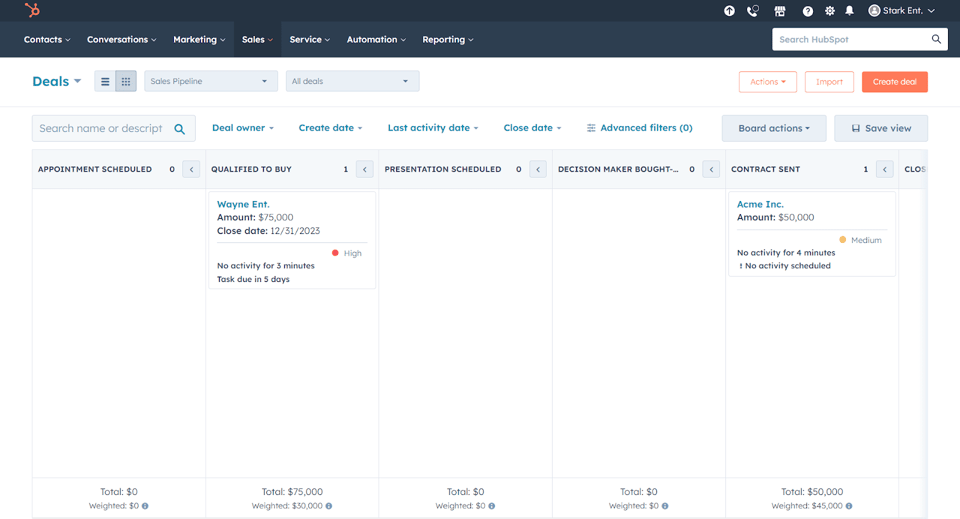
HubSpot automates the widest slice of demand generation from a single account, covering CRM records, content publishing, forms, nurture workflows and reporting. Its real advantage is not any one feature. It is that the visitor, the form fill, the nurture email and the deal all live in the same database, so attribution is a report rather than an archaeology project.
The workflow builder is where the demand generation work happens. A download triggers a nurture sequence, a repeat visit to a pricing page triggers an internal alert, a lead score crossing a threshold moves the record to sales.
The trade-off is the pricing model. Paid Marketing Hub tiers bill by marketing contacts, so cost rises with the size of the database rather than with how much you use it. Teams that import large lists find that out in month three.
Pros
- One record per person across marketing, sales and service.
- Genuinely usable free CRM tier for teams starting out.
- Strong workflow automation and reporting without a specialist to run it.
- Large integration ecosystem, so it is rarely the tool that cannot connect.
Cons
- Billing by contacts means the price grows with list size, not with value.
- Advanced features sit on higher tiers that step up sharply.
- Multichannel outbound is thin. No dialer, no LinkedIn steps, no WhatsApp.
- Onboarding a full suite is a project, not an afternoon.
3. Hey Sid: best for pointing ads, content and outreach at one account list
- From
- Not published, quoted per account
- Free trial
- Book a demo
- Best for
- Mid-sized B2B teams who want paid, organic and outbound aimed at the same target accounts without hiring a specialist for each.
Hey Sid automates account-based demand generation, running ad targeting, organic content and sales outreach against one list of target accounts instead of three campaigns that never meet. It launched in 2024 and says 100+ companies across Europe and North America now use it.
The gap it closes sits one stage earlier than the handoff problem this article opened with. Most stacks buy ads in one tool, publish content from another and send outreach from a third, so the same account collects three uncoordinated impressions and nobody can say which of them moved it. Hey Sid reports at the account level across all three, which turns the weekly question from which channel performed into which accounts are warming up.
It sells itself as a complete marketing team for less than one hire, and that framing tells you the buyer it has in mind: a mid-market team that wants the work run for them rather than another dashboard to staff. The headline results on its site, a 2.5x shorter sales cycle and 85% lower ad spend, are vendor-published and unaudited, so treat them as a hypothesis to test against your own baseline rather than a benchmark.
Pros
- Paid, organic and outbound are planned against one account list rather than three separate campaigns.
- Account-level reporting shows which accounts are warming, not just which channel got clicks.
- The done-for-you model suits teams with no dedicated ABM owner.
- Built for mid-market B2B, so the workflows assume a long, committee-led buying cycle.
Cons
- No published pricing. Every plan starts with a demo and a quote.
- Founded in 2024, so there is little independent review history to check the claims against.
- The performance figures come from the vendor and are not independently verified.
- A managed service is harder to unwind than a tool if the fit turns out to be wrong.
4. Semrush: best for the research stage that feeds everything else
- From
- Per-user monthly, plus add-ons
- Free trial
- Free tier with limited daily lookups
- Best for
- Marketers deciding what to publish, which keywords to chase and where a competitor is winning traffic they should have.
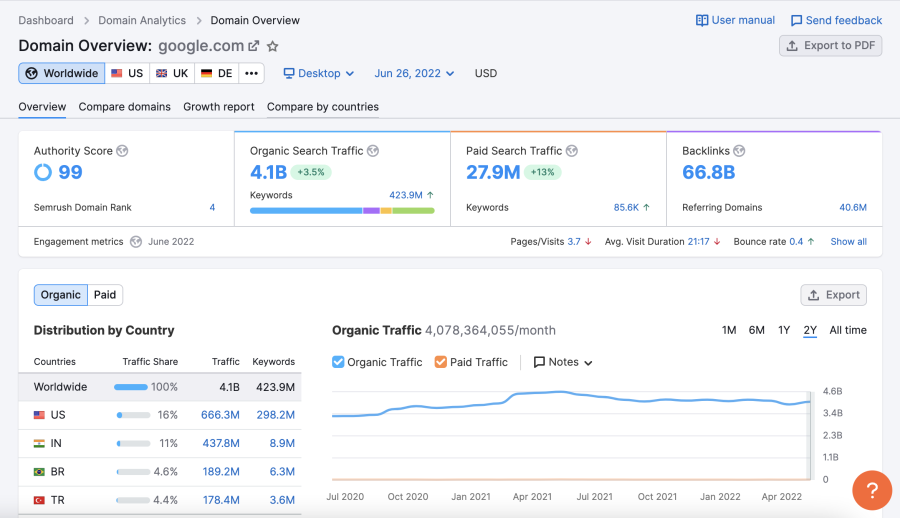
Semrush automates market research, so keyword demand, competitor visibility, backlink profiles and content gaps, which is the input every other demand generation tool depends on. Publishing without it is guesswork, and guesswork at content production cost is expensive.
For demand generation the useful loop is competitive. You can see which pages send a competitor the most organic traffic, which keywords they rank for that you do not, and which of those have commercial intent worth writing for. Pair that with website monitoring and you get both the demand signal and the technical health of the pages meant to capture it.
The on-page SEO checker and writing assistant close the loop by scoring drafts against what currently ranks, before publication rather than after.
Pros
- The deepest competitive keyword and backlink data in the category.
- Content gap analysis turns competitor research into a publishing plan.
- Covers paid search and social alongside organic, so channels are comparable.
- Site audit catches the technical problems that quietly cap organic growth.
Cons
- Priced per user, and extra users cost close to a full extra plan.
- Many of the most useful reports sit behind add-ons that are billed separately.
- It tells you what to do. It does not do any of it.
- Data volume is genuinely overwhelming for a small team without an SEO owner.
5. GetResponse: best for behaviour-based nurture and webinars
- From
- Billed by list size
- Free trial
- Free plan for small lists
- Best for
- Teams running webinar-led or content-led nurture who want the emails, the funnel and the webinar in one tool.
GetResponse automates the nurture stage, combining email sequences, conversion funnels and webinar hosting in one platform so a lead can be captured, nurtured and invited without leaving the tool. The webinar piece is the differentiator, because webinar-led demand generation otherwise needs a separate platform and a fragile integration.
The workflow builder is drag and drop, and triggers run on behaviour rather than time alone. Someone who clicks a pricing link gets a different next email from someone who only opened. Built-in AI drafts subject lines and sequence copy, which shortens the setup rather than replacing the thinking.
Segmentation is the part worth setting up properly. Behavioural data is only useful if the list is split by it, and the default of sending everything to everyone wastes the feature entirely.
Pros
- Webinars, email and funnels in one place, so no fragile integration between them.
- Behaviour-based triggers are straightforward to build without a specialist.
- Cheaper entry point than most all-in-one suites.
- Landing pages and forms included rather than sold separately.
Cons
- Billed by list size, so unengaged contacts cost the same as buyers.
- The CRM is light. Most B2B teams still need a real one alongside it.
- Reporting is shallower than HubSpot or Semrush for anything multi-touch.
- Built for marketing email, not for cold outbound or multichannel sequences.
6. Leadfeeder: best for identifying the demand already on your site
- From
- Free tier, paid by companies identified
- Free trial
- Free plan with limited history
- Best for
- Teams whose site gets real traffic from target accounts that almost never fill in a form.
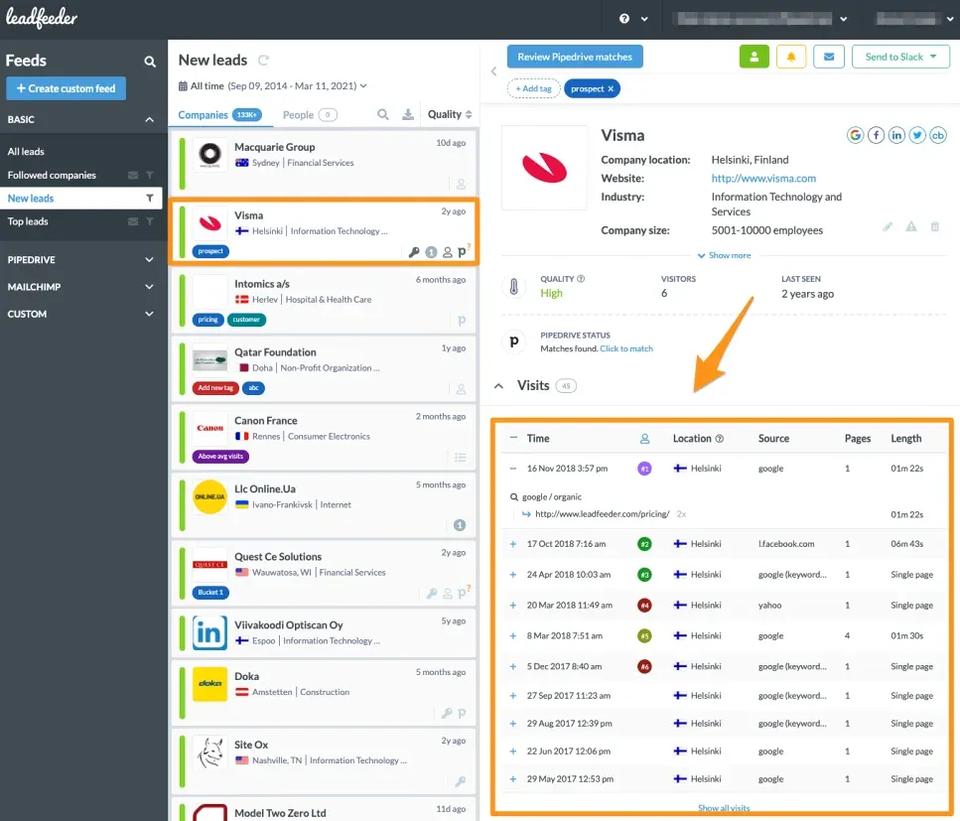
Leadfeeder automates visitor identification, resolving anonymous website traffic to company records and showing which pages each one viewed and for how long. For B2B demand generation this closes a specific and common gap, which is that the overwhelming majority of interested companies never identify themselves.
The behavioural detail is what makes it actionable rather than interesting. A company that viewed the pricing page twice and the integrations page once is a different prospect from one that bounced off a blog post, and the filters let you build a list of only the first kind.
Two limits are worth knowing before buying. It identifies companies, not people, so someone still has to work out who to contact. And identification rates vary sharply by region and company size, which is why the free tier is the honest way to find out whether your traffic resolves well.
Pros
- Surfaces target accounts that would otherwise never be known.
- Page-level behaviour makes prioritisation straightforward.
- Filters and scoring turn raw visits into a workable account list.
- CRM sync means no manual re-entry.
Cons
- Identifies companies rather than individual people.
- Identification rates drop for small companies and outside core markets.
- Cost rises with the number of companies identified, which is not something you control.
- It produces a list. Contacting it is another tool's job.
7. Unbounce: best for landing pages and conversion testing
- From
- Billed by traffic and conversions
- Free trial
- 14-day free trial
- Best for
- Marketers who need to ship and test campaign pages weekly without waiting on an engineering sprint.
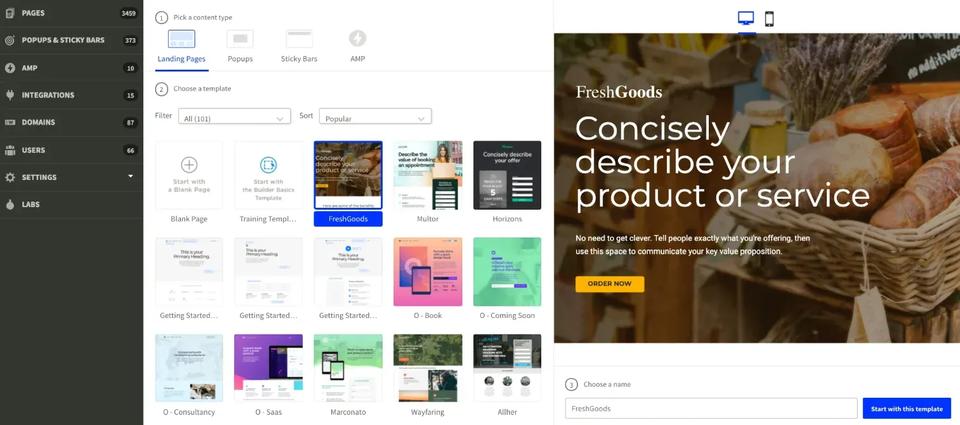
Unbounce automates landing page creation and conversion testing, letting a marketer build, publish and A/B test campaign pages without writing code or booking developer time. In demand generation the constraint is usually not ideas for campaigns, it is that each one needs a page and the page needs a queue slot.
The testing side is the part that compounds. Running two versions of a page against real traffic and keeping the winner turns conversion rate into something you improve deliberately rather than hope about. Its AI-driven traffic routing extends that by sending visitors to whichever variant performs best for people like them.
Pages push lead data into a CRM or marketing platform, so a form fill can trigger nurture or outbound follow-up rather than sitting in an export.
Pros
- Ship a campaign page in an afternoon with no engineering time.
- A/B testing and traffic routing built in rather than bolted on.
- Large template library covering common B2B campaign types.
- Connects to the usual CRM and marketing platforms cleanly.
Cons
- Billed by traffic and conversions, so success raises the bill.
- Pages live on Unbounce, which is a dependency your site does not otherwise have.
- Meaningful test results need real traffic volume. Low-traffic pages never reach significance.
- It converts existing traffic. It does not create any.
How to make demand generation automation tools work together
The advantage rarely comes from one tool. It comes from the handoffs between them being automatic.
A working chain looks like this. Semrush says what the market is searching for. Unbounce turns a campaign into a page. Leadfeeder identifies the companies that visited it. HubSpot or GetResponse nurtures the ones who identified themselves. SmartReach.io reaches the ones who did not, across email, LinkedIn, calls and WhatsApp, and pushes replies back to the CRM.
Start with the leak
Buy one tool for the stage that is actually broken and connect it properly before buying a second. A single well-integrated tool beats four that each hold a partial copy of the truth. If interest is being created but not followed up, the capture stage is the leak.
Then pick the record of truth
Choose one system, usually the CRM, that every other tool writes into. Connect on events rather than schedules, so a page visit or a reply moves things immediately. SmartReach.io connects to 8,000+ apps through Zapier alongside 14 named native integrations.
B2B demand generation automation FAQ
What are B2B demand generation automation tools?
B2B demand generation automation tools are software that runs the repeatable parts of building awareness and interest in a market, so attracting visitors, identifying who they are, nurturing them with relevant content, and handing qualified people to sales. Most teams end up with two or three rather than one, because attracting demand and capturing it are different jobs. SmartReach.io covers the capture side, running email, LinkedIn, calls and WhatsApp as steps in one sequence from $29 a month.
What is the difference between demand generation and lead generation?
Demand generation creates awareness and interest across a market, often before anyone is ready to buy. Lead generation captures the people that interest produces and turns them into contactable records. Demand generation is measured in pipeline influenced and share of the addressable market reached. Lead generation is measured in contacts and meetings. Most stacks need tools for both, which is why a content and analytics tool rarely replaces an outreach tool.
Which automation tool is best for B2B demand generation?
It depends on which stage is leaking. HubSpot is the strongest single suite if you want CRM, content and nurture on one invoice. Semrush is the pick for research and organic visibility. SmartReach.io is the pick for the capture and follow-up stage, because it runs email, LinkedIn, calls and WhatsApp from one cadence and is rated 4.6 on G2 from 60 reviews as of September 2026.
How much do B2B demand generation automation tools cost?
Pricing splits into three models. Suites like HubSpot bill by contacts in the database, research tools like Semrush bill per user per month, and outreach tools bill by how many prospects are active. SmartReach.io uses the third model, starting at $29 a month for Email Outreach and $39 a month for Sales Engagement, with no per-seat pricing and unlimited users from the Plus tier up.
Can one tool handle the whole demand generation process?
Rarely, and the attempt is where budget disappears. A suite that does content, CRM and nurture is usually weak at multichannel outbound, and an outreach tool is not a content management system. Two tools that pass data cleanly beat one tool that does everything at half strength. Pick the one that owns your weakest stage first, then check it integrates with what you already run.
How do you connect demand generation tools so they actually work together?
Pick one system as the record of truth, usually the CRM, and make every other tool write to it rather than hold its own copy. Then connect on the events that matter, so a page visit, a form fill, or a reply. SmartReach.io syncs replies and call outcomes back to the CRM and connects to 8,000+ apps through Zapier, so a prospect who replies on one channel stops receiving follow-ups on the others.
Stop juggling tools
Book more meetings on every channel
Join 5,000+ teams running multichannel outreach from one sequence, with deliverability built in.