Salesloft vs SmartReach.io for Growing Sales Teams

Your sales team just tripled. The spreadsheet-and-Gmail setup that worked last quarter? It’s falling apart. Emails are landing in spam, nobody knows who followed up with which prospect, and your CEO wants pipeline numbers by Friday.
That’s usually when teams start comparing platforms, and the two names that come up most in SDR forums and comparison threads are Salesloft and SmartReach.io. One is built for enterprise revenue orchestration. The other is built to get lean teams into market fast, without the $1,000+/month bill.
Both tools help you run outbound sequences, track engagement, and book more meetings. But they’re built for very different buyers. Salesloft targets mid-market and enterprise teams with deep pockets and complex sales cycles. SmartReach.io is built for lean teams that want multichannel outreach without the enterprise price tag.
Here’s the thing about choosing between Salesloft vs SmartReach: it’s not really about which tool is “better.” It’s about which one fits your team’s size, budget, and the way you actually do outreach.
Alex runs a 12-person SDR team at a B2B SaaS company. His reps send thousands of cold emails every week, run LinkedIn outreach, and make about 200 calls a day. He tried Salesloft for a year. Solid product, no complaints about features. But when renewal came up, the per-seat costs had eaten through his budget faster than expected.
He started looking at alternatives.
That’s the kind of decision this comparison is here to help with. We’ll break down pricing, features, team fit, and where each tool shines so you can make the right call for your outreach stack.
What makes SmartReach.io different from Salesloft?
Salesloft is a revenue orchestration platform. SmartReach.io is a sales engagement tool. That distinction matters more than you’d think.
Salesloft started as an outbound sales tool but has grown into something much bigger. It now covers deal management, conversation intelligence, revenue forecasting, and coaching alongside its original cadence features. If your sales org needs pipeline visibility from first touch to closed deal, Salesloft offers that full picture.
SmartReach.io stays focused on what most SDR teams actually use every day: cold email sequences, LinkedIn automation, calling, and WhatsApp outreach. It doesn’t try to be your CRM or your forecasting tool. Instead, it goes deep on outreach execution and email deliverability.
Here’s a quick positioning overview:
| Salesloft | SmartReach.io | |
| Core focus | Revenue orchestration | Multichannel outreach |
| Best for | Mid-market to enterprise | SMBs, startups, agencies |
| Pricing model | Per seat (custom quotes) | Per prospect volume |
| Channels | Email, phone, social | Email, LinkedIn, phone, WhatsApp |
| CRM integrations | Salesforce, HubSpot, MS Dynamics | Salesforce, HubSpot, Pipedrive, Zoho |
| Timezone-based sending | No | Yes, auto-detects prospect timezone |
| Holiday calendar | No | Yes, blocks sending on local holidays |
| Email infrastructure (secondary domains) | Not included | Buy in-app, fully authenticated |
The biggest difference? Pricing structure. Salesloft charges per user seat. SmartReach.io charges based on prospect volume. For teams that are adding reps quickly, that changes the math completely.
How does SmartReach.io pricing actually work?
Before comparing numbers, it’s important to understand what drives SmartReach.io’s pricing, because it’s structured differently from most tools in this category.
SmartReach.io pricing varies based on four things:
- Number of prospects contacted – how many unique prospects you can actively reach in your campaigns per month
- Number of users – how many team members can log in and run campaigns
- Number of emails sent per month – your total monthly send volume across all campaigns
- Number of sending email accounts – how many inboxes you connect to send from
Most platforms charge per seat and leave you scrambling to manage the rest separately. SmartReach.io flips this: all plans include unlimited sending email accounts at no extra per-seat cost.
What changes across plans is how many prospects you can contact, how many users you have, and how many emails you can send per month.
This matters a lot in practice. A team of 10 SDRs each running multiple sending accounts on Salesloft, would pay for every seat. On SmartReach.io, you pay based on how many prospects you’re working, not how many people are working them.
How does pricing compare between Salesloft and SmartReach.io?
SmartReach.io plans start at $29/month for email outreach and $39/month for full sales engagement. Salesloft doesn’t publish pricing, but industry estimates put it at $125–165 per user per month.
Let’s put real numbers on the table.
SmartReach.io pricing:
| Plan | Monthly price | Prospects/mo | Emails/mo | Users | Sending accounts |
| Basic | $29 | 1,000 | 10,000 | 1 | Unlimited |
| Plus | $89 | 50,000 | Unlimited | 10 | Unlimited |
| Pro | $199 | 100,000 | Unlimited | Unlimited | Unlimited |
| Scale | $499 | 500,000 | Unlimited | Unlimited | Unlimited |
For multichannel outreach (adding LinkedIn and calling), the sales engagement plans run $39–599/month with the same prospect tiers. Annual billing saves you up to 40%.
Salesloft pricing (estimated): Salesloft requires you to contact sales for a quote. According to CloudTalk’s 2026 pricing analysis, typical costs range from $125–165 per user per month, with a minimum of three seats. The dialer costs an extra $200/user/year. Note that Salesloft pricing changes frequently, contact their sales team for current quotes, as published estimates may not reflect your actual contract.
That puts the starting cost at roughly $375–495/month just to get in the door with three reps.
Now here’s where it gets interesting.
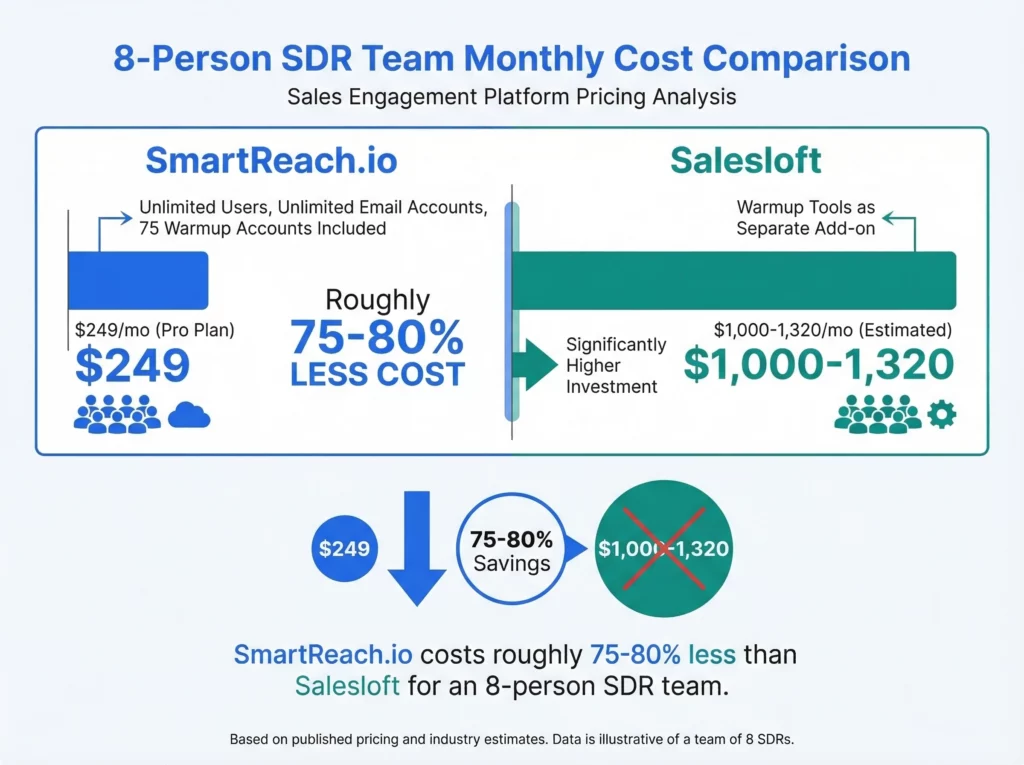
Let’s compare costs for a team of 8 SDRs:
| Salesloft (est.) | SmartReach.io Pro | |
| Monthly cost | $1,000–1,320 | $249 |
| Annual cost | $12,000–15,840 | $2,988 |
| Per-user cost | $125–165/user | ~$31/user |
| Sending email accounts | Paid per seat | Unlimited |
| Warmup accounts | Add-on needed | 75 included |
| Users | Per seat fee | Unlimited |
ROI Snapshot, 8 SDR Team, Switching from Salesloft to SmartReach.io Pro:
- Annual savings: $9,000–$12,852
- Included warmup accounts (75): eliminates ~$89/month third-party tool
- Unlimited email accounts: eliminates inbox rotation add-on costs
- Total first-year savings potential: $10,000–$14,000+
What stands out about this comparison is that the gap isn’t marginal – it’s 75–80% cheaper for the same outbound execution capability. That’s not a pricing edge; it’s a different product category masquerading as competition.
According to G2’s sales engagement software category data, the average platform in this space costs about $71 per user per month. SmartReach.io comes in well under that average, while Salesloft runs nearly double.
Now, Salesloft’s price includes features that SmartReach.io doesn’t offer, like deal management and revenue forecasting. If you actually use those features, the extra cost makes sense. But if your team mostly needs outbound execution?
You’re paying for capabilities you won’t touch.
There’s also the hidden cost factor. With Salesloft, most teams end up adding a separate email warmup tool ($50–100/month), a deliverability monitor, and sometimes a LinkedIn automation add-on. SmartReach.io bundles all of that into the base price.
Core features side by side
Both platforms cover the basics of sales engagement. The differences show up in depth, approach, and what’s included versus what costs extra.
Cold email sequences & automation
Salesloft offers cadences with email, phone, and social steps. You can personalize templates, A/B test subject lines, and track opens and clicks. It’s solid and well-built.
SmartReach.io takes sequences further with conditional logic. Your drip campaigns can branch based on prospect behavior, so someone who opens but doesn’t reply gets a different follow-up than someone who clicks a link. You also get Spintax support for natural email variations, which means each message reads a little differently even at scale.
Timezone-based sending and holiday calendar
This is one of the most underrated differences between the two platforms and it directly affects reply rates.
Salesloft lets you set sending windows, but it doesn’t automatically detect or adjust for a prospect’s local timezone or local public holidays. Your reps need to manage this manually or accept that campaigns go out on days when no one’s reading their inbox.
SmartReach.io handles this natively in two ways:
Timezone-based sending: SmartReach.io automatically detects each prospect’s timezone and schedules emails to land in their inbox during business hours in their local time — not yours. If you’re in New York emailing prospects in Sydney and Berlin at the same time, each email goes out at the right local hour without any manual adjustment.
Sending Holiday Calendar: SmartReach.io lets you configure a holiday calendar at the campaign level. When a prospect’s local holiday falls during your campaign window, the email is automatically held and sent the next working day instead.
SmartReach.io auto-considers the recipient’s timezone when applying these exclusions, so a US holiday doesn’t pause emails going to your UK prospects, and vice versa. The platform notes that emails landing on a national holiday see up to 90% lower open-to-reply rates after the holiday passes, as inboxes pile up and cold outreach gets buried.
For teams running international outreach across multiple regions, this combination, timezone detection plus holiday-aware scheduling, means your campaigns stay relevant without someone manually building out region-specific sending rules.
| Scheduling feature | Salesloft | SmartReach.io |
| Custom sending windows | Yes | Yes |
| Timezone-based auto-sending | No | Yes – auto-detects per prospect |
| Holiday calendar | No | Yes – per campaign, per region |
| Account-based domain send limits | No | Yes |
Multichannel sales outreach automation
Salesloft supports email, phone, and social selling steps within cadences. LinkedIn actions are typically manual tasks the rep completes as a to-do item.
SmartReach.io automates LinkedIn outreach directly, including connection requests, messages, and profile views. It also adds WhatsApp messaging and an in-built dialer. All channels run from a single sequence, a real time-saver when your reps are juggling four channels at once.
Shared Inbox: SmartReach.io’s Shared Inbox gives managers real-time visibility into every prospect reply across all sending accounts, so team leads can monitor pipeline health and hand off qualified leads without leaving the platform.
AI features for sales engagement
Salesloft has invested in AI for conversation intelligence, deal scoring, and forecasting. Their AI analyzes call recordings and helps managers coach reps on talk-to-listen ratios and objection handling.
SmartReach.io’s AI focuses squarely on outreach execution. Its Content AI auto-generates complete multi-step sequences with personalized subject lines and ice-breakers — reducing sequence setup time from hours to minutes for new campaigns. It suggests reply templates based on incoming prospect responses and enriches lead data by pulling insights from the web.
For calling teams, SmartReach.io’s Call Sentiment Analysis maps call outcomes and connection rates to CRM records, giving managers the data to refine territory strategies without a separate analytics layer.
But do you really need AI that scores deals, or do you need AI that writes better cold emails? Your answer probably depends on your role. Sales leaders and RevOps teams might prefer Salesloft’s analytics-focused AI. SDRs and outbound teams will get more daily value from SmartReach.io’s content and prospecting AI.
CRM integration & infrastructure
Beyond sequence logic and AI, the infrastructure supporting your outreach matters just as much. Here’s how the two tools compare on CRM connectivity and email health.
Both connect to major CRMs with two-way sync. Salesloft has deeper native integrations with Salesforce and Microsoft Dynamics, including custom object sync. SmartReach.io supports Salesforce, HubSpot, Pipedrive, and Zoho with bi-directional data flow.
Secondary domains and sending setup
This is a topic that most comparison articles skip, but it’s one of the most important practical differences between Salesloft and SmartReach.io, especially if you’re serious about cold outreach at scale.
Why secondary domains matter
Cold outreach carries inbox risk. When you send high volumes from your primary company domain and something goes wrong, bounce rates spike, a spam complaint lands, or an ESP flags your account, you can damage the sender reputation of your main business email. Every email from your CEO, your account team, and your customer success reps suddenly becomes less likely to land in the inbox.
The industry-standard protection is to send cold outreach from secondary domains, domains that look similar to your main brand (e.g., getsmartreach.io or try-smartreach.io) but are separate sending identities. If a secondary domain gets flagged, your main domain stays clean.
Setting this up properly requires domain authentication: MX records, SPF, DKIM, and DMARC all need to be configured for every domain. For most teams, this means going to a domain registrar, provisioning a new domain, setting it up in Google Workspace or Microsoft 365, configuring the DNS records correctly, then connecting it to their outreach platform. Done manually, this takes hours per domain and requires technical knowledge most SDRs don’t have.
How Salesloft handles it
Salesloft does not include a built-in secondary domain purchase or setup feature. If you want to run inbox rotation across secondary domains, you provision and authenticate those domains externally, then connect the email accounts to Salesloft manually. There’s no in-app guidance or automation for the domain setup process itself.
How SmartReach.io handles it
SmartReach.io lets you buy and fully configure secondary domains directly inside the platform, without leaving your dashboard. You can create hundreds of Google or Microsoft 365 mailboxes with a few clicks, and SmartReach handles the full DNS configuration automatically: MX records, SPF, DKIM, and DMARC are all set up for you.
Key details:
- All secondary domains automatically redirect to your main website so prospects who check the domain don’t land on a dead page
- Domains use an IP infrastructure designed to avoid blacklisting, with hundreds of IPs and automatic replacement of flagged IPs
- Pricing is exclusive to SmartReach users, billed monthly with no long-term commitment
- Inbox rotation then runs across all these accounts within your SmartReach campaigns automatically
For teams running multi-domain outreach at scale, whether that’s a 5-person startup protecting their main brand or an agency managing outreach for 20 clients, this removes an entire category of technical overhead.
| Email infrastructure | Salesloft | SmartReach.io |
| Buy secondary domains in-app | No | Yes |
| Auto DNS setup (SPF, DKIM, DMARC, MX) | No | Yes |
| Inbox rotation across domains | No (manual setup) | Yes, native |
| IP blacklisting protection | No | Yes, auto IP replacement |
| Warmup for secondary accounts | Requires third-party tool | Built-in |
| Domain redirect to main website | Manual | Automatic |
Email deliverability & inbox health tools
SmartReach.io’s deliverability toolkit is one of its key advantages. It includes AI-powered email warmup, inbox rotation, ESP matching, spam testing, and domain health monitoring, all built into the platform at no extra cost.
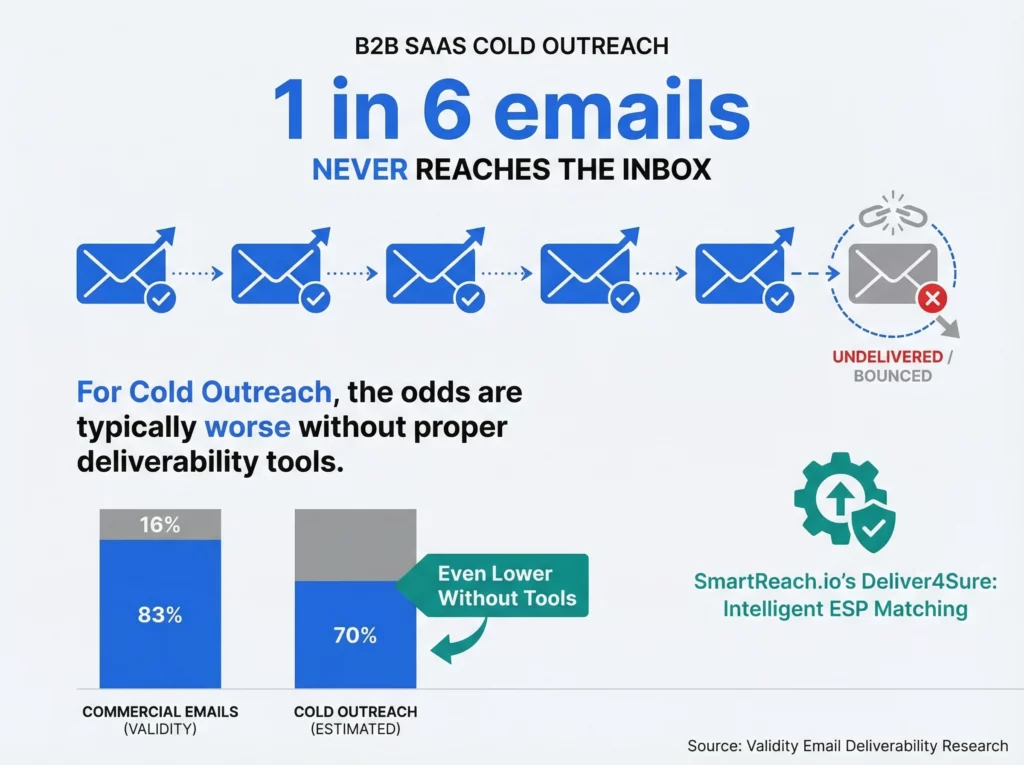
This isn’t a minor detail. According to Validity’s email deliverability research, roughly 1 in 6 commercial emails never reach the inbox. Independent tests by email tool review sites such as EmailToolTester and Reachmail have documented inbox placement rates for cold campaigns running as low as 60–70% without dedicated warmup infrastructure.
As noted by sales operations practitioners in communities like RevGenius and Pavilion, inbox placement is often the single biggest variable in cold outreach performance, more than copy, timing, or targeting.
SmartReach.io’s email deliverability ESP matching routes emails through the best sending path for each recipient’s email provider. SmartReach.io’s internal campaign data indicates 15% higher inbox placement rates compared to standard sending, a figure worth validating against your own domain performance during the trial.
What’s included in SmartReach.io’s deliverability stack at no extra cost:
- AI email warmup with up to 75 warmup accounts on the Pro plan
- Inbox rotation across unlimited email accounts
- Free email verification to catch bad addresses before you hit send
- Spam testing to preview inbox placement before launching campaigns
- Secondary domain management with authenticated Google and Microsoft 365 mailboxes
- Deliver4Sure ESP Matching for intelligent sending path selection
Stan, a Sales Ops manager at a 30-person company, switched his team’s outreach tool specifically for this reason. He was spending $89/month on a separate warmup solution and still fighting deliverability issues. Moving everything into one platform cut his bounce rate from 8% to under 2% and simplified his tech stack considerably.
Salesloft handles email sending well, but it doesn’t include a dedicated warmup tool, inbox rotation feature, or in-app secondary domain setup. Most Salesloft users end up pairing it with a third-party deliverability tool, which adds another $50–100/month to the stack.
Which tool fits your team size?
The right choice often comes down to how many people are sending outreach and how fast your team is growing.
Solo reps and teams of 1–3
SmartReach.io’s Basic plan ($29–39/month) gives you everything you need to get started. You get email sequences, LinkedIn and calling capabilities, built-in warmup, and email verification. Salesloft’s minimum of 3 seats at $125+ each means you’re spending $375+ before sending a single email. For a solo rep or small team, that’s a tough number to justify.
Growing teams of 4–10
This is where SmartReach.io’s pricing model really pulls ahead. The Plus plan ($89–99/month) supports up to 10 users with 50,000 active prospects. That’s less than $10 per user per month.
Alex’s situation, 12 reps, multichannel outreach, 200 calls a day, is exactly where SmartReach.io’s Plus plan becomes compelling. At under $10/user/month with LinkedIn and calling built in, it’s a fundamentally different cost model than what he was running on Salesloft. He didn’t just save money on the subscription; he eliminated the warmup tool, simplified his stack, and stopped recalculating the budget every time he hired.
Most growing teams don’t need a $125/seat enterprise tool, they need reliable multichannel sequences and the freedom to add reps without recalculating the budget. What happens when you double that headcount next quarter? With per-seat pricing, your costs double too. With SmartReach.io’s volume-based model, you might not even change plans.
Mid-market teams of 10–25
The decision gets more nuanced here. SmartReach.io’s Pro plan ($199–249/month) supports unlimited users and 100,000 prospects.
For teams in this range, the decision comes down to one question: Is your sales engagement tool also your forecasting and deal management tool? If yes, Salesloft’s full-suite pricing may be justified.
If you use a dedicated CRM for pipeline management and only need outbound execution from your engagement platform, SmartReach.io’s Pro plan at $249/month versus an estimated $1,500–$2,500/month for Salesloft makes the math clear.
Enterprise teams of 25+
Salesloft was built for this segment. If you’ve got a large sales org with multiple teams, layers of management, and a dedicated RevOps function, Salesloft’s revenue orchestration features make a lot of sense.
SmartReach.io’s Scale plan can handle the email volume, but it doesn’t offer the same depth of pipeline analytics, forecasting, or conversation intelligence that enterprise teams typically need.
When does Salesloft make more sense?
Salesloft isn’t overpriced for what it delivers. It’s a different product for a different buyer. To be clear about where it genuinely wins, here are the scenarios where it’s the better fit.
You need full-cycle revenue visibility. Your sales leaders track deals from first touch through close and forecast revenue quarterly. Salesloft’s platform covers that entire journey. SmartReach.io focuses on the top-of-funnel outreach piece.
Your team is already productive in it. Switching sales tools mid-quarter is painful. If your reps know Salesloft well and you’ve built workflows around it, the migration cost and productivity dip might outweigh any savings.
Conversation intelligence matters to you. Salesloft’s AI analyzes sales calls and surfaces coaching insights. SmartReach.io does offer Live Call Coaching with Listen, Whisper, and Barge functionality for real-time rep guidance, though it doesn’t include Salesloft’s post-call AI analysis of talk-to-listen ratios. If deep post-call analytics is a priority for your managers, Salesloft is still the stronger choice there.
You’re deeply embedded in Salesforce. Salesloft’s Salesforce integration is one of the deepest in the category. If your org relies on Salesforce with custom objects and complex workflows, Salesloft handles that sync well.
Budget isn’t the primary constraint. According to Gartner Peer Insights, enterprise sales teams consistently rate Salesloft highly for its feature breadth. If you’ve got the budget and need the full suite, it delivers.
When does SmartReach.io make more sense?
SmartReach.io wins when outbound execution and cost efficiency are your top priorities.
You’re watching your budget closely. At $29–249/month versus an estimated $375–4,000+/month for Salesloft, the cost difference is significant. For startups, agencies, and SMBs, those savings can fund another SDR hire or a bigger prospect list, resources that directly drive pipeline, rather than paying for forecasting features you don’t use.
Deliverability keeps you up at night. SmartReach.io’s built-in warmup, inbox rotation, email deliverability, ESP matching, spam testing, and in-app secondary domain setup mean you don’t need to stitch together extra tools. Everything works from a single dashboard.
You’re doing international outreach. Timezone-based sending and the holiday calendar mean your campaigns automatically adjust for each prospect’s local context, without building separate regional sequences. You set it once, and it handles the rest.
You want true multichannel automation. LinkedIn automation, WhatsApp messaging, calling, and email all run from one sequence without manual task steps. Your reps set up a campaign and let it run across channels automatically.
Your team is scaling fast. Volume-based pricing means adding a new rep doesn’t trigger a new per-seat charge. Go from 5 to 15 SDRs on the same plan without a price increase.
You run an outreach agency. SmartReach.io has dedicated agency pricing and features, including client management and white-label options. It’s built for teams managing outreach across multiple client accounts.
You need unlimited email accounts. Every SmartReach.io plan includes unlimited sending email accounts, a significant advantage for teams running inbox rotation strategies across multiple domains to protect sender reputation.
Salesloft vs SmartReach: making the right pick for your team
There’s no universal “better” tool here. Salesloft and SmartReach.io solve different problems at different price points.
Pick Salesloft if you’re a mid-market or enterprise team that needs revenue orchestration, deal tracking, and conversation intelligence alongside your outreach. You’ve got the budget, and you want one platform for the full sales cycle.
Pick SmartReach.io if you’re an SMB, startup, or agency that needs high-volume multichannel outreach without the enterprise price tag. You want built-in email deliverability tools, pricing that scales with your prospect list instead of your headcount, timezone-aware and holiday-aware scheduling, and the ability to spin up secondary domains without touching DNS records yourself.
Most teams reading this comparison are probably in that second camp. You’ve got a lean budget, a growing team, and a prospect list that isn’t going to email itself.
For most teams under 25 reps, the decision is simpler than it looks. You don’t need revenue orchestration, you need outbound that works and a budget that doesn’t disappear into per-seat costs every time you hire.
If that sounds like you, SmartReach.io’s free trial takes under 10 minutes to set up. Import a prospect list, build a sequence, and see how inbox rotation and ESP matching perform against your current tool.
Frequently asked questions
What’s the main difference between Salesloft and SmartReach.io?
Salesloft is a revenue orchestration platform designed for mid-market and enterprise sales teams, while SmartReach.io is a multichannel sales engagement tool built for SMBs and agencies, with volume-based pricing that scales with prospects, not per-seat headcount. The core difference is scope: Salesloft covers deal management and revenue forecasting; SmartReach.io focuses on outbound execution across email, LinkedIn, phone, and WhatsApp.
How much does Salesloft cost per user?
Salesloft does not publish pricing. Based on CloudTalk’s 2026 pricing analysis, typical costs range from $125–165 per user per month, with a minimum of three seats. Contact Salesloft’s sales team directly for a current quote, as these estimates may not reflect your contract.
Is SmartReach.io a Salesloft alternative?
Yes, SmartReach.io is a direct Salesloft alternative for teams focused on outbound sales execution. It covers the same core use cases, cold email sequences, LinkedIn outreach, and calling, at significantly lower cost, making it the preferred choice for SMBs, startups, and agencies that do not require Salesloft’s deal management or revenue forecasting features.
Can SmartReach.io replace Salesloft for cold outreach?
Yes. SmartReach.io covers email, LinkedIn, phone, and WhatsApp outreach with built-in deliverability tools. It does not include deal management or revenue forecasting, but for outbound execution it is a strong fit. You can also check how it compares to other tools in the outreach competitors breakdown.
Does SmartReach.io include email warmup?
Yes. Every plan includes AI-powered warmup accounts (10–75+ depending on the tier) plus inbox rotation and ESP matching at no extra cost.
Which tool is better for small sales teams?
SmartReach.io is typically the better fit for small sales teams of under 10 people. Its plans start at $29/month for email outreach and $39/month for full multichannel sales engagement, compared to Salesloft’s estimated minimum of $375+/month for three seats. SmartReach.io’s volume-based pricing also means adding new reps does not trigger additional per-seat charges.
Does SmartReach.io support timezone-based email sending?
Yes. SmartReach.io automatically detects each prospect’s timezone and schedules emails to be delivered during their local business hours. It also includes a Sending Holiday Calendar that pauses outreach on public holidays in the prospect’s region, using the recipient’s timezone to apply the exclusions correctly, so your emails land when people are actually at their desks.
Can I buy and set up secondary email domains inside SmartReach.io?
Yes. SmartReach.io lets you purchase and fully authenticate secondary domains, including Google or Microsoft 365 mailboxes, directly from your dashboard. DNS records (MX, SPF, DKIM, DMARC) are configured automatically, secondary domains redirect to your main website, and the infrastructure uses hundreds of IPs with automatic replacement of flagged ones. Salesloft does not offer this feature.