How to Switch Between Cold Email Platforms Without Affecting Client Deliverables

On this page
There are two ways to switch cold email platforms, and almost every guide covers only the easy one.
In the easy version, your domains and mailboxes are yours: registered in your registrar, running in your own Google Workspace or Microsoft 365 tenancy, and the platform just presses the buttons. In that version your reputation was never at stake, and we'll show you why in a minute.
Then there's the version you're probably living if you started your agency in the last two or three years: the platform provided the infrastructure. Domains, mailboxes, warmup, all provisioned inside the tool in an afternoon, which is exactly why you bought it.
Now you want out, and the fine print has surfaced. The infrastructure isn't yours to take. Every one of your 40 clients was promised meetings this month, and the asset those meetings run on belongs to the landlord.
Sound familiar? Then let's answer the question the way it actually gets asked: "how do we migrate 40 clients off this thing without re-warming everything, and without the client dashboards ever showing a dip?"
If you own your infrastructure, the answer is short and reassuring. If the platform owns it, the answer is a real exit plan: test what you have, export before you announce, rebuild as an asset, and bridge the gap with a wave plan tuned to your reporting calendar. We'll do both, with the math, including the parts that aren't flattering.
The two ways to switch cold email platforms
Start by locating yourself, because the two migrations share almost nothing.
If you own the infrastructure, the reassuring mechanics: cold email platforms in a bring-your-own setup don't send from their own servers. They connect to your Google Workspace or Microsoft 365 accounts and send through them, so the receiving filters built their opinion of your domains and mailboxes, not your dashboard.
Per SmartReach.io's State of Cold Email 2026, built on 40M+ emails across 100+ agencies, fully authenticated domains with DMARC on enforcement are about 2.7x more likely to reach the inbox, and only about 7.6% of domains enforce it. That authentication work lives in your DNS and travels with the domain; if you haven't done it, do it before migrating, not during (here's the SPF, DKIM, and DMARC setup).
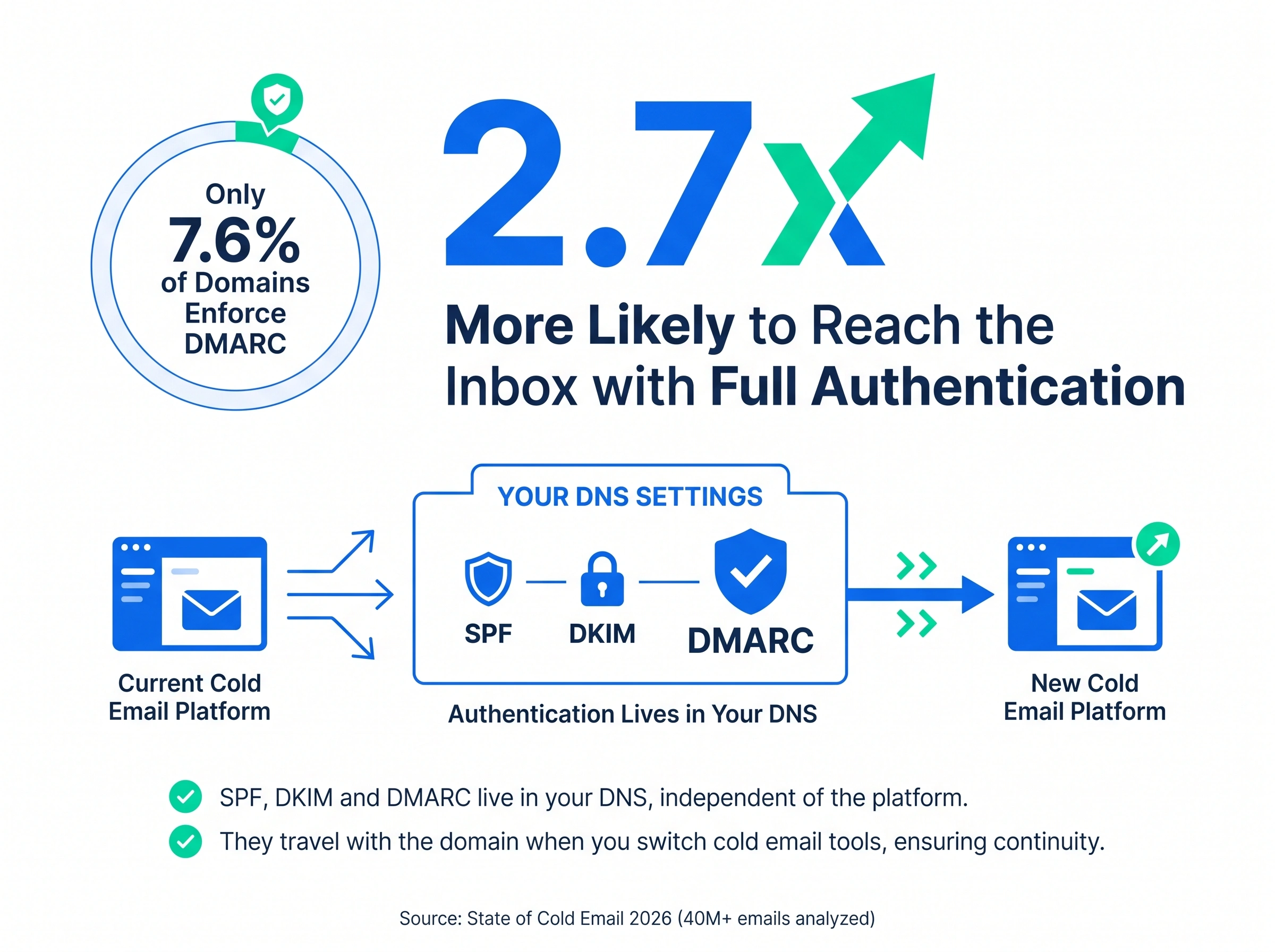
Reconnect the same mailboxes on the new platform, ramp, and you're done inside eight weeks. No re-warming, because nothing that held your reputation changed.
Either way, four things stay behind on any switch, and they're all data or plumbing rather than reputation:
Moves with you
Your domains and their authentication records, if they're registered to you. Your mailboxes and their earned sending history, if they're in your tenancy. Your list quality, your copy, your offer, and the client relationships all of it exists to serve.
Stays behind
The platform's warmup pool and the engagement it generated. The platform's shared tracking domain. Your sequence state, reply history, and analytics baselines. Your suppression and unsubscribe lists, unless you export them deliberately.
Look at the qualifiers in the left card: if they're registered to you, if they're in your tenancy. When the platform provisioned your infrastructure, both cards collapse into the right one, and the left card is what you're about to rebuild. If that's you, the next three sections are the actual article.
If the platform owns your infrastructure, start with a test, not a eulogy
Before anything else, name the reason you're leaving. In practice it's one of three: the bill got heavy, deliverability got bad, or support went quiet while a client campaign was on fire.
Sit with that for a second, because if your reason is deliverability, the aged-domains argument is already over. Domains that have been landing in spam aren't an asset you're protecting. They're the problem you're solving.
And none of this was carelessness on your part. Bundled infrastructure solves a real problem, onboarding friction, and quietly manufactures a second thing, exit friction, both by design. The free domains were the most expensive thing you bought.
But don't take deliverability on faith either, in either direction, because the signal most agencies trust here is rigged. If you've been on the platform's warmup network for four to six months, every domain in that pool has been trading friendly opens and replies with the same inboxes the whole time. By now they all know each other.
Your warmup dashboard says "inbox" because the pool inboxes its own, and that tells you nothing about where your mail lands with a stranger at a company that has never seen your domain before. Plenty of agencies discover this three weeks after a client asks why replies dried up.
So test properly, this week, before any migration decision:
- Run every sending domain through MX Toolbox and note which ones sit on a blacklist.
- Run placement tests with an independent seed-based tool (GlockApps or similar), one that sends to inboxes outside any warmup network. Gmail and Microsoft on separate lines.
- Pull six months of bounce and reply trend per client, and get your domains into Google Postmaster Tools for the reputation trendline.
Then let the results make the call:
- Placement is genuinely good. Then be honest with yourself: why are you moving? If the answer is cost or support, fair, but it changes your posture. This infrastructure is worth fighting for, so lean hard on the transfer and buyout paths in the next section, and don't rush.
- Placement is bad, or domains are blacklisted. The age debate is finished. Pulling an established domain out of spam takes two to three months of consistent positive engagement, roughly what it takes to warm a fresh domain you actually own. Same wait either way. Only one of them ends with an asset in your name. The migration isn't the risk to your deliverability; it's the recovery plan.
On the age question itself, the honest version: domain age matters, but it's front-loaded. Filters treat a domain with real suspicion for its first 30 to 90 days (the window where the 15-25 sends per inbox ceiling applies), and after that they mostly score the last two or three months of behavior.
The six-to-twelve-month aging that lifts placement by up to 30 points in the report data buys headroom at the top end, and Microsoft's memory runs longer than Gmail's, so keep Outlook-heavy clients for late waves.
Now ask what that headroom was even buying you. The old pitch for aged domains was throughput: a seasoned inbox could carry 40-50 sends a day where a fresh one caps at 15-25. But look at how the best agencies actually send in 2026. Nobody serious runs inboxes that hot anymore. Since the Gmail and Yahoo bulk-sender rules tightened, the discipline is under 40 sends per inbox per day, spread across 5-7 mailboxes per domain, and you scale by adding rotated inboxes, not by pushing old ones harder.
So the one concrete advantage age used to buy is headroom you shouldn't use anyway. Run at today's volumes and a well-warmed 90-day domain does roughly the same job as your three-year-old one. What exactly are you holding on to?
One more thing the tidy versions of this math skip: new domain cohorts have variance. Some fresh domains underperform for no reason you'll ever find. Buy 15-20% spare, cull without sentiment, and think in cohort survival. Every serious sending operation runs this way.
The exit playbook: leave in the right order
Order matters more than speed here, because several of these steps only work while you're still a customer in good standing.
- Export everything before anyone knows you're leaving. Suppression and unsubscribe lists first (losing one isn't a deliverability mistake, it's a compliance incident), then sequence state, reply history, contact data, and per-client analytics deep enough to serve as baselines. The renewal-date advantage only works in one direction, and export friction has a way of appearing after you give notice.
- Audit the registrant on every domain. "Bought through the platform" doesn't always mean "owned by the platform." Any domain registered in your name or your client's can be moved to a registrar you control with a transfer authorization code; ICANN's transfer policy backs you, with a 60-day lock after registration or a prior transfer. It'll slow you down; it won't stop you.
- Ask for a buyout. One direct email: "we're leaving; will you transfer or sell us the domains?" Some providers will, priced against the cost of losing you noisily. You'll never know if you don't ask, and the answer also tells you exactly what kind of vendor you've been funding.
- Learn the account-closure behavior before you trigger it. Do sequences halt the moment you cancel, or drain? How long until data purges? What happens to surrendered domains: parked, or resold into someone else's cold email pool? Get it in writing from support while you're still a paying customer.
- Plug the reply leak. This is the one nobody budgets for. Replies keep arriving for weeks after a sequence ends, addressed to mailboxes you're about to lose. A positive reply landing nineteen days after cancellation, in an inbox nobody can open, is a booked meeting that never existed, and no dashboard will ever show it. Before closing anything: reroute reply-to addresses on everything still in flight to addresses you'll keep, set forwarding where the platform allows it, and let in-flight sequences drain fully.
- Then give notice, timed against your renewal date, not theirs.
Rebuild the infrastructure as an asset
The rule that ends this cycle permanently: whoever manages your infrastructure, the ownership answers to you. Domains registered in an account you or your client controls, mailboxes in a real Google Workspace or Microsoft 365 tenancy, a custom tracking domain per client. Managed is fine. Unowned is not. (Secondary domains still do the brand-protection job they always did; the point is who owns them.)
What does the rebuild actually cost? Honest ranges, not a tidy number. Domains run $10-15 a year. Mailboxes depend on where you buy them: running your own Google Workspace costs about $7 per inbox per month, and for what it's worth, SmartReach.io sells managed Google and Microsoft 365 mailboxes at $4 a month, real tenancy mailboxes rather than seats in a shared SMTP pool.
We'll keep $7 in the math anyway, since it's the fully-DIY worst case; a managed route only improves it. Either way, look at what you're buying: the cheap bulk boxes you're on now share their standing with a crowd, and these don't. A typical mid-size client needs 4-6 domains and 8-12 mailboxes at steady state, plus the 15-20% spare domains for culling.
Two things soften that bill. First, the spend converts rent into equity: twelve months from now this cohort is the aged cohort, and it appreciates in an account you control instead of the landlord's. Second, the warming itself is no longer artisanal work; AI email warmup running from day one makes the 90-day ramp a background process rather than a project.
On the destination side, rebuilding is mostly reconnecting. In SmartReach.io every inbox you bring over lands in one Email accounts list that runs SPF, DKIM and DMARC checks per inbox, so the migration audit is built into the connect step.
- Open Settings and select Email accounts
- Click Add Email Account for each inbox you are moving
- Let the health checks run, and fix any failed record before that inbox joins a campaign
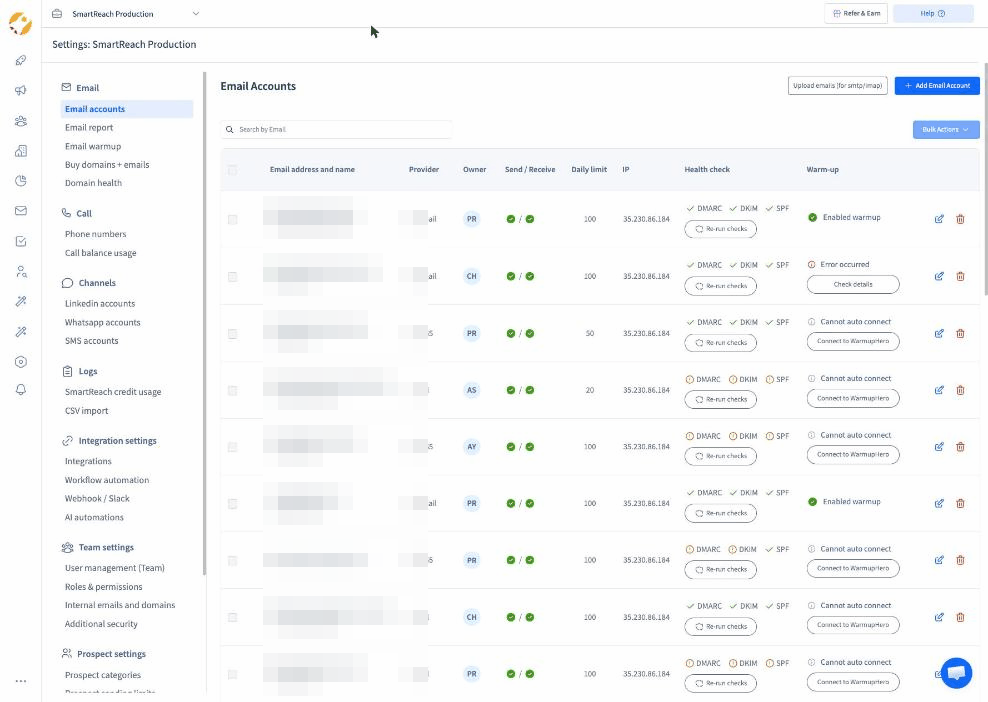 The migration audit happens at connect time. Each moved inbox shows its checks before it sends a single email.
An inbox that fails a check on arrival would have failed it on the old platform too. Catching it during the move is the one silver lining of switching.
The wave plan that keeps client results flat
Hold the whole migration to the only standard your clients recognize: they don't buy deliverability, they buy replies, leads, and booked meetings, on schedule, every month.
Deliverability is machinery. The plan is judged on whether the client dashboards ever show the seam.
First, the honest timeline, because this is where client results actually get tanked. If you own your infrastructure, six to eight weeks in waves. If you're rebuilding rented infrastructure, it's a quarter: 90 to 120 days of parallel running while the new cohort warms to full capacity. Anyone promising you the rented-infrastructure exit in six weeks is describing the easy migration and selling it to the hard one.
Why waves and not one cutover weekend? Because a migration mistake is almost never a reputation problem on day one; it's a configuration problem (a missing tracking domain, an OAuth hiccup, a throttle default) that becomes a reputation problem after a week of sending.
Waves shrink the blast radius: a misconfiguration hits three clients, not 40.
- Wave zero, the pilot: 2-3 forgiving clients. Healthy baselines, no high-stakes campaign in flight, Gmail-heavy lists. The report data is blunt that Microsoft is the strict one, so Outlook-heavy clients go late, after you've learned the new platform's quirks on predictable terrain.
- Then waves of 8-10 clients, batched by DNS dependency and mailbox-provider mix, not alphabetically.
- Gate every wave on the previous one. Seven days of data, four conditions: bounce under 2%, placement within a few points of that client's baseline, no complaint spike, reply pace inside normal week-to-week noise. Fail a gate, and the schedule pauses while you diagnose. A wave plan without gates is just a slow big-bang.
- One clean handover rule for sequences. Prospects mid-sequence finish on the old platform; new prospects only ever start on the new one. Import suppression lists into the new platform before anything sends. Nobody gets a duplicate step three; nobody vanishes mid-conversation.
Here's why this structure keeps deliverables flat rather than merely keeping domains safe. Replies lag sends by days, and about 42% of cold email replies arrive after the first touch, per the State of Cold Email 2026. During a client's ramp, their in-flight follow-ups still run at full volume on the old platform, so the reply engine that books their meetings never stops; only new-prospect sends are ramping.
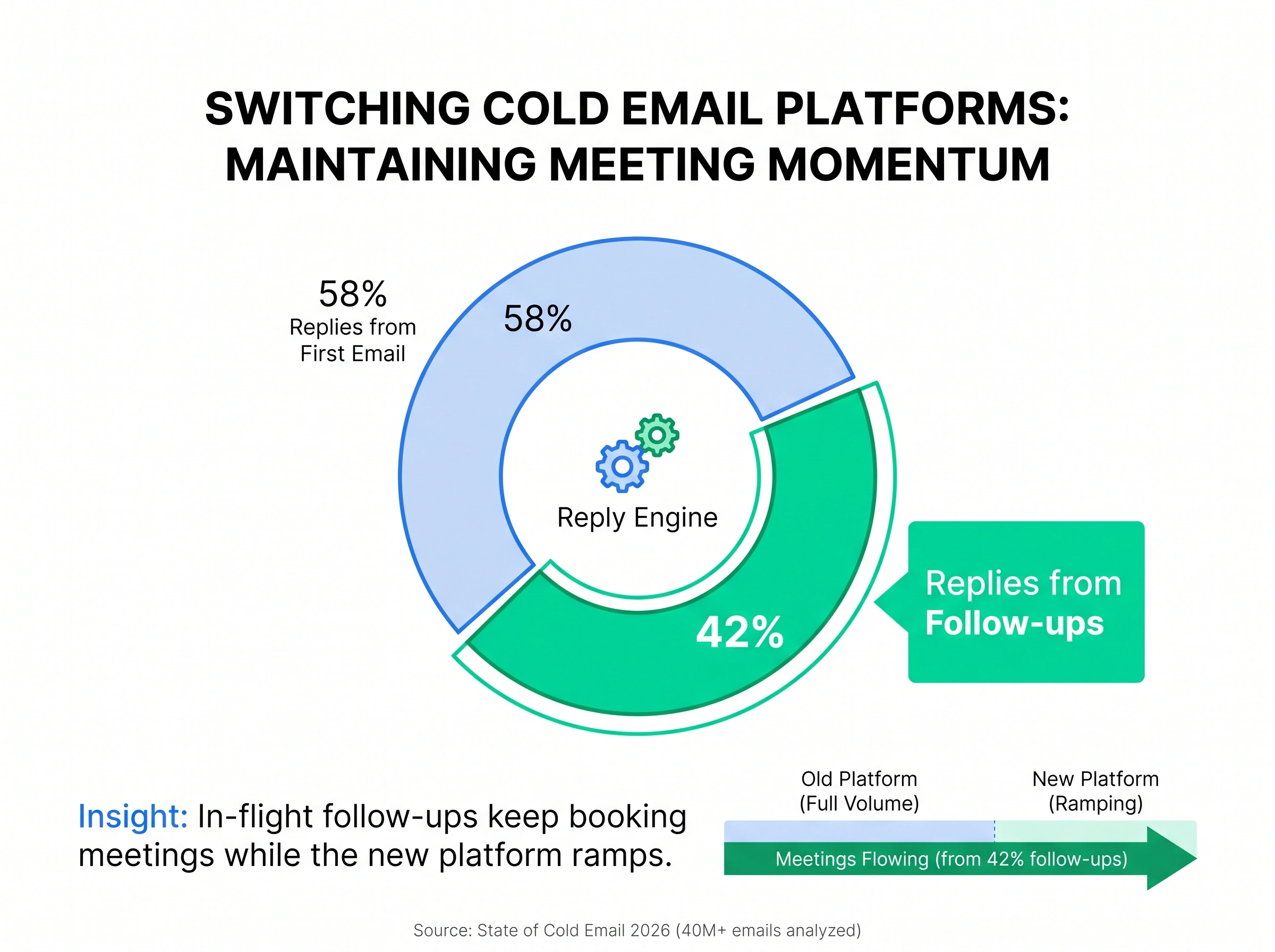
The old platform is your capacity bridge for the whole overlap; the spare capacity you're building is insurance for after cutover, not doubled steady-state. Run the two platforms as one system and each client's total outbound stays roughly level throughout.
Then time it against the calendar that actually matters: schedule each client's wave for the week after their monthly report, not the week before. The ramp lands at the top of their cycle, the reply tail covers it, and by the next reporting call the new setup is at full volume.
A client mid-quarter on a hard meetings target waits for a later wave; the sequencing is yours to control, so spend it where the commercial risk is.
Cutover discipline per client, compressed: custom tracking domain live and verified before the first send (never the platform's shared one), authentication test passed before volume, new-prospect sends starting at 50-70% of normal and reaching 100% over 10 to 14 days inside the old send windows, warmup on for the first two to three weeks, seed tests on days 1, 7, and 14.
Our deliverability checklist covers the full pre-flight list, and Google's Email sender guidelines are worth rereading mid-migration: one-click unsubscribe and complaints under 0.3% are requirements now, and you're touching every client's setup anyway.
What should you watch after cutover?
Four numbers, per client, for 30 days. But read them in the client's order: no client will ever ask about your bounce rate. They'll ask where the meetings are.
- Replies and meetings against the pre-migration baseline. The deliverable goes first. Opens are inflated and clicks are noisy; replies are the metric that can't lie, and meetings are the one your invoice depends on. If reply pace holds within normal noise for two weeks, the migration worked, whatever your anxiety says.
- Bounce rate, your earliest warning. Under 2% is healthy. Past 2%, slow the ramp and check list hygiene. Past 5%, stop sending for that client and diagnose, because a dragged domain becomes a missed meetings target three weeks later.
- Inbox placement, Gmail and Microsoft on separate lines. The report data shows domains that look healthy on Gmail quietly landing in junk at Microsoft, and blended placement numbers hide it until an Outlook-heavy client goes quiet. Deliverability suites like Deliver4Sure split placement by provider so the divergence is visible on day one.
- Spam complaints. Effectively zero is the target; 0.3% is the cliff edge.
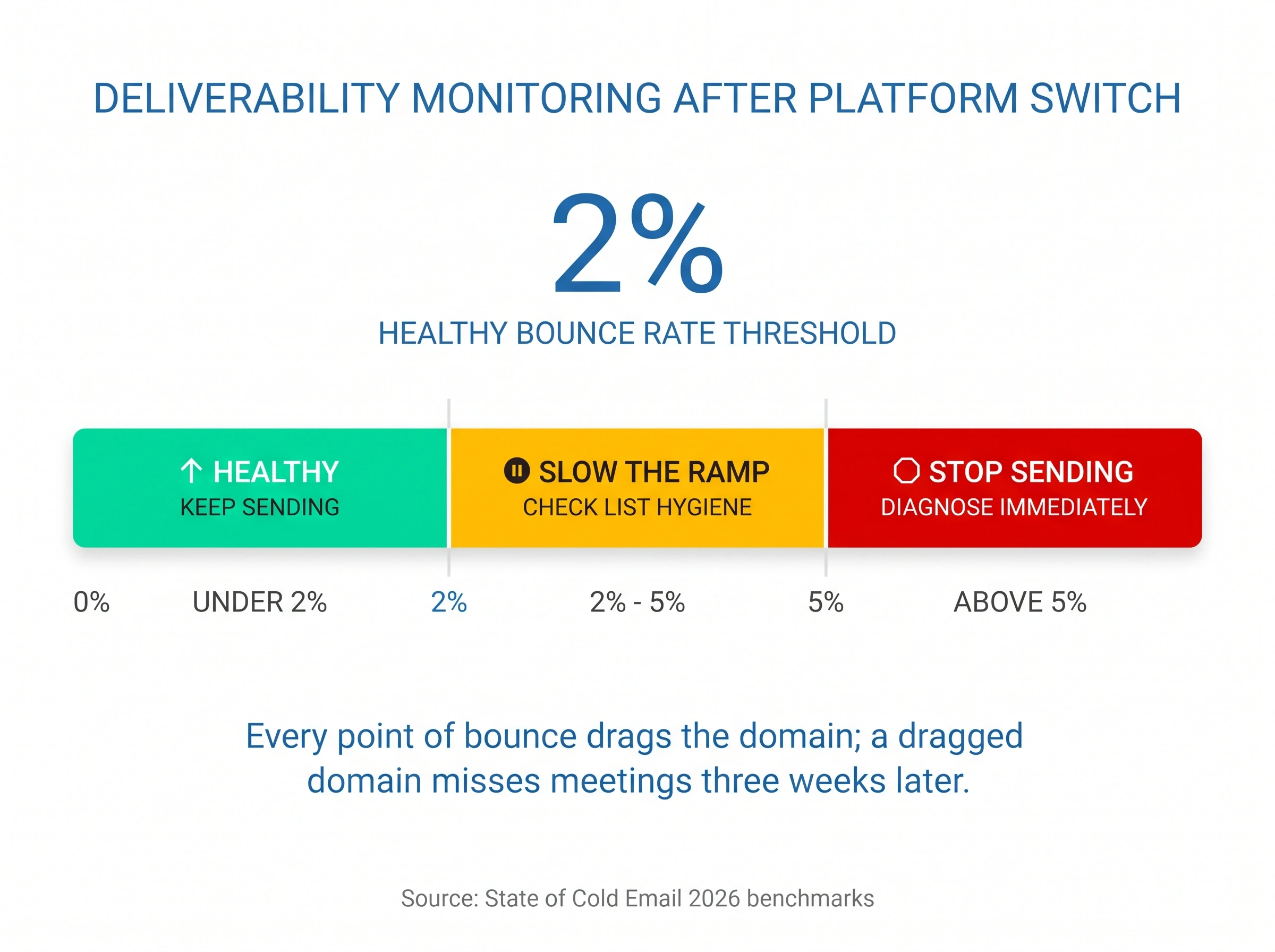
Keep the old platform's seats for the current wave until its gate passes. Rollback should mean "repoint this wave's sending back for a week," a billing decision, not a DNS emergency.
How long until the filters fully trust the new setup? We can't give you an exact number, and neither can anyone else. Google publishes thresholds; Microsoft publishes almost nothing.
We've seen migrations stabilize in ten days and we've seen Microsoft placement wobble for six weeks on identical setups. Plan for the slow case and let the fast case be a pleasant surprise.
Never again: pick a platform you could leave
You're running this migration because the last platform decision optimized for speed over independence. Nearly everyone's first infrastructure decision does. But you're moving anyway, which makes this the cheapest moment you'll ever get to fix it permanently. Four checks, all visible before you sign:
- Assets stay in your name, if you have the team to run them. Domains in your registrar and mailboxes in your own tenancy are the strongest position, but only if someone on your team can get DNS, SPF, DKIM, and DMARC set up accurately and keep them maintained, because one wrong record quietly costs you placement for weeks. If you don't have that IT depth, a platform that provisions and manages real Google or Microsoft mailboxes for you is the better trade. Just ask the exit questions before signing, whoever you pick: whose name is on the domain, what transfers out, what happens to the mailboxes when you leave. In writing. The sin was never managed infrastructure; it's shared pools with no exit rights.
- Data leaves as easily as it enters. Before the sales demo ends, ask to see the exports: suppression lists, sequence state, reply history, per-client analytics. A vendor who makes exports a support ticket or an enterprise-tier feature has just told you its retention strategy, and it isn't the product.
- A real API and webhooks, so your system of record is yours. Build what clients actually judge you on, reporting, meeting attribution, suppression management, inside systems you control, fed by the platform's API and webhooks with replies, bounces, and meetings streaming out as events, plus native CRM sync so pipeline lands where the client relationship lives. Do this and the sending platform becomes a swappable component behind your own layer; the next migration is a connector change, not a quarter.
- AI-agent access, because MCP is the new integration test. Your team already works through AI assistants, and the Model Context Protocol is how those assistants talk to tools. An MCP server, or a clean API an MCP wrapper can sit on, is what lets you build your own agents: one that assembles each client's monthly report, watches reply pace against baseline, or flags a Microsoft dip before the client's next call. Ask where MCP sits on the roadmap; the answer tells you how the vendor thinks about your independence.
One more habit worth stealing from the bigger agencies: they never single-home. Talk to founders running the largest books and you'll find at least two platforms live at any time, campaigns split between them, and usually a third being tested on a small cohort.
That sounds like overhead until you notice what it buys. A permanent second lane means every future migration is a traffic shift, not a project. Platform price increases lose their teeth, because walking away is already half done. And you get a live, same-book benchmark for placement and reply rates that no review site can give you.
So when this migration ends, don't dismantle the overlap you just built. Keep your best-performing second platform running on a slice of the book. You paid for the posture; keep it.
Somewhere in that list you probably felt the 2026 itch: with AI coding tools this good, why rent the platform at all, why not build the scheduler and sender yourself? We take that idea seriously enough that we answered it properly in should you build your own cold email tool with AI.
The short version is a boundary, not a verdict: the execution layer (sending, deliverability, LinkedIn activity) is an adversarial, network-effect business that punishes solo operators, while the intelligence layer (reporting, attribution, personalization, QA agents) is exactly what AI just made buildable. Rent the arm, build the brain, and hold whatever you rent to the four standards above.
The platform was never the moat
If your agency can't survive a change of software, you didn't have infrastructure, you had a lease with compounding switching costs. The moat was always the parts that move when you move: your list quality, your offer, your client relationships, and, once you've rebuilt it in your own name, infrastructure that appreciates for you instead of a landlord.
Around 17% of cold emails never reach the inbox even in steady state, per the State of Cold Email 2026, so the margin for unforced errors is thin, and every failure mode in this playbook is self-inflicted: the big-bang cutover, the un-exported suppression list, the unplugged reply leak, the six-week promise applied to a 90-day rebuild.
Take the boring path. Test, export, transfer what you can, rebuild what you must, wave, gate. Judge it the way your clients will, by whether the meetings kept coming, and a quarter from now the question that kept you locked in for a year turns out to have been the easy part.
Frequently asked questions
Do I have to re-warm my domains when I switch cold email platforms?
No, not if you keep the same domains and mailboxes. Sender reputation attaches to your domain and its sending history with Gmail and Microsoft, not to the software that triggers the sends. What you should do is ramp: restart at 50-70% of normal volume on the new platform and return to full volume over 10 to 14 days. Only genuinely new domains or mailboxes need a full warmup cycle.
What if my domains were bought through my cold email platform?
First check who the registrant is: domains registered in your or your client's name can be transferred to a registrar you control using the transfer authorization code, subject to ICANN's 60-day lock. It's also worth asking the provider directly for a transfer or buyout; some will, priced against losing you noisily. If the provider owns the domains outright, replace them in parallel: buy a fresh cohort under your own registrar with 15-20% spare for culling, warm it while the rented infrastructure keeps sending on the old platform, and shift volume as it ages. Budget about a quarter of parallel running.
Can I trust my warmup tool's inbox placement numbers?
Not on their own, especially after four to six months on one platform's warmup network. By then the domains in that pool all know each other, and the friendly engagement inside the network keeps showing 'inbox' regardless of where your mail lands with strangers. Verify independently: run domains through MX Toolbox for blacklist status, and use a seed-based placement tool like GlockApps that tests against inboxes outside any warmup network, with Gmail and Microsoft reported separately.
How do I keep client results steady while switching cold email platforms?
Run the old and new platforms as one system. In-flight sequences finish on the old platform at full volume, and about 42% of cold email replies come from follow-ups, so the reply engine keeps booking meetings while new-prospect sends ramp on the new platform. Time each client's wave for the week after their monthly report, gate the next wave on reply pace holding within normal noise, and each client's total outbound, and their results, stay roughly flat through the cutover.
How long does it take to migrate 40 clients to a new cold email platform?
Six to eight weeks in weekly waves of 8 to 10 clients, if you own your domains and mailboxes. If the platform provided your infrastructure, budget a quarter: 90 to 120 days of parallel running while a new owned cohort warms to full capacity. Each wave earns the next: advance only when bounce rates stay under 2%, inbox placement holds within a few points of baseline, and reply pace stays inside normal noise.
Should I run both cold email platforms in parallel during a migration?
Yes. Keep the old platform live until the final wave passes its checks, typically one extra billing cycle, or a full quarter if you're rebuilding rented infrastructure. In-flight sequences finish on the old platform while new campaigns start on the new one, so no prospect gets dropped mid-conversation or emailed twice. The overlap cost is small compared to rebuilding burned reputation or explaining a quiet month to 40 clients.
What deliverability metrics should I watch after switching platforms?
Watch four numbers for 30 days per client: bounce rate (under 2% is healthy, over 5% means stop), inbox placement measured separately for Gmail and Microsoft, spam complaint rate, and reply rate against the pre-migration baseline. Microsoft deserves its own line because a domain that looks fine on Gmail can quietly slip to junk in Outlook.
What should I look for in a new cold email platform to avoid lock-in?
Four things: domains and mailboxes registered in accounts you control, data exports (suppression lists, sequence state, reply history) verified before you sign, a documented API with webhooks so reporting and workflows live in your own CRM or dashboard, and AI-agent access via MCP or an API an MCP wrapper can sit on. Together they turn the sending platform into a swappable component, so a future switch is a connector change rather than a migration project.
Should an agency run more than one cold email platform?
The larger agencies usually do. Running two platforms with campaigns split between them, plus a third under test on a small cohort, turns any future migration into a traffic shift instead of a project, blunts single-vendor pricing power, and gives you a live same-book benchmark for placement and reply rates. If you're mid-migration now, you're already building that second lane; keep it running once the move is done.
Can I switch cold email platforms mid-sequence without emailing prospects twice?
Yes, with a clean handover rule: prospects already in a sequence finish it on the old platform, and only new prospects enter sequences on the new one. Import your suppression and unsubscribe lists into the new platform before the first send. Within two weeks the old platform drains naturally. If your mailboxes belong to the platform, also reroute reply-to addresses before cancelling: replies keep arriving for weeks after a sequence ends, and a reply landing in a mailbox you've lost is a lost meeting.
Stop juggling tools
Book more meetings on every channel
Join 5,000+ teams running multichannel outreach from one sequence, with deliverability built in.