
LinkedIn email finder for verified business emails
Find business emails for a single LinkedIn profile, a whole search list, or a CSV of profile URLs, then send from the same platform.
How the LinkedIn email finder works
There are two ways to get the address. One runs inside SmartReach, the other runs on LinkedIn itself.
Enrich a list of LinkedIn URLs inside SmartReach
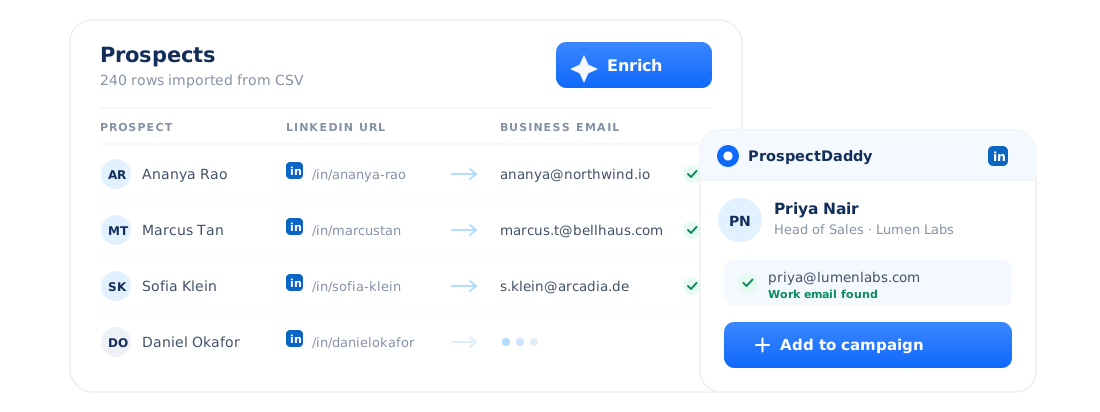
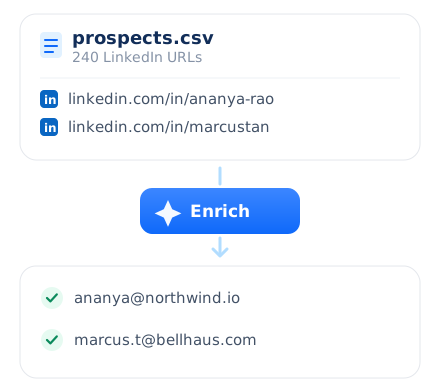
Upload a CSV of prospects that carries their LinkedIn profile URLs and press Enrich. The working business email comes back against each row in one pass, so a long list becomes a sendable audience without anyone opening a tab.
Or use ProspectDaddy on LinkedIn itself
ProspectDaddy is the LinkedIn email finder Chrome extension that runs with SmartReach. Use it on a single profile or on a whole LinkedIn search list, and add the prospects it finds to a campaign straight from the extension.
Read the ProspectDaddy guide →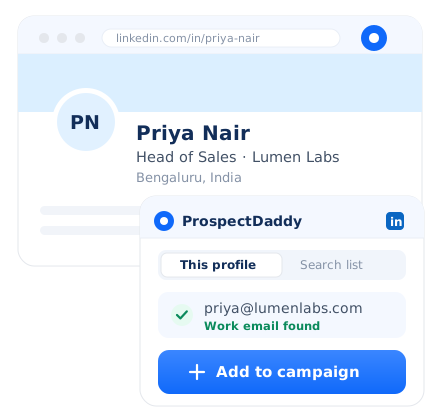
Then it goes straight into your campaign
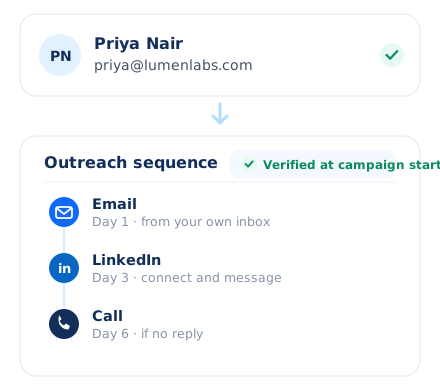
The address is already in the tool you send from, so there is nothing to export and nothing to import. Add the prospect to an email, LinkedIn and calling sequence, and SmartReach checks the address as the campaign starts.
Emails that land, not bounce
A LinkedIn email finder is only as good as the addresses it hands you. Send to a wrong one and it bounces, and enough bounces put your sending domain at risk.
Work emails, not personal ones
ProspectDaddy works out the prospect's business email from their name and their company, so what comes back is a work address you can put in a B2B campaign rather than a personal one.
Verified when your campaign starts
Every SmartReach campaign has email verification built in, and it runs when the campaign starts. Addresses that went stale between finding and sending are caught before they can bounce.
Free credits, and top ups when you need them
Every plan includes a monthly pool of free SmartReach credits, and a credit only comes off when a contact is actually returned. If you run out before the month does, you can buy more.
Built for deliverability first
Data protection controls, two factor authentication and encryption sit around the data, and there is a public opt out route for anyone who asks to be removed from it at any time.
What happens after you find the email
Finding the email is the easy part. What turns it into a reply is everything that comes next, and all of it is on the same platform.
Email, LinkedIn and calling in one sequence
The person you found on LinkedIn can be followed up by email, on LinkedIn and by phone from one sequence, instead of across three separate tools.
See multichannel sequences →Contacts sync to your CRM
New contacts sync out to the CRM you already run, across 14 named integrations plus Zapier and the API, so nobody is pasting rows between systems.
Browse the integrations →Replies land in a shared inbox
Answers come back to a team inbox rather than one rep's private mailbox, so a reply to a prospect that somebody else sourced never sits unread while that rep is away.
How the shared inbox works →One bill, priced by prospects contacted
Finding and sending are one product on one invoice, and you are priced by the prospects you actually contact rather than by the number of people on the team.
See pricing →Looking for something else? Use the B2B lead finder to discover people from a database, see what SmartReach cold email software does end to end, use LinkedIn automation to message prospects on LinkedIn itself, or see how the sales engagement platform runs email, calls and LinkedIn as one cadence.
Find and send in one place
Everywhere else, finding and sending are two products. You pay for a finder, export a CSV, import it into a sending tool, and repeat that every week. Here the email arrives already inside the platform that sends it, so outreach starts the moment you find the person.
Teams that prospect this way
As the CEO of a growing digital marketing agency, finding qualified leads used to be a constant struggle. SmartReach.io has been a game-changer. Super friendly user interface. Their verified leads and seamless CRM integration save us tons of time. We've seen a significant increase in qualified leads and closed deals since using SmartReach.io. Highly recommend.
SmartReach.io has been a goldmine for our partnerships! Targeting specific decision-makers at large e-commerce brands used to be a nightmare. Now, with SmartReach's laser focus on titles and revenue, we find the right people in seconds. No more dead-end emails! It's a must-have for any platform aiming to expand their partner network.
Before you ask
How does the SmartReach LinkedIn email finder work?
Two ways. Inside SmartReach.io you upload a CSV of prospects carrying LinkedIn profile URLs and press Enrich, and the working business email comes back against each row. On LinkedIn itself you use ProspectDaddy, the Chrome extension that runs with SmartReach, on a single profile or on a whole search list.
How do I find someone's email address from their LinkedIn profile?
Open the profile with the ProspectDaddy Chrome extension running. It returns the prospect's business email, and you can add that prospect to a SmartReach.io campaign directly from the extension without copying the address anywhere. The same works from a LinkedIn search list rather than one profile at a time, so a page of results enriches in one pass.
Can I find emails in bulk from a list of LinkedIn URLs?
Yes, and there are two routes. Upload a CSV of prospects that includes LinkedIn profile URLs inside SmartReach.io and press Enrich, or run ProspectDaddy over a LinkedIn search list. Either way you get the business email for the whole set rather than looking profiles up one by one, and the results land ready to sequence.
Where does the email address actually come from?
ProspectDaddy, the extension that runs with SmartReach.io, works out the prospect's business email from their name and the company they work at, using publicly available business data. That is why it returns work addresses rather than personal ones, and why a profile it cannot resolve simply returns nothing instead of a guess.
Is there a LinkedIn email finder Chrome extension?
Yes. ProspectDaddy is the LinkedIn email finder Chrome extension that runs with SmartReach.io. It finds business emails from a single LinkedIn profile or from a LinkedIn search list, and lets you push those prospects straight into a campaign that combines email, LinkedIn steps, calls and WhatsApp in one cadence rather than four disconnected tools.
Are the emails verified before I send to them?
Yes. Every SmartReach.io campaign has email verification built in, and it runs when the campaign starts. That is what catches addresses which went stale between the day you found them and the day you send, so bounces do not reach the domains you have warmed and your sender reputation stays intact.
What does the LinkedIn email finder cost?
Every SmartReach.io plan includes a monthly pool of free SmartReach credits, and credits are only charged when a contact is actually returned, so a lookup that finds nothing does not cost you a credit. If you use them all up you can buy more, and you can try the whole platform on a 14-day free trial with 200 prospects and no card required.
Do I need a separate tool to email the people I find?
No, and that is the point of finding them here. The address arrives inside SmartReach.io, the platform that sends, so it goes straight into an email, LinkedIn and calling sequence with no export step and no second subscription. One bill, one tool, and one inbox where every reply from every channel lands.
How is this different from the SmartReach B2B Lead Finder?
The SmartReach.io B2B Lead Finder is for building a list from scratch, where you filter a database by industry, title, location and technology to discover people you did not know about. The LinkedIn email finder is for people you have already identified on LinkedIn, and its job is to return their business email.
Start finding emails on LinkedIn
Tell us how you prospect on LinkedIn and we will show you where SmartReach fits, or start on the 14-day free trial with no card required.