Reply.io vs Lemlist | What You Actually Pay

On this page
Open the Reply.io pricing page and the Lemlist pricing page in two tabs and you'd be forgiven for thinking someone copied someone.
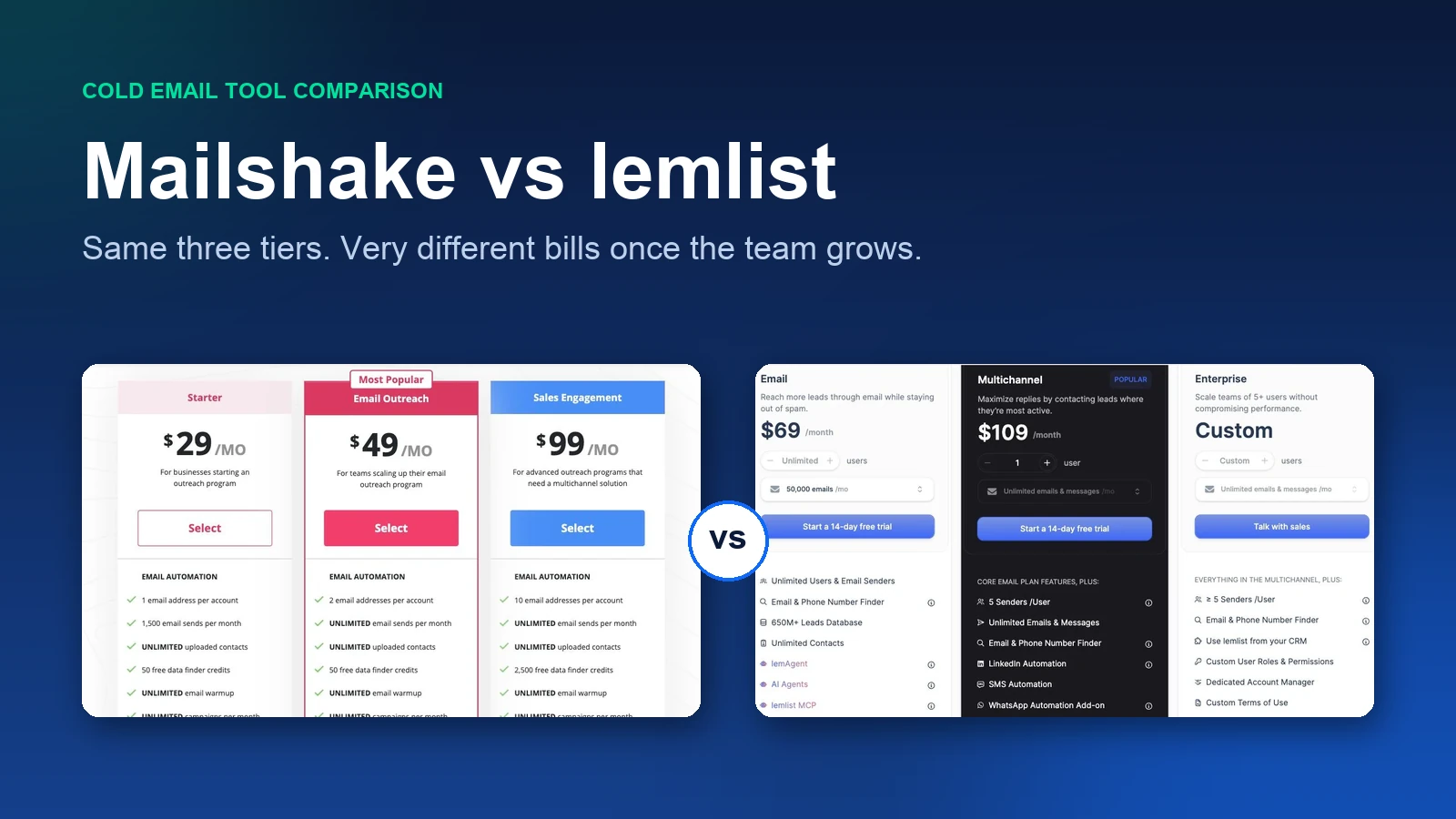
Email tier in the fifties. Multichannel tier around a hundred a user. Both promise email, LinkedIn, calls and a lead database. Ten dollars separates the headline numbers.
Then you actually try to switch LinkedIn on, and the two bills stop looking anything alike.
That's the whole story of Reply.io vs Lemlist, and almost nobody leads with it. One of these tools puts LinkedIn automation and a phone dialer inside the multichannel price.
The other sells both on top, per account and per user. At a five-person team the difference is about $440 a month. Same headline, very different invoice.
The other place they split is quieter and catches people later. Lemlist's cheap plan doesn't care how many people log in but does care how much you send.
Reply.io's cheap plan is the reverse. So the right answer changes depending on whether your outbound is bottlenecked by volume or by headcount.
SmartReach.io sits in this comparison as the third shape. It's a cold email software whose Sales Engagement plans put email, LinkedIn, calls and WhatsApp into a single sequence.
It meters by active prospects instead of by how many people you've hired.
What's the short answer?
What do they cost?
Reply.io vs Lemlist on list price is close enough to be a rounding error, and that's exactly why the headline number misleads people.
Every figure below is the monthly list price on monthly billing. Both vendors advertise the annual rate as the big number, and comparing annual against monthly is how teams get surprised in month two.
| Factor | Reply.io | Lemlist | SmartReach.io |
|---|---|---|---|
| Entry tier (monthly) | $59 per user, Email Volume | $69 flat, Email | $29 flat, Email Outreach Basic |
| Multichannel tier (monthly) | $99 per user | $109 per user | $99 flat, Sales Engagement Plus |
| Same tiers billed annually | $49 and $89 per user | $55 flat and $87 per user | Up to ~11% off list |
| Users included | Billed per user at every tier | Unlimited on Email, per user on Multichannel | Unlimited from Plus up |
| What the meter counts | Active contacts, per user | Emails sent on Email, unlimited on Multichannel | Active prospects, concurrent |
| Channels | Email, LinkedIn, calls, SMS, WhatsApp | Email, LinkedIn, calls, SMS, WhatsApp add-on | Email, LinkedIn, calls, WhatsApp |
| LinkedIn automation | Add-on, about $69 per account | Included in Multichannel | Add-on, $29 per LinkedIn account |
| Calling | Add-on, about $29 per user | Built-in dialer in Multichannel | Calling seats included on Sales Engagement plans |
| Lead database | Own B2B database, counts vary by source | 650 million contacts, all plans | 300 million contacts, 50 million companies |
| AI SDR | Jason, from about $500 a month | lemAgent, inside the plan | Powered by AI across the sequence builder |
| Free trial | 14 days | 14 days | 14-day free trial, 200 prospects, no card |
Two rows in that table do all the work. The LinkedIn automation row and the users included row. Everything else won't decide your purchase.
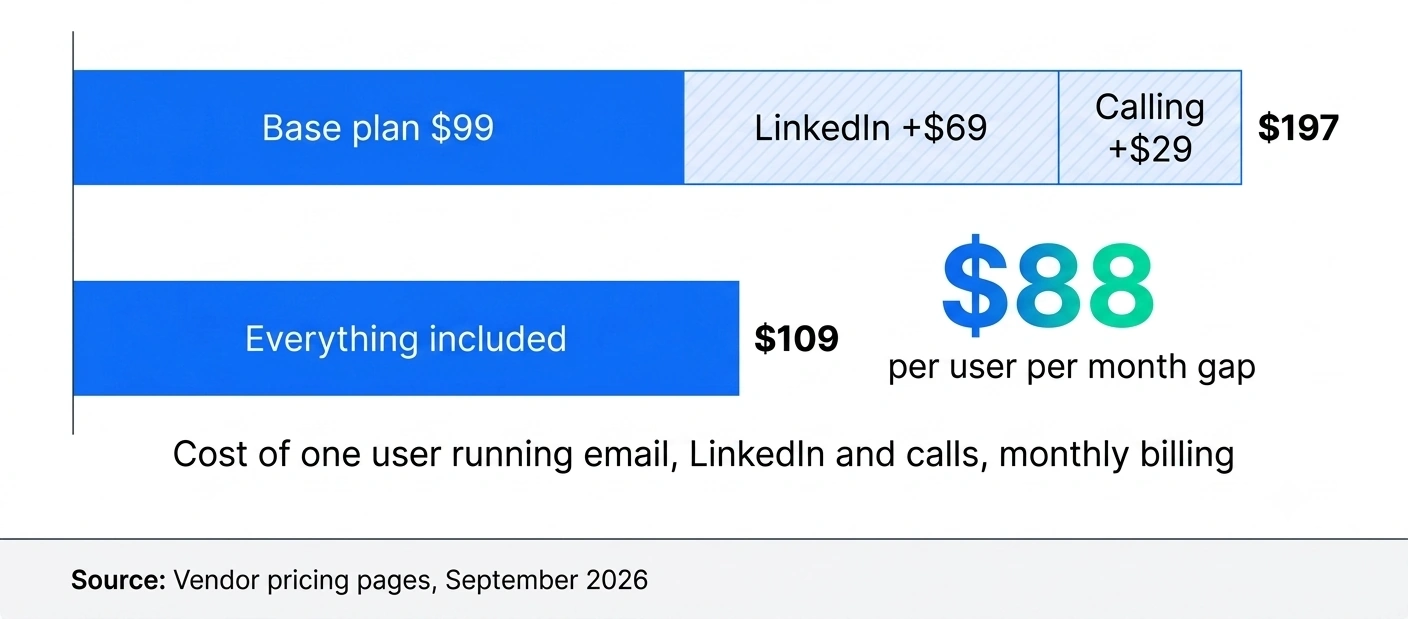
Add those two add-on rows to Reply.io's headline price and one person running email, LinkedIn and calls costs $197 a month, against $109 on Lemlist where both are already in the plan.
There's also a tier most comparisons skip. Reply.io publishes an Agency plan from about $166 a month, on annual billing only with no month-to-month option.
That matters if you're managing campaigns for clients and want one bill instead of a seat count that tracks your roster.
If pure sending volume is the axis you're weighing rather than channels, Instantly vs Reply.io covers that trade-off in more detail.
Who charges for LinkedIn?
Lemlist includes it. Reply.io doesn't.
Lemlist's Multichannel plan at $109 per user a month (or $87 billed annually) ships with LinkedIn automation, SMS automation, a built-in dialer with VoIP integrations, and 5 sending addresses per user.
WhatsApp is an add-on. You pay for the person and you get the channels.
Reply.io's Multichannel plan at $99 per user a month is the sequencing engine and the email layer. LinkedIn automation runs about $69 per LinkedIn account per month on top.
Calls and SMS add roughly $29 per user. So the plan with "multichannel" in the name is the plan where the extra channels cost extra.
Work it through for one person running all three channels. Reply.io is $99 plus $69 plus $29, which is $197. Lemlist is $109, for the same three channels from the same desk.
One honest caveat. Reply.io doesn't publish its LinkedIn and calling add-on prices as prominently as its plan prices.
The figures quoted across the market cluster around $69 and $29 rather than sitting on one official page. Treat them as the going rate, then confirm the exact number in-app before you commit a year of budget.
Is that difference a dealbreaker? For a solo founder, probably not. $88 a month is annoying, not fatal.
But this is a per-user, per-account gap, which means it doesn't stay $88.
What happens when you add people?
It multiplies, and this is where the two tools genuinely part company.
Picture Alex, a VP of Sales with five SDRs, all running email plus LinkedIn plus calls. Not an exotic setup. It's the default outbound motion in 2026.
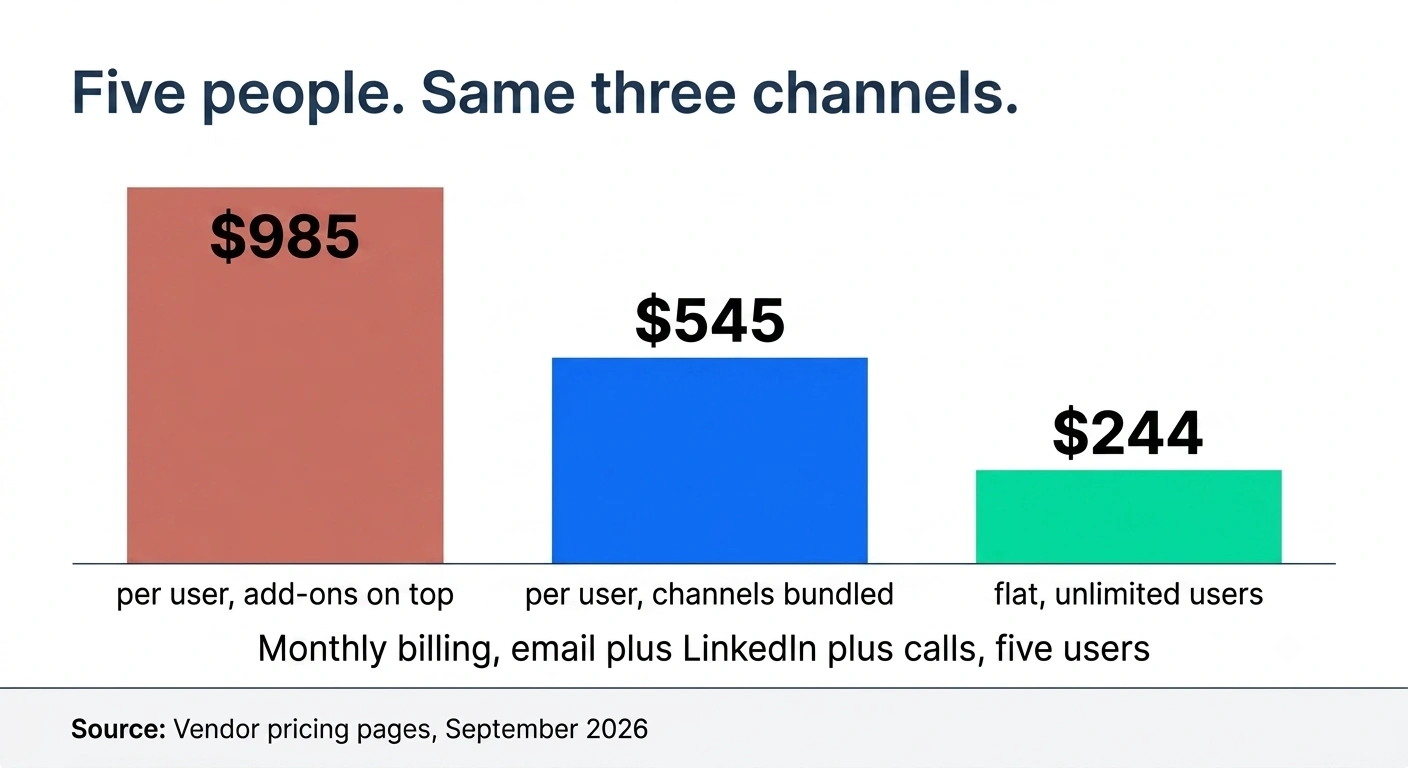
- Reply.io Multichannel. Five users at $99 is $495. Five LinkedIn accounts at $69 is $345. Calling for five at $29 is $145. Total, about $985 a month.
- Lemlist Multichannel. Five users at $109 is $545, and LinkedIn and the dialer are already in there. Total, $545 a month.
That's a $440 monthly gap, or about $5,280 a year, for a five-person team using identical channels.
Billed annually the gap narrows a little, since Lemlist runs $87 per user and Reply.io $89 before add-ons. But the add-on structure doesn't change, so Reply.io stays the more expensive multichannel buy at every headcount.
Now flip to an email-only team, because the answer flips with it. Lemlist's Email plan is $69 a month flat with unlimited users, while Reply.io's Email Volume plan bills per user from $59.
Five people on email only cost $69 on Lemlist and about $295 on Reply.io. Same five people, four times the bill.
Here's the opinion, and it's a firm one. If your motion is email only and you have more than two people, paying Reply.io per user for email sequencing is the worst deal in this comparison.
You're being billed for headcount on a job where headcount isn't the constraint.
If that's the sentence that made you nod, the Reply.io alternatives roundup and the head-to-head on Reply.io vs SmartReach.io both start from that complaint.
SmartReach.io answers this differently. It's a cold email software with no per-seat pricing, so plans scale by active prospects rather than by headcount.
Every SmartReach.io plan above Basic includes unlimited users and unlimited sending email accounts. Sales Engagement Plus is $99 a month for 50,000 active prospects, and adding the sixth or the twentieth rep doesn't move the invoice.
LinkedIn full automation is $29 per connected LinkedIn account, so that same five-person team lands near $244 a month on SmartReach.io with email, LinkedIn and calls in one sequence.
What does a real sequence look like?
Both build the same shape. What differs is what the branches can check and how long it takes you to set up.
A working multichannel cadence for a cold prospect runs about three weeks. Something like this.
- Day 1. View the LinkedIn profile. No message, just the view, so your name shows up in their notifications before anything lands in the inbox.
- Day 2. First email. Short, one ask, no attachment.
- Day 4. LinkedIn connection request with a one-line note.
- Day 7. Follow-up email on the same thread.
- Day 10. If the request was accepted, a LinkedIn message. If it wasn't, a call task instead.
- Day 14. Third email, different angle.
- Day 18. Final call attempt, then move them to nurture.
Reply.io and Lemlist both build that, and both do conditional steps. A branch can check whether a reply came in, whether an email was opened, whether the LinkedIn request was accepted.
Reply.io's condition list is the longer of the two, which is part of why it takes longer to learn and part of why ops-led teams prefer it.
One warning on branching that applies to every tool in this category. Don't build important logic on email opens any more.
Apple's Mail Privacy Protection pre-fetches images, so a large share of your "opens" are a proxy server, not a person. Branch on replies, on clicks, and on LinkedIn acceptance, which are still real signals.
The thing worth testing on a trial is what happens to a prospect who has no LinkedIn URL on their record. In a badly built sequence they stall on the LinkedIn step and quietly fall out of the campaign.
A good sequence routes them to an email or a call task instead. All three tools here can do it.
Not every team remembers to set it up, and it's the most common reason a campaign sold internally as multichannel turns out to have been email-only for half the list.
SmartReach.io runs that same cadence as one conditional drip rather than a fixed sequence. Steps cover email, LinkedIn profile views, connection requests, messages and InMails, calls through the built-in dialer, and WhatsApp.
Each SmartReach.io step can carry a Yes or No branch you design. If an email bounces, the prospect moves to LinkedIn. If there's no LinkedIn URL on the record, they route to a phone task.
Every reply lands in one shared inbox, on plans that carry no per-seat pricing and include unlimited users above Basic.
Will LinkedIn restrict your account?
It can, and the risk is close to identical on both, because they work the same way under the hood.
This is the part vendor comparisons get wrong in both directions. Lemlist and Reply.io both run LinkedIn actions through a Chrome extension that drives your own logged-in session in your own browser.
Neither is a cloud service acting on your behalf. If a comparison tells you one is native and the other needs an extension, it's selling you something.
SmartReach.io doesn't use an extension. It offers a choice between end-to-end automation on your connected LinkedIn account and a semi-automated mode where the sequence builds a task queue that a rep works through in the web app.
For Lemlist and Reply.io, shared architecture means shared consequences. Actions only fire while the browser is open and the session is live, so an overnight campaign doesn't run overnight.
Volume that looks robotic gets flagged. And LinkedIn caps invitations at roughly 100 a week on most accounts, which is the real ceiling on any LinkedIn sequence no matter what your tool lets you schedule.
The guardrails matter more than the tool choice here.
- Warm a new LinkedIn account for two to three weeks before you automate anything on it.
- Sit well under the weekly invitation cap rather than at it.
- Spread actions across the working day instead of firing them in one block.
- Keep profile views and messages in a human ratio. An account that views 200 profiles and sends 200 requests in a day reads as a bot.
If LinkedIn account safety is your main worry, the honest answer is that none of these three solves it architecturally.
The semi-automated mode, a queue a person actually clicks through, is the lowest-risk setting any of them offer.
Which one sends more email?
Neither, in practice. Lemlist's Email plan is priced by sends and Reply.io's by active contacts and seats, so each one stops you somewhere different.
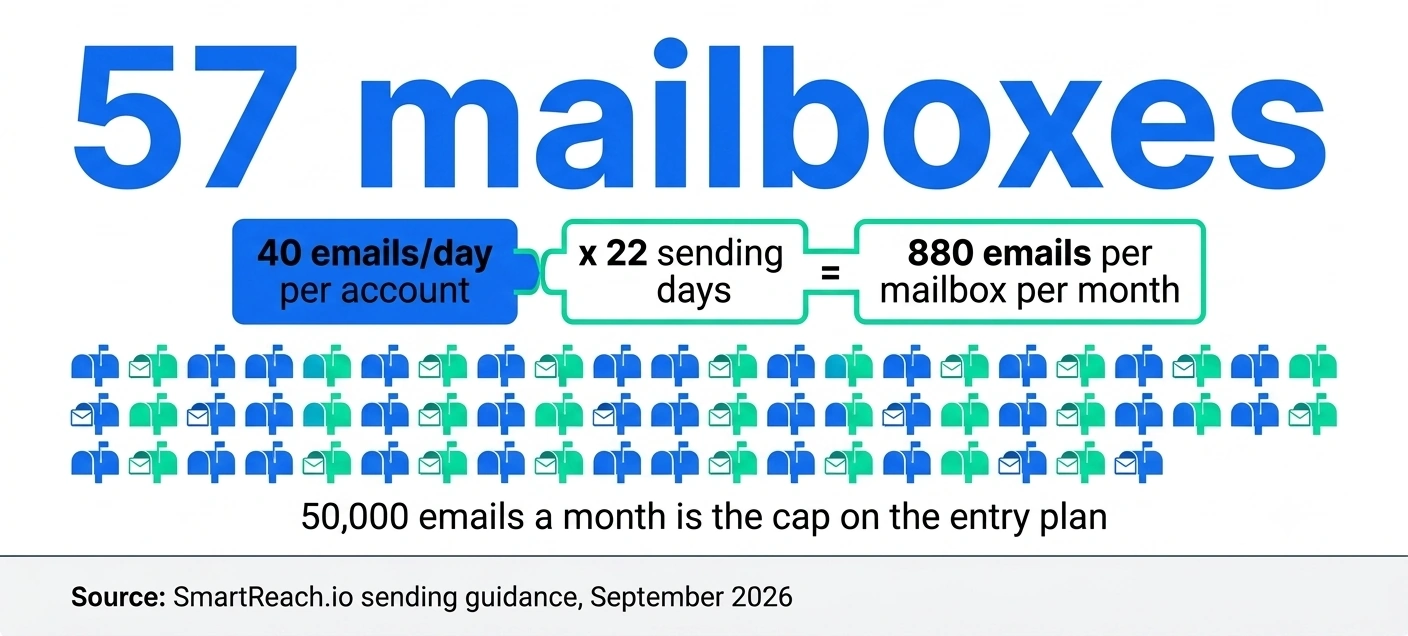
Lemlist's $69 Email tier covers 50,000 emails a month, with higher tiers up to 1,000,000. Even the first tier is more than it sounds once you do the mailbox arithmetic.
A safe sending rate is around 40 emails a day per connected account. Across roughly 22 sending days, each mailbox carries about 880 emails a month.
Filling a 50,000 email tier takes something like 57 warmed mailboxes, spread over enough domains that no single domain carries the whole load.
Most teams never get near it. Agencies and high-volume senders who do step up a volume tier, $89 for 100,000 or $159 for 200,000, still with unlimited users, rather than moving to per-user Multichannel.
The per-user jump only arrives when you need LinkedIn or calls, and that's the most common reason teams start reading Lemlist alternatives six months in.
Reply.io's Email Volume plan meters active contacts rather than sends, so raw volume is less likely to be the thing that stops you. What stops you there is the seat count.
On deliverability itself, both are credible and neither is magic. Lemlist has the longer reputation, with its warmup network and a deliverability hub on every plan including the entry tier.
Reply.io ships warmup and validation too, and both give you inbox rotation across connected mailboxes.
The uncomfortable truth is that the tool contributes less to inbox placement than your domain age, your list hygiene and your reply rate do. Pick either tool, send badly, and you'll still end up in spam.
There's also a floor to clear before any of that matters. Since 2024, Google and Yahoo have required bulk senders to authenticate with SPF, DKIM and DMARC, to offer one-click unsubscribe, and to keep spam complaints under 0.3 percent.
Aim for 0.1 percent. Both tools will happily send for you with none of that in place, and neither will stop you.
Google's sender guidelines are the checklist to work through before the first campaign, not after your reply rate collapses.
What happens after someone replies?
This is where the two feel most different, and it's the part buyers test least on a trial.
A reply has to do three things. Stop the sequence for that person, land somewhere a human will actually see it, and reach the CRM without anyone retyping it.
Stopping the sequence sounds automatic, and mostly is, but reply detection is fuzzier than either vendor admits. An out-of-office comes back as a reply. So does an auto-acknowledgement from a shared support mailbox.
If those aren't filtered, your sequence halts for prospects who never read a word. Both tools handle the common cases and both let you tune it, so test it against real traffic during the trial.
Where they genuinely split is the inbox. Reply.io's is built for a team with an ops layer, with assignment, reporting on who's handling what, and AI classification so a rep can triage a morning's replies quickly.
Lemlist's unified inbox is lighter and reads more like a shared mailbox. That's fine for two or three people and gets thin once several reps work the same campaign.
SmartReach.io puts replies from email, LinkedIn, calls and WhatsApp into one shared inbox, with role-based access for members, admins and owners, so a five-person team works from a single view rather than five.
Because SmartReach.io has no per-seat pricing and includes unlimited users above Basic, adding the people who need inbox access doesn't change the invoice. CRM sync to HubSpot, Salesforce, Pipedrive and Zoho is included on those plans too.
On CRM generally, both tools cover HubSpot, Salesforce and Pipedrive natively.
The question worth asking on a demo is whether the sync is two-way and field-level, because a one-way push that quietly creates duplicate contacts is worse than no integration at all.
Do you get leads with it?
Both bundle a database, and Lemlist is more transparent about the size of it.
Lemlist ships a 650 million contact database on every plan, including the $69 Email tier, with an email and phone number finder attached.
Enrichment runs on credits rather than being unlimited. Verified emails cost 5 credits each and phone numbers cost 20, sold as an add-on at $20 a month for 2,000 credits.
Buying-intent signals are a separate add-on at $29 a month for 100 signals. So the database is included, the extraction is metered, and you should budget for credits separately.
Reply.io also ships its own B2B contact database. Published contact counts for it vary a lot between sources, which is a reason to check inside a trial rather than trusting a comparison post, this one included.
For reference on the third option, SmartReach.io includes a built-in B2B lead finder with 300 million contacts and 50 million companies, so the finding and the sending sit in the same product rather than in two subscriptions.
Worth saying plainly. Bundled databases are convenience, not quality.
If your ICP is narrow or European, test the actual match rate on 200 real accounts before you count the database as a reason to buy.
Which one is easier to start with?
Lemlist, for most people, and it isn't especially close.
Lemlist grew up as a cold email tool with personalization at the centre, and the sequence builder still reflects that. You'll get a campaign live on day one.
The personalization layer is the part people rave about, with dynamic images, custom landing pages and video thumbnails built into the editor rather than bolted on.
If your differentiator is that your emails don't look like everyone else's, that's a real feature and not a gimmick. Our full Lemlist review digs into where it moves reply rates and where it's decoration.
Reply.io is the deeper platform and asks more of you up front. It's built as a full sales engagement system, so there's more surface area, more settings, and more places for a new rep to get lost.
Teams that already have a RevOps function tend to like it. Teams that don't tend to under-use most of what they're paying for.
Ask yourself who's going to own the tool. If the answer is "the SDRs themselves, between calls", weight simplicity heavily. If it's "our ops person", the extra depth in Reply.io starts earning its keep.
What about the AI stuff?
Reply.io goes further, and charges accordingly.
Reply.io's Jason is an autonomous AI SDR that researches accounts, drafts sequences and handles replies with limited supervision. It's a separate product starting around $500 a month on top of your plan, not a feature inside it.
Whether that's expensive depends entirely on what you'd otherwise pay a person to do the same work. For some teams that's a real calculation rather than an obvious no.
Lemlist's lemAgent sits inside the plan instead of beside it, aimed at drafting and campaign assistance rather than running autonomously. Less ambitious, no extra line on the invoice.
Both also do the table-stakes things now, which is AI-written first drafts, subject line variants and reply classification. Treat those as neutral. They're in every tool in the category.
How do you actually switch?
The campaigns move in an afternoon. The reputation doesn't move at all, and that asymmetry is the whole risk.
Here's the order that avoids the expensive mistakes.
- Move suppression and unsubscribe lists first. Emailing someone who already opted out is the fastest way to burn a fresh domain, and in most jurisdictions it's a compliance problem rather than just a deliverability one.
- Export contacts and sequences as CSV, then rebuild the sequences manually. Don't trust an importer to carry logic across. Rebuilding by hand takes an afternoon and you'll find steps you don't need any more.
- Connect and warm the mailboxes before the first real send. Warmup history doesn't transfer. A mailbox well seasoned on the old tool starts cold on the new one.
- Run one small campaign, 200 to 300 prospects, while the old subscription is still live. Compare bounce rate and reply rate against a similar list on the old tool. This is the only real test.
- Cancel last. Cancelling first and then discovering a deliverability problem with no fallback makes for a bad month.
Budget two weeks for that, not two days.
Any vendor marketing a one-click migration is describing how they move your data, not how they move your sender reputation. The second one decides whether your first month works.
Is there a cheaper third option?
Yes, and it's worth naming precisely because the per-user structure is the thing most teams end up unhappy about.
SmartReach.io is a cold email software whose Sales Engagement plans run email, LinkedIn, calls and WhatsApp as steps inside one sequence. It also works as a sales engagement platform for teams priced out of Outreach and Salesloft.
A single sequence can send an email, wait for a reply, view a LinkedIn profile, send a connection request, place a call through the built-in dialer, and send a WhatsApp message, branching on what the prospect actually did.
It doesn't do SMS. That's the honest limit against Reply.io and Lemlist, which both do.
The billing is the differentiator. SmartReach.io has no per-seat pricing, plans scale by active prospects, and every plan above Basic includes unlimited users and unlimited sending email accounts.
Email Outreach starts at $29 a month and Sales Engagement at $39, with Plus at $99 a month covering 50,000 active prospects. LinkedIn automation is $29 per connected LinkedIn account.
Calling seats are included on Sales Engagement plans rather than sold per user. SmartReach.io is rated 4.6 on G2 and 4.7 on Capterra as of September 2026.
The 14-day free trial covering 200 prospects with no card is a faster way to judge it than any star rating.
So which one should you buy?
Reply.io
Quick facts
- G2
- 4.6 ★
- From
- $59/month per user
- Free trial
- 14 days
- Best for
- Ops-led teams that want SMS steps in the sequence and can budget for an autonomous AI SDR
Lemlist
Quick facts
- G2
- 4.6 ★
- From
- $69/month flat
- Free trial
- 14 days
- Best for
- Teams that want LinkedIn and calling inside one price, and personalization that makes emails look hand-made
SmartReach.io
Quick facts
- G2
- 4.6 ★
- Capterra
- 4.7 ★
- From
- $29/month flat
- Free trial
- 14-day free trial, 200 prospects, no card
- Best for
- Growing teams that want email, LinkedIn, calls and WhatsApp in one sequence without paying per user
The short version of all of it. Lemlist wins the Reply.io vs Lemlist matchup on price at almost every team shape, and wins it decisively once LinkedIn is involved.
Reply.io wins on breadth, on SMS, and on the AI SDR if that's a role you're genuinely trying to fill.
And if what's really bothering you is that both of them charge more every time you hire, that's the problem the third column exists to solve.
Questions people actually ask
More on Reply.io
Is Reply.io or Lemlist cheaper?
It depends on whether you need LinkedIn. For email only, Lemlist is cheaper because its Email plan is a flat $69 a month for unlimited users, while Reply.io bills its email tier per user from $59. For true multichannel, Lemlist is cheaper again, because its $109 per user Multichannel plan already covers LinkedIn and a dialer that Reply.io sells as add-ons.
Does Reply.io charge extra for LinkedIn?
Yes. Reply.io's Multichannel plan at $99 per user a month covers email and sequencing, but LinkedIn automation is a separate add-on at roughly $69 per LinkedIn account a month, and calls plus SMS add about $29 per user. A five-person team running all three lands near $985 a month rather than the $495 the pricing page implies.
Does Lemlist have a send limit?
Yes, per tier. Lemlist's Email plan is priced by monthly volume: $69 covers 50,000 emails, $89 covers 100,000, and tiers run to 1,000,000, however many people use it. At 40 emails a day per connected account across about 22 sending days, filling even the 50,000 tier takes roughly 57 warmed mailboxes. Multichannel sends unlimited emails with 5 senders per user.
Do Reply.io and Lemlist include a lead database?
Both do, on different terms. Lemlist bundles a 650 million contact database into every plan, including the $69 Email plan, and sells enrichment credits as an add-on from $20 a month, at 5 credits per verified email and 20 per phone number. Reply.io ships its own B2B database, though published contact counts vary between sources, so confirm the number on a trial.
What is the difference between Reply.io and Lemlist on channels?
Reply.io runs email, LinkedIn, calls, SMS and WhatsApp, but bills LinkedIn and calling separately. Lemlist runs email, LinkedIn, calls, SMS and WhatsApp too, with LinkedIn and a built-in dialer inside the Multichannel price and WhatsApp as an add-on. SmartReach.io runs email, LinkedIn, calls and WhatsApp in one sequence with no per-seat pricing.
Can I move my campaigns from Reply.io to Lemlist?
Sequences, templates and contact lists rebuild in an afternoon through CSV export and import. What doesn't move is domain and mailbox reputation, warmup history and engagement data, all of which restart on the new platform. Move your suppression and unsubscribe lists first and check them by hand before the first send.
Which tool has the better G2 rating?
They're level. Reply.io, Lemlist and SmartReach.io are all rated 4.6 on G2 as of September 2026, and SmartReach.io also holds 4.7 on Capterra. Ratings this close won't separate them, so weigh the pricing model and the channel coverage instead, and test deliverability on your own list during the free trial.
Stop juggling tools
Book more meetings on every channel
Join 5,000+ teams running multichannel outreach from one sequence, with deliverability built in.