Mailshake vs lemlist | What 5 Users Actually Cost

On this page
Open the Mailshake pricing page and the lemlist pricing page side by side and you'll see the same shape twice.
Three tiers. An entry plan for email, a middle plan for teams, a top plan that adds the phone. The numbers even land in the same neighbourhood.
Then you go looking for the free trial button on one of them, and it isn't there.
That's the first real difference in Mailshake vs lemlist, and it sets the tone for the rest. One tool lets you run a full multichannel campaign for two weeks before paying anything.
The other takes your card first and offers a refund window instead. Neither approach is wrong, but they suit very different buyers.
The second difference is bigger and costs more. Both tools put "multichannel" in their marketing, and only one of them actually automates LinkedIn.
SmartReach.io belongs in this conversation as the third shape. It's a cold email software whose Sales Engagement plans put email, LinkedIn, calls and WhatsApp into one sequence, and it meters by active prospects rather than by headcount.
That third column is going to keep showing up below, because on most of the questions these two split on, the answer isn't Mailshake or lemlist. It's a pricing model that doesn't charge you again every time you hire.
What's the quick answer?
What do they cost?
Mailshake starts cheaper and lemlist finishes cheaper, and the crossover lands between two and three users.
Every figure below is the monthly list price on monthly billing. Both vendors show the annual rate as the headline number, which is how teams end up surprised in month two.
| Factor | Mailshake | lemlist | SmartReach.io |
|---|---|---|---|
| Entry tier (monthly) | $29 per user, Starter | $69 flat, Email | $29 flat, Email Outreach Basic |
| Mid tier (monthly) | $49 per user, Email Outreach | Not applicable | $89 flat, Email Outreach Plus |
| Top tier (monthly) | $99 per user, Sales Engagement | $109 per user, Multichannel | $99 flat, Sales Engagement Plus |
| Same tiers billed annually | $25, $45 and $85 per user | $55 flat and $87 per user | Up to 40 percent off list |
| Users included | Billed per user at every tier | Unlimited on Email, per user on Multichannel | Unlimited from Plus up |
| What the meter counts | Users, and mailboxes per plan | Emails sent on Email, users on Multichannel | Active prospects, concurrent |
| Channels | Email, calls, LinkedIn as a manual task | Email, LinkedIn, calls, WhatsApp, SMS | Email, LinkedIn, calls, WhatsApp |
| LinkedIn automation | Not automated | Included in Multichannel | Add-on, $29 per LinkedIn account |
| Sending mailboxes | 1, 2 or 10 by plan | Unlimited on Email, 5 per user on Multichannel | Unlimited above Basic |
| Lead database | Data Finder add-on, $19 a month | 650 million contacts, all plans | 300 million contacts, 50 million companies |
| Free trial | None, 30-day money-back guarantee | 14 days, full Multichannel, no card | 14-day free trial, 200 prospects, no card |
Two rows decide most purchases here. The users included row and the LinkedIn automation row.
Mailshake's Starter plan is genuinely the cheapest way for one person to start sending, at $29 a month. It's also the most restricted, with one connected mailbox and a hard 1,500 sends a month.
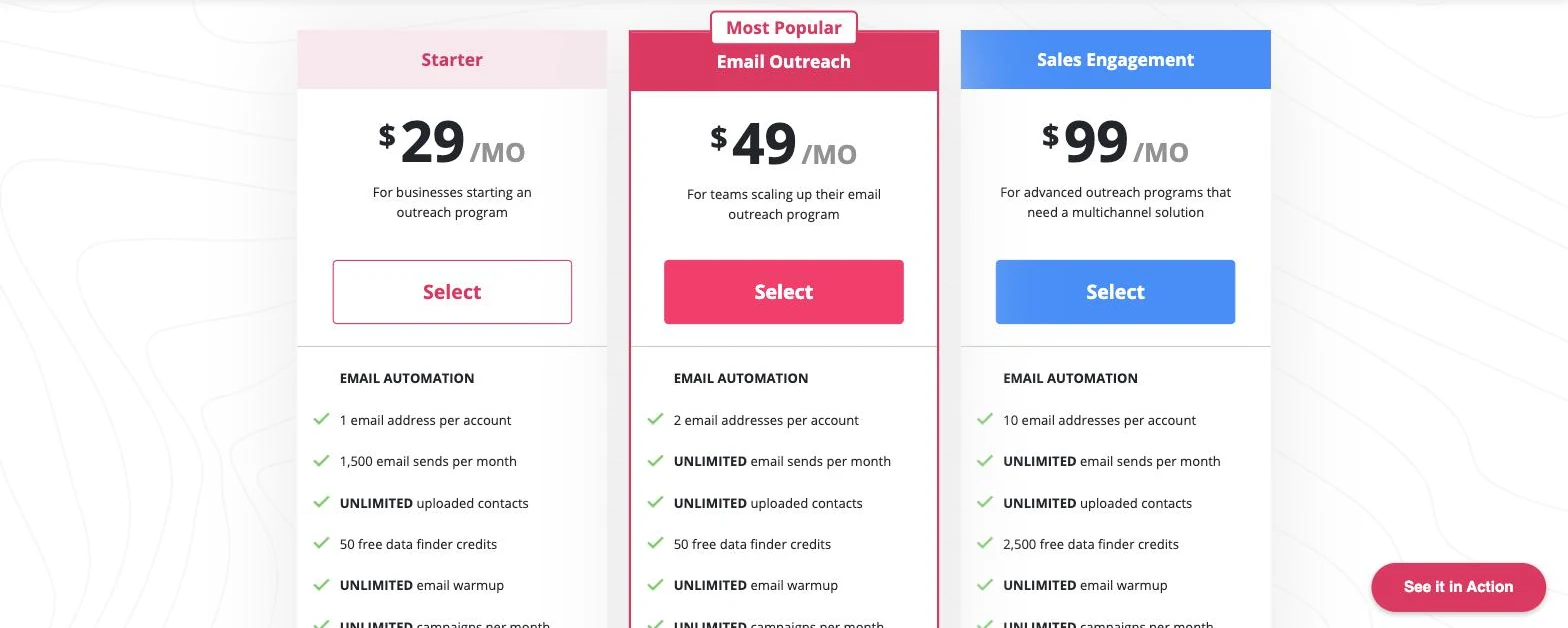
Mailshake's three tiers on monthly billing. Note the email address cap on each plan, which is the ceiling most teams hit first.
There's also an Agency plan on Mailshake that most comparisons skip. It's everything in Sales Engagement plus unlimited email addresses, and it's quote-only.
That matters if you're running campaigns for clients and the mailbox cap is the thing standing in your way.
Read the table one more time down the third column, though. SmartReach.io matches Mailshake's $29 entry price, matches lemlist on multichannel at $99, and is the only one of the three where none of those numbers move when the team gets bigger.
Can you try before you pay?
lemlist does. Mailshake doesn't, and it says so plainly in its own FAQ.
lemlist gives 14 days of the full Multichannel plan, no credit card, with LinkedIn steps, the dialer and the lead database switched on. After the trial you keep account access but can't launch new campaigns.
Mailshake collects payment up front. Its own pricing FAQ answers the free trial question with a straight no, and points to concierge onboarding and a 30-day money-back guarantee instead.
That's a real trade, not a trick. You get a human walking you through setup, which suits people who've never run a sequence before.
But it does mean the only way to test Mailshake against your own list, your own domain and your own deliverability is to buy it first and ask for money back later.
For what it's worth, the money-back guarantee is longer than the trial. Thirty days beats fourteen if you're disciplined about actually asking for the refund, which most people aren't.
If the point of a trial is to test deliverability before you commit, SmartReach.io is the closest match to what you actually want here. Its 14-day free trial covers 200 prospects with no card, which is enough of a real segment to watch bounce and reply rates on your own domain rather than a demo account.
What happens when you add people?
This is where the two bills stop looking alike, and it happens fast.
Mailshake bills per user at every tier. Its own FAQ is refreshingly direct about it, saying billing is based on how many users you purchase, and that each user you pay for lets you connect one mail account.
lemlist splits the difference. Its Email plan at $69 a month is priced per workspace with unlimited users, so the fifth person costs nothing. Multichannel at $109 goes back to per user.
You can see it in the plan selectors on lemlist's own pricing page. The Email card says unlimited users. The Multichannel card puts a counter next to the price and increments it one person at a time.
Start with one person on each vendor's entry email plan, which is the only genuinely like-for-like row. Mailshake Starter is $29, SmartReach.io Email Outreach Basic is $29, and lemlist Email is $69. At a single user, lemlist is the expensive one.
Now add four colleagues and ask each vendor for its cheapest email plan that actually covers five people. Mailshake stays on Starter but multiplies, so five users is $145. lemlist Email stays $69 because users are unlimited. SmartReach.io steps up to Email Outreach Plus at $89, because Basic is a single-user plan.
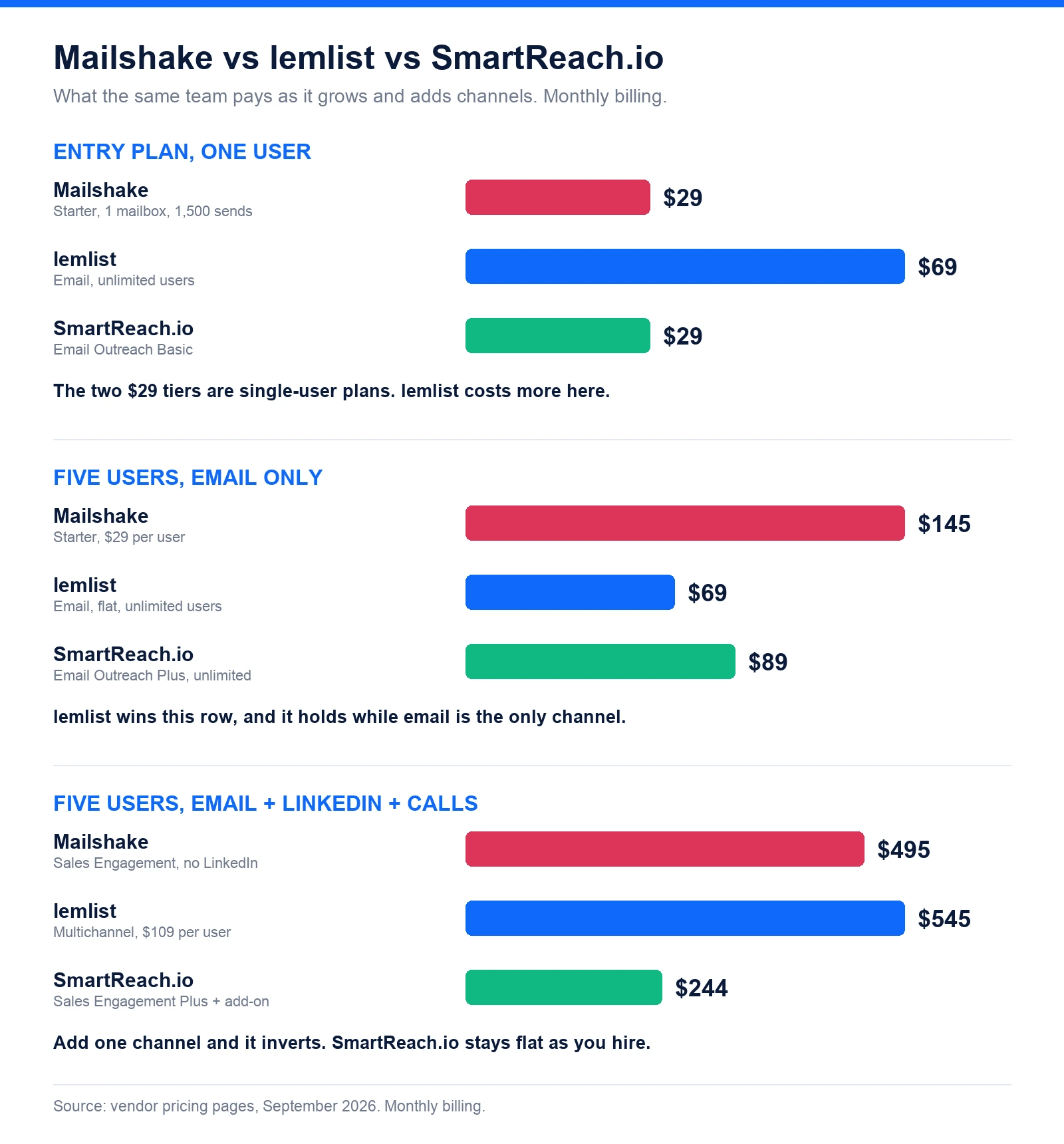
For email and nothing else, lemlist wins that row on price and it's worth saying plainly. The ranking only holds while email is the only channel you run.
Add LinkedIn and calls for those same five people and it inverts for good. lemlist Multichannel is $545 a month. Mailshake Sales Engagement is $495 and still isn't automating LinkedIn. SmartReach.io Sales Engagement Plus is $99 flat, plus $29 per LinkedIn account, so $244 with all five reps on LinkedIn.
That's the shape of the whole decision. Mailshake and lemlist both make the second channel a per-person charge, and SmartReach.io doesn't, which is why the gap widens with every hire rather than closing.
Who actually automates LinkedIn?
lemlist does. Mailshake adds LinkedIn to a sequence as a task for a human to complete.
That distinction gets blurred constantly in comparison content, and it's the single most expensive misunderstanding in this matchup. Both tools describe themselves as multichannel. Only one of them clicks the buttons for you.
lemlist automates the actions themselves. Profile visits, connection invites, text messages and voice notes run as sequence steps on the $109 per user Multichannel plan, alongside email, SMS, WhatsApp and calls.
Mailshake's own features page describes its social layer as incorporating social media into sequences and adding tasks that remind you to perform prospecting activities. That's a to-do list item, not automation.
Is the manual approach worse? Not always. Manual LinkedIn steps are slower, but they're also much harder for LinkedIn to detect and restrict, and a rep writing each note by hand usually writes a better note.
If your team is three people sending twenty thoughtful invites a day, Mailshake's task list is fine. If it's ten people who need two hundred touches a day to happen without anyone remembering, it isn't.
SmartReach.io is the third answer here, and it deliberately gives you both modes. Manual LinkedIn task seats come with the Sales Engagement plans, and full LinkedIn automation that runs profile views, connection requests and messages on its own is a $29 per LinkedIn account add-on.
Charging for automation per account rather than bundling it everywhere is a design choice worth understanding. LinkedIn restricts accounts that behave like software, and the restriction lands on the individual profile, not the vendor.
So the account is the unit that carries the risk, and it's the unit SmartReach.io asks you to switch on. You turn automation on for the two reps whose profiles are warm enough to handle it, keep the rest on manual task steps, and never pay to automate a profile you didn't want automated.
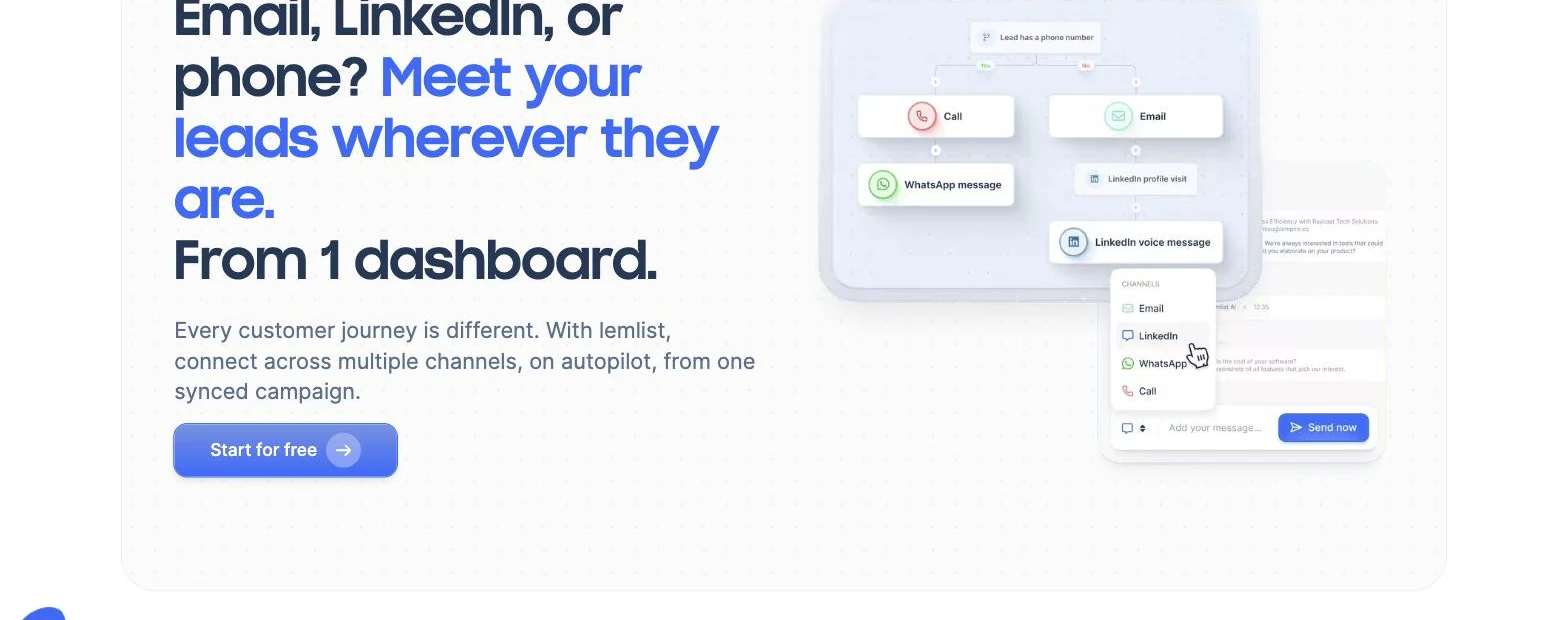
A lemlist campaign branching on whether a lead has a phone number, with LinkedIn and WhatsApp steps running as automation rather than reminders.
How much can you send?
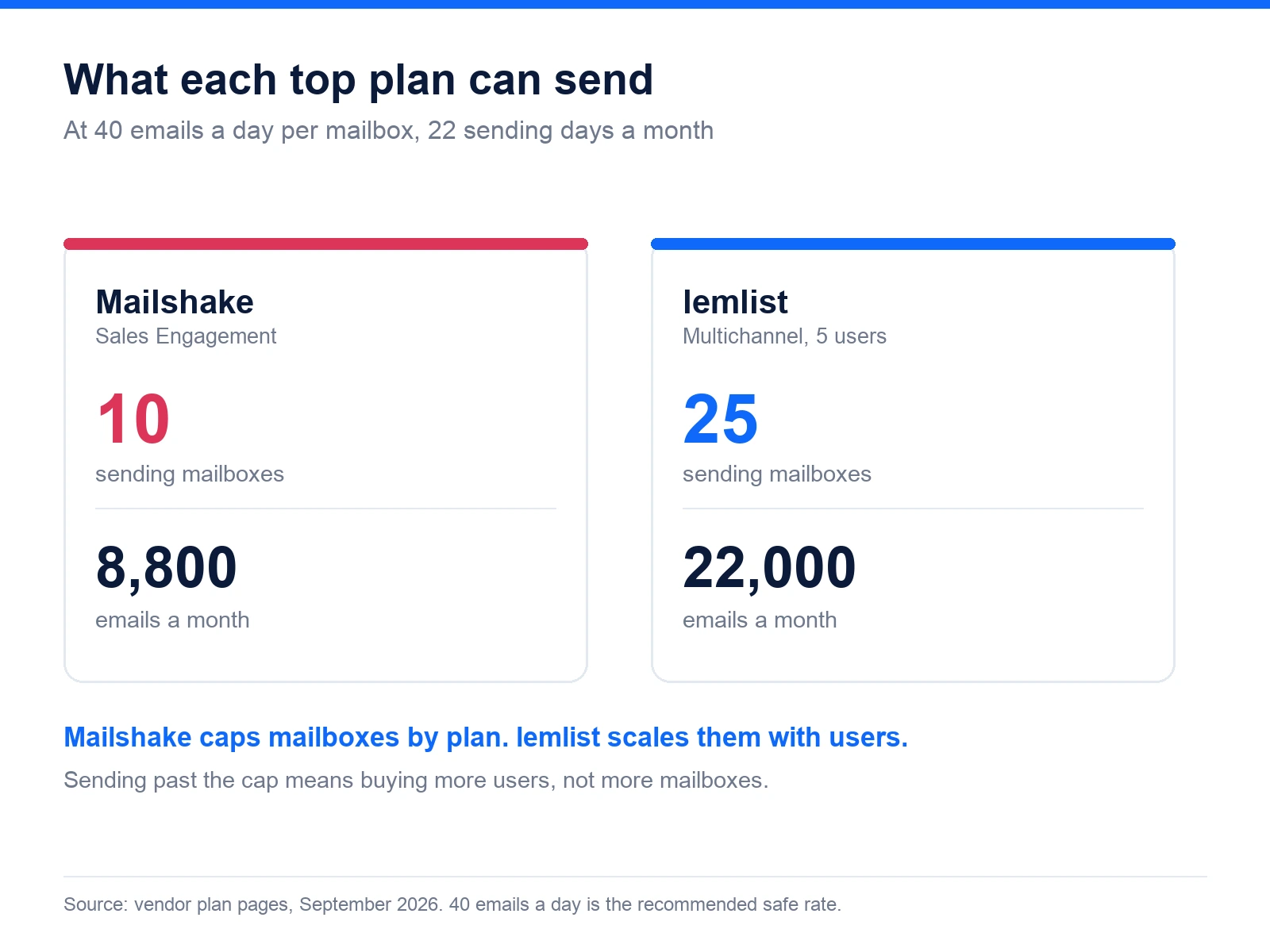
Mailshake caps mailboxes by plan. lemlist scales them with users, and caps total emails instead on its cheap tier.
Mailshake gives 1 connected email address on Starter, 2 on Email Outreach and 10 on Sales Engagement. Sends are unlimited above Starter, but mailbox count is the real ceiling, because a mailbox can only send so much before it burns.
At a safe 40 emails a day per mailbox across about 22 sending days, Mailshake's 10 mailboxes top out near 8,800 emails a month. Ten users on lemlist Multichannel get 50 senders and roughly 44,000.
lemlist's Email plan inverts the model. Senders are unlimited, but the plan stops at 50,000 emails a month no matter how many people or mailboxes you attach.
Filling that 50,000 properly would take about 57 warmed mailboxes at 40 a day. Most teams on that plan never come close, which is the point. The cap is generous enough to be theoretical.
The difference shows up in how you break through the ceiling. On lemlist you attach more mailboxes and more domains until the send limit bites.
On Mailshake you buy another user, because the mailbox allowance is welded to the plan. That's a different purchase decision, and a more expensive one if volume is what you're short of rather than people.
Both tools include warmup at no extra cost, which is now table stakes. lemlist bundles lemwarm on every plan, and Mailshake lists unlimited email warmup on all three tiers.
SmartReach.io removes the ceiling question rather than answering it. Every plan above Basic includes unlimited sending email accounts, so scaling volume means connecting more mailboxes and warming them, not moving up a tier or buying a user you don't need.
Which one is better on the phone?
Mailshake, and it isn't especially close on cost.
Mailshake's $99 Sales Engagement plan includes 5 phone numbers, a power dialer, call recording and unlimited free dialer minutes to North American numbers. If your team calls the US and Canada all day, unlimited minutes is a genuinely strong offer.
lemlist ships a dialer on Multichannel too, plus VoIP integrations with tools like Aircall and Ringover. Call minutes draw down the same credit balance that enrichment uses, so heavy calling has a running cost.
The structural point is that calls are a native sequence step in Mailshake rather than an integration you wire up. A rep works the cadence and the dial happens in the same window, with recording and notes attached to the prospect.
Speed matters more than volume on the phone, and that's well documented. The classic Harvard Business Review analysis of online sales leads found firms that responded within an hour were far likelier to qualify a lead than those that waited longer.
A dialer sitting inside the same tool as the sequence is how you get that hour back. Whichever tool you pick, put the call step early.
Where do the leads come from?
lemlist includes a database. Mailshake sells one as an add-on.
lemlist bundles a 650 million contact database into every plan, including the $69 Email tier, and charges credits only for successful enrichment. Verified emails cost 5 credits and phone numbers 20, with credits priced at a cent each.
Mailshake's Data Finder is $19 a month on top of the plan, and each tier includes some free credits. Starter and Email Outreach come with 50, and Sales Engagement with 2,500.
Neither headline number should decide anything. A 650 million row database is only useful if it's deep in your niche, and the only way to know that is to run twenty searches for your actual ICP during a trial.
SmartReach.io takes the third route and puts the data inside the plan rather than behind a meter. Its B2B lead finder searches 300 million contacts and 50 million companies, filtered by job title, industry, company size, location and whether a phone number exists.
There's also a LinkedIn email finder for the way most reps actually build lists, which is from a LinkedIn profile or a search result rather than from a database screen. You find the person first and pull the verified work email second.
The practical difference is that a list you build in SmartReach.io drops straight into a sequence that already has email, LinkedIn, calls and WhatsApp steps in it. On the other two you're either paying credits per record or paying $19 a month for the search box.
Is there a third option?
SmartReach.io is a cold email software that runs email, LinkedIn, calls and WhatsApp as steps in one sequence, and it prices by active prospects instead of by user.
That last part is the structural difference. Email Outreach plans start at $29 a month and Sales Engagement at $39, and every plan above Basic includes unlimited users and unlimited sending email accounts. Adding the sixth rep doesn't change the invoice.
The channel set is worth stating plainly, because vs pages tend to flatten it. A single SmartReach.io sequence can send an email, wait, visit a LinkedIn profile and send a connection request, place a call through the built-in dialer, and send a WhatsApp message, with the next step conditional on what the prospect did.
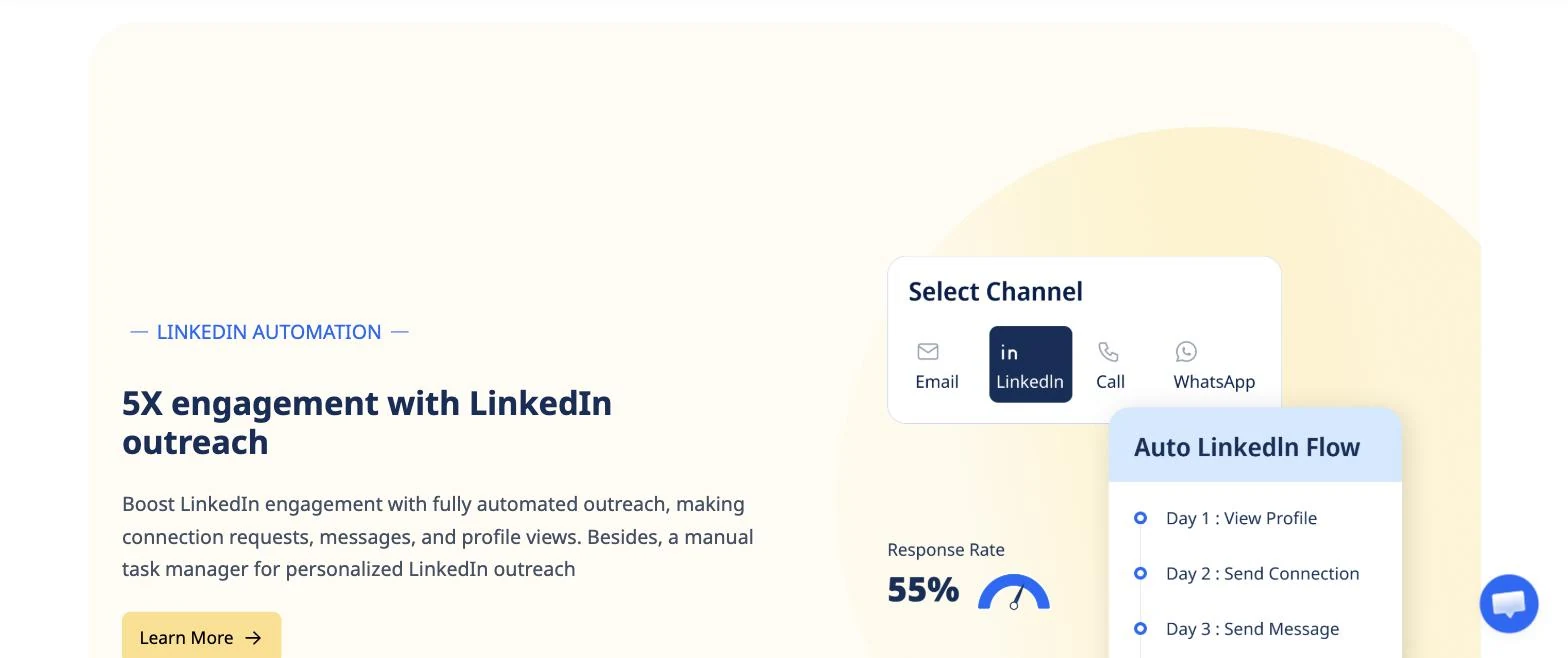
Picking a channel for a sequence step in SmartReach.io, with the LinkedIn flow running profile view, connection and message across three days.
On deliverability, SmartReach.io rotates sends across connected inboxes and runs spam testing, inbox placement and domain health checks under Deliver4Sure. The recommendation is about 40 emails a day per connected account, well under the 200 a day the platform allows.
It also works as a sales engagement platform on those plans, which is the shortlist most teams are really building when they compare these two. Gartner's guide to sales engagement platform selection is a decent framework for that evaluation.
SmartReach.io is rated 4.6 on G2 from 60 reviews and 4.7 on Capterra from 27 reviews as of September 2026, and there's a 14-day free trial covering 200 prospects with no card.
So which one should you buy?
Mailshake
Quick facts
- G2
- 4.7 ★
- From
- $29/month per user
- Free trial
- None, 30-day money-back guarantee
- Best for
- Solo operators and small email-first teams who call North America heavily and want a short learning curve
Mailshake is the simplest of the three to learn, and reviewers say so consistently. The sequence builder is uncluttered, onboarding is hands-on, and a new rep can have a campaign live the same afternoon.
The limits are structural rather than cosmetic. Ten mailboxes is the ceiling, LinkedIn is a task rather than automation, and every person you add costs the full plan price again.
Pros
- Cheapest entry point of the three at $29 a month
- Unlimited dialer minutes to North American numbers on Sales Engagement
- 5 phone numbers, call recording and phone scripts included
- Consistently rated for ease of use and fast setup
- Unlimited email warmup and verification on every tier
Cons
- No free trial, payment is taken up front
- LinkedIn steps are manual tasks, not automation
- Sending mailboxes hard-capped at 1, 2 or 10 by plan
- Per-user billing at every tier, with no flat option
- Lead data costs $19 a month on top of the plan
lemlist
Quick facts
- G2
- 4.7 ★
- From
- $69/month flat for email
- Free trial
- 14 days, full Multichannel, no card
- Best for
- Teams that need real LinkedIn automation and more than two people in the tool without paying for every email user
lemlist is the more complete platform of the two, and the flat Email plan is the most underrated thing on either pricing page. Unlimited users at $69 is hard to argue with for a growing team.
The catch is that everything past email goes back to per-user billing, so a five-person multichannel team lands at $545 a month before credits.
Pros
- Unlimited users on the $69 Email plan
- Real LinkedIn automation, including voice notes and invites
- 650 million contact database on every plan
- 14-day free trial of the full Multichannel plan, no card
- lemwarm and deliverability tooling included everywhere
Cons
- Multichannel is $109 per user, which scales steeply
- 50,000 email a month cap on the flat Email plan
- Enrichment, intent signals and call minutes all draw on credits
- WhatsApp is an add-on rather than included
- More features than a small team will use or configure
SmartReach.io
Quick facts
- G2
- 4.6 ★
- Capterra
- 4.7 ★
- From
- $29/month flat, priced by active prospects
- Free trial
- 14-day free trial, 200 prospects, no card
- Best for
- Teams running several channels who want unlimited users and unlimited sending accounts without a per-head multiplier
SmartReach.io is the option to look at when the per-user maths is the problem rather than the feature list. Email, LinkedIn, calls and WhatsApp run in one sequence, and headcount doesn't move the price above Basic.
It's a smaller review base than either of the other two, which is a fair thing to weigh. Test it on your own list during the trial rather than taking the ratings as the answer.
Pros
- No per-seat pricing, unlimited users above Basic
- Unlimited sending email accounts above Basic
- Email, LinkedIn, calls and WhatsApp in one conditional sequence
- Deliver4Sure spam testing, inbox placement and domain health
- 300 million contact and 50 million company Lead Finder built in
Cons
- Smaller G2 review base than Mailshake or lemlist
- LinkedIn automation is a $29 per account add-on
- No SMS channel, unlike lemlist
- Calling is limited to the Sales Engagement plans
Three questions that settle it
Put the feature tables down for a second. Nearly every team that stalls on this decision is stuck on one of three questions, and each one points somewhere different.
Will anyone else ever log in? If the honest answer is no, Mailshake at $29 is the cheapest sensible start, and a hands-on onboarding call is worth more to a first-time sender than a trial would be.
Is email the only channel you'll run this year? If yes, lemlist Email at $69 for unlimited users is the best value anywhere on this page. Take it, and don't overthink it.
Will you add a person, or a channel, or both? If yes, neither per-user model survives contact with your own roadmap, and SmartReach.io is the only one of the three that doesn't re-price the moment that answer changes.
Most teams end up at the third question, usually about six months later than they expected to. That's not a sales line. It's just what happens when a two-person experiment quietly becomes an outbound function.
If you're not ready to shortlist yet, the best cold email tools widens the field, and lemlist vs Instantly is the more useful read when raw sending volume, not channel count, is what's actually holding you back. Mailshake versus Saleshandy is the comparison to read if flat pricing is the thing you are really after.
Questions people actually ask
Is Mailshake or lemlist cheaper?
It depends on headcount and channels. One person on email costs $29 on Mailshake and $69 on lemlist. Five people cost $145 on Mailshake Starter and still $69 on lemlist, because lemlist's Email plan covers unlimited users. Add LinkedIn and calls for those same five and it flips again, to $545 on lemlist against $244 on SmartReach.io.
Does Mailshake have a free trial?
No. Mailshake collects payment up front and offers a 30-day money-back guarantee instead of a trial, so you buy first and ask for a refund if it doesn't work out. lemlist runs a 14-day free trial on the full Multichannel plan with no credit card. SmartReach.io also runs a 14-day free trial covering 200 prospects with no card.
Does Mailshake do LinkedIn automation?
Not automatically. Mailshake adds social touches to a sequence as manual tasks, so it reminds a rep to open LinkedIn and do the step by hand. lemlist automates the actions themselves, including profile visits, connection invites, text messages and voice notes, on its $109 per user Multichannel plan.
How many email accounts can you connect?
Mailshake caps sending mailboxes by plan at 1, 2 or 10 email addresses. lemlist gives unlimited senders on its Email plan and 5 senders per user on Multichannel. SmartReach.io includes unlimited sending email accounts on every plan above Basic, so sending capacity isn't what you buy the next tier for.
Which one is better for cold calling?
Mailshake, on raw call economics. Its $99 Sales Engagement plan includes 5 phone numbers and unlimited dialer minutes to North American numbers, which is hard to beat if your team calls US and Canada all day. lemlist ships a dialer on Multichannel too, but bills call minutes from its credit balance.
Do both include a lead database?
Both offer one on different terms. lemlist bundles a 650 million contact database into every plan and charges credits for enrichment at 5 credits per verified email and 20 per phone number. Mailshake sells Data Finder as a $19 a month add-on, with 50 free credits on the lower tiers and 2,500 on Sales Engagement.
What is the difference between Mailshake and lemlist on channels?
Mailshake runs email and calls automatically, with LinkedIn as a manual task. lemlist runs email, LinkedIn, calls, WhatsApp and SMS from one campaign. SmartReach.io runs email, LinkedIn, calls and WhatsApp in a single sequence with no per-seat pricing, and is rated 4.6 on G2 from 60 reviews as of September 2026.
Can I move my campaigns from Mailshake to lemlist?
Sequences, templates and contact lists rebuild in an afternoon through CSV export and import. What doesn't move is domain and mailbox reputation, warmup history and engagement data, all of which restart on the new platform. Move your suppression and unsubscribe lists first, then check them by hand before the first send.
Stop juggling tools
Book more meetings on every channel
Join 5,000+ teams running multichannel outreach from one sequence, with deliverability built in.