Instantly vs Reply.io | What Each One Really Costs

On this page
Instantly and Reply.io don't lose deals to each other on features. They lose them on arithmetic.
One of them prices your outreach by how much you send and hands you a single channel to send it through. The other prices it by how many people log in, then sells the extra channels on top. Put five SDRs on both and the invoices land roughly $340 apart before anyone opens a sequence builder. Put twenty on them and the gap stops being a line item and starts being a hiring decision.
That's the honest shape of this comparison. Not "which has better AI", not "which sequence builder feels nicer", but which axis your bill grows along and whether the channels you actually need are inside the price or bolted to it.
SmartReach.io is a cold email software, and its Sales Engagement plans run email, LinkedIn, calls and WhatsApp as steps inside one sequence, billed by active prospects rather than by headcount. It sits in this comparison as the third shape, the one that bills like Instantly and covers channels like Reply.io.
TL;DR for Instantly vs Reply.io
Side by side, on the same billing period
Every price below is the monthly list price on monthly billing. Both vendors advertise annual rates as the headline number, and comparing an annual rate against a monthly one is how people end up surprised in month two.
| Factor | Instantly | Reply.io | SmartReach.io |
|---|---|---|---|
| Built around | Cold email sending at volume | Multichannel sales engagement | Cold email with multichannel steps in one sequence |
| Pricing axis | Sending volume and contacts | Per user on Multichannel | Active prospects, no per-seat pricing |
| Entry (billed monthly) | $47 | $49 email volume, $89 per user multichannel | $29 email, $39 with calling and LinkedIn |
| Mid tier (billed monthly) | $97 | $89 per user plus add-ons | $89 email, $99 with calling and LinkedIn |
| Top published tier | $358 | Custom above Multichannel | $499 email, $599 with calling and LinkedIn |
| Users included | Workspace based, headcount free | Billed per user on Multichannel | Unlimited from Plus up |
| Prospect meter | Uploaded contacts, lifetime total | Active contacts, monthly | Active prospects, concurrent |
| Entry contact cap | 1,000 lifetime | Scales with plan | 1,000 |
| Email accounts | Unlimited | Unlimited | Unlimited |
| Channels | Email; calls and SMS via separate CRM | Email, LinkedIn, calls, WhatsApp, SMS | Email, LinkedIn, calls, WhatsApp |
| LinkedIn automation | No native automation, third-party tools only | Add-on, about $69 per account | Add-on, $29 per LinkedIn account |
| Calling | Via its separate CRM, price not published | Add-on, about $29 per user | Included on Sales Engagement plans |
| Native warmup | Yes, granular controls | Yes | Yes |
| Inbox rotation | Yes | Yes | Yes |
| ESP matching | No | No | Yes |
| Conditional branching | Linear sequences with variants | Yes, multichannel conditions | Yes, across channels |
| Lead database | 450M+, separate credits plan | Bundled at higher tiers | 300M+ contacts, 50M+ companies, included |
| Buy domains and mailboxes in-app | Yes, Google $5/mo, Airmail $4/mo, domains $15/yr | No | Yes, Azure, Google, Microsoft 365 |
| G2 rating | ~4.8, 4,000+ reviews | 4.6, ~1,448 reviews | 4.6, 58 reviews |
| Free trial | 14 days | 14 days | 14 days, 200 prospects, no card |
One caveat before you screenshot that table. Add-on pricing at Reply.io moves with contract and region, and Instantly has revised its plan limits more than once in the past year. Confirm both on your own signup screen rather than trusting any comparison post, this one included.
The pricing axis that decides this
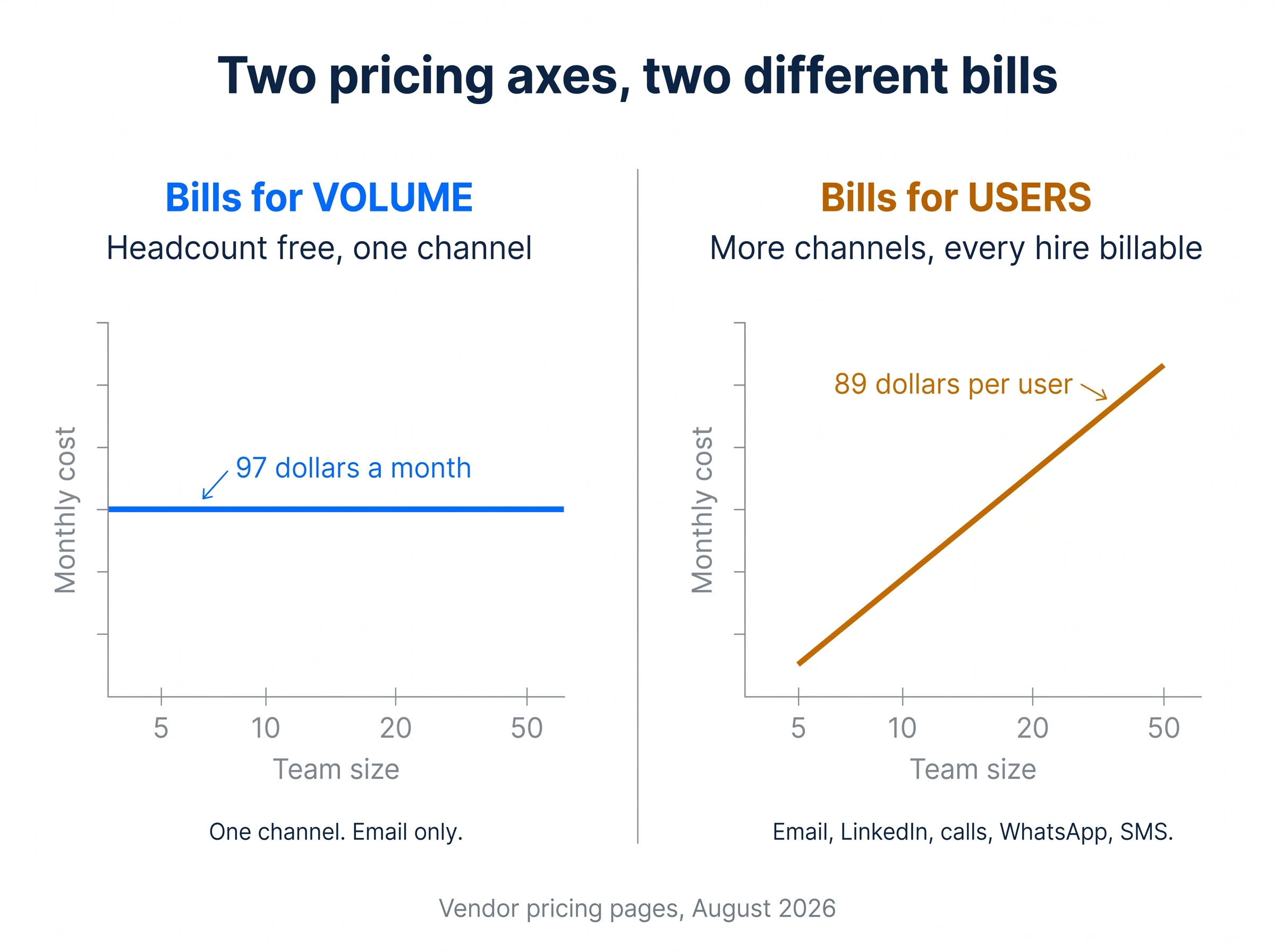
Instantly bills for sending volume and Reply.io bills for users once you need more than email. That single difference settles most evaluations between them, and it has nothing to do with features.
Instantly bills for throughput. A five-person team and a fifty-person team pay the same $97 on Hypergrowth. What you're buying is sending capacity and contact storage, so growing the team costs nothing and growing the list costs money.
Reply.io bills for people, once you need more than email. The Email Volume plan is contact-based and starts around $49 a month, but it's email only. The moment you want LinkedIn, calls or WhatsApp, you move to Multichannel at roughly $89 per user per month, and every new SDR is another $89 before add-ons.
Those are mirror images. One makes headcount free and channels impossible. The other makes channels possible and headcount expensive.
Instantly meters uploads, and the counter never resets
Instantly's contact cap is uploaded contacts, and it behaves as a lifetime total rather than a monthly allowance. Every lead ever added to a campaign counts against it, whether that campaign is running, paused, draft or finished two quarters ago.
Two things catch people out.
- Duplicates count twice. Upload a prospect to Campaign A and again to Campaign B and you've spent two slots on one human being. Run the same list past three offers and it costs three times.
- Deleting is the escape hatch. Removing leads from campaigns returns the space, and the counter catches up within roughly five to ten minutes. So list hygiene becomes a billing chore, not only a deliverability one.
Growth's "1,000 contacts" isn't a thousand a month. It's a thousand ever, until you delete something or buy a capacity add-on at about $87 a month. Monthly email volume is a separate meter that does reset, running roughly 5,000 on Growth, around 125,000 on Hypergrowth, and 500,000 on Light Speed.
Reply.io meters contacts, then charges for the desk
Reply.io's Email Volume plan counts active contacts in your sequences and resets on the normal billing cycle, which is the friendlier of the two models for teams buying fresh lists.
The cost lands somewhere else. Channels aren't bundled. LinkedIn automation runs about $69 per LinkedIn account per month on top of the seat, and voice plus SMS adds roughly $29 per user per month. A three-person team wanting email, LinkedIn and calling is paying three seats, three LinkedIn accounts and three voice add-ons.
Is that unreasonable? Not exactly, since Reply.io is genuinely running five channels and LinkedIn automation carries real per-account infrastructure cost. But it's the shape that surprises people, because the pricing page shows $89 and the invoice shows $187.
Here's the opinion, and it's the strongest one in this post. Paying per user for a channel your team touches twice a week is the worst deal shape in outbound tooling. Channel access should scale with the channel, not with the org chart. It's why the seat question is worth answering before the feature question.
Instantly, up close
Quick facts
- G2
- ~4.8/5 , 4,000+ reviews ★
- From
- $47/mo, billed by volume
- Free trial
- 14 days
- Best for
- Email-only outbound at scale, where headcount grows but the channel mix doesn't.
What it is. A cold email sending platform built for volume. Unlimited connected mailboxes on every paid plan, automatic inbox rotation, one of the largest warmup networks in the category, and a unified inbox for replies.
Best for. Agencies and teams whose entire motion is email, who send across dozens of warmed mailboxes, and whose list is stable enough that a lifetime contact cap isn't a monthly tax.
Key features. Warmup is included on every plan with unusually granular controls over ramp speed, daily limits and reply rate. Inbox rotation spreads sends across the mailbox pool automatically. The higher Agency and Light Speed tiers add dedicated sending infrastructure for teams whose volume justifies it. A lead database of 450M+ contacts sits behind a separate credits subscription. The AI reply agent classifies inbound responses and handles first-pass objection replies.
Limitations, honestly. There's no LinkedIn automation and no WhatsApp, and the Outreach plans are email only; calling and SMS sit in Instantly's separate CRM, a second product to buy. The uploaded-contacts cap is the tightest meter in this comparison and it never resets. Lead data is a second subscription rather than an included feature. Sequences are linear, with variants and A/B testing but no conditional branching into a different follow-up path.
Pros
- Headcount is free, so a growing team never changes the invoice
- Unlimited connected mailboxes on every paid plan
- The deepest warmup controls of the three, on the largest warmup network
- Fastest setup in the category, sending inside an hour
- Dedicated sending infrastructure available at the top tiers
Cons
- Outreach plans are email only, with no native LinkedIn or WhatsApp; calling and SMS need its separate CRM
- Uploaded contacts is a lifetime cap that duplicates double-count against
- Lead database is a separate credits subscription
- Linear sequences with no conditional branching
Reply.io, up close
Quick facts
- G2
- 4.6/5 , ~1,448 reviews ★
- From
- $49/mo email volume, $89/user multichannel
- Free trial
- 14 days
- Best for
- Small teams that need five channels in one sequence and can absorb per-user pricing.
What it is. A multichannel sales engagement platform with more than ten years in the category and roughly 3,000 customer companies. Email, LinkedIn, calls, WhatsApp and SMS all exist as steps inside a single sequence builder.
Best for. Teams under about thirty SDRs whose prospects genuinely don't reply to email, where the extra channels earn their cost, and where an enterprise platform like Outreach or Salesloft would be over-engineering.
Key features. The sequence builder handles conditional multichannel logic, so a prospect who ignores two emails can be routed to a LinkedIn touch and then a call task without manual triage. Reply detection pauses the whole thread across channels. B2B data is bundled at higher tiers rather than sold entirely separately. The AI features cover reply classification and sequence drafting, and the platform has the deepest CRM integration set of the three.
Limitations, honestly. Per-user pricing on Multichannel makes team growth a direct cost, and the two add-ons compound it. LinkedIn automation at about $69 per account is the line item that most often doubles a quoted price. There's no ESP matching, and you can't buy pre-authenticated domains or mailboxes inside the platform, so DNS setup stays a manual job.
Pros
- Five channels as native sequence steps, including WhatsApp and SMS
- Conditional multichannel branching with cross-channel reply detection
- Ten years of platform maturity and a large G2 review corpus
- B2B data bundled at higher tiers
- Deep CRM integration coverage
Cons
- Per-user pricing on Multichannel, so headcount is directly billable
- LinkedIn automation is roughly $69 per account per month on top
- Voice and SMS add about $29 per user per month
- No ESP matching and no in-app domain or mailbox purchasing
SmartReach.io, up close
Quick facts
- G2
- 4.6/5 , 58 reviews ★
- Capterra
- 4.7/5 , 27 reviews ★
- From
- $29/mo email, $39/mo with calling and LinkedIn
- Free trial
- 14 days, 200 prospects, no card
- Best for
- Teams that need multichannel sequences without paying per head for them.
What it is. SmartReach.io is a cold email software with email, LinkedIn, calls and WhatsApp available as steps in one sequence. On its Sales Engagement plans it also works as a sales engagement platform, with a built-in dialer and LinkedIn steps in the same cadence as email.
Best for. Teams that have outgrown email-only outreach but don't want the invoice to track headcount, and anyone who would rather not spend a week in DNS records before the first send.
Key features. Pricing scales by active prospects with unlimited users from the Plus tier up, so hiring never changes the bill. The B2B Lead Finder covers 300M+ contacts and 50M+ companies with email verification included. Deliverability is a product rather than a settings tab, covering warmup, inbox rotation, ESP matching, pre-send spam testing, blacklist monitoring that auto-pauses a flagged domain, and inbox placement reporting. You can buy pre-authenticated secondary domains and mailboxes inside the platform across Azure, Google and Microsoft 365. A conditional multichannel drip moves a quiet prospect to the next channel on its own, and a reply anywhere pauses every other step.
Limitations, honestly. The G2 review corpus is 58 reviews against Reply.io's roughly 1,448 and Instantly's 4,000-plus, so the shared 4.6 rating carries far less statistical weight and should be read that way. The lead database at 300M+ contacts is smaller than Instantly's advertised 450M+, and deep-filter prospecting will notice. LinkedIn automation is a $29 per month add-on for each LinkedIn account, so it isn't free either, just cheaper per account than the alternative here. And a four-channel platform has more surface to learn than a single-channel sender.
Pros
- No per-seat pricing, with unlimited users on every plan above Basic
- Email, LinkedIn, calls and WhatsApp with conditional branching between them
- ESP matching, which neither competitor offers
- Pre-authenticated domains and mailboxes bought in-platform, no manual DNS
- Lead database and email verification included rather than a separate credits plan
- Blacklist monitoring that pauses a flagged domain automatically
Cons
- Small G2 review corpus compared to both competitors
- Lead database smaller than Instantly's advertised number
- LinkedIn automation is a per-account add-on
- No SMS channel, unlike Reply.io
What a multichannel sequence actually looks like
Competitor comparison pages tend to file SmartReach.io under "email tool", so it's worth stating plainly what the sequence builder actually does.
A single SmartReach.io sequence combines four channels. Email steps, LinkedIn steps, calls through the built-in dialer, and WhatsApp messages, all in one cadence with conditions between them. A prospect who ignores two emails can be routed to a LinkedIn view and connection request, then to a call task, without anyone exporting a CSV. A reply on any channel pauses every remaining step across all of them. LinkedIn messages need a human click by design, which is a deliberate account-safety decision rather than a missing feature. Sales Engagement plans start at $39 a month with no per-seat pricing.
That's the correction worth making, because "email-only" is the framing this category repeats about SmartReach.io and it hasn't been accurate for a while.
Where does that leave Instantly? Email-only in its Outreach plans, with calling and SMS pushed to a separate CRM and no native LinkedIn automation (LinkedIn runs only through connected third-party tools). Reply.io covers one channel more than SmartReach.io, since SMS is a real Reply.io feature and isn't part of the SmartReach.io channel set.
Which one actually lands more mail?
None of the three can promise inbox placement, and any tool that does is selling you something. What they can do is give you controls, and the controls differ.
Deliverability in 2026 is mostly a compliance problem before it's a tooling problem. Microsoft now requires SPF, DKIM and DMARC for domains sending more than 5,000 messages a day to consumer Outlook addresses, with non-compliant mail routed to Junk first and rejected after that, per Microsoft's own announcement. Google and Yahoo hold bulk senders to a published 0.3% spam complaint threshold. Get authentication wrong and no amount of warmup rescues the domain.
The warmup dials, and how people break them
All three include warmup at no extra cost. Instantly gives the finest controls over ramp speed, daily volume and target reply rate, and runs the largest warmup network of the three. Reply.io and SmartReach.io both include warmup that runs continuously alongside live campaigns.
The failure mode is identical everywhere. People warm a mailbox for four days, see healthy numbers, and immediately push 200 sends a day through it. Warmup builds a reputation curve, and the curve breaks when actual volume outruns it. Two to three weeks before real sending is the honest minimum, and SmartReach.io recommends around 40 emails a day per connected account against a technical ceiling of 200.
The mailbox arithmetic
This is the calculation almost nobody does before buying, and it decides how many mailboxes you're actually paying for.
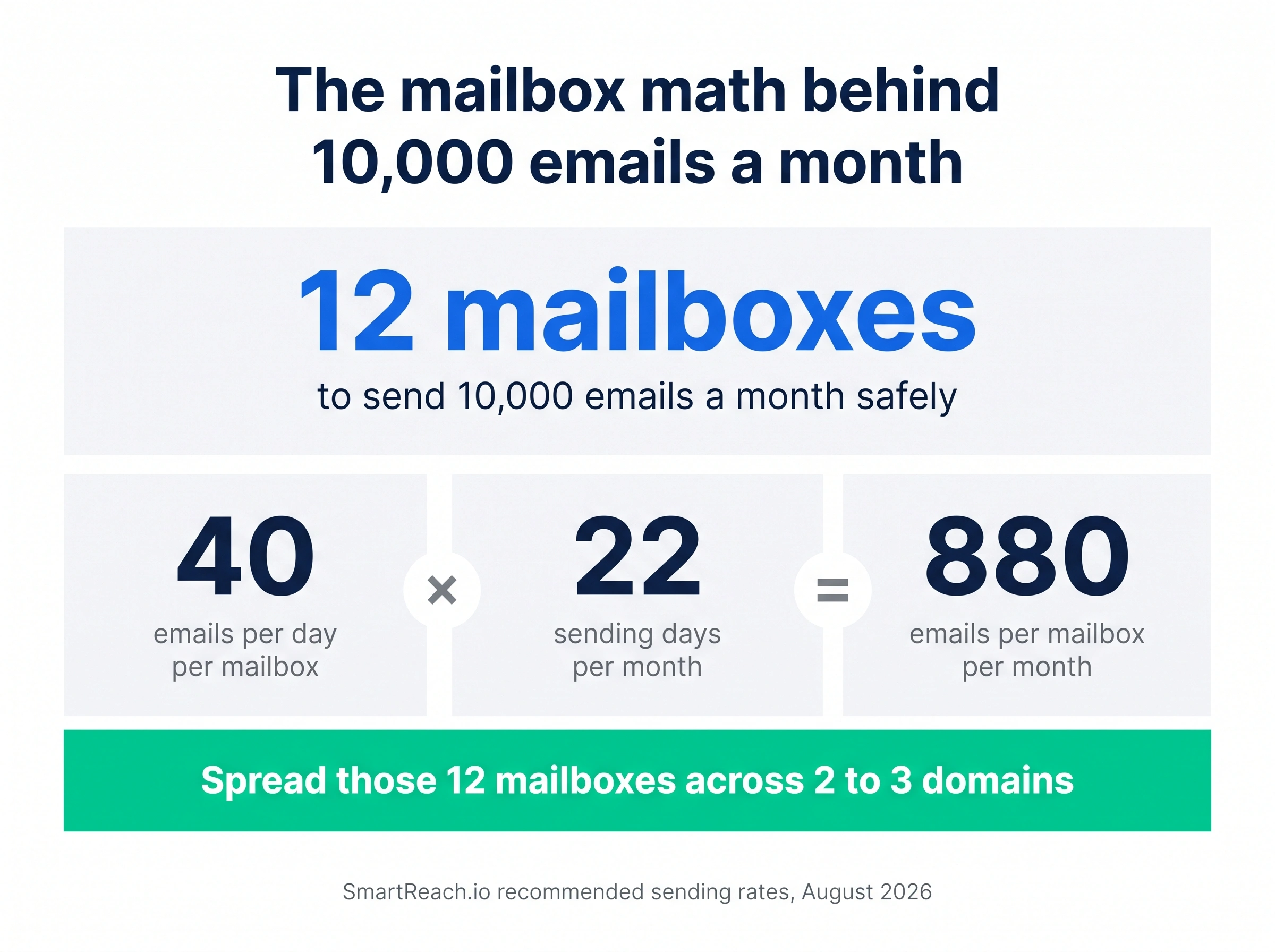
At roughly 40 emails a day per connected account across about 22 sending days, one mailbox carries close to 880 emails a month. So 10,000 emails a month needs about 12 mailboxes, spread across 2 or 3 domains so no single domain carries the whole load.
All three connect unlimited mailboxes, so the platform isn't the constraint. Buying and authenticating twelve mailboxes is. Reply.io expects you to arrive with them configured. Instantly sells done-for-you Google and Airmail mailboxes plus domains, and SmartReach.io sells pre-authenticated domains and mailboxes inside the platform across Azure, Google and Microsoft 365, which is either a convenience or a week of your life, depending on how much DNS you've done.
Where ESP matching comes in
One genuine technical difference. ESP matching aligns your sending mailbox with the recipient's email provider, so mail to a Google Workspace address goes out from a Google-hosted mailbox and mail to Microsoft 365 goes out from a Microsoft-hosted one. Neither Instantly nor Reply.io offers it. Whether it moves your placement numbers depends on your mailbox mix, and it's worth being honest that the public evidence for the size of the effect is thinner than vendors imply.
What does each one really cost at five SDRs?
Take Alex, a VP of Sales running five SDRs on a multichannel motion. Email, LinkedIn touches, and calls. Here's the monthly bill.
| Line item | Instantly | Reply.io | SmartReach.io |
|---|---|---|---|
| Platform, 5 users | $97 Hypergrowth, headcount free | $445 at $89 per user | $99 Sales Engagement Plus, unlimited users |
| LinkedIn automation | No native automation, third-party tools only | About $345, at $69 per account | $145, at $29 per LinkedIn account |
| Calling | Separate CRM, price not published | About $145, at $29 per user | Included |
| Monthly total | $97, email only | About $935 | $244 |
Read that table carefully, because the cheapest column is also the one that doesn't do the job. Instantly at $97 is excellent value and covers one of the three channels Alex asked for. The comparison that matters is the second and third columns, where Reply.io runs roughly $935 and SmartReach.io runs $244 for a similar channel set minus SMS.
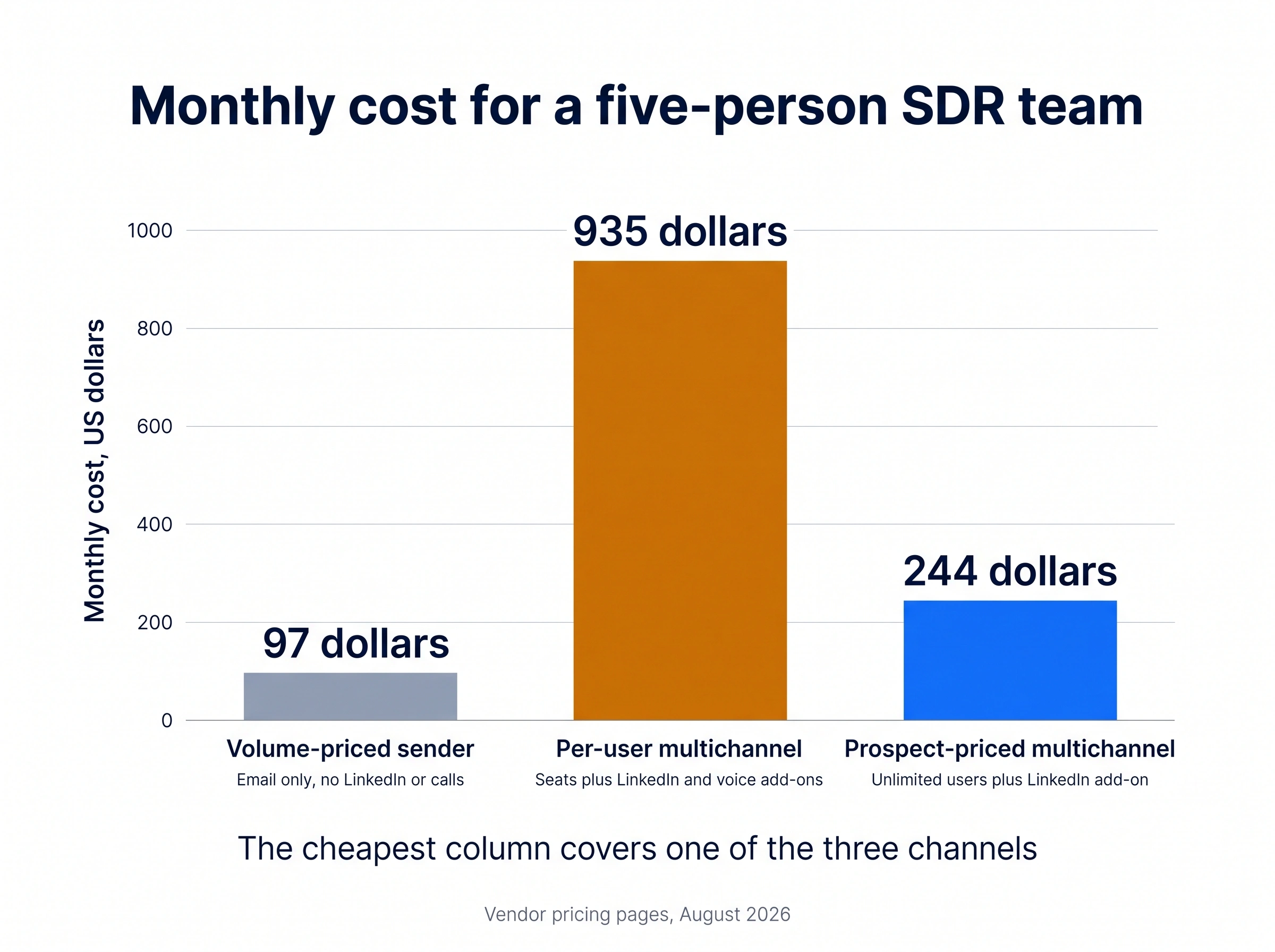
Scale it to twenty SDRs and the shape gets sharper. Instantly stays near $97 plus capacity add-ons for the bigger list. Reply.io moves past $3,700. SmartReach.io moves to $99 plus $29 for each LinkedIn account, so about $679 with twenty LinkedIn users, and less if only half the team runs LinkedIn.
Lead data, and the headline number problem
Instantly advertises 450M+ contacts through a separate credits subscription. Reply.io bundles B2B data at higher tiers. SmartReach.io includes a Lead Finder covering 300M+ contacts and 50M+ companies with verification included.
Those numbers are close to meaningless on their own. What matters is coverage inside your niche, and every database in this category is strong somewhere and thin somewhere else. A 450M database that's mostly US mid-market is worse than a 300M one with real depth in your vertical.
Run the same test on all three. Take twenty companies you already know well, pull contacts for a specific role, and check how many are correct and how many bounce. That number tells you more than any headline figure, and it takes about an hour.
The billing detail worth noticing is that Instantly's data is a second subscription, Reply.io's is tier-gated, and SmartReach.io's is included with verification free on Plus and above rather than metered from a credit wallet.
What breaks when you switch
Sequences, templates and lists rebuild in an afternoon. Three things don't move.
Domain and mailbox reputation. It stays with the domain, not the platform, so switching tools doesn't reset it. Switching to fresh domains does, and not in your favour.
Warmup history. The new platform starts its own warmup curve. Budget two to three weeks before real volume.
Engagement data. Open, click and reply history usually doesn't export in a form the next tool can use, which means any conditional logic built on past engagement gets rebuilt from scratch.
Move suppression and unsubscribe lists first, and verify them by hand. The fastest way to burn a new setup is emailing someone who already opted out.
So which one should you buy?
Choose Instantly if
Your motion is email and only email, and you'd rather spend the budget on sending capacity than on channels you won't use. Your team is growing but your list is stable, which is the exact condition a lifetime upload cap rewards. You want the deepest warmup controls available and the fastest path from signup to first send.
The right pick for pure email volume. If setup speed is your bottleneck, stop comparing and go buy it.
Choose Reply.io if
You need five channels including SMS and WhatsApp, your team is small enough that per-user pricing stays comfortable, and platform maturity with a large peer-review corpus matters to your procurement process. Bundled B2B data at the higher tiers is worth real money to you.
Budget 1.5x to 2x the headline price once LinkedIn and voice add-ons are counted. Price the add-ons before the trial ends, not after.
Choose SmartReach.io if
Email alone has stopped working on your segment and you need LinkedIn, calls and WhatsApp as real automated steps rather than tasks in a second tool. Your headcount is growing and you don't want the invoice to track it. You're standing up new domains and mailboxes and would rather buy them pre-authenticated than spend a week in DNS.
Best fit for teams past the single-channel stage who'd rather run one system than reconcile three bills.
The verdict
Whatever you shortlist, run the same test on it. Take 200 real prospects from your actual target market, run an identical sequence for two weeks, and measure inbox placement and reply rate rather than counting features. Check your contact meter on day 14 as well, because on Instantly that's the number that surprises people in month three.
Want to go deeper on either one? There's a full Instantly.ai review, a SmartReach.io vs Instantly comparison and a detailed Reply.io vs SmartReach.io breakdown. If you're still widening the list, the roundups of Instantly alternatives and Reply.io alternatives both start from the invoice, and Instantly vs Saleshandy covers the version of this question where prospect metering is the deciding factor rather than channels.
Questions people actually ask
More on Reply.io
Is Instantly or Reply.io better for cold email?
Instantly is better for pure cold email at volume. It bills by sending capacity rather than headcount, connects unlimited mailboxes, and runs one of the largest warmup networks in the category. Reply.io is better when email alone isn't reaching your segment, because it runs LinkedIn, calls, WhatsApp and SMS as sequence steps. If your motion is email-only, Instantly usually costs less.
How does Instantly's uploaded contacts limit work?
It's a lifetime total, not a monthly allowance, and it doesn't reset. Every lead ever added to a campaign counts, including paused, draft and finished campaigns, and the same person uploaded to two campaigns counts twice. Deleting leads returns the space within minutes. Growth covers 1,000 contacts, Hypergrowth 25,000, and capacity add-ons run about $87 a month each.
Which is cheaper for a five-person SDR team?
Instantly, by a wide margin, but its Outreach plans only do email. Instantly's Hypergrowth plan is about $97 a month no matter how many people use it. Reply.io Multichannel is about $445 for five users before add-ons. SmartReach.io Sales Engagement Plus is $99 a month with unlimited users, plus $29 per month for each LinkedIn account you connect.
Does Instantly have LinkedIn automation or calling?
Not in its Outreach plans. Instantly is email-first, with no native LinkedIn steps and no WhatsApp; calling and SMS come only with its separate CRM product. Its depth sits in the email layer instead, covering warmup, inbox rotation, deliverability infrastructure and a large lead database sold as a separate credits subscription. Multichannel teams run it alongside a second tool or pick a platform that covers the channels natively.
How many mailboxes do I need to send 10,000 emails a month?
Around 12. A safe sending rate is roughly 40 emails a day per connected account, and across about 22 sending days each mailbox carries close to 880 emails a month. Spread those 12 mailboxes across 2 or 3 domains so no single domain carries the whole load, and warm every one of them before the first campaign.
What doesn't transfer when you switch outreach tools?
Domain and mailbox reputation, warmup history, and engagement data. Sequences, templates and lists rebuild in an afternoon, but reputation restarts from zero on the new platform. Move suppression and unsubscribe lists first and verify them by hand, because emailing someone who already opted out is the fastest way to burn a fresh domain.
Stop juggling tools
Book more meetings on every channel
Join 5,000+ teams running multichannel outreach from one sequence, with deliverability built in.