10 Best LinkedIn Automation Tools, Safe & Ranked

Picking the best LinkedIn automation tools in 2026 is less about who has the longest feature list and more about who won't get your account throttled by Friday.
LinkedIn now sits north of a billion members, it's still where roughly 8 in 10 B2B social leads start, and the reps hitting quota are the ones who quit sending connection requests by hand. So the real question isn't whether to automate.
It's which tool does the work without cooking your account.
I put 15 tools on the bench: 10 core LinkedIn outreach automation tools reviewed in depth, plus 5 more worth knowing. Every one ran through the same test: connect an account, build a real sequence, send to a live list, and watch what breaks.
Below you'll find blunt "best for X" calls, the G2 and Capterra scores I actually verified (a few numbers floating around the internet are just wrong), current monthly pricing, and honest per-tool pros and cons. Let's get into it.
TL;DR for the best LinkedIn automation tools
Short on time? Here's the whole guide in ten seconds:
- Best overall, multichannel: SmartReach.io. Runs LinkedIn, email, and calls inside one sequence with safe built-in limits. My pick for sales teams that don't want three tools.
- Best for agencies / many accounts: HeyReach. Flat-rate, multi-account, built for running 20-plus senders at once.
- Best free tool: Waalaxy. A genuine free tier so you can test automation before paying a cent.
- Cheapest simple automation: Octopus CRM. No-frills LinkedIn automation from $9.99/mo, and one of the most-reviewed tools here.
- Safest pure-LinkedIn play: Expandi. Cloud-based with a dedicated IP, the setup LinkedIn's detection hates least.
- Best LinkedIn + email combo for solos: La Growth Machine. Slick multichannel sequences with strong enrichment.
- The one number that matters: stay near 100 connection invites per week. That single limit prevents most restrictions, no matter which tool you pick.
- 2026 reality check: after LinkedIn tightened detection, cloud tools now beat browser extensions on safety. If a tool lives only as a Chrome overlay on your logged-in session, treat it as higher risk.
Jump to:How I scored them Compare the top 10 The top 10 5 bonus tools Head-to-head FAQ
How I tested and scored these 15 tools
Every tool here earned its place the same way, so you're comparing apples to apples instead of marketing pages.
I connected a real (warmed) LinkedIn account to each one, built the same three-step sequence, ran it against a live prospect list, and paid attention to the boring stuff: how long setup took, whether the safety controls were real or decorative, and what the tool did when a prospect replied.
Here's the eight-point rubric behind every verdict below.
- Account safety. Cloud with a dedicated IP, or a browser extension riding your live session? Randomized timing, warm-up, and real sending caps score highest. This carries the most weight, because a banned account costs more than any subscription.
- Setup and ease. How fast a normal person gets from sign-up to a running campaign. Guided templates and clear onboarding beat a blank canvas.
- Sequence depth. Conditional branching, multi-step follow-ups, trigger-based actions. A tool that stops at "send one message" isn't automation, it's a macro.
- Personalization and AI. Merge tags are the floor. AI drafting, image or GIF personalization, and dynamic fields are what actually move reply rates.
- Multichannel reach. LinkedIn-only, or does it coordinate email and calls in the same sequence? More channels, more chances to land.
- Data and prospecting. Built-in lead finding, enrichment, and email lookup, so the list and the sender don't live in two different apps.
- CRM and reporting. Native syncs and per-campaign analytics on acceptance, replies, and sentiment, not just a raw activity log.
- Value at your size. Price against what you get, modeled at real headcount. A cheap per-seat tool can cost more than a flat agency plan once you add people.
Two things to keep me honest. First, I run marketing at SmartReach.io, so yes, SmartReach is on this list, and yes, I've handed use-case crowns to rivals wherever they earned them (Expandi for safety, HeyReach for agencies, Waalaxy for free).
Second, I score G2 and Capterra as inputs, not gospel. Review counts get inflated all over the web, so every rating below was cross-checked against the live product pages.
Where a tool has almost no reviews, I say so instead of dressing up a 2-review "5.0" as a trust signal.
How the top 10 tools compare at a glance
Here's the top 10 on one screen. G2 shows the rating with its verified review count in parentheses, because "4.6" from 700 reviews and "4.6" from 2 reviews are not the same claim.
Prices are the month-to-month starting rate in USD; annual billing is cheaper almost everywhere. Scroll the table sideways on mobile.
| Tool | Type | Channels | From (mo) | Free trial / tier | G2 (reviews) | Best for |
|---|---|---|---|---|---|---|
| SmartReach.io | Cloud, sales-engagement | LinkedIn + email + calls + WhatsApp | $39 | 14-day, no card | 4.6 (56) | All-in-one multichannel |
| La Growth Machine | Cloud | LinkedIn + email + calls | ~$66 | 14-day | 4.6 (56) | Multichannel for small teams |
| HeyReach | Cloud, dedicated IP | LinkedIn + inbox | $79 | 14-day, no card | 4.6 (70) | Agencies, multi-account |
| Expandi | Cloud, dedicated IP | LinkedIn + email | $99 | 7-day, no card | 4.2 (135) | Safest pure LinkedIn |
| Waalaxy | Chrome extension | LinkedIn + email | Free / ~$21 | Free-forever + trial | 4.5 (714) | Free / solo entry |
| Dripify | Cloud | $59 | 7-day, no card | 4.5 (322) | Beginners | |
| Octopus CRM | Chrome extension + cloud | $9.99 | 7-day | 4.3 (107) | Cheapest simple automation | |
| Linked Helper | Desktop app | $8.25 | 14-day | 4.5 (145) | LinkedIn-only budget | |
| Dux-Soup | Extension (+ cloud) | $14.99 | 14-day | 4.4 (88) | Lightweight budget pick | |
| Zopto | Cloud, dedicated IP | LinkedIn + email + X | $157 | None | 4.5 (71) | Enterprise scale |
*G2 and Capterra figures verified against live product pages, July 2026. G2 counts are read from G2's indexed product data and drift week to week, so treat them as close, not frozen. Prices are starting month-to-month rates and change often, so confirm on each vendor's page before buying.*
What a LinkedIn automation tool does, and the 3 types you'll meet
A LinkedIn automation tool is software that does the repetitive parts of outreach for you: viewing profiles, sending connection requests, firing off follow-up messages and InMails, and tracking who replied, all on a schedule you set.
You still write the message and pick the targets. The tool handles delivery, timing, and record-keeping so you're not living inside LinkedIn's tab eight hours a day.
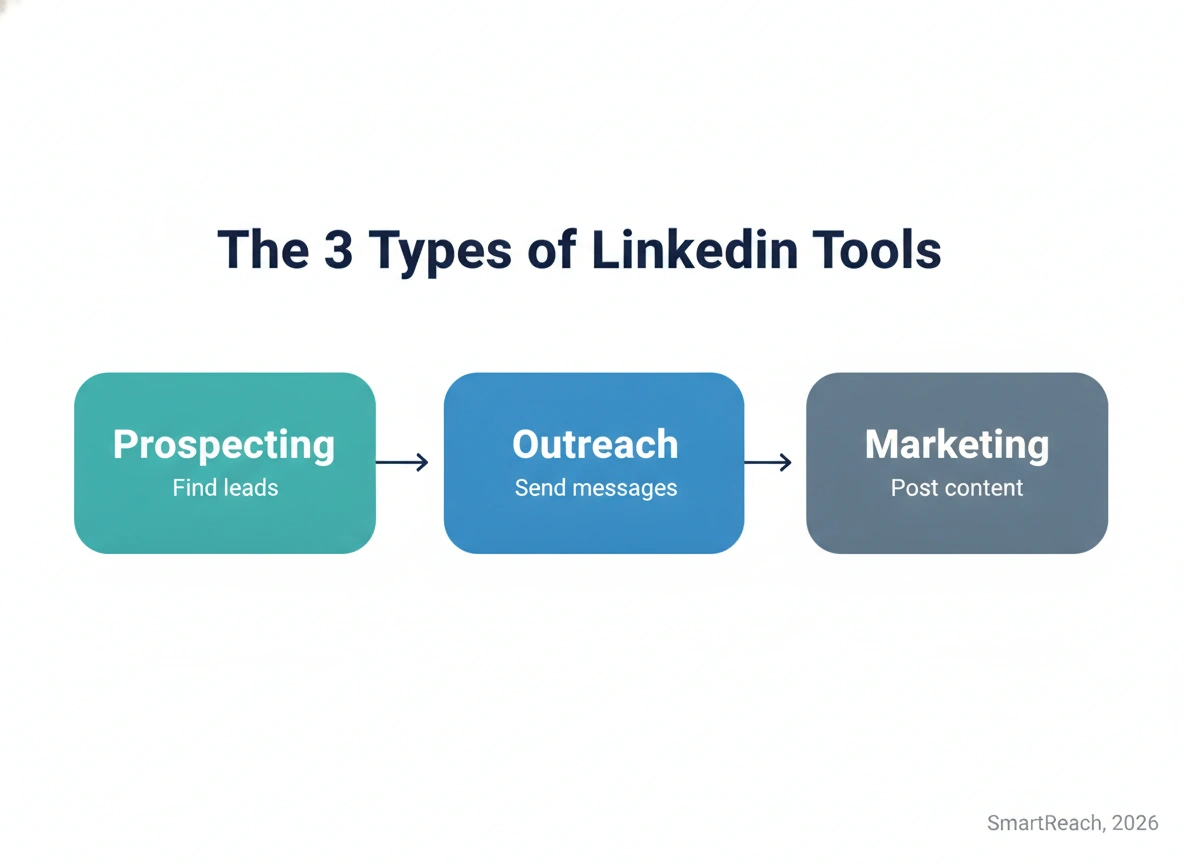
Here's the part most listicles skip: not every "LinkedIn tool" does the same job. There are three types, and mixing them up is how people overpay or pick the wrong fit.
- Prospecting tools (the finders). These scrape and enrich data: verified emails, LinkedIn URLs, company details, phone numbers. Think ProspectDaddy or Apollo (see my Apollo review for where it fits). They fill your list. They don't send anything.
- Outreach tools (the senders). These automate the actual conversation: connection requests, messages, InMails, follow-up sequences. SmartReach.io, Expandi, HeyReach, Waalaxy, Dripify, and Octopus CRM live here. This is what most people mean by "LinkedIn automation," and it's the focus of the top 10 below.
- Marketing tools (the broadcasters). These schedule content and manage LinkedIn ad or page campaigns. Different job, different buyer. We won't spend much time here.
Most real workflows pair a finder with a sender: something builds the list, something works the list. The best setups do both in one place so your data doesn't get lost in a CSV handoff.
If you're still assembling a list strategy, my LinkedIn prospecting playbook goes deeper. Keep that finder-plus-sender split in mind as you read the reviews.
The 10 best LinkedIn automation tools, reviewed in depth
These 10 are the core outreach senders, ranked. Each entry follows the same shape: what it's genuinely best at, the capabilities that matter, honest pros and cons side by side, real pricing, the hidden costs nobody lists, and what it runs you at scale.
The five adjacent tools (research, scraping, CRM, and the caution picks) get a condensed round right after. Let's start at the top.
1. SmartReach.io: best for LinkedIn, email, and calls in one safe sequence
Full disclosure up front: this is my tool, so read the score knowing that.
The rubric was identical for everyone, and the honest reason SmartReach tops the list isn't the LinkedIn features, it's that LinkedIn is one lane in a bigger sequence.
SmartReach.io is a cloud-based sales-engagement platform that runs cold outreach across LinkedIn, email, calls, WhatsApp, and text from a single workflow.
On LinkedIn it automates profile views, connection requests, messages, and InMails, and it holds every account inside safe sending limits so volume doesn't quietly turn into a restriction.
When I ran the test sequence, the thing that stood out was continuity. A prospect who ignored the connection request still got an email on the next step and a call task after that, all from the same campaign, all landing in the same inbox.
That's the difference between "a LinkedIn tool" and an outreach engine, and it's why teams running more than one channel stop paying for three separate apps.
Here are the core capabilities of SmartReach.io that matter most:
- True multichannel sequences. Build a single drip across LinkedIn, email, and calls with conditional branches (if no reply, do this; if the prospect has no email, do that) instead of reconciling three disconnected tools by hand.
- Semi and full automation, per step. Automate the busywork (views, requests, follow-ups) while keeping a manual gate on high-value prospects. You decide which steps run themselves.
- AI drafting that works with you. The smart email AI agent proposes openers and follow-ups from prospect data, then you sharpen the lines that matter.
- AI-SDR for LinkedIn (a separate plan). Tell the AI what you're selling and it recommends the audience, writes the content, hyper-personalizes each message off around 10 live buyer signals, and starts engaging on LinkedIn on its own. It works deliberately, prospect by prospect, not by blasting at scale.
- Built-in prospect finder. Source decision-makers by ICP with the B2B lead finder so the list and the sender live in one place. No CSV graveyard between apps.
- Shared team inbox with sentiment tagging. Every reply across every channel lands in one inbox, tagged by sentiment, so a team can split follow-ups and forecast from real signals.
- Deliverability tooling. Warm-up, inbox rotation, and spam testing keep the email steps landing, so a multichannel sequence doesn't silently break at the email leg.
PROS
- One platform for LinkedIn, email, and calls, so no stitching and no double data entry.
- Safe-by-default sending limits with per-account controls.
- A real shared inbox and strong analytics built for teams, not just solo reps.
- Built-in lead finder and CRM sync, so the whole loop lives in one login.
CONS
- No GIF or image personalization (Expandi and Waalaxy have it).
- Full hands-off LinkedIn automation is a $29-per-account add-on on top of the plan.
- More to set up than a one-trick extension, because it does more.
How much does SmartReach.io cost?
LinkedIn lives on the Sales Engagement plan, and the tier is set by how many prospects you outreach each month, not by seats.
Each step up raises both your monthly prospect volume and the number of LinkedIn accounts you can run for manual, task-based engagement. Every tier sends LinkedIn as tasks by default, with a co-pilot mode to speed up the connection requests, messages, and InMails.
| Sales Engagement plan | Monthly | Active prospects | LinkedIn accounts | Best for |
|---|---|---|---|---|
| Basic | $39 | 1,000 | 1 | Solo reps on one account |
| Plus | $99 | 50,000 | 3 | Small teams with a few accounts |
| Pro | $249 | 100,000 | 10 | Growing sales teams |
| Scale | $599 | 500,000 | 100 | Agencies and large fleets |
Full automation is a $29-per-account add-on. If you want hands-off sending, where connection requests, messages, and profile views fire without you lifting a finger, that's a separate LinkedIn Automation add-on at $29 per month per account, on top of your Sales Engagement tier.
Hidden costs: the base tiers send LinkedIn tasks manually, so budget the $29-per-account automation add-on if you want true set-and-forget. Every plan still includes a 14-day trial with 200 prospects and no card.
Cost at scale: your plan tier tracks the volume of prospects you outreach, and moving up adds more LinkedIn accounts for task-based engagement.
A team that needs 10 accounts and up to 100,000 prospects lands on Pro ($249), then adds $29 per account for full automation if they want it hands-off. Model the tier and the add-on together.
📚 Dig deeper: See how the full loop fits together in the omnichannel platform overview, or dig into the dedicated LinkedIn automation workflow.
2. La Growth Machine: best for multichannel sequences on a lean team
La Growth Machine (LGM) is the multichannel specialist for lean teams, and its 4.9/5 Capterra score is one of the highest in this guide for a reason.
It's cloud-based, so nothing rides on a fragile browser tab, and its whole pitch is coordinating LinkedIn, email, and calls inside one visual workflow with enrichment baked in.
Drop a lead in and LGM fills the missing email and profile data as the sequence runs, which keeps fewer prospects stalled on a blank field.
Building a campaign in it feels designed rather than bolted on. The drag-and-drop canvas is one of the cleaner ones in the category, and the multichannel branching reacts to what a prospect actually does instead of firing on a dumb timer.
Here are the core capabilities of La Growth Machine that matter most:
- Visual multichannel sequences across LinkedIn, email, and calls (plus X on the top tier), with branches that respond to prospect behavior.
- Native enrichment that auto-completes contact data mid-sequence, not a paid add-on.
- LinkedIn voice-message and profile-visit steps for warmer touches than a plain DM.
- Built-in inbox and reply management so conversations don't scatter across tabs.
- Per-channel reporting that shows which touch actually drove the reply.
PROS
- Genuinely smooth multichannel orchestration for the money.
- Enrichment included, so lists fill themselves.
- One of the nicer builders to actually use day to day.
- Excellent Capterra track record (4.9/45).
CONS
- Priced per identity, so costs climb fast with team size.
- Occasional campaign-execution bugs show up in reviews.
- The best features sit on the higher tiers.
How much does La Growth Machine cost?
| Plan | Monthly | What you get |
|---|---|---|
| Basic | ~$66/identity | LinkedIn + email sequences, enrichment |
| Pro | ~$110/identity | Adds calls and voice messages |
| Ultimate | ~$165/identity | Adds X, higher limits, priority support |
Hidden costs: billing is per "identity" (per sender), so every extra rep is a full extra subscription. Enrichment credits are generous but finite on lower tiers.
Cost at scale (5 identities, annual): because it bills per identity, a five-seat team lands well above a flat-rate agency tool like HeyReach. Do the headcount math before you commit.
3. HeyReach: best for agencies running many LinkedIn accounts
HeyReach does one job better than anyone: running LinkedIn outreach across a lot of accounts, safely, without a per-seat tax. It's cloud-based with a dedicated IP per sender, and its flat agency pricing is exactly why lead-gen shops standardize on it.
If "manage 20 senders across 10 clients" is your actual job, this is the tool built for that sentence. Its G2 base (4.6 from 70 reviews) is solid; ignore the Capterra 5.0, it's only 2 reviews and means nothing yet.
Running the multi-account test, the unified inbox was the standout. One person can work replies from 25 profiles without logging in and out, which is the daily grind that kills agency margins.
Here are the core capabilities of HeyReach that matter most:
- Unlimited senders on agency tiers with no charge for adding teammates, clients, or VAs.
- Unified inbox across every connected account, so one person works replies from many profiles.
- Dedicated IP per sender plus human-like pacing for safety at scale.
- Native integrations with CRMs and data tools like Clay, plus a newer email and multichannel layer.
- Agency workspaces and reporting to keep client campaigns separated and legible.
PROS
- Flat pricing that gets cheaper per account the more you scale.
- Strong safety reputation across large fleets of accounts.
- One inbox for an entire team of profiles.
- Clean integrations with Clay and the major CRMs.
CONS
- Entry price is steep for a single user.
- Email and multichannel are newer and less mature than the LinkedIn core.
- Overkill if you only send from one profile.
How much does HeyReach cost?
| Plan | Monthly | What you get |
|---|---|---|
| Starter | $79 | 1 sender, unified inbox, integrations |
| Agency | $999 | 25 senders, workspaces, reporting |
| Unlimited | $1,999+ | Unlimited senders, priority support |
Hidden costs: none per teammate, which is the whole appeal. Extra senders beyond your tier are the main upsell.
Cost at scale (25 accounts, Agency tier): works out to roughly $40 per sender per month, which per-seat tools simply can't touch. That's the number agencies buy on.
4. Expandi: best for the safest pure-LinkedIn automation
Expandi built its whole brand on safety, and the architecture earns it: cloud-based, one dedicated country-based IP per account, randomized human-like timing, and warm-up actions before you ever send a request.
If your single biggest worry is keeping a LinkedIn account alive while you scale, this is the specialist to beat. The 4.2 G2 score is a touch below the top of this list, mostly because of the learning curve, not the safety record.
Setting up the test account, the warm-up flow was noticeably more careful than the extensions: profile visits and light engagement before any ask, which is exactly the behavior LinkedIn's detection rewards.
Here are the core capabilities of Expandi that matter most:
- Dedicated country-based IP per account, so activity looks local and each profile stays isolated.
- Smart, randomized sending with delays that mimic a real person's rhythm.
- Hyper-personalization including images and GIFs through the Hyperise integration.
- Webhook automations to push prospect data into CRMs, Gmail, Outlook, and more.
- Auto warm-up actions (profile visits, likes, endorsements) that open conversations before the ask.
PROS
- Among the safest setups for a single LinkedIn account.
- Image and GIF personalization most rivals lack.
- Solid conditional sequences with an omnichannel option.
- Dedicated IP per account isolates risk.
CONS
- Pricier than tools with similar features, SmartReach included.
- The V2 interface has a real learning curve.
- Support is thin on lower tiers, and data enrichment is basic.
How much does Expandi cost?
| Plan | Monthly | What you get |
|---|---|---|
| Business | $99/account | Dedicated IP, sequences, warm-up, personalization |
| Agency | Custom (10+ seats) | Multi-account management, priority support |
Hidden costs: image personalization runs through a paid Hyperise add-on, and the annual rate ($79/account) is the only way to bring the price down.
Cost at scale (5 accounts, annual): roughly $79 per account per month, LinkedIn-only. If you also need email and calls, a multichannel platform is better value for the same spend.
5. Waalaxy: best free or low-cost solo entry point
Waalaxy is the easiest way to try LinkedIn automation, mostly because it's the only serious tool here with a genuine free-forever plan, and its 714 G2 reviews make it the most-reviewed tool in the top 10.
It runs as a Chrome extension with cloud components, ships prebuilt sequences, and is friendly enough that a first-timer is live in an afternoon.
One note before you cite its numbers: Waalaxy markets a "4.8 from 2,000-plus reviews" figure that blends the Chrome Web Store with G2. The real G2 score is 4.5.
The trade-off is architecture. An extension that acts through your live session is the common safety knock in 2026, so it's a fine place to start and a place to graduate from once volume climbs.
Here are the core capabilities of Waalaxy that matter most:
- Free-forever tier (throttled to a small weekly quota) with no card required.
- Prebuilt LinkedIn sequences you launch in a few clicks.
- Email finder credits on paid plans, plus a cold-email layer on the top tier.
- Beginner-friendly UI with an in-app inbox.
- LinkedIn plus email multichannel once you reach the Business plan.
PROS
- Genuine free entry, which almost nothing else here offers.
- Very low learning curve.
- Cheap paid tiers for solo users.
- Huge, credible review base.
CONS
- Chrome-extension architecture raises account-safety concerns.
- Credit-based limits and occasional bugs come up in reviews.
- Email and multichannel are gated to the top tier.
How much does Waalaxy cost?
| Plan | Monthly | What you get |
|---|---|---|
| Free | $0 | Small weekly quota, prebuilt sequences |
| Pro | ~$21 | Higher limits, email finder credits |
| Business | ~$76 | Adds email, cold-email layer, multichannel |
Hidden costs: email-finder credits run out, and getting multichannel means jumping to the top tier. The free plan's quota is real but small.
Cost at scale: cheap for one or two solo users, but the per-seat pricing and extension model make it a poor fit for high-volume or multi-account teams. Graduate to a cloud tool when safety starts to matter.
6. Dripify: best for beginners who want fast, simple funnels
Dripify is the tool I'd hand a brand-new SDR, and its numbers agree: 4.5 on G2, 4.7 on Capterra, and one of the larger review bases here (477 on Capterra).
It builds automated LinkedIn sales funnels with a tutorial-first experience: pick a template, drop in your triggers, launch. It's cloud-based and LinkedIn-only, and it trades depth for a genuinely gentle on-ramp.
In testing, the video-guided funnel builder did exactly what it promised: a non-technical user had a real sequence running fast, with A/B testing available without hunting for it.
Here are the core capabilities of Dripify that matter most:
- Drag-and-drop funnel builder with a video walking you through each step.
- Trigger-based sequences (connect, endorse, message, follow) driven by prospect actions.
- Built-in A/B testing on audiences, connection notes, and message templates.
- Team management with roles and clean onboarding.
- Activity-based conditions so steps fire only when they should.
PROS
- Fastest setup for a non-technical user.
- Solid A/B testing for the price.
- Easy to roll out across a small team.
- Big, healthy review base on both platforms.
CONS
- LinkedIn-only, with no email or calls.
- No mobile app.
- Advanced features still take time to master.
How much does Dripify cost?
| Plan | Monthly | What you get |
|---|---|---|
| Basic | $59 | Funnels, one campaign at a time |
| Pro | $79 | Unlimited campaigns, A/B testing, team |
| Advanced | $99 | Advanced automation, integrations |
Hidden costs: the cheapest tier limits you to one active campaign, so most teams land on Pro. Annual billing drops Basic to about $39.
Cost at scale (5 users, Pro, annual): predictable and mid-range, but remember it's LinkedIn-only. Add an email tool and the real cost climbs.
7. Octopus CRM: best for cheap, simple LinkedIn automation
Octopus CRM is the budget crowd-pleaser, and the reviews back it up: 4.3 on G2, 4.6 from 274 Capterra reviews, and a starting price of $9.99 a month that undercuts almost everything here.
It automates the LinkedIn basics (connection requests, bulk messages to your 1st-degree connections, profile views, and skill endorsements) and lets you chain them into a simple funnel, all from a Chrome extension with a personal CRM dashboard.
When I tested it, the appeal was obvious: it's cheap, it's easy, and the activity controls are real, not decorative. The ceiling is just as obvious. It's LinkedIn-only and extension-based, so treat it as a strong starter tool rather than something you scale an agency on.
Here are the core capabilities of Octopus CRM that matter most:
- Automated connection requests with personalized notes, sent on safe daily limits.
- Bulk messaging to 1st-degree connections for fast follow-up at scale.
- Auto profile views and skill endorsements to warm prospects before the ask.
- Simple funnel builder that chains actions (visit, connect, message, endorse) into a sequence.
- Personal CRM dashboard with activity stats and campaign performance.
- Integrations and activity control, including HubSpot and Zapier, with caps that protect the account.
PROS
- Rock-bottom starting price ($9.99/mo).
- Genuinely easy to learn and run.
- Real, adjustable activity limits for safety.
- Large, healthy review base (274 on Capterra).
CONS
- LinkedIn-only, with no email or calls.
- Chrome-extension model carries more account risk than cloud tools.
- Personalization and analytics are basic next to premium platforms.
How much does Octopus CRM cost?
| Plan | Monthly | What you get |
|---|---|---|
| Starter | $9.99 | Connection requests, activity control |
| Pro | $14.99 | Adds bulk messaging, views, endorsements |
| Advanced | $21.99 | Adds funnels, integrations, exports |
| Unlimited | $39.99 | All features, full automation |
Hidden costs: those rates are annual-billing prices; monthly is higher, and because it's an extension, your browser has to be open for campaigns to run.
Cost at scale: unbeatable for one or two individual users, but the per-seat pricing, extension model, and LinkedIn-only scope cap how far it carries a growing team.
8. Linked Helper: best for LinkedIn-only automation on a tight budget
Linked Helper is the cheapest real automation in this guide and a longtime favorite of freelancers who only want LinkedIn.
Don't let the low price fool you on quality: it holds a 4.5 on G2 and a genuine 4.9 from 267 Capterra reviews, one of the strongest track records here.
It runs as a desktop app rather than a cloud service, which keeps the price down but means it works while your machine is on.
For the money, the feature depth is surprising: messages, InMails, connection requests, endorsements, a built-in CRM, and even image personalization. The catch is the desktop model and a UI that takes a little learning.
Here are the core capabilities of Linked Helper that matter most:
- Messages, InMails, connection requests, profile visits, and endorsements at scale.
- Smart templates and personalized variables, including images.
- Built-in CRM and lists for managing prospects.
- Autoresponder for reaching 2nd and 3rd-degree connections.
- Lifetime license option alongside the subscriptions.
PROS
- The lowest price for genuine automation.
- Surprisingly deep feature set for the cost.
- Excellent Capterra track record (4.9/267).
- A lifetime-license option.
CONS
- LinkedIn-only, with no other channels.
- Desktop-app model, so it runs on your machine.
- Bulk messaging can trigger restrictions, and the UI takes learning.
How much does Linked Helper cost?
| Plan | Monthly | What you get |
|---|---|---|
| Standard | $8.25 | Core automation, templates, CRM |
| Pro | $24.75 | Advanced actions, autoresponder |
Hidden costs: billed yearly for those rates, and because it's a desktop app, your computer has to be running for campaigns to work.
Cost at scale: unbeatable per-seat price for LinkedIn-only, but the desktop model and lack of other channels cap how far it takes a growing team.
9. Dux-Soup: best lightweight, low-cost LinkedIn automation
Dux-Soup is the veteran budget pick, and its 4.4 G2 score shows it still does the basics well (the 4.0 Capterra is from just 16 reviews, so lean on the G2 number). It's simple, cheap, and gets the LinkedIn fundamentals done.
Historically a Chrome extension, it now offers a cloud version (Turbo) for faster, always-on campaigns.
The reply-aware drip is the feature I'd highlight: sequences stop the moment a lead replies, which is table stakes done right. Just know the extension version can lag behind LinkedIn's changes.
Here are the core capabilities of Dux-Soup that matter most:
- Automated profile visits, messages, connections, and InMails with humanized delays.
- Drip campaigns that stop the moment a lead replies.
- Notes and tags right on profiles for light prospect management.
- Cloud (Turbo) version for faster deployment and access.
- CRM data export, though it's manual in places.
PROS
- Very low entry price.
- Easy to start.
- Reply-aware drip sequences.
- Cloud Turbo option for always-on campaigns.
CONS
- The extension version lags on LinkedIn changes.
- Limited CRM sync, often manual transfer.
- Gets pricey for individuals once you add features.
How much does Dux-Soup cost?
| Plan | Monthly | What you get |
|---|---|---|
| Pro Dux | $14.99 | Core automation, drip campaigns |
| Turbo Dux | $55 | Cloud version, CRM integration |
| Cloud / Agency | $99+ | Always-on, multi-account (annual) |
Hidden costs: the cheap tier is extension-only; always-on cloud campaigns mean the Turbo price. Annual billing is where the low numbers come from.
Cost at scale: fine for one or two individual users, but the per-seat model and extension risk make it a weak choice for teams or high volume.
10. Zopto: best for enterprise-scale, multi-account outreach
Zopto is the enterprise option: cloud-based, dedicated IPs, and multi-account management built for agencies and large teams. It's powerful and well-reported (4.5 on G2), but it starts where most tools' top tiers end, so it's not a solo purchase.
The central dashboard for managing many profiles is the reason large teams pick it, along with real-time reporting and AI targeting on newer plans. Just know there's no free trial to soften the commitment.
Here are the core capabilities of Zopto that matter most:
- Manage many LinkedIn profiles from one central dashboard.
- Dedicated IPs and cloud connection for account isolation.
- In-app LinkedIn inbox across all connected accounts.
- Multichannel reach (LinkedIn, email, X) with real-time reporting.
- AI targeting on newer plans.
PROS
- Built for scale and agency workflows.
- Strong reporting and a unified inbox.
- Dedicated IPs for safety.
- Solid G2 standing.
CONS
- Expensive, with a high entry price.
- Limited CRM integrations.
- Steep learning curve and no free trial.
How much does Zopto cost?
| Plan | Monthly | What you get |
|---|---|---|
| Basic | $157 | 1 account, core automation, dedicated IP |
| Pro / Agency | $237+ | More accounts, AI targeting, reporting |
| Enterprise | Custom | Managed multi-account scale |
Hidden costs: no free trial means your first month is the trial, and CRM gaps may push you toward extra middleware.
Cost at scale (agency, multi-account): it earns its price only at volume. Solos and SMBs will find better value in the specialists above.
Plus 5 more LinkedIn automation tools worth knowing
These five sit next to the core outreach senders rather than inside the pack: a research layer, a scraper, a social-selling CRM, a capable-but-risky all-rounder, and an AI-first newcomer. Same card format, shorter reviews. Each is genuinely useful for the right job, so here's the fast version.
Sales Navigator isn't an automation tool, it's the research layer everything else plugs into, and because it's LinkedIn's own product, you can't get flagged for using it. If your targeting is sloppy, no sender saves you, and this is where you fix that.
Quick accuracy note: its real G2 base is about 2,044 reviews at 4.4, not the ~6,700 you'll see quoted (that number lumps in every LinkedIn product). Is it worth the money?
I broke down every plan in the Sales Navigator cost guide.
Core capabilities:
- The best lead and company filters anywhere, with saved searches and alerts.
- 50 InMail credits a month on every paid tier, capped at 150 if you bank them.
- Lead lists and CRM sync that feed straight into your sender.
- Real-time buyer signals like job changes and company growth.
PROS
- Unmatched targeting precision.
- Native to LinkedIn and impossible to get banned for.
- Feeds every other tool on this list.
CONS
- No outreach automation on its own.
- Expensive for solo users.
- Getting data out is slow.
How much does Sales Navigator cost?
| Plan | Monthly | What you get |
|---|---|---|
| Core | $99.99 | Advanced filters, 50 InMails, saved searches |
| Advanced | $149.99 | TeamLink, CRM highlights, smart links |
Hidden costs: the annual commitment is where the sticker price softens, and you still need a separate sender to message anyone.
Cost at scale: budget it as a per-seat research line item under your outreach stack, not a replacement for it.
12. PhantomBuster: best for scraping and custom data workflows
PhantomBuster is the power user's data tool, with steady 4.4/4.5 scores to match its reputation.
It scrapes LinkedIn and other platforms, enriches the output, and pipes it wherever you want through automation "phantoms." It'll send messages too, but its real value is feeding clean data into the rest of your stack.
Core capabilities:
- Profile and company scraping (emails included) at scale.
- Search-to-Lead flow that targets, connects, and extracts in one chain.
- A large library of automation phantoms across many platforms.
- CRM and tool handoffs, including straight into email senders.
PROS
- Top-tier scraping and extraction.
- Extremely flexible and multi-platform.
- Great for custom growth workflows.
CONS
- Limited CRM integrations.
- No A/B testing, and follow-ups cap at three messages.
- A real learning curve; not a guided sequence builder.
How much does PhantomBuster cost?
| Plan | Monthly | What you get |
|---|---|---|
| Starter | $56 | 20 hours execution, 5 slots |
| Pro | $128 | 80 hours, 15 slots, more credits |
| Team | $352 | 300 hours, 50 slots, priority |
Hidden costs: everything runs on execution-time and credit budgets, so heavy scraping burns through your allowance faster than the tier names suggest.
Cost at scale: priced on compute, not seats, so cost tracks usage. Great for a growth team, pricey if you just wanted a simple sender.
13. Breakcold: best for outreach, pipeline, and CRM in one view
Breakcold isn't a heavy automation engine and doesn't pretend to be, and its dual 4.7/4.8 scores across 200-plus combined reviews back that up.
It's a sales CRM with social selling wired in, built for reps who want to warm prospects on LinkedIn and track the deal on the same screen. The mental model is "engage, then manage," not "set it and forget it."
Core capabilities:
- LinkedIn feed aggregation that pulls prospect posts into one stream to engage without the hunt.
- Send LinkedIn messages and emails from the CRM, tied to the contact and the deal.
- Pipeline and deal tracking in a fast, modern interface reviewers praise.
- Cold email sending on the higher tier for light outbound.
PROS
- Outreach and pipeline in one clean tool.
- Excellent value for a CRM plus social selling.
- Fast, well-reviewed interface with strong ratings on both platforms.
CONS
- LinkedIn actions are mostly manual, not automated sequences.
- Not built for high-volume connection campaigns.
- Lighter on analytics than dedicated outreach platforms.
How much does Breakcold cost?
| Plan | Monthly | What you get |
|---|---|---|
| CRM | $29/user | Social selling, pipeline, LinkedIn + email from the CRM |
| Cold Email | $59/user | Adds automated cold email sending |
Hidden costs: cold email volume is tier-gated, so heavy outbound pushes you up a plan.
Cost at scale (5 users, CRM tier, annual): stays cheap for a CRM-plus-outreach combo, which is the value story. Just don't expect it to replace a dedicated sender.
14. MeetAlfred: capable, but proceed with caution on account safety
MeetAlfred spans LinkedIn, email, and X with a built-in CRM, and it can genuinely do a lot.
The catch is the track record, and I won't soften it: it carries no verified G2 or Capterra score to stand on, and reviewers repeatedly tie its aggressive automation to account suspensions.
This is one you drive with both hands on the wheel, and if safety or responsive support is non-negotiable, the specialists above are a safer buy at a similar price.
Core capabilities:
- Multi-platform campaigns across LinkedIn, email, and X.
- Built-in Alfred CRM to track connections and conversations.
- Saved templates and sequences for brand consistency.
- Auto-withdrawal of pending invites to reduce flags.
PROS
- Broad channel and social-selling coverage.
- Built-in CRM and template library.
- Bulk sending for scale.
CONS
- No verified G2 or Capterra track record to reassure you.
- Aggressive automation tied to suspensions in reviews.
- No A/B testing, and CRM sync is limited to LinkedIn.
How much does MeetAlfred cost?
| Plan | Monthly | What you get |
|---|---|---|
| Individual | $59 | LinkedIn automation, templates |
| Business | $89 | Multi-platform, CRM, team features |
Hidden costs: the real cost is risk, the time spent babysitting limits and the chance of a restriction.
Cost at scale: priced like the mid-pack, but I'd weigh the safety record heavily before rolling it out to a team.
15. Demand (formerly Saleshub): best for AI-generated first drafts
Demand leans on AI harder than most, drafting LinkedIn messages and emails and adapting follow-ups to how each prospect behaves. It's still listed on G2 under its former name, Saleshub, where it holds a modest 4.1/5.
That's a small review base for a smaller, newer player, so treat the score as a light signal and lean on your own trial before you commit.
Core capabilities:
- AI message and email generation from prospect data, interests, and location.
- Behavior-based automation of follow-ups and engagement.
- Wide CRM support (HubSpot, Pipedrive, Zoho, and more).
- Website visitor identification on the top plan.
PROS
- Strong AI drafting across channels.
- One of the widest CRM integration lists here.
- Dynamic, behavior-driven sequences.
CONS
- No verifiable third-party review track record yet.
- Aggressive automation needs careful limits.
- Monthly billing only, with no annual discount.
How much does Demand cost?
| Plan | Monthly | What you get |
|---|---|---|
| Sales Acceleration | $59/user | AI outreach, sequences, CRM sync |
| All-in-One | $99/user | Adds visitor ID, full feature set |
Hidden costs: monthly-only billing means no annual discount, and the AI-heavy automation needs manual limit-setting to stay safe.
Cost at scale: treat a paid rollout as a bet you should trial first, given the thin track record.
SmartReach vs Expandi vs HeyReach: head-to-head
If you've narrowed it to the safe, serious picks, these three come up most. SmartReach is the multichannel all-rounder, Expandi is the safety specialist, and HeyReach is the agency workhorse. Here's how they line up on the things that decide it.
| SmartReach.io | Expandi | HeyReach | |
|---|---|---|---|
| Best for | All-in-one multichannel | Safest pure LinkedIn | Agencies, many accounts |
| Architecture | Cloud, safe limits | Cloud, dedicated IP | Cloud, dedicated IP |
| Channels | LinkedIn + email + calls | LinkedIn (+ email) | LinkedIn (+ newer email) |
| Multichannel | Full, one sequence | Add-on | Newer layer |
| Account safety | Built-in caps per account | Strong per-account isolation | Strong across large fleets |
| Shared inbox | Yes, cross-channel | Basic | Yes, cross-account |
| Starting price | $39/mo | $99/mo | $79/mo |
| G2 (reviews) | 4.6 (56) | 4.2 (135) | 4.6 (70) |
The short version: pick SmartReach if you run more than one channel and want it in a single safe workflow, Expandi if you're LinkedIn-only and safety is everything, and HeyReach if your job is running many accounts at once.
How to choose the right tool for your team
Skip the feature-list rabbit hole. The right tool falls out of six honest questions about how you actually sell. Work through them in order, because the early ones (safety, channels) rule out whole categories before you ever compare features.
1. How much does account safety matter to you? If you're running one profile casually and a restriction would just be an annoyance, a browser-extension tool like Waalaxy or Octopus CRM is fine. If you're running several accounts, or that profile is how you earn a living, this question outranks every other one: choose a cloud tool with a dedicated IP per account, randomized timing, and real sending caps (Expandi, HeyReach, SmartReach). A single banned account costs you weeks of pipeline, which dwarfs anything you saved on a cheaper subscription.
2. How many channels do you really need? Be honest about your motion, not your ambitions. If every deal genuinely happens on LinkedIn, a specialist wins on price and focus, and you're overpaying for a platform. But if your best conversations need a LinkedIn touch plus an email plus a call, stop duct-taping three tools together and buy one multichannel platform. The two extra subscriptions plus the hours spent reconciling them by hand almost always cost more than a single coordinated sequence.
3. How good does the personalization have to be? Merge tags (name, company, role) are the floor, and every tool here clears it. The real difference sits on top: AI drafting that writes a usable first version from prospect data, conditional steps that branch on what a prospect does, and image or GIF personalization for the touches that need to stand out. If your reply rates are stuck in the single digits, this is almost always the lever, not more volume.
4. Does the price actually scale with your team? A cheap per-seat tool can quietly become the expensive option once you add people. Model your real headcount six months out, not today's. Five reps on a $66-per-identity tool cost more every month than a flat agency plan that charges once for the whole fleet. Do that math before the sticker price seduces you.
5. How fast can a normal person get live? Setup friction is a hidden cost that multiplies by headcount. A guided, template-first tool (Dripify, Octopus CRM) gets a new SDR sending in an afternoon; a powerful-but-raw platform can eat a week of ramp per person. If you're rolling this out across a team, weight ease of onboarding heavily.
6. Is the support any good when something breaks? A capable tool with dead support will cost you a quarter the first time a campaign misfires or an account gets flagged. Read a handful of recent reviews for the exact tier you're buying (support is usually thinnest on the entry plans) and check response times before you commit.
Answer those six honestly and the shortlist writes itself. Most teams land in one of three places: a multichannel platform if they sell across channels, a safety-first specialist if they live on LinkedIn at volume, or a cheap focused tool if they're a solo operator still testing the water.
Run the whole play on autopilot with SmartReach
Say you've worked through those questions and landed on a real multichannel setup. So what does running the whole play actually look like day to day? Here's the loop end to end, with SmartReach.io as the example since it covers all of it in one place.
The point isn't to take you out of outreach. It's to strip out the busywork so your time goes to replies, not repetition.
- Connect and cap. Add your LinkedIn account under settings, then set daily limits for requests, messages, and profile views. The safe defaults are already there, so you don't have to guess.
- Build a multichannel campaign. Pick a drip that mixes LinkedIn with email and calls, so a prospect who ignores a connection request still hears from you another way.
- Load the list. Pull prospects from a CSV, your CRM, an existing campaign, or the built-in prospect finder so the data lands ready to work.
- Draft with AI, not instead of you. The AI writer proposes openers and follow-ups from your prospect data, and you sharpen the lines that matter. Give it your angle and let it personalize the rest.
- Let the sequence run, then manage replies in one inbox. Follow-ups fire on schedule, replies land in a shared team inbox with sentiment tags, and deliverability tooling keeps your emails out of spam so the email steps actually land.
That's the whole arc: find the list, write with help, send safely, follow up automatically, cross channels, and protect deliverability. One tool, one workflow, no CSV graveyard between five apps.
The bottom line
The best LinkedIn automation tool isn't the one with the most features. It's the one that matches how you sell and keeps your account alive while it scales.
If you live in LinkedIn only, a specialist like Expandi or a budget pick like Linked Helper or Octopus CRM does the job. If you run an agency, HeyReach earns its price. If you want to test the water for free, start with Waalaxy.
And if you'd rather run LinkedIn, email, and calls from one safe workflow instead of duct-taping three tools together, that's exactly what SmartReach.io is built for.
Pick the tool that matches how you sell, keep your sending human-paced, and automation stops being a risk and starts being the reason your pipeline never goes quiet.
Ready to run LinkedIn, email, and calls from one place? Start a 14-day SmartReach.io free trial. No credit card, 200 prospects, every Sales Engagement feature.
Frequently asked questions
What is the best LinkedIn automation tool?
For most sales teams, SmartReach.io is the best all-around pick because it runs LinkedIn, email, and calls in one safe sequence.
If you only touch LinkedIn, Expandi is the safest specialist, HeyReach is best for agencies, Octopus CRM is the cheapest simple option, and Waalaxy is the best free one. The best tool depends on your channels, team size, and how much account safety matters.
Is LinkedIn automation safe and legal?
Yes, when you do it right. Automation gets risky when you blow past daily limits, send generic spam, skip account warm-up, or use tools with no safety features. Stay near 100 connection requests a week, personalize your messages, and pick a tool with built-in limits, and your account stays clean.
Will LinkedIn ban you for using automation tools?
LinkedIn can restrict or ban accounts that show automation red flags: identical message timing, mass requests in short bursts, very high non-response rates, or spam reports. It rarely comes after careful, human-paced outreach.
Cloud tools with dedicated IPs and randomized timing are far safer than browser extensions running on your live session.
What are the best free LinkedIn automation tools?
Waalaxy has the best genuine free-forever tier (throttled but real). Octopus CRM and most others give a 7 to 14-day trial rather than a permanent free plan. For finding leads, ProspectDaddy is free for up to 100 prospects a month. So free usually means try before you buy.
How much do LinkedIn automation tools cost?
Most start between $29 and $99 a month per user.
Budget LinkedIn-only tools like Linked Helper ($8.25), Octopus CRM ($9.99), and Dux-Soup ($14.99) sit at the low end, multichannel platforms land in the middle, and enterprise or agency tools like Zopto ($157+) run higher. Annual billing usually cuts 20 to 40% off.
Which is safer: cloud-based or Chrome extension LinkedIn tools?
Cloud-based tools are safer in 2026. A browser extension runs automation through your live LinkedIn session, which is easier for detection to spot.
Cloud platforms with a dedicated IP per account (Expandi, HeyReach, SmartReach) mimic natural activity and isolate each account, which is why agencies and multi-account teams almost always choose them.
How many connection requests can you send on LinkedIn per week?
About 100 invitations per week, shared across Free, Premium, and Sales Navigator plans. Without Sales Navigator, staying under roughly 80 is safer. Spread them across the week rather than sending in bursts, and let your tool randomize the timing.
Are the G2 and Capterra ratings in this guide accurate?
Every rating here was checked against the live G2 and Capterra product pages in July 2026, not copied from other blogs. Watch three common misreports: Sales Navigator's G2 count, Apollo's aggregated seller count, and Waalaxy's 4.8 marketing figure.
Where a tool has almost no reviews, treat the rating as noise, not a signal.
Do I still need Sales Navigator if I use an automation tool?
Usually yes. Sales Navigator is the research and targeting layer, not a sender. Most automation tools pull their prospect lists from Sales Navigator searches, so the two work together. The exception is tools with a strong built-in finder, like SmartReach.io's B2B lead finder.