Instantly vs Saleshandy | What the Pricing Pages Hide

On this page
Most comparison posts open by telling you the two tools are wildly different. This one can't, because they aren't.
Instantly and Saleshandy arrived at nearly the same answer to the same question. Both connect unlimited mailboxes on every paid plan. Both include warmup at no extra cost. Both rotate sends across a pool of inboxes. Both ship a unified inbox, both sell a B2B lead database (Instantly's as a separate subscription), and both price by workspace rather than per seat. Put their feature lists side by side and you'll spend twenty minutes finding a real gap.
So a feature scorecard won't settle this. What will is the plumbing underneath: how each one counts your prospects, what its sequences can branch on, which warmup dials it hands you, and how many mailboxes the arithmetic actually demands. That's where these two stop agreeing, and it's where the money is.
TL;DR on Instantly vs Saleshandy
Side by side, on the same billing period
Every price below is the monthly list price on monthly billing. That matters more here than in most comparisons, because both vendors advertise the annual rate as the headline number, and the gap between the two is where a lot of "wait, why is this more expensive than I thought" comes from.
| Factor | Instantly | Saleshandy | SmartReach.io |
|---|---|---|---|
| Built around | Cold email sending at volume | Cold email with team structure | Multichannel sales engagement |
| Entry (billed monthly) | $47 | $41 | $29 |
| Mid tier (billed monthly) | $97 | $99 | $89 email, $99 with calling |
| Top published tier | $358 | $189 | $499 email, $599 with calling |
| Prospect meter | Uploaded contacts, lifetime | Active prospects, concurrent | Active prospects, concurrent |
| Entry / mid prospect cap | 1,000 / 25,000 | 2,000 / 30,000 | 1,000 / 50,000 |
| Monthly send cap | 5,000 / 125,000 / 500,000 | 6,000 / 150,000 and up | Unlimited from Plus up |
| Seats on the entry plan | Workspace based | 1 user | Unlimited from Plus up |
| Email accounts | Unlimited | Unlimited (10 per sequence on Starter) | Unlimited |
| Native warmup | Yes, with granular controls | Yes, via TrulyInbox (controls on Pro+) | Yes |
| Inbox rotation | Yes | Yes | Yes |
| Conditional branching | No | Subsequences, Pro and above | Yes, across channels |
| ESP matching | No | No | Yes |
| Lead database | Separate credits plan, from $9 | Credits included in plan | Included, 300M+ contacts |
| Email verification | Via Instantly credits | One-time credits per plan | Free on Plus and above |
| Buy domains and mailboxes in-app | Yes, Google from $5, Airmail $4, domains $15/yr | Mailboxes yes, from ~$2.99 | Yes, Azure, Google, Microsoft 365 |
| Channels | Email; calls and SMS via separate CRM | Email, plus third-party LinkedIn | Email, LinkedIn, calls, WhatsApp |
| Whitelabel | No | Scale and above | Client dashboards from Plus |
| G2 rating | ~4.8/5, 4,000+ reviews | 4.6/5, ~775 reviews | 4.6/5 |
| Free trial | 14 days | 7 days | 14 days, 200 prospects, no card |
One caveat before you screenshot that table. Saleshandy's public pricing page and its own help centre currently list different plan limits and credit allowances, so confirm the numbers on your actual signup screen rather than trusting any comparison post, this one included.
How each one counts your prospects
This is the section nobody writes, and it decides more invoices than every feature in the table above.
Both tools quote a prospect number on the pricing page. Those numbers measure completely different things.
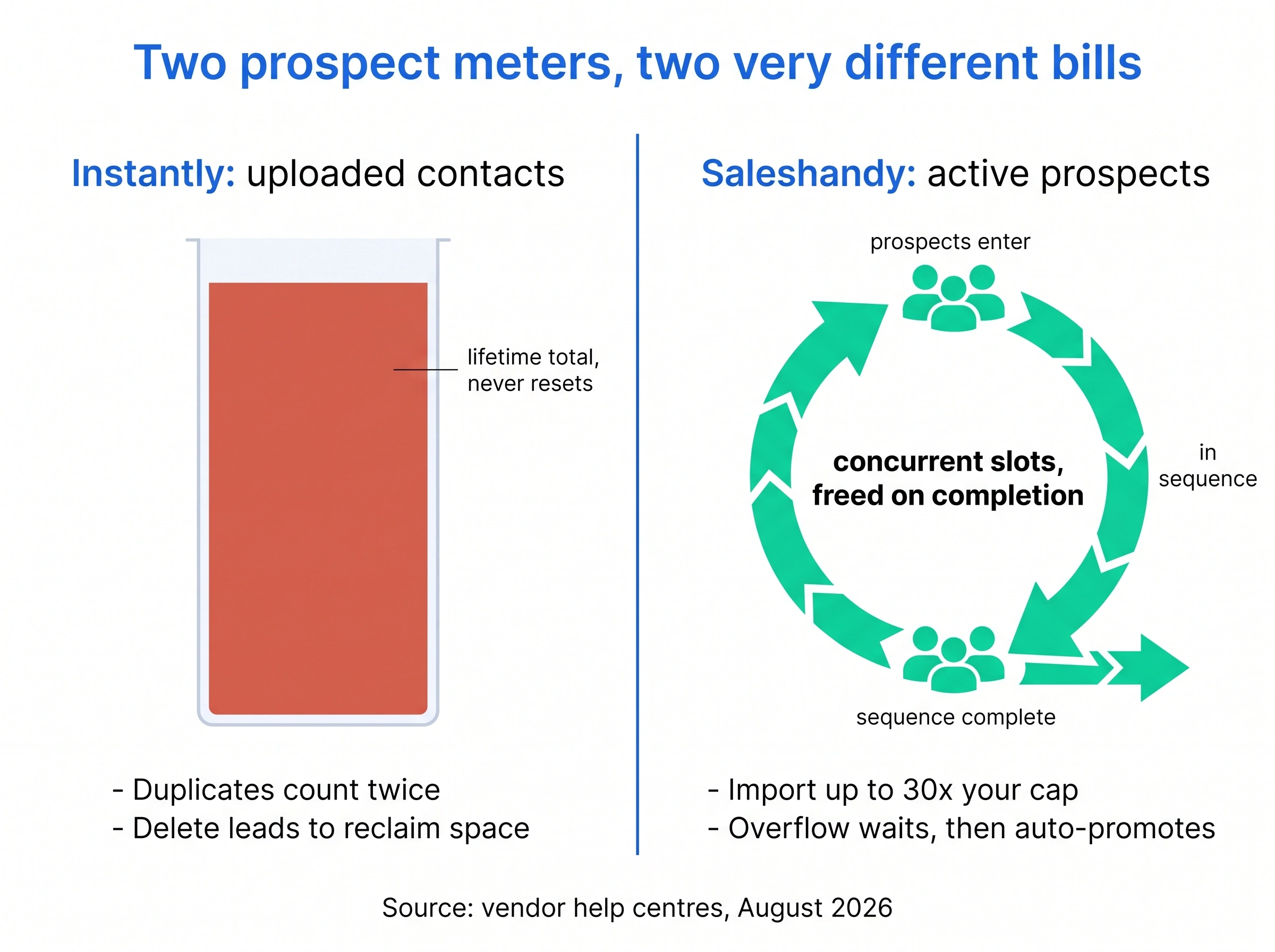
Instantly meters uploads, and it never resets
Instantly's cap is uploaded contacts, and its own help centre is blunt about the mechanics: it's a fixed total, not a monthly allowance, and it doesn't refresh. Every lead you have ever added to a campaign counts, whether that campaign is active, paused, draft or long finished.
Two consequences that catch people out:
- Duplicates count twice. Upload a prospect to Campaign A and again to Campaign B and you've spent two of your allowance on one human being. Run the same list past three offers and it costs you three times.
- Deleting is how you reclaim. Removing leads from campaigns frees the space back up, and the counter catches up within roughly five to ten minutes. That's a real escape hatch, but it means list hygiene becomes a billing chore, not just a deliverability one.
So Growth's "1,000 contacts" isn't a thousand a month. It's a thousand ever, until you delete something or pay more. Hypergrowth gives 25,000 and Light Speed 100,000 on the same lifetime basis, and the capacity add-on runs about $87 a month for another 25,000.
The monthly emails allowance is a separate meter that does reset: 5,000, 125,000 and 500,000 respectively.
Saleshandy meters concurrency
Saleshandy's cap is active prospects, which is how many people can sit in live sequences at once. A prospect who finishes their sequence releases the slot and the next one takes it.
The knock-on effects run the other way:
- You can import far more than your cap. Saleshandy's documentation puts the import ceiling at about 30 times your active limit, so a 2,000 active-prospect plan can hold roughly 60,000 records in the account.
- Overflow queues instead of failing. Push more prospects into a sequence than your plan allows and the extras land in a Waiting state, then get promoted into Active automatically as slots open. Your campaign throttles rather than stopping.
The honest counter-case: if your list is stable and you re-run the same audience with new messaging, Instantly's model is fine and arguably cheaper, because you upload once. It's churn that punishes it. Agencies and anyone buying fresh lists monthly feel this within a quarter. A founder emailing the same 800 target accounts all year never notices.
Verdict: Saleshandy, decisively, for any list that turns over. Instantly if your audience is fixed and you re-message it.
Instantly, up close
Quick facts
- G2
- 4.8/5 ★
- From
- $47/mo (about $30/mo billed annually)
- Free trial
- 14-day trial
- Best for
- Solo operators and agencies who want to be sending today, from a big pool of warmed mailboxes, against a stable list.
What it is. A cold email sending platform with a lightweight CRM attached. Connect unlimited mailboxes, warm every one automatically, rotate sends across the pool, and pull replies into the Unibox. The product has one opinion and commits to it.
Best for. Anyone whose constraint is time to first campaign. Its reputation for the shortest setup in the category is earned, and it shows up repeatedly in its G2 reviews, which are also by far the largest review corpus of the three tools here.
Key features. Unlimited sending accounts and unlimited warmup on every paid plan. A private warmup network of more than four million accounts, run through headless browsers that emulate reading behaviour rather than just pinging an SMTP server. Genuinely granular warmup controls: a daily warmup limit, an "increase by day" ramp, a target reply rate, read emulation, and a filter tag that keeps warmup traffic out of your real inbox. Inbox rotation. A built-in CRM so a reply becomes a record without an export. AI Copilot for campaign generation. Lead Finder, a 450M+ contact database with waterfall enrichment across several providers, sold as its own credits plan from $47 a month. Dedicated IP rotation on Light Speed.
Pricing. Growth $47, Hypergrowth $97, Light Speed $358, billed monthly. Annual billing takes those to roughly $30, $77 and $286. Capacity add-ons run about $87 a month each.
Limitations. The lifetime upload cap covered above is the big one, and Growth's 1,000 is genuinely small. The lead database is a second purchase, sold as credits from $9 a month, or $47 for 1,500 to 2,000 credits, so the sticker price isn't the bill. Sequences are linear: variants and A/B tests, but no conditional branch. Its Outreach plans are email only, with calling and SMS in a separate CRM. And the data-quality complaints that follow every bundled database follow this one, with reviewers reporting stale titles and higher bounce rates than a dedicated provider.
Pros
- Fastest setup in the category, and it isn't close
- Unlimited mailboxes and unlimited warmup on every paid plan
- The largest published warmup network of any tool here
- The finest-grained warmup controls of the three: ramp, reply rate, read emulation
- Built-in CRM means a reply doesn't need exporting anywhere
- Dedicated IP rotation available at the top tier
- The biggest review corpus in the category, so the rating carries weight
Cons
- Uploaded contacts is a lifetime cap that never resets, and duplicates count twice
- Growth's 1,000-contact allowance is the tightest entry plan here
- Lead database is a separate credits plan, from $9 a month
- Capacity add-ons at about $87 each stack up quickly
- No conditional branching, so sequences stay linear
- Outreach plans are email only, so LinkedIn lives in another tool and calls in a separate CRM
- Advertised price is the annual rate, roughly 57% below the monthly one
Saleshandy, up close
Quick facts
- G2
- 4.6/5 ★
- From
- $41/mo (about $34/mo billed annually)
- Free trial
- 7-day trial
- Best for
- Teams of five and up that recycle lists, need shared access, and want branching follow-ups on one bill.
What it is. A cold email platform built with a team in mind from the start. The same unlimited mailboxes and rotation as Instantly, wrapped in seats, permissions, native CRM sync, and a sequence engine that can branch.
Best for. The five-to-fifteen-person outbound team, and agencies that need whitelabel without an enterprise conversation.
Key features. Unlimited email accounts and unlimited warmup on every plan. Subsequences, which move a prospect into a different follow-up flow when trigger conditions match. A/Z testing with up to 26 variants. Spintax. A unified inbox. Native two-way sync with HubSpot, Pipedrive, Zoho and Salesforce, plus API and webhooks on Pro and above. Lead Finder credits bundled into every plan, where one credit buys a verified work email and a phone number costs six. Inbox Radar for placement testing against 50-plus seed accounts across Gmail, Outlook, Yahoo and Zoho. Whitelabel from Scale up. Mailboxes you can buy from the platform at roughly $2.99 to $3.99 each per month, with domains at $14 a year.
Pricing. Billed monthly: Starter $41, Pro $99, Scale $189, then Enterprise on request. Annual billing takes those to $34, $76 and $149. Starter is one seat, Pro covers ten, Scale has no seat limit.
Limitations. Starter is thinner than the price suggests: one user, no A/Z testing, no advanced warmup settings, no API, and a cap of ten email accounts per sequence, which quietly limits how wide you can rotate even though the account allows unlimited mailboxes. Warmup runs through TrulyInbox, a sister product with its own login, so the thing protecting your domain and the thing sending your campaigns are configured in different places. Verification credits are a one-time allocation per plan rather than a monthly refill. And the LinkedIn step isn't really automation: it hands the prospect to a third-party tool that needs its own paid account, so the replies live over there.
Pros
- Concurrency-based metering, so finished prospects free their slots
- Pro covers ten users and Scale has no seat limit at all
- Subsequences branch on behaviour instead of running a flat drip
- Lead Finder credits bundled into the plan, not a second subscription
- Native two-way sync with four major CRMs, plus API and webhooks
- Inbox Radar gives per-provider placement, not just a bounce number
- Whitelabel arrives at Scale rather than at enterprise pricing
Cons
- Starter caps you at 10 email accounts per sequence, limiting rotation width
- Warmup lives in a separate product with a separate login
- Advanced warmup controls and A/Z testing are gated to Pro and above
- Verification credits are one-time per plan, not monthly
- LinkedIn steps push the prospect into a third-party paid tool
- Trial is 7 days, the shortest of the three
- Public pricing and help-centre limits currently disagree
SmartReach.io, up close
Quick facts
- G2
- 4.6/5 ★
- From
- $29/mo flat, priced by active prospects
- Free trial
- 14 days, 200 prospects, no card
- Best for
- Teams whose prospects don't all reply to email, and who'd rather not buy mailboxes and channels from three vendors.
What it is. Cold email software that also works as a full sales engagement platform: email, LinkedIn, calling and WhatsApp as steps inside one sequence, with a built-in lead database and a full cold email deliverability suite underneath.
Best for. Teams that already know email alone isn't converting their segment, and anyone who has spent a week in DNS records and would rather not repeat it.
Key features. Plans bill on active prospects with unlimited users from the Plus tier up, so headcount never changes the invoice. The B2B Lead Finder covers 300M+ contacts and 50M+ companies with free email verification. Deliverability is a product, not a settings tab: warmup, inbox rotation, ESP matching, pre-send spam testing, blacklist monitoring that auto-pauses a flagged domain, and inbox placement reports. You can buy pre-authenticated secondary domains and mailboxes inside the platform across Azure, Google and Microsoft 365. A conditional multichannel drip moves a quiet prospect to another channel on its own, and a reply anywhere pauses every other step.
Pricing. Email Outreach runs $29, $89, $199 and $499 a month. Sales Engagement, which adds calling and LinkedIn, runs $39, $99, $249 and $599. Flat, monthly, no seat multiplier. The 14-day free trial covers 200 prospects without a card.
Limitations, honestly. The lead database is smaller than what either competitor advertises, and deep-filter prospecting will notice. LinkedIn automation is a $29 per month add-on per LinkedIn account, so three LinkedIn users on Sales Engagement Plus is $99 plus $87, which is $186 a month rather than $99. The G2 review corpus is a fraction of Instantly's, so the shared 4.6 rating carries much less statistical weight. And the surface area is larger than a pure email tool, which is the honest cost of doing five channels.
Pros
- Five channels in one sequence with conditional branching between them
- ESP matching, which neither competitor offers
- Buy pre-authenticated domains and mailboxes without touching DNS
- Free email verification on Plus and above rather than metered credits
- Unlimited users from Plus up, so hiring is free
- Blacklist monitoring that pauses a flagged domain automatically
Cons
- Lead database is smaller than either competitor's headline number
- More product to learn than a single-channel email tool
- Mailbox buying is gated to the Plus tier and above
How the sequences actually branch
Both tools let you write steps and delays. What separates them is whether the sequence can make a decision.
Instantly's sequences are linear. You get steps, delays, multiple variants per step, A/B testing, and reply detection that stops the thread. That covers most campaigns competently, and there's an argument that linear is a feature: fewer moving parts, fewer ways to build something that misfires at 3am.
Saleshandy's Subsequence is a branch. You define trigger conditions (opens, clicks on a specific URL, a tag being applied, a reply), combine them, set a delay, and matching prospects get pulled into a separate follow-up flow. Two details make it more useful than the average branching feature: conditions can be combined rather than fired one at a time, and the branch applies to prospects already in the sequence, not just ones added afterwards. It's on Pro and above.
The open-tracking trap nobody mentions
Here's where I'd push back on how this feature usually gets sold. The obvious use is "if they opened three times, send the hot-lead email." Don't build that.
Open tracking has been unreliable since Apple's Mail Privacy Protection started pre-fetching images, and Gmail proxies images too. A prospect who "opened three times" may be a privacy proxy that fetched your tracking pixel, or a security scanner walking your links before delivery. Branch on that and you'll route perfectly cold prospects into your warmest follow-up, then wonder why the hot-lead sequence converts worse than the normal one.
Branch on clicks and replies, which require a deliberate human action, and on tags you set from real signals like a demo booking or a CRM stage. Treat opens as a directional trend across a campaign, never as a trigger for an individual person.
On 26 variants
Saleshandy's A/Z testing goes to 26 variants and it's a genuine differentiator on paper. It's also a trap if you use it as advertised.
Run the arithmetic. Cold email reply rates sit in low single digits, so telling two variants apart reliably needs a substantial sample in each. Split a campaign 26 ways and each variant gets a twenty-sixth of your volume. On Starter's 6,000 monthly sends that's about 230 emails per variant, which is nowhere near enough to distinguish a 3% reply rate from a 4% one. You'll pick a "winner" that's noise, then scale it.
Two or three variants with real volume behind each will teach you more in a month than 26 variants will in six. The feature is good for the rare case of testing a genuinely wide creative space at high volume. It's not a default.
Verdict: Saleshandy, on capability, with the caveat that the two headline features here reward restraint.
Which one actually lands more mail?
Here's where the tie breaks, and not in the direction the feature table suggests.
Both tools warm mailboxes automatically. Both rotate sends. On paper that's parity. The difference is architectural: Instantly runs warmup inside the sending product on a private network of more than four million accounts, and Saleshandy runs it through TrulyInbox, a separate product with a separate login that happens to share an owner.
Does the separate login change your deliverability? No. It changes your operations. When placement drops on a Tuesday, the question is always "what changed", and having sending settings in one console and warmup settings in another adds a step to every one of those investigations. Small tax, paid weekly.
The warmup dials, and how people break them
Instantly exposes more warmup controls than most tools, which is good and also a loaded gun. The ones that matter:
- Daily warmup limit. How many warmup emails the mailbox sends per day. The suggested starting point for a brand-new account is around 10.
- Increase by day. The ramp. It steps the daily volume up gradually rather than starting at full tilt.
- Reply rate. The share of warmup emails that get answered by the pool.
- Read emulation. Headless browsers that scroll the message rather than just marking it read.
- Filter tag. Keeps warmup traffic out of your real inbox.
The reply-rate dial is where I see the most damage. People set it high on the theory that more engagement is better. A brand-new domain showing a 50% reply rate is not a human pattern, it's a signal that something is manufacturing engagement. Keep it plausible and let the ramp do the work over weeks.
The filter tag is the other one. Skip it and warmup traffic mixes into your real inbox, which makes your own reply metrics meaningless and buries actual prospect replies.
Saleshandy's warmup works, but the advanced controls are gated to Pro and above. On Starter you get warmup running with the defaults and no dials, which is fine for a first domain and limiting once you're managing several.
Seed lists tell you less than you think
Saleshandy's Inbox Radar is a real advantage over a bare delivery percentage. It sends to 50-plus seed inboxes across Gmail, Outlook, Yahoo and Zoho, and reports placement per provider: primary, spam, promotions, undelivered. You can schedule it rather than running it by hand. Standalone plans start around $23 a month for 15 tests, with unlimited testing near $79.
The caveat matters as much as the feature. A seed inbox is not your prospect. Seed accounts have no history with your domain, never replied to you, and never will. Your actual recipients have engagement history, or the conspicuous absence of it, and mailbox providers weight that heavily per-recipient. Placement tests catch catastrophic problems well: you're in spam everywhere, or Outlook hates you specifically. They're much weaker as a fine-grained optimization signal, and a clean seed test on a campaign that's quietly getting filtered for your real audience is a common and expensive false comfort.
The mailbox arithmetic
This is the calculation that decides whether your volume target is even reachable, and almost nobody runs it before buying.
Say you want 10,000 emails a month. Work backwards:
- Safe rate is roughly 40 emails a day per mailbox, well under the ~200 a day per account ceiling.
- About 22 sending days a month, if you're not emailing at weekends. That's ~880 emails per mailbox per month.
- 10,000 ÷ 880 ≈ 12 mailboxes.
- At 5 to 7 mailboxes per domain, that's 2 to 3 sending domains.
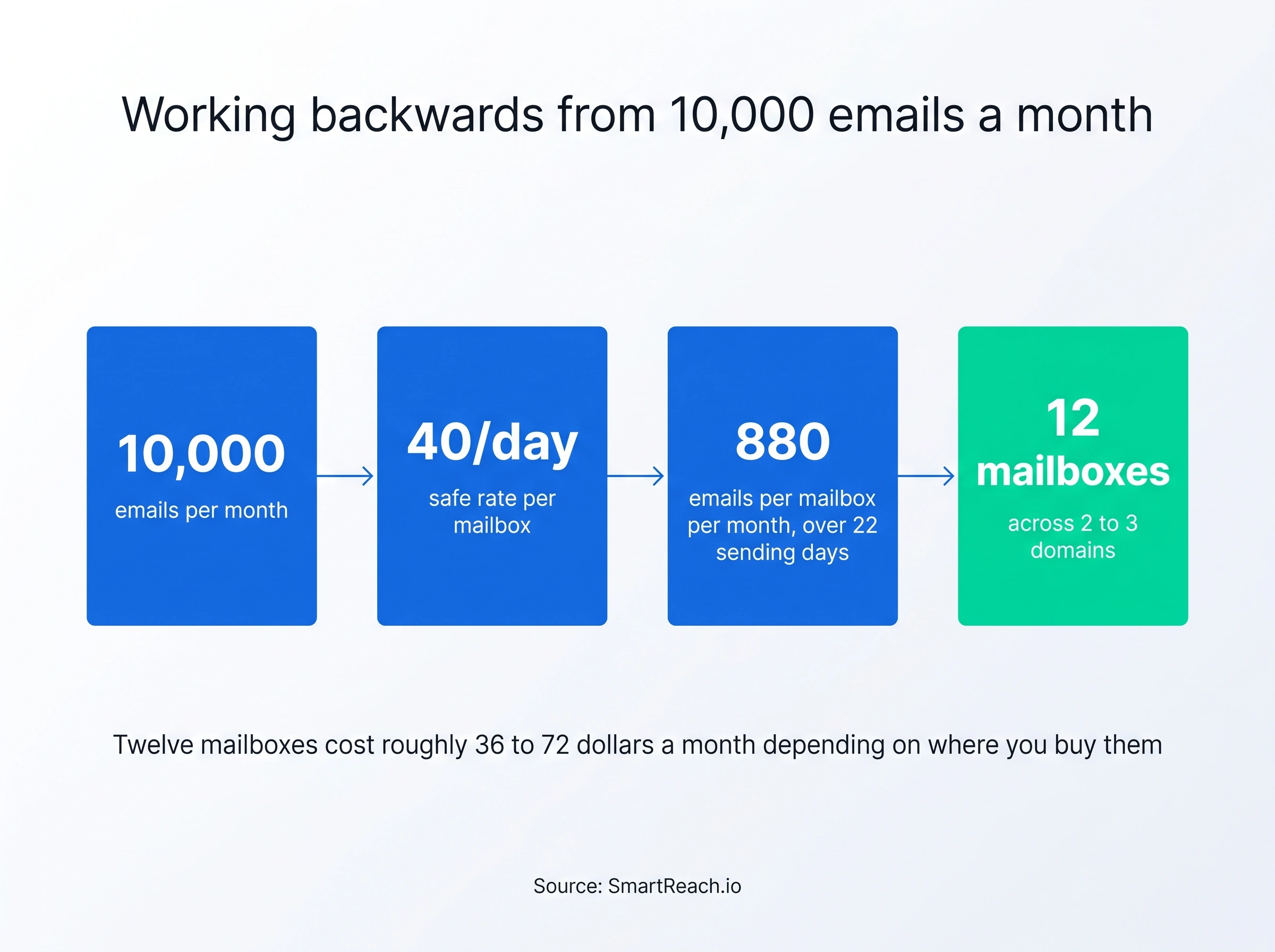
Now price it. Twelve mailboxes on Google Workspace at $6 each is $72 a month. Through Saleshandy at about $2.99 each it's roughly $36, plus $14 a year per domain. Instantly sells done-for-you mailboxes too, at $5 a month for a Google account or $4 for an Airmail account, plus $15 a year per domain.
Which reframes "unlimited email accounts" honestly: it's unlimited in the tool. Every mailbox is still a real cost somewhere. Unlimited mailboxes is a shift in where you pay, not a saving.
Two constraints fall out of this that the feature tables hide. Instantly Growth caps you at 5,000 emails a month, so the plan binds before the mailboxes do. And Saleshandy Starter allows only ten email accounts per sequence, so a single campaign can't rotate across the twelve mailboxes you just bought.
That 40-a-day figure is the number worth internalizing before you compare anything else. It sits well under the roughly 200 a day per account that mailbox providers will tolerate, and the gap is deliberate: the ceiling is what you can get away with, not what you should aim at. Our email warmup guide covers why the reputation curve cares about consistency far more than which vendor built the tool.
SmartReach adds ESP matching on top of rotation, which neither competitor has: it routes mail from a Google mailbox toward Google recipients and Microsoft toward Microsoft, because same-provider delivery paths are treated better. Small lever, compounds across thousands of sends.
Verdict: Instantly on warmup network and controls, Saleshandy on placement diagnostics, SmartReach on routing. If you're standing up new domains, the ranking barely matters next to your send rate.
What does each one really cost?
This is the section both vendors would rather you skimmed.
Instantly advertises about $30 a month. Saleshandy advertises about $34. Both figures are annual rates requiring a year up front. Pay month to month, which is what most teams do while evaluating, and Instantly is $47 while Saleshandy is $41.
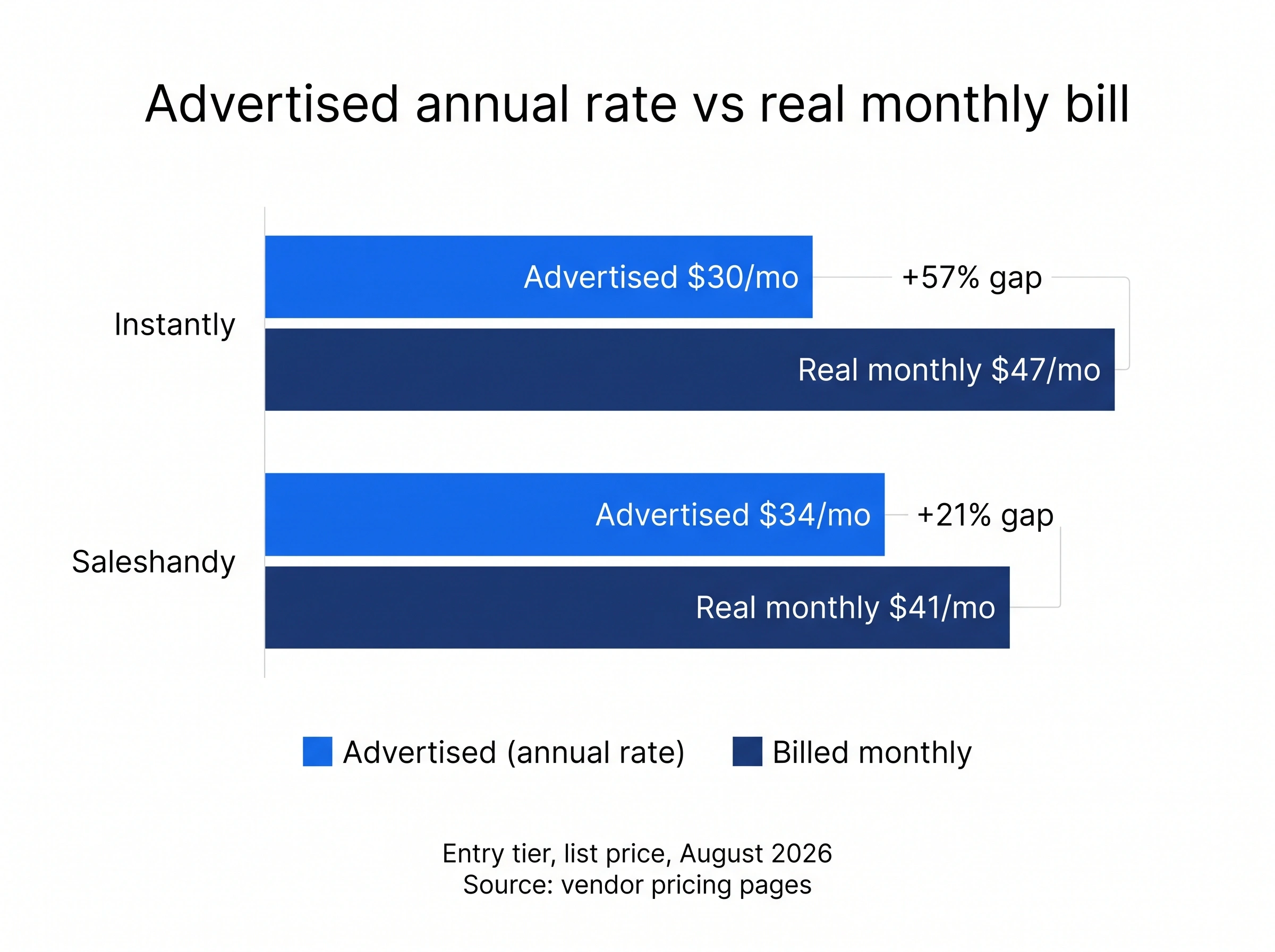
A 57% gap between the headline and the invoice isn't a rounding error, and it's the most common reason a cold email budget comes in over plan. Read every price on both sites as the annual number until proven otherwise.
Now run a real scenario. Alex is a VP of Sales with eight SDRs, about 25,000 prospects contacted a month, mostly fresh lists, and everyone needs to see everyone else's replies.
Three plans within two dollars of each other on the pricing page, and a roughly $900 first-year spread once the metering model is applied. That's the whole pricing story, and it's invisible on every comparison table including the one at the top of this post.
Three costs nobody puts in the table:
- Mailboxes. Not included in any base price. Twelve of them is $36 to $72 a month depending on where you buy.
- Verification. Saleshandy's credits are a one-time allocation per plan, so a team reloading lists monthly buys more.
- Phone numbers. Saleshandy's Lead Finder charges one credit for a verified email and six for a phone number, so a list of 500 contacts with numbers costs 3,500 credits, not 500.
Verdict: Saleshandy on cost per prospect between the two named tools, and the gap widens the more your list turns over.
Lead data, and why the headline number is noise
Both tools sell a database. Both quote a number. The numbers aren't comparable and neither predicts anything about your niche.
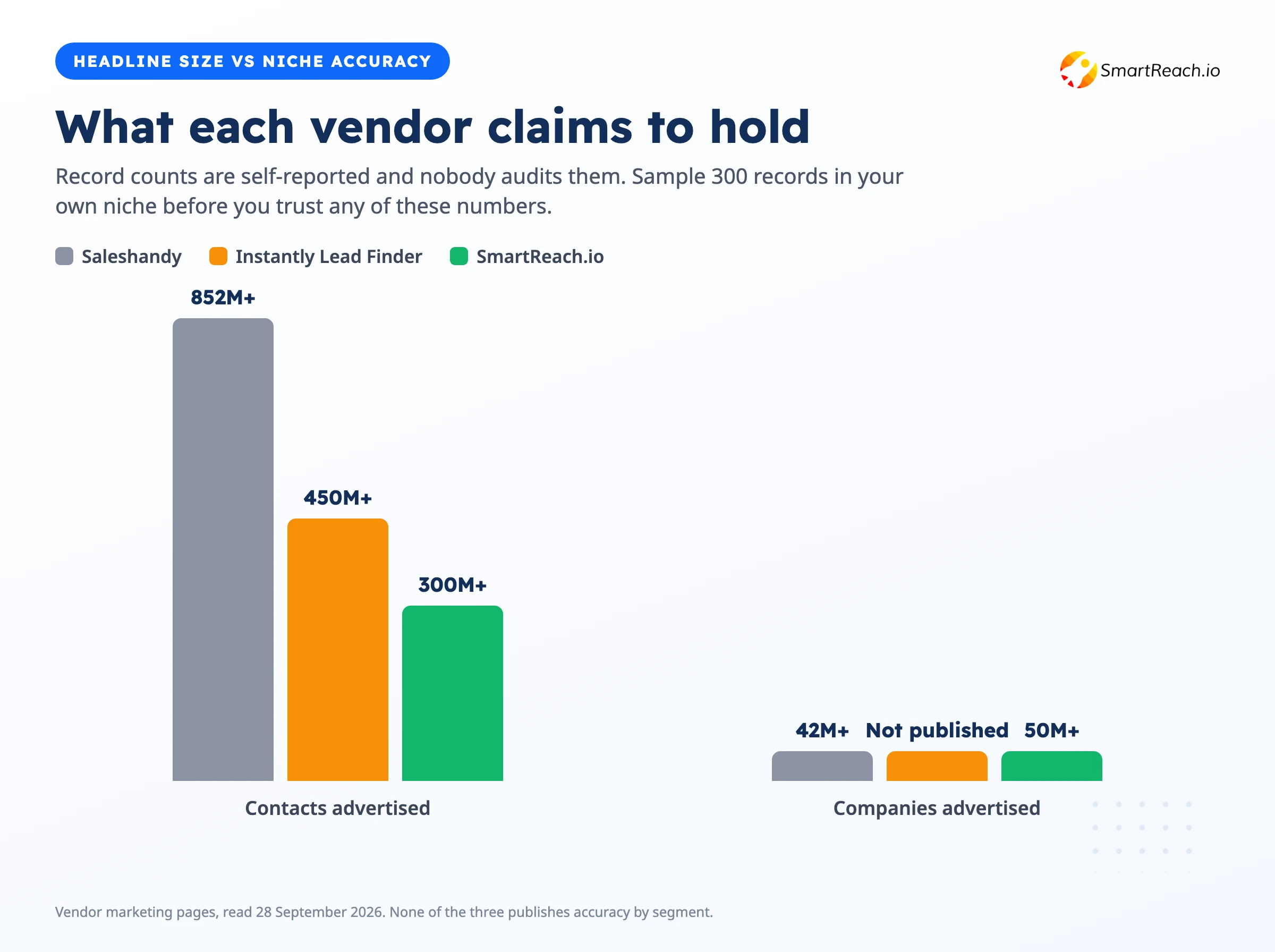
Saleshandy's own marketing quotes 852M+ contacts, the largest figure of the three by a wide margin. Instantly's Lead Finder publishes 450M+ with waterfall enrichment across several providers, which is a genuinely useful mechanism: if the first provider can't return a verified email, it tries the next. SmartReach bundles 300M+ contacts and 50M+ companies with free verification on every contacted prospect.
Here's the opinion I'll defend. Database size is the least useful number on any of these pricing pages. Vendors count differently, deduplicate differently, and none publishes accuracy by segment. An 850-million-record database that covers US mid-market beautifully and has stale titles for European mid-market is worse than a 300-million-record one that's current in your exact vertical.
What matters more is the commercial model, and the three differ sharply. Instantly sells the database separately, so it's two subscriptions and two renewal dates. Saleshandy meters it as monthly credits inside the plan, with the 1-credit email and 6-credit phone split above. SmartReach includes it without a credit wallet.
Am I certain the commercial model matters more than raw size? No. If Instantly's waterfall enrichment is materially more accurate in your market, paying twice is defensible. I'd just want that tested rather than assumed. Pull 300 records from each in your real target segment and count how many titles are current. That's an afternoon, and it beats every database claim on the internet, this post included.
Verdict: Saleshandy on commercial model, Instantly on enrichment mechanism, neither on accuracy until you've sampled.
Does either one do more than email?
Short answer: no, not in the way most teams mean.
Instantly keeps its Outreach plans email-first by design, sells calling and SMS in a separate CRM, and has no native LinkedIn automation, which is a defensible product decision. Saleshandy names multichannel on its site, but the LinkedIn step hands the prospect to a third-party tool with its own paid account and its own login. Your sequence starts in Saleshandy and your LinkedIn replies land elsewhere. That's an integration, not a channel.
For plenty of teams this doesn't matter. If your buyers reply to email, skip this section. But if you sell into a segment where email reply rates have gone flat, this comparison has no winner and you're shopping in the wrong category. That's the case for a sales engagement platform instead, where LinkedIn, calls, WhatsApp and SMS are steps in the same sequence and a reply on any of them pauses the rest.
What breaks when you switch
Worth knowing before you commit, because the migration cost is asymmetric and mostly invisible.
What moves easily. Sequences, templates and lists. Rebuilding a five-step sequence in a new tool is an afternoon, and both platforms import CSVs without drama. Don't let anyone tell you this is the hard part.
What doesn't move at all. Domain and mailbox reputation, warmup history, and per-recipient engagement data. Reputation attaches to your sending domains and IPs, not to your vendor, so switching tools doesn't reset a damaged domain and doesn't carry a good one forward into new mailboxes. If your placement problem is a burned domain, changing platforms fixes nothing.
What will hurt you if you rush it. Suppression and unsubscribe lists. Move these first, verify them by hand, and confirm they're enforced across every campaign and mailbox in the new tool before a single send goes out. Emailing someone who already opted out is the fastest way to earn spam complaints on a brand-new setup, and complaints are the one signal mailbox providers act on immediately.
One practical sequence: keep both tools running for two weeks, move one domain at a time, and watch placement on the new platform before pointing everything at it.
So which one should you buy?
Choose Instantly if
Your audience is stable and you re-message it rather than buying fresh lists monthly, which is the condition its lifetime upload cap rewards. You want to be sending within the hour. You want the deepest warmup controls and the largest warmup network behind your domains. Linear sequences are enough.
The right pick for speed and for pure email volume against a fixed list. If setup time is your bottleneck, stop comparing and go buy it.
Choose Saleshandy if
Your list turns over, which makes concurrency-based metering worth real money. You're five people or more and everyone needs access. You want branching follow-ups, bundled lead credits and per-provider placement testing on one bill. Or you're an agency needing whitelabel without an enterprise contract.
Better cost per prospect than Instantly once metering and seats are counted. The trial is only 7 days, so plan the test before you start it.
Choose SmartReach.io if
Email alone has stopped working on your segment. You need LinkedIn, calls or WhatsApp as real automated steps rather than tasks in a third tool. You're spinning up domains and mailboxes and would rather buy them pre-authenticated than spend a week on DNS. Or you want verification and lead data without a credit wallet.
Best fit for teams past the single-channel stage who'd rather run one system than reconcile three.
The verdict
Whatever you pick, run the same test on it. Take 200 real prospects from your actual target market, send an identical sequence for two weeks, and measure inbox placement and reply rate instead of feature counts. Check your contact meter on day 14 too, because that's the number that will surprise you in month three. These two tools look almost the same on paper and behave differently on your domain, with your list, in your niche.
Want the deeper look at either one? We've written a full Instantly.ai review, a SmartReach.io vs Instantly comparison and a detailed Saleshandy vs SmartReach.io breakdown that prices both against a real ten-person team. If you're still widening the shortlist, the roundups of Saleshandy alternatives and Instantly alternatives both start from the invoice, and Instantly vs Apollo covers the version of this question where lead data is the bottleneck rather than sending.
Still weighing Saleshandy itself? The Saleshandy review covers its tiers and limits in full, Saleshandy versus Dripify is the read when LinkedIn is the channel that matters, and Saleshandy versus Lusha is the one when the contact data is the harder half.
Questions people actually ask
Is Instantly or Saleshandy better for cold email?
Saleshandy suits teams that recycle lists and add people, because it meters prospects by concurrency and its Pro plan covers ten users. Instantly suits solo senders and agencies that want the fastest setup and the biggest warmup network. The deciding factor is usually how your list behaves over time, not which feature list is longer.
How does Instantly count contacts, and does the limit reset?
It doesn't reset. Instantly's uploaded contacts limit is a fixed lifetime total that counts every lead you've ever added to a campaign, including paused, draft and completed ones. The same person uploaded to two campaigns counts twice. Deleting leads frees the space back up within about 5 to 10 minutes, which makes list hygiene a billing task, not just a deliverability one.
How does Saleshandy count active prospects?
By concurrency, not consumption. Your limit is how many prospects can sit in live sequences at the same time, so a prospect who finishes a sequence releases their slot for the next one. You can import up to 30 times your active limit, and anything over the cap waits in a queue and gets promoted automatically as slots free up.
How much do Instantly and Saleshandy really cost per month?
The advertised prices are annual rates. Paid monthly, Instantly runs $47, $97 and $358, and Saleshandy runs $41, $99 and $189. Instantly's lead database is a separate credits plan from $9 a month, and its done-for-you mailboxes start at $4. Saleshandy bundles Lead Finder credits and sells mailboxes from around $2.99 each per month.
Does Saleshandy have conditional sequence branching?
Yes, through Subsequences on Pro and above. You set trigger conditions such as opens, clicks, tags or replies, combine them, add a delay, and matching prospects move into a separate follow-up flow. It applies to existing prospects too, not just new ones. Instantly has no direct equivalent, so its sequences stay linear with variants.
Is Saleshandy's 26-variant A/Z testing actually useful?
Rarely, at normal cold email volumes. Splitting a campaign 26 ways means each variant gets a fraction of your sends, and cold email reply rates are low enough that you'd need tens of thousands of sends before the winner means anything. Two or three variants with real volume behind each beats 26 variants of noise.
Does Saleshandy include email warmup?
Yes, unlimited warmup is included on every paid plan, but it runs through TrulyInbox, a sister product with its own login, and the advanced warmup controls are gated to Pro and above. So Starter gets warmup running without the dials to tune it. SmartReach.io includes warmup in the same app, at 10 accounts on Basic and 25 from its $89 Plus plan.
Which is better for an agency, Instantly or Saleshandy?
Saleshandy in most cases, because whitelabel arrives at Scale and its concurrency-based metering suits client lists that cycle. Instantly's lifetime upload cap is the constraint to watch: an agency loading fresh lists every month consumes it permanently and ends up buying $87 add-ons or deleting leads to stay under it.
What doesn't transfer when I switch cold email tools?
Domain and mailbox reputation, warmup history, and engagement data. Sequences, templates and lists you can rebuild in an afternoon. Move your suppression and unsubscribe lists first and verify them by hand, because the fastest way to burn a domain on a new platform is emailing someone who already opted out.
Stop juggling tools
Book more meetings on every channel
Join 5,000+ teams running multichannel outreach from one sequence, with deliverability built in.