How can I boost email open rates to improve deliverability?

On this page
Amy sent the same sequence to two lists last quarter. The first list, built by hand, opened well and booked meetings. The second, bought in a hurry, went silent within a week. Then her next campaign from the same domain went silent too, even to good prospects.
Her first instinct was to rewrite the subject lines. Sound familiar? That's the wrong end of the problem. Open rates don't earn you the inbox. The inbox earns you open rates, and an email sitting in spam can't be opened at all.
Fix what decides where your email lands, and your open rates and deliverability recover together. Here's the order to do it in for 2026, using the numbers mailbox providers actually publish.
Does a higher open rate improve deliverability?
Not directly. A higher open rate is a result of good deliverability, not a cause of it. Google's email sender guidelines state that "Google doesn't track open rates" and that low open rates "aren't necessarily an accurate indicator of deliverability or spam classification issues." Gmail judges senders on spam complaints, authentication, sending patterns and how recipients treat mail inside the inbox.
That doesn't make opens useless. A sudden drop is often the first visible sign that something upstream broke. The diagnosis side is covered in why low open rates lead to spam folder issues. This guide is the fix list.
The gap is bigger than most senders assume. Validity's 2026 Email Deliverability Benchmark found that 87.2% of email reached the inbox worldwide in 2025. Of the rest, 6.6% went to spam and 6.1% was blocked or deferred before it arrived. Validity also points out that the "delivered" rate in most sending tools is just sent minus bounced, so it can look near perfect while one email in eight never reaches a person.
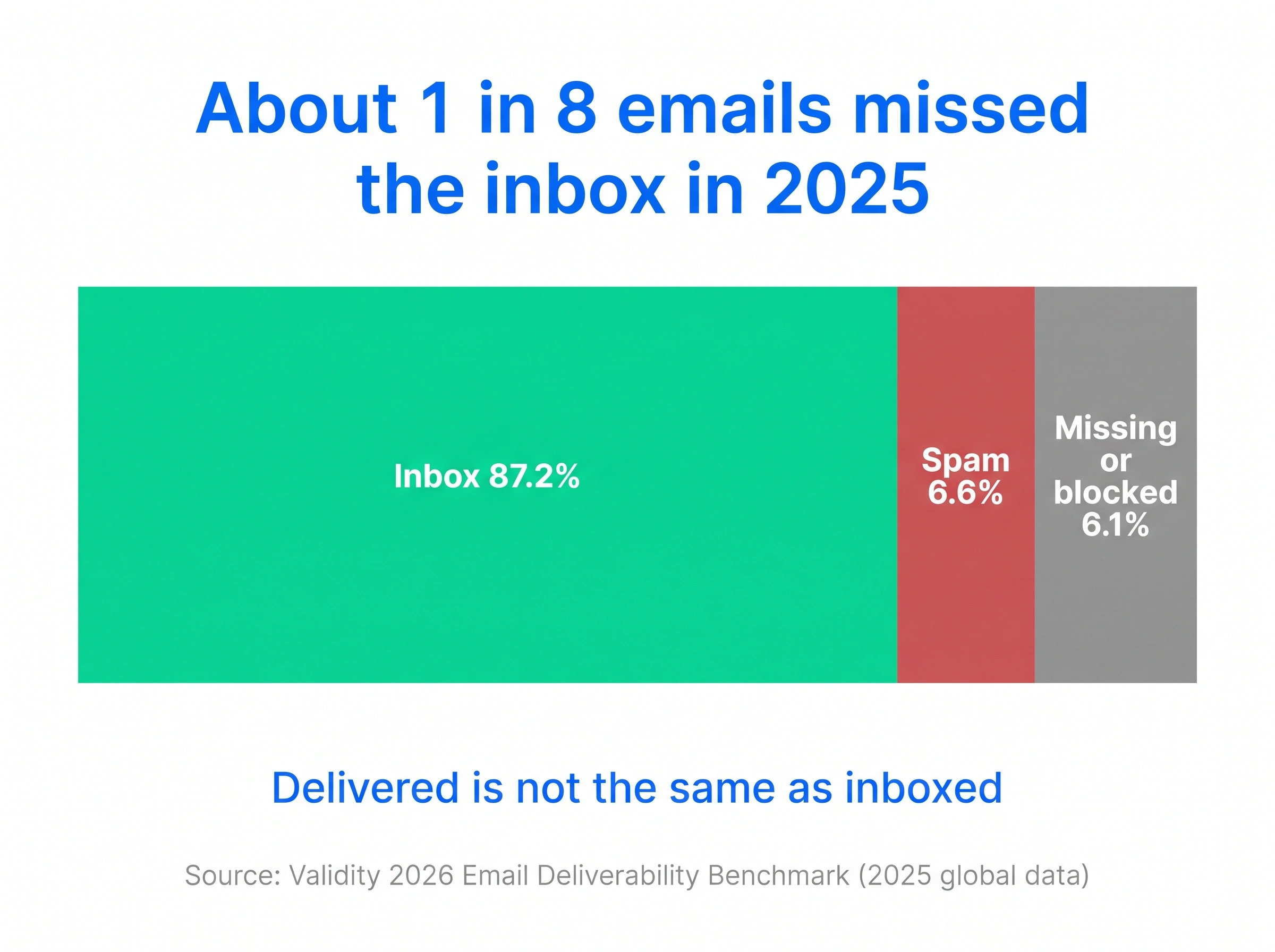
Every email in that missing slice is an open you can't win back with a better subject line.
What should I fix first to raise open rates and deliverability?
Fix what decides placement before what decides clicks. This is the order I'd work in, because each step makes the next one measurable.
- Authentication. SPF, DKIM and DMARC passing and aligned on every sending domain.
- Spam complaints. Under 0.1% at Gmail, with an easy way out of your emails.
- List hygiene. No invalid addresses and no long-term non-engagers.
- Sending volume. Steady daily volume spread across warmed inboxes.
- Content. No spam-filter triggers in the copy, links or HTML.
- Subject lines and timing. Only now does copy testing tell you anything.
Here's my strong opinion. Don't A/B test a single subject line until steps 1 to 3 are clean. If a third of variant B lands in spam, the test is measuring placement luck, not copy.
How do I check authentication before a campaign?
Look up the SPF, DKIM and DMARC records for every domain you send from, and confirm the From domain aligns with them. Gmail requires SPF or DKIM from every sender, and all three records plus alignment from anyone sending more than 5,000 messages a day to Gmail accounts. Microsoft set the same bar for Outlook.com and began rejecting non-compliant bulk mail with a "550; 5.7.515" error from May 5, 2025.
Run each domain through the free email authentication checker. It reads all three records and flags the one that's failing. If a record is missing, the setup steps are in how to set up SPF, DKIM and DMARC.
Re-check after any DNS edit, because a change made by someone else on the team can quietly break a DKIM key. Every new secondary domain needs its own records before it sends anything.
How do I keep spam complaints low enough?
Keep your Gmail spam rate below 0.10% in Postmaster Tools and never let it reach 0.30%. Those are Google's published limits, and Google warns that a high spam rate leads to more spam classification that takes time to reverse. The bulk sender rules also require one-click unsubscribe on marketing mail.
When Google announced those rules in October 2023, Gmail's Neil Kumaran wrote that its defenses already "stop more than 99.9% of spam, phishing and malware from reaching inboxes and block nearly 15 billion unwanted emails every day" (Google). Large senders must also process unsubscribe requests within two days. A filter that strict doesn't need many complaints to sort you with the spam.
Three habits keep complaints down in cold outreach.
- Make leaving easy. A plain "not the right person? reply and I'll stop" line beats a buried link. People who can't find the exit click "Report spam".
- Don't mislead in the subject line. A fake reply prefix or invented urgency earns one open and a lasting complaint.
- Stop early. A five-step sequence to someone who ignored the first three is mostly complaint risk.
The spam complaint rate calculator shows where a campaign sits against Google's two lines.
Which contacts should I stop emailing?
Stop emailing invalid addresses and anyone who hasn't engaged with anything you've sent in months. Google's guidelines go further than most sales teams would, suggesting you "consider unsubscribing recipients who don't open or read your messages." A smaller list that engages sends better signals than a big one that ignores you.
Old lists carry a second risk. Validity notes that Yahoo closes inactive mailboxes after 12 months and Gmail after 24 months, so an address that was valid when you collected it can turn into a hard bounce. Unknown-user bounces hurt sender reputation, which is why list detox still matters in 2026.
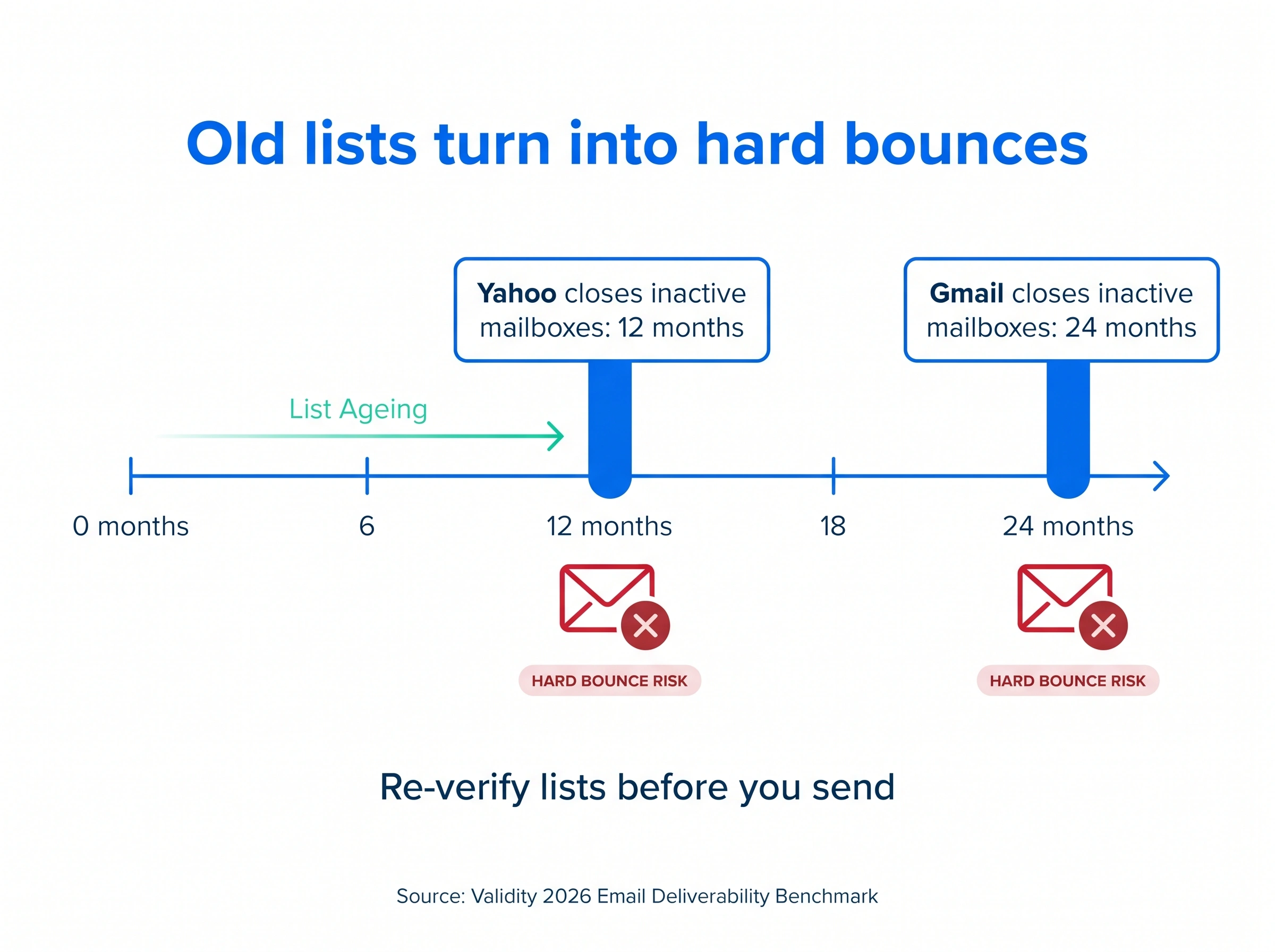
A workable sunset rule for cold outreach looks like this.
- Verify every new list before it enters a sequence, and re-verify anything older than six months.
- Score prospects on fit and fresh signals (a job change, hiring, funding) and send to the top scores first, so a domain's early sends get the best engagement.
- Remove anyone who finishes a sequence without a reply, and don't re-add them for at least a quarter.
- Suppress every bounce and every "not interested" immediately.
Why inactive subscribers affect email deliverability explains how silent contacts drag a domain down.
How many emails should each inbox send per day?
Send steady, modest volume from several warmed inboxes rather than big bursts from one. Why risk a whole domain on one busy Tuesday? Google warns that suddenly doubling volume can bring rate limiting or a reputation drop, and asks senders without a history of large volumes to increase slowly.
I'll admit the uncertainty here. Nobody outside Google knows where Gmail's line sits, and it likely differs by domain age and history.
What works in practice is reputation layering.
- Keep cold outreach off your main domain. Send from secondary domains and email accounts so a bad week never touches invoices and customer mail.
- Warm every new inbox before it joins a campaign. The email warmup guide covers ramp schedules.
- Rotate sends across inboxes so no single account carries the campaign. Cold email inbox rotation walks through the setup.
- Pause, don't push. If one inbox's replies fall off a cliff, stop it and check placement before sending more.
How do I tell if emails land in spam or just go unopened?
Send a seed test and split your results by mailbox provider. If Gmail recipients reply and Outlook recipients go silent, you have a placement problem at Microsoft, not a weak subject line. Validity found Microsoft the toughest provider in 2025 at 77.4% inbox placement, so it's the first place to look.
Three checks answer the question.
- Seed test. Send the real campaign email to test inboxes at Gmail, Outlook and Yahoo and note which folder each lands in. An inbox placement test beats staring at open rates.
- Google Postmaster Tools. It shows your Gmail spam rate and whether you meet the bulk sender requirements.
- A real difference. The free open rate calculator tells you whether a gap between two campaigns is real or a small sample moving around.
Read opens with care. Apple Mail Privacy Protection loads tracking pixels whether or not anyone reads the email, so replies by provider are the cleaner signal.
Which content triggers spam filters?
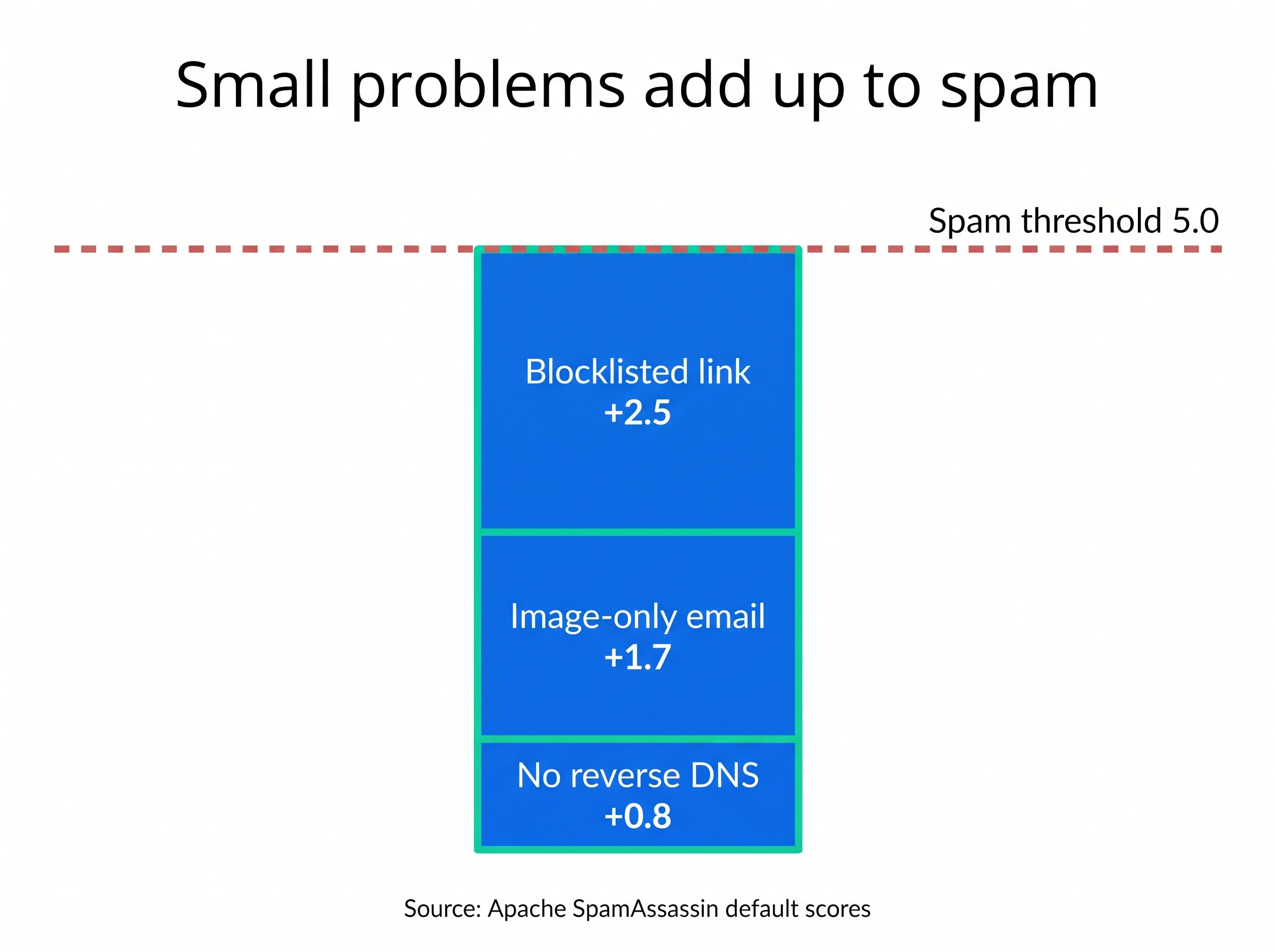
Content filters add up many small signals and act only once the total crosses a line. SpamAssassin, the open-source filter that many company mail servers run, publishes its scores, and it marks a message as spam at 5.0 points by default. No single item below gets you there, but three or four together can.
| What's in the email | SpamAssassin rule | Points added |
|---|---|---|
| A link to a domain on the Spamhaus blocklist | URIBL_DBL_SPAM | 2.5 |
| A body with nothing in it | EMPTY_MESSAGE | 2.3 |
| A "Dear Something" greeting | DEAR_SOMETHING | 2.0 |
| DMARC failure on a domain set to reject | DMARC_REJECT | 1.8 |
| Almost all image and very little text | HTML_IMAGE_ONLY_08 | 1.7 |
| A sending server with no reverse DNS | RDNS_NONE | 0.8 |
| A subject line in all capitals | SUBJ_ALL_CAPS | 0.5 |
| A valid DKIM signature | DKIM_VALID | -0.1 |
Scores come from SpamAssassin's published score file for its standard setup with Bayes and network tests on, rounded to one decimal.
Notice that a DMARC failure costs more than an all-caps subject line. Plain text, a real greeting and clean links do more than deleting every "free" from your copy. To check a draft anyway, paste it into the spam word checker.
Do better subject lines still raise open rates?
Yes, once your email reaches the inbox. With placement fixed, the subject line and preview text become the biggest levers you control. Keep subject lines short, specific and honest, write the preview text on purpose, and send during the recipient's working hours.
For the copy side, start with B2B cold email subject lines, then how to increase email open rate for cold outreach and the best time to send cold emails.
How does SmartReach.io help raise open rates?
SmartReach.io is a cold email software that treats deliverability as part of every send, and its Sales Engagement plans move a quiet prospect from email to LinkedIn, calls or WhatsApp instead of firing a fifth email into the same silence. The fix order above maps onto it step by step.
- Authentication. SmartReach.io checks SPF, DKIM and DMARC when you connect a sending email account, so a broken record shows up before a campaign goes out.
- Volume per inbox. Inbox rotation spreads one campaign across connected email accounts with a daily cap on each. SmartReach.io recommends under 40 emails a day per inbox, well within its limit of 200 a day per account.
- Warmup. AI email warmup builds a new inbox's reputation before it carries real outreach.
- Monitoring. The cold email deliverability tools flag a struggling inbox before it drags the rest of the campaign down.
SmartReach.io is rated 4.6 on G2 from 60 reviews as of October 2026, and its plans scale by active prospects with no per-seat pricing.
Conclusion
Amy's fix wasn't a better subject line. She moved cold outreach to warmed secondary domains, trimmed the bought list and checked placement by provider before each launch. The opens came back because the emails were finally in the inbox.
Work the same order, and leave the copy for last. If you'd like those checks built into every campaign, start a 14-day free trial of SmartReach.io and connect your first sending account.
FAQs on increasing open rate
How can I increase my email open rate?
Get more of your email into the inbox first, then improve what recipients see. Pass SPF, DKIM and DMARC, keep Gmail spam complaints under 0.1%, remove invalid and long-silent contacts, and send steady volume from warmed inboxes. Once placement is clean, short honest subject lines, deliberate preview text and sending in the recipient's working hours lift opens further. Judge each change on replies, because Apple Mail Privacy Protection inflates opens.
Does open rate affect deliverability?
Not directly. Google states that it doesn't track open rates, and that low open rates aren't necessarily a sign of spam classification problems. Mailbox providers judge senders on spam complaints, authentication, sending patterns and how people treat the mail inside their inbox. A low open rate is usually a symptom of those problems, so fix the cause and the open rate recovers on its own.
How to maximize email deliverability?
Work in order. Authenticate every sending domain with SPF, DKIM and DMARC, keep spam complaints under Google's 0.1% target, verify lists and drop contacts who never engage, and spread steady volume across warmed secondary-domain inboxes. Then clean up content such as image-only emails and blocklisted links, which SpamAssassin scores against you. Check placement with seed tests and Google Postmaster Tools after every change.
What is a good deliverability rate?
Measure inbox placement, not the delivered rate. A sending tool's delivered rate is sent minus bounced, so it often reads above 95% while plenty of mail sits in spam. Validity's 2026 benchmark put average global inbox placement at 87.2% in 2025, with Gmail at 89.8% and Microsoft at 77.4%. Staying above 90% at every provider is a strong result for cold outreach.
How to calculate deliverability?
Divide the emails that reached the inbox by the emails you sent, then multiply by 100. If you send 1,000 emails and a seed test suggests 870 of them landed in the inbox, your inbox placement rate is 87%. The more common formula, delivered divided by sent, only removes bounces, so it shows the server accepted the mail but not whether anyone could see it.
Can cold email software improve open rates?
It can, by protecting inbox placement rather than writing subject lines. SmartReach.io is a cold email software that spreads campaigns across connected email accounts with inbox rotation, warms new inboxes, and checks SPF, DKIM and DMARC on each sending account. SmartReach.io recommends under 40 emails a day per inbox, within its 200-a-day limit per account, and its Sales Engagement plans add LinkedIn, calls and WhatsApp steps.
Stop juggling tools
Book more meetings on every channel
Join 5,000+ teams running multichannel outreach from one sequence, with deliverability built in.