Why Low Email Open Rates Lead to Spam Folder Issues?

On this page
Tanya's first cold campaign looked fine for two weeks. Then the open rate on her dashboard fell by half, replies stopped, and her manager asked the question every new SDR dreads. Are we in spam?
Maybe. But not because the open rate dropped. That's the part most advice gets backwards, including the first version of this article.
Google's own sender guidelines say it plainly. "Google doesn't track open rates." The same page says low open rates "aren't necessarily an accurate indicator of deliverability or spam classification issues." What Gmail and Outlook watch is what recipients do with your email, and a falling open rate is often the first visible sign that those signals have turned against you.
Here's which signals move an email into spam in 2026, and what to fix first.
Why do low open rates cause my emails to end up in spam?
They don't, at least not directly. Mailbox providers don't see the open rate your sending tool reports, and Google states that it doesn't track opens at all. What sends email to spam is the behavior that usually sits behind a low open rate. Recipients delete without reading, ignore message after message, or click "Report spam", and those actions lower the sender's reputation with that provider.
So the old explanation (low opens make Gmail distrust you) has the cause and effect reversed. A cold, badly targeted list produces two things at once. It produces low opens, which you see, and complaints and silent deletes, which Gmail sees.
Fix the list and both numbers recover. Chase the open rate with clickbait subject lines and you'll often make the second problem worse, because a misleading subject line is exactly what earns a spam report.
Here's my strong opinion on this. Open rate shouldn't be a headline metric for cold email in 2026. Report it to nobody. Use it only as a smoke alarm that tells you to go and check the signals below.
What do Gmail and Outlook actually measure?
They measure complaints, authentication, and engagement inside their own inboxes. None of these depends on your tracking pixel. The numbers below come from the providers' own rules and Validity's benchmark.
| Signal | What the provider looks at | The 2026 line to stay behind |
|---|---|---|
| Spam complaints | Recipients clicking "Report spam" or "Junk" | Under 0.1% in Google Postmaster Tools, never 0.3% (Google) |
| Authentication | SPF, DKIM and DMARC passing and aligned | Required above 5,000 emails a day by Gmail and Microsoft |
| Engagement | Replies, reads, deletes without reading, "Not spam" rescues | No published threshold, weighted more each year (Validity) |
| Sending pattern | Volume spikes, bursts from new domains | Steady, gradual increases (Google) |
| List quality | Bounces and unknown users | Remove invalid addresses before sending |
Spam complaints
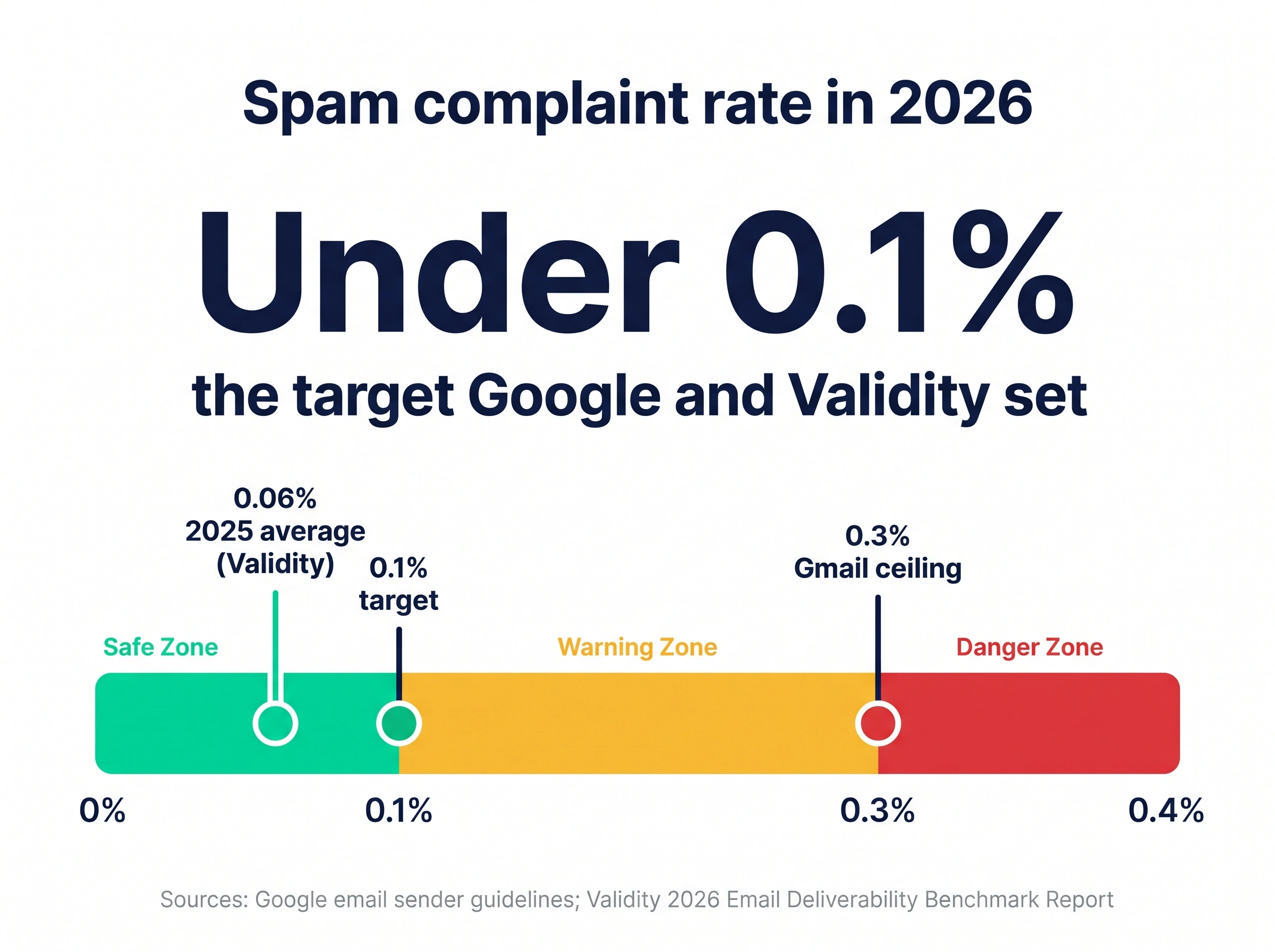
Complaints are the strongest signal a recipient can send, and the one most directly tied to spam folder placement. Google asks senders to keep their spam rate in Postmaster Tools below 0.1% and to "avoid ever reaching a spam rate of 0.30% or higher." It adds that a high spam rate "leads to increased spam classification" and that recovery takes time.
The bar has tightened. Validity's 2026 Email Deliverability Benchmark Report notes that guidance used to allow 0.2% to 0.3%, while "under 0.1 percent is now the expectation." Across 2025 the average complaint rate it measured was 0.06%. If you want to know where a campaign sits, the free spam complaint rate calculator does the arithmetic.
Authentication
Authentication proves the email really comes from your domain. Google requires SPF or DKIM from every sender, and SPF, DKIM and DMARC from anyone sending more than 5,000 messages a day to Gmail accounts. Microsoft went further.
Since May 5, 2025, Outlook has rejected mail from high-volume domains that fail these checks with the error "550; 5.7.515 Access denied", according to Microsoft's announcement. A rejected email can't be opened, so a broken record looks like a sudden drop in opens. Run your domain through the free email authentication checker before you touch the copy.
Engagement
Engagement is the signal low open rates point at, and it matters more each year. Validity's report lists "user engagement as a primary trust signal" among its key findings, and it describes Gmail's new AI features ranking messages by "response patterns, and engagement." Microsoft also runs a panel, Validity notes, that asks real users whether emails they receive are wanted or junk, and uses the answers to calibrate its filters.
What nobody outside Google or Microsoft knows is the exact weight of each action. I'm not sure whether a delete without reading counts more than a week of being ignored, and I'd distrust anyone who quotes you a precise number.
The safe reading is simple. Every email a recipient doesn't want is a small vote against your domain. Two related guides cover the details, on deletion rate and on inactive recipients.
Why is my open rate number unreliable?
Because it's counted with a tracking pixel, and pixels now misfire in both directions. Your sending tool adds a tiny invisible image to each email and records an "open" when that image loads. That method can't see a real read when images are blocked, and it records fake reads when software loads the image on the recipient's behalf.
The biggest source of fake reads is Apple. According to Apple's Mail Privacy Protection notice, the feature "downloads remote content in the background by default," and does so "regardless of whether you engage with the email." Every Apple Mail user with it switched on looks like an opener. So what is the number still good for?
Not much on its own. A list heavy with Apple Mail users can show healthy opens while landing in spam, and a list with images off can show terrible opens from the inbox. You can sanity-check a campaign with the open rate calculator or the CTOR calculator, but treat the output as a direction, not a verdict.
How do I tell spam placement from a weak subject line?
Split the results by mailbox provider. A weak subject line hurts opens evenly across Gmail, Outlook and Yahoo. Spam placement almost never does, because each provider judges your domain separately. If one provider's numbers collapse while the others hold, you're looking at a deliverability problem with that provider.
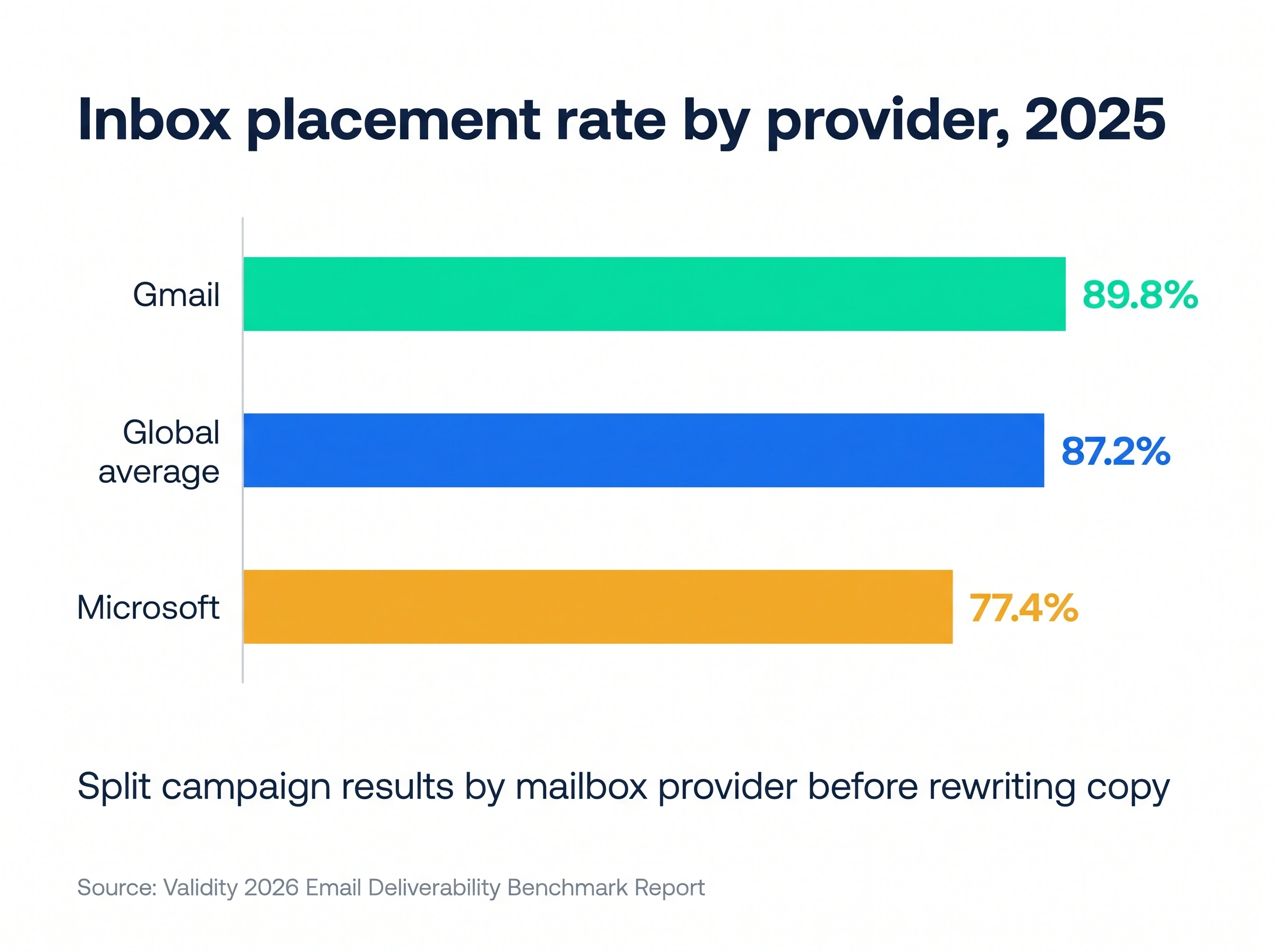
Microsoft deserves a separate check. Validity measured an 89.8% inbox placement rate at Gmail in 2025, against 77.4% at Microsoft, the toughest of the large providers. The global average was 87.2%.
| What you see | Likely cause | What to check |
|---|---|---|
| Opens fall at one provider only | Spam or junk placement there | Postmaster Tools, Microsoft SNDS, a seed test |
| Opens fall everywhere, replies steady | Tracking noise or image blocking | Reply rate and positive replies |
| Opens and replies both fall everywhere | Weak targeting, tired list or authentication failure | DNS records, list source, bounce rate |
| Opens high, replies near zero | Machine opens from Apple Mail or scanners | Reply rate by provider |
| Bounces climbing | Old or unverified data | Verify the list before the next send |
The inbox placement guide walks through seed testing step by step.
What should I do when my open rate drops?
Work from the signals providers weigh most to the ones they weigh least. Rewriting the subject line is the last step, not the first.
- Check complaints. Open Google Postmaster Tools and look at the spam rate for the sending domain. Anything near 0.1% means pausing the campaign today.
- Check authentication. Confirm SPF, DKIM and DMARC still pass. DNS edits break DKIM more often than people expect.
- Split by provider. Compare Gmail, Outlook and Yahoo recipients before you change anything else.
- Cut the non-engagers. Stop emailing anyone who hasn't replied or clicked after a short sequence. Google itself suggests removing recipients "who don't open or read your messages."
- Slow down. Spread volume across more sending inboxes instead of pushing more through one address.
- Fix the targeting. A targeting mistake creates both the low opens and the complaints.
- Then test subject lines. Use the cold email subject lines guide, and keep them honest.
Stan, who runs RevOps for a team of 12 SDRs, followed this order after a quarter of falling opens. Postmaster Tools showed nothing wrong at Gmail. Outlook was the problem, and a DKIM key had been dropped during a DNS migration. One record fixed what three rounds of subject line tests hadn't.
Before you drop a non-engager, send one honest last email. It lets them leave without reporting you.
Hi [First name], I've sent a few notes about cutting bounce rates on your outbound domains and haven't heard back, which usually means the timing's wrong. I'll stop here. If it becomes a priority later, reply "later" and I'll check in next quarter. Thanks, Tanya
For the full playbook on lifting engagement once the basics are fixed, read how to boost open rates to improve deliverability.
How SmartReach.io keeps low engagement from becoming a spam problem
SmartReach.io is a cold email software built around the signals above, so a dip in engagement shows up as a warning before it becomes a reputation problem. It's rated 4.6 on G2 from 60 reviews as of October 2026. Its Sales Engagement plans put email, LinkedIn, calls and WhatsApp in one sequence, so a prospect who's ignored three emails gets a LinkedIn step or a call next, not a fourth email and a fresh chance to report you.
Spam test on every sending account. SmartReach.io checks SPF, DKIM and DMARC when you connect a sending email account and scans the domain against common blacklists every week, with a fix suggested for each failure.
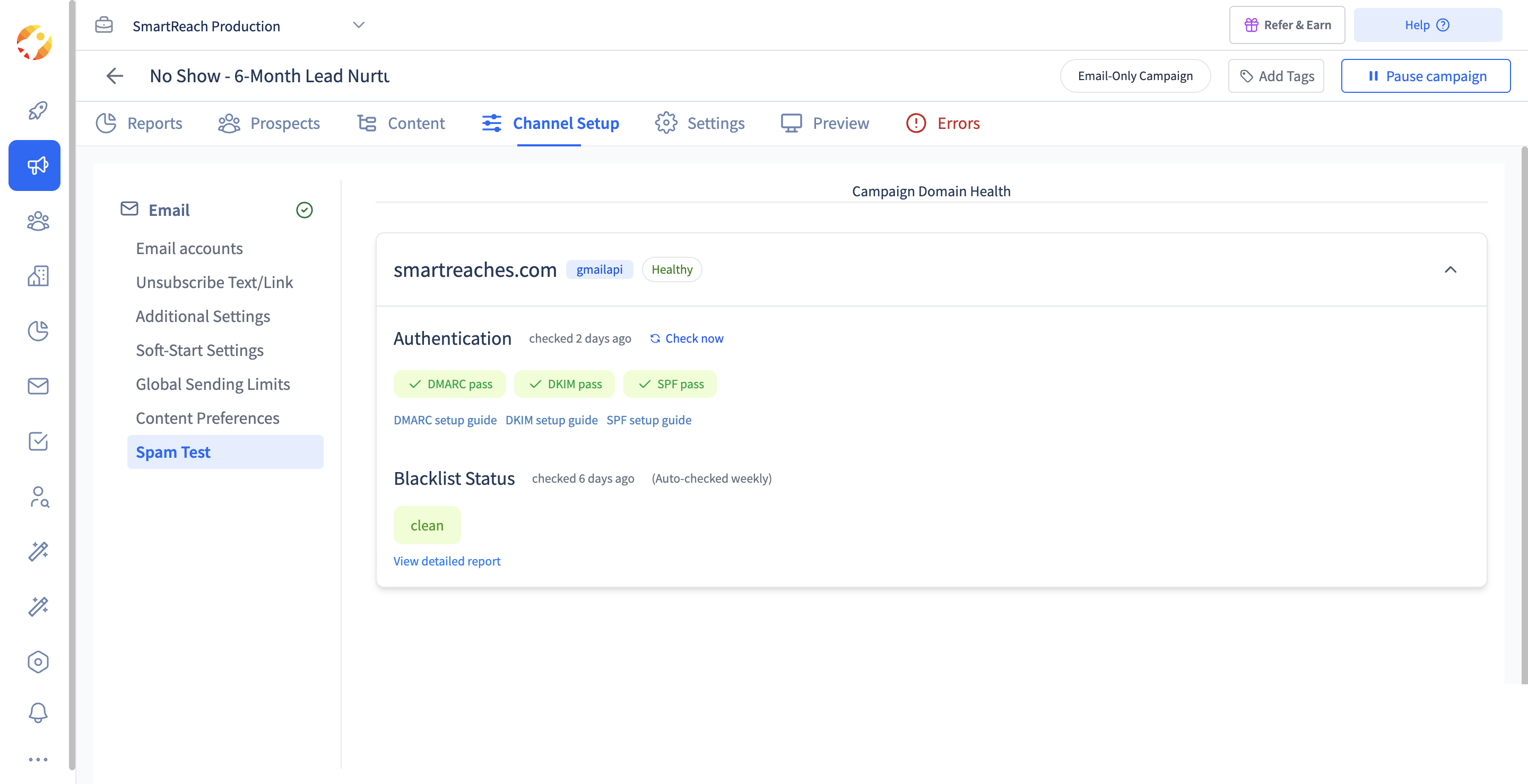 The Spam Test in a SmartReach.io campaign. Clear these checks before you rewrite a single subject line.
Volume that protects reputation. Inbox rotation spreads one campaign across several connected email accounts with a daily cap on each. SmartReach.io recommends staying under 40 emails a day per inbox, well inside the 200-a-day limit per account.
Replies in one place. Replies from every connected sending account land in one shared inbox, so the team sees who answered and stops chasing who merely opened.
Deliverability protection (Deliver4Sure) bundles these checks, and it's part of the 14-day free trial for up to 200 prospects.
Conclusion
A low open rate doesn't put your emails in spam. Complaints, broken authentication and recipients who don't want your email do, and a falling open rate is often the first place you notice them. Check those signals in order, split your results by provider, and stop sending to people who've shown no interest.
Then change how you keep score. Replies tell you what's working, and they're the signal Gmail's 2026 inbox rewards too. If you'd like those checks running on every campaign, start your 14-day free trial of SmartReach.io and connect your first sending account.
FAQ on low open rates and the spam folder
Why do my emails keep ending up in spam?
Emails usually land in spam because of the sender, not the subject line. The common causes are missing SPF, DKIM or DMARC records, a spam complaint rate above 0.1%, a young domain sending too much too fast, and a list full of people who never engage. Google's sender guidelines name complaints and authentication as the signals that drive spam classification, so check those two first.
Does a low open rate cause emails to go to spam?
Not directly. Google says it doesn't track open rates, and that low open rates aren't necessarily an accurate sign of a spam problem. A low open rate is a symptom. The causes behind it, such as a cold list, weak targeting and recipients who delete without reading or report the email as spam, are what damage sender reputation and push future emails out of the inbox.
Why do regular emails suddenly go to spam?
A sudden drop usually follows a change on the sender's side. A new list with more complaints, a jump in daily volume, a broken DKIM key after a DNS edit, or a provider rule change can all do it. Microsoft started rejecting non-compliant mail from domains sending over 5,000 emails a day on May 5, 2025, which caught many senders who had been fine before.
Is 50% a good open rate?
It can be, but treat it with suspicion. Apple Mail Privacy Protection downloads tracking pixels in the background whether or not the recipient reads the email, so any list with many Apple Mail users reports inflated opens. A 50% open rate with almost no replies points to machine opens. Judge a campaign on reply rate and positive replies, and use opens only to compare sends to the same list.
How do I stop my emails from being marked as spam on Gmail?
Keep your Gmail spam rate under 0.1% in Postmaster Tools and never let it reach 0.3%, which is Google's hard ceiling. Authenticate with SPF, DKIM and DMARC, send only to people who have a real reason to hear from you, and stop emailing anyone who hasn't engaged after a short sequence. Gmail increasingly sorts mail by engagement, so fewer, better emails win.
How can I check if my emails are landing in spam?
Compare results by mailbox provider before changing copy. If Gmail recipients reply but Outlook recipients go silent, it's a placement problem with one provider, not a weak subject line. Check Google Postmaster Tools for spam rate and reputation, run an authentication check on your domain, and send a test to seed inboxes at Gmail and Outlook to see which folder each lands in.
Stop juggling tools
Book more meetings on every channel
Join 5,000+ teams running multichannel outreach from one sequence, with deliverability built in.