Cold Email Outreach | The 2026 Guide to Email Outreach That Gets Replies

On this page
Most cold email outreach fails quietly. The emails send, the dashboard fills with opens, and almost nobody writes back.
That's rarely a copywriting problem. The industry average reply rate has slid from 8.5% in 2019 to somewhere near 5% today, and roughly 17% of cold emails never reach an inbox at all. The teams still getting replies changed how they run the whole program, not how they word the first line.
This guide covers what cold email outreach is, what the 2026 benchmarks actually look like, the infrastructure that has to be right before you send anything, the six steps that make a single email work, the cadence that sits behind it, and how to pick the software that runs it.
What is cold email outreach?
Cold email outreach is the practice of sending targeted emails to people who have never interacted with your business, backed by a planned follow-up sequence. The recipient hasn't opted in, hasn't downloaded anything, and doesn't know your company exists. That's what makes it cold.
It isn't spam, and the difference is operational rather than semantic. Spam is bulk, untargeted, and hard to escape. Cold email outreach is aimed at a specific person for a specific reason, sent from an authenticated domain, and carries an easy way out. Under CAN-SPAM in the US, cold B2B email is legal when the from name and subject are honest, a real postal address is included, and opting out is simple. GDPR in the EU is stricter and expects a documented legal basis, usually legitimate interest, plus a record of why you believed the recipient would want to hear from you.
The goal of a cold email is almost never the sale. It's the reply. A good first touch asks for a short conversation, a piece of feedback, or permission to send something useful. SDRs use cold email outreach to book meetings, sales leaders use it to open accounts, founders use it to raise money and hire, and marketers use it for partnerships and link building.
What separates it from every other kind of email is that you're borrowing attention you haven't earned yet. Everything in this guide follows from that one constraint.
What is email outreach, and how is it different?
Email outreach is the broader practice of using email to start a conversation with someone whose attention you want. Cold email outreach is the subset where the recipient has no prior relationship with you.
That distinction matters when you're choosing tooling, because the two have different failure modes.
| Email outreach | Cold email outreach | |
|---|---|---|
| Recipient relationship | Sometimes warm, sometimes cold | Always cold, no prior contact |
| Typical use | Partnerships, link building, recruiting, customer follow-up | Sales prospecting, new-account opening |
| Volume per campaign | Tens to low hundreds | Hundreds to thousands |
| Main risk | Being ignored | Landing in spam, burning the domain |
| What it needs | A good list and a clear ask | Authentication, warmup, inbox rotation, verification |
| How success is measured | Replies and completed asks | Reply rate, positive-reply rate, meetings |
Both need sequencing, personalization and reply tracking. Only cold email outreach needs the deliverability layer underneath, because you're contacting people whose spam filters have never seen your domain before.
In practice, most teams searching for an "email outreach tool" are describing the cold case. If your list came from research rather than a signup form, treat it as cold and set up accordingly.
How cold email outreach changed
A decade ago the play was volume. Businesses blasted an identical pitch to a purchased list and enough people replied to make it work. Inbox providers caught up, then buyers did, and that approach now burns domains faster than it books meetings.
Three shifts did it. Gmail and Microsoft moved from keyword filtering to engagement-based filtering, so a domain nobody replies to gets quietly demoted regardless of what the copy says. Google and Yahoo tightened bulk-sender requirements in 2024, making SPF, DKIM and DMARC effectively mandatory. And generative AI made mediocre personalization free, which means a merge tag in the first line no longer signals effort to anyone.
The result is that the difference between a 3% program and a 10% program is rarely the copy. It's the list, the infrastructure and the discipline of the follow-up.
What the 2026 data says about cold email outreach
The numbers below come from the SmartReach.io State of Cold Email 2026 report, a first-party benchmark drawn from more than 40 million emails across 5,000+ campaigns and 400+ sending accounts between January and June 2026.
Three things in that data change how you should run a program.
The ceiling hasn't dropped, the bar for reaching it has risen. Agencies that run cold email outreach full time reply at roughly double the in-house average, and the gap holds across every industry measured. The difference is authenticated infrastructure, aged domains, tighter lists and disciplined follow-up. It isn't better writing. That's encouraging, because infrastructure is learnable in a fortnight and talent isn't.
Open rate is no longer a real metric. Apple Mail Privacy Protection pre-loads tracking pixels and corporate security scanners auto-click links, so reported open rates near 28% are inflated. They no longer separate an interested prospect from an indifferent one, and a campaign can show 60% opens while nobody has actually read it. Manage reply rate, positive-reply rate and meeting rate instead.
Follow-ups carry the program. With 42% of replies arriving after the first email, a single-touch send throws away close to half the response you already paid for with list research.
| Industry | In-house reply rate | Agency reply rate | Positive reply | Uplift |
|---|---|---|---|---|
| Professional services | 6.0% | 10.5% | 2.3% | +75% |
| Healthcare | 5.0% | 8.5% | 1.8% | +70% |
| SaaS and Technology | 4.5% | 8.0% | 1.6% | +78% |
| E-commerce and Retail | 4.5% | 7.5% | 1.5% | +67% |
| Financial services | 4.0% | 7.0% | 1.4% | +75% |
Read the uplift column as your realistic headroom. Whatever your vertical, a well-run program lands roughly 70% to 80% above the in-house average, and none of that gap comes from a cleverer subject line.
Before you write a word, fix the list and the domain
This is the part most teams skip, and it's the part the data says decides the outcome. A brilliant email to the wrong person from an unauthenticated domain doesn't underperform. It doesn't arrive.
Build a list you can defend
The test for a list is simple. For every contact, can you say in one sentence why this person, at this company, right now?
If you can't, the campaign is a volume play and will be treated as one by both the filter and the reader. Strong lists are built from signals rather than firmographics alone.
- Hiring signals. A company posting three SDR roles has an outbound problem worth talking about.
- Funding and expansion. New capital or a new office changes what a team is allowed to buy.
- Technology signals. A CRM or a competing tool in their stack tells you what the workflow already looks like.
- Content signals. A post, a podcast appearance or a conference talk gives you a real opening line that nobody else is using.
- Role changes. A new VP of Sales in their first 90 days is rebuilding the stack by definition.
Then verify. Bounce rate is the fastest way to lose a domain, and inbox providers read a spike as a sign the list was bought. Keep bounces under 2% and spam complaints under 0.3%. Sourcing emails for outreach covers where the data actually comes from, and the SmartReach.io B2B lead finder verifies contacts before they enter a campaign rather than after the bounce.
Authenticate every sending domain
Authentication is three DNS records, and since the 2024 bulk-sender rules from Google and Yahoo they're not optional.
| Record | What it does | What to check |
|---|---|---|
| SPF | Lists which servers may send as your domain | One SPF record only, under 10 DNS lookups |
| DKIM | Signs each message so the receiver can verify it wasn't altered | Signature present and passing on a real send |
| DMARC | Tells receivers what to do when SPF or DKIM fails, and reports back | Published and moving toward enforcement, not left at p=none forever |
Full SPF, DKIM and DMARC on enforcement, plus warmed and aged domains, makes 85% to 95% inbox placement achievable, against the roughly 17% of cold email that currently never lands. You can check all three in a minute with the free email authentication checker, or test them individually with the SPF checker and DMARC checker. If the lookup count is the part you are close to breaking, the measured table of SPF lookup costs gives the current price of every major provider's include.
Send cold email outreach from a secondary domain, never your main company domain. A lookalike domain keeps the reputation risk away from the address your invoices and contracts go out from.
Verification does not end at DNS. SmartReach.io re-checks SPF, DKIM and DMARC per sending domain under Domain health and re-checks blacklist status weekly, so a record that breaks mid-campaign surfaces within days.
- Open the campaign and go to Content
- Click Add New Step for each follow-up and set the day gap before it
- Open Reports to read reply and positive-reply rates once 300 to 500 prospects have been contacted
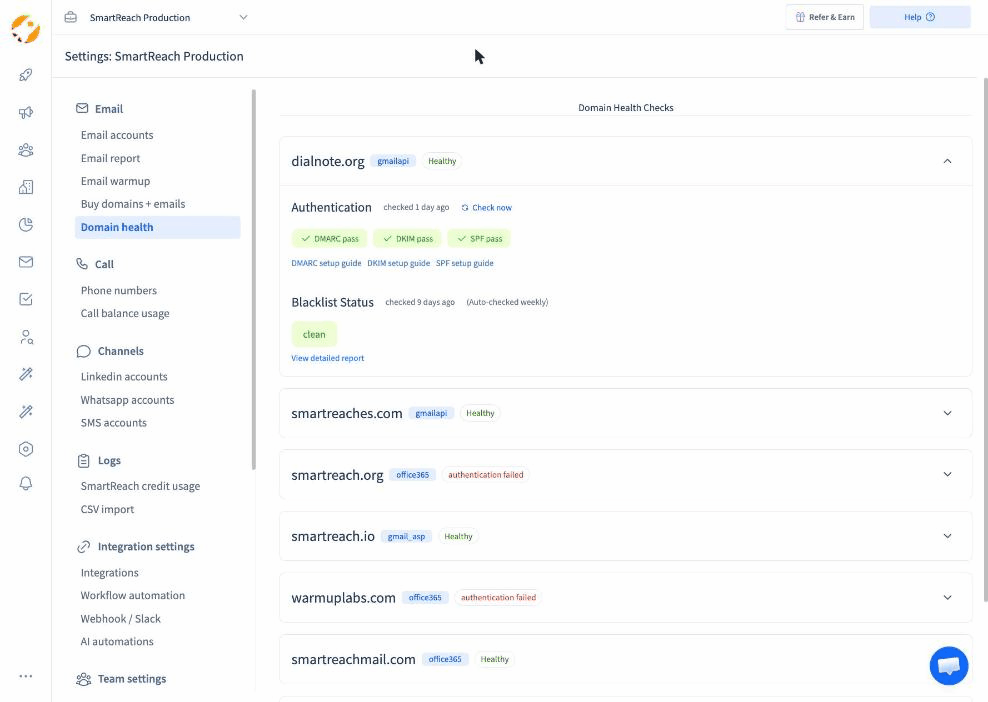 Authentication as an ongoing check, not a setup task. Domain health in SmartReach.io.
Warm up, then spread the volume
A brand-new inbox that sends 200 cold emails on day one is a spam signal wearing a costume. Warmup builds a sending history first, with real conversations that get opened and replied to, so the account looks like a person before it looks like a campaign.
Budget roughly two weeks. Email warmup runs automatically in the background on SmartReach.io and keeps running once campaigns start, which matters because reputation decays when a mailbox does nothing but send.
Then spread the load. SmartReach.io allows up to 200 emails a day per connected account and recommends staying nearer 40 a day per account, spread across several mailboxes rather than concentrated in one. Inbox rotation distributes a campaign across every connected account automatically, so 400 sends a day is eight mailboxes at a safe volume rather than two at a reckless one.
Run a spam test before the first real send. The deliverability checklist covers the full pre-flight, and email deliverability is where the ongoing monitoring lives.
How to run a cold email outreach campaign in 6 steps
With the list and the domain sorted, the email itself comes down to six decisions, in this order.
Step 1. Get the from line right
The from line decides whether your email gets opened or binned, and most teams never revisit it. It's the first thing a prospect sees, before the subject line, and it's the only trust signal available to someone who doesn't know you.
There are two separate fields, and they're often confused. The display name is the human-readable label. The from address is the actual mailbox. Both get read, and a mismatch between them is a trust problem.
| Pattern | Example | Works for |
|---|---|---|
| First name plus company | Amy from SmartReach.io | The safest B2B default, personal with company context |
| Full name | Amy Sharma | Enterprise and regulated buyers who expect formality |
| First name only | Amy | Founder-led outreach at small volume, weak at scale |
| First name plus role | Amy, deliverability | Useful when the role itself is the reason to reply |
What to avoid is more clear-cut. Never send from noreply@, info@, sales@ or team@. Role addresses signal automation, they can't hold a conversation, and several filters weight them negatively. Send from a real person's mailbox that a human actually monitors.
Then leave it alone. Changing the from line mid-sequence resets whatever recognition the first touch earned, and a prospect who half-remembers your name is worth more than one meeting you for the first time on touch three.
Step 2. Write a subject line worth opening
The subject line earns the open. Frame it badly and it goes unread, or worse, it trips a filter.
Keep it short. Mobile clients truncate around 35 to 40 characters, and more than half of B2B email is first seen on a phone, so anything past that is decoration. Lowercase or sentence case beats title case, because Title Case On Every Word reads like a newsletter and newsletters get archived.
Three things separate the ones that work.
- Personalization that's specific. A company name in the subject is now noise. A detail only someone who looked would know is not.
- Their problem, not your product. Show there's something inside that benefits them.
- Curiosity, not a pitch. Don't resolve the whole message in the subject. If the subject line contains the offer, the email has nothing left to do.
These shapes hold up.
| Subject line | Why it works |
|---|---|
| "quick question about [specific thing]" | Low commitment, reads like internal mail |
| "[Their company] + [your company]?" | Frames a fit question, not a pitch |
| "saw your post on [topic]" | Proves research before the email is opened |
| "[mutual connection] suggested I reach out" | Borrowed trust, only if true |
| "idea for [specific goal they've stated]" | Specific enough to be worth ten seconds |
And these don't. "Following up", because it's a lie on a first touch. "RE:" or "FWD:" on a message that isn't one, which is deceptive and breaks CAN-SPAM. Anything with "free", "guarantee", "act now" or an exclamation mark. Running a draft through the free spam word checker catches the phrases filters penalize before a campaign goes out.
SmartReach.io supports merge tags in both the subject line and the body, including custom tags you define, and recommends subject lines based on the email content you've already written. Test two variants per campaign, not five, and judge them on replies rather than opens.
Step 3. Open with a line about them
A great subject line is half the job. The opening line keeps them reading, and it should be about the recipient, not you.
The first sentence has one job, which is to prove a human looked. That means referencing something specific and recent. Where to find it, in rough order of how much signal it carries.
| Source | What you get | Effort |
|---|---|---|
| Their LinkedIn posts | Their actual opinions, in their words | Low |
| Recent company news | Funding, launches, expansion, leadership changes | Low |
| Job postings | What they're building and where the gaps are | Medium |
| Podcast or webinar appearances | Long-form views nobody else in their inbox has read | Medium |
| Their product itself | A real observation from using it | High, and worth it |
Vague flattery reads as automated because it usually is. "I love what you're doing at [company]" tells the reader you ran a merge. So does "As a [job title], you probably struggle with [generic pain]", which is a template wearing a name badge. If the sentence would work for two hundred other people, it isn't personalization.
Hi {{first_name}}, I saw your post on LinkedIn about the revenue growth at {{company_name}}.
Usually that means the pipeline is running hotter than the team can work, and the SDRs end up choosing between follow-ups and new accounts.
Is that roughly where you are right now?
Note what that does. It names a specific source, draws one inference from it, and ends on a question the reader can answer in four words. It doesn't mention a product at all. Our guide to personalizing outreach without sounding fake goes deeper on the difference, and opening lines has more shapes to borrow.
SmartReach.io's spintax rotates words and phrases so no two emails in a batch are identical, which keeps a sequence from looking machine-generated to both the filter and the reader.
Step 4. Give one clear value proposition
Nobody cares about your award. They care about what changes for them.
After the opener, cover three things and stop. Why you're writing, what you can help with, and the problem your product solves. A workable shape is one sentence for the problem, one for the outcome, one for the proof.
Two rules keep this section honest.
- Lead with the benefit, not the feature. A list of capabilities bores a prospect. What the capability does for their number doesn't. "Rotates sends across eight inboxes" is a feature. "Lets you triple daily volume without the bounce rate moving" is the same thing said usefully.
- Quantify or cut it. An unquantified claim is read as marketing and skipped. "Significantly improve deliverability" carries less weight than "take inbox placement from roughly 83% to the 85% to 95% range".
Proof comes in four flavours, in descending order of persuasiveness. A named customer in their industry. A specific number from your own data. A named customer in any industry. An unnamed aggregate. Use the highest one you can honestly reach for.
Most teams at that stage lose replies in the follow-up rather than the first touch. About 42% of cold email replies arrive after email one, so a two-touch sequence quietly leaves half the pipeline unworked.
We run the follow-ups automatically and pause the moment someone answers, so nobody gets chased after they've replied.
Worth a ten-minute look at how your current sequence compares?
Step 5. Ask for one thing
Every cold email ends with a call to action, and it should ask for exactly one thing.
"Are you free for five minutes Thursday at 4 to talk through this?" works. "Let me know if you'd like a demo, or a case study, or I can send pricing" doesn't, because it hands the prospect a decision instead of a choice.
Match the size of the ask to the temperature of the relationship. On a first touch to a stranger, a meeting request is a big ask, and interest-based CTAs consistently outperform calendar links.
| Ask | Friction | Best used |
|---|---|---|
| "Is this a problem for you right now?" | Lowest, a yes or no | First touch, cold |
| "Want me to send the two-minute version?" | Low, permission not commitment | First or second touch |
| "Worth a quick look at how yours compares?" | Medium, implies a call | Second or third touch |
| "Free Thursday at 4 for ten minutes?" | High, a specific commitment | Once they've engaged |
| A bare calendar link | Highest on a cold first touch | Warm replies only |
Keep it to one sentence, put it on its own line, and don't stack a P.S. with a second ask underneath it. Include a phone number only if a call is the ask.
Step 6. Close with a clean signature
The signature is the last trust signal, and it's also a deliverability surface most people never think about.
Keep it to four lines. Name, role, company, and one contact route. That's enough for a prospect to verify you're real, which is the only job it has.
What to leave out matters more. Image-heavy signatures raise the image-to-text ratio, which filters read as promotional. Banner graphics, social icon strips, legal disclaimers and inspirational quotes all add weight and none of them earn a reply. Tracking-laden HTML is worse, because a signature stuffed with redirect links looks structurally like the marketing email you're trying not to resemble.
On a first touch, plain text with a single link outperforms anything designed.
What a cold email outreach sequence looks like
One email isn't outreach. A sequence is, and its shape matters as much as its copy.
The data points at three to four touches. About 42% of replies arrive after the first email, but returns bend after the third or fourth in 2026, and pushing past that costs sender reputation for very little added response.
| Day | Touch | What it does |
|---|---|---|
| 0 | Email 1 | The full pitch. Opener, one problem, one proof point, one small ask |
| 3 to 4 | Email 2 | New angle on the same problem. Never "just bumping this" |
| 7 to 9 | LinkedIn or call | Different channel, same thread of thought |
| 10 to 14 | Email 3 | Shortest of the three. A single question or a useful resource |
| 18 to 21 | Email 4, optional | The polite close. "Should I stop here?" earns more replies than it should |
Three rules hold this together.
Every touch adds something. A follow-up that only says you're following up teaches the reader that your emails are safe to ignore. Give each one a new angle, a new proof point, or a smaller ask.
Space them out. Three to seven days between touches. Daily follow-ups read as pressure, and monthly ones read as a different sender entirely.
Stop on reply, always. Chasing someone who already answered is the single fastest way to lose a warm lead. SmartReach.io auto-pauses the sequence the moment a prospect replies, so that can't happen by accident.
Adding a second channel is where sequences get their next step up. A LinkedIn view or connection before email two makes the sender familiar, and on the Sales Engagement plans SmartReach.io runs LinkedIn steps, calls and WhatsApp from the same cadence rather than a separate tool a rep has to remember to open.
Cold email outreach metrics that matter
How long should a cold email be?
Between 50 and 125 words, which is roughly three to six short sentences. A Boomerang study of 40 million emails found messages in that range earned the best response rates.
That's enough to make a first impression and ask for a conversation. Nobody reads a long email from a stranger, and length correlates with being skipped rather than with being convincing. If it needs scrolling on a phone, cut it. The usual culprit is the second proof point, and the second proof point is always the one to lose. Our full breakdown of cold email best practices covers the structure that fits in that budget.
When should you send cold email outreach?
Tuesday through Thursday, between 8 and 10am in the prospect's own timezone.
Most professionals start their working day around 10 or 11am, so an email already sitting in the inbox gets attention that a mid-afternoon send doesn't. Avoid Friday, when people have mentally left, and avoid Monday morning, when they're clearing the weekend backlog and deleting on sight.
Send by their clock, not yours. A 9am send from London lands at 4am in San Francisco and gets buried under everything that arrives after it. SmartReach.io reports on the best time to send based on your own campaign history rather than a generic benchmark, so the window narrows to your buyers rather than to averages.
What's a good cold email conversion rate?
Work backwards from the funnel instead of chasing a single number. In the State of Cold Email 2026 data, the agency cohort turns a 10% reply rate into 2.2% positive replies, 1.2% meetings booked and 0.6% opportunities.
Read that as roughly one meeting per hundred prospects contacted, and one opportunity per one hundred and sixty. It's also a diagnostic. A healthy reply rate with a weak positive-reply rate means you're reaching the right people with the wrong message. A weak reply rate with a strong positive rate means the message lands but the list is too small or too loose.
Three things move the whole funnel more than anything else. How warm the list is, how specific the personalization is, and the sending domain's reputation. The third one is invisible until it isn't, which is why deliverability work belongs at the start of a program rather than after the first bad month.
How should you follow up?
Three to four touches, spaced three to seven days apart, each adding something new.
With 42% of replies arriving after the first email, follow-up is where the program is won. But returns bend after the third or fourth touch in 2026, and pushing past that starts costing you sender reputation. Each follow-up should carry a new angle, a new proof point, or a smaller ask, never just "bumping this to the top of your inbox".
Keep follow-ups in the same thread. It gives the reader context without re-reading, and it keeps your name in one place in their inbox rather than four.
Which numbers to ignore
Open rate, mostly. Apple Mail Privacy Protection pre-loads images and security scanners auto-click links, so a reported 28% open rate might be six real humans. Treat it as a rough deliverability smoke alarm, useful when it collapses to near zero, meaningless when it's high.
Click rate is similarly polluted by the same auto-clicking scanners. And total sends is a vanity number that rewards exactly the behaviour that gets domains blocked.
The four to actually watch are reply rate, positive-reply rate, meetings booked, and bounce rate. You can benchmark the first of those against the report's cohorts with the free open rate calculator, and cold email statistics has the wider set.
Seven mistakes that kill cold email outreach
- Sending from the main company domain. One bad campaign and your invoices start landing in spam. Use a secondary domain.
- Skipping warmup. A new inbox at full volume is the clearest bulk-sender signal there is. Two weeks of warmup costs less than a burned domain.
- Treating open rate as truth. It's been unreliable since Apple Mail Privacy Protection shipped. Optimising for it means optimising for a scanner.
- Stopping after one email. With 42% of replies arriving later, a one-touch campaign is a half-finished one.
- Personalizing the first line only. Readers spot the pattern instantly. If the rest of the email would work for anyone, the merge tag doesn't rescue it.
- Asking for a meeting on the first touch. It's the biggest ask in the ladder, offered at the coldest moment. Ask for interest first.
- Judging a campaign on 50 prospects. At a 5% reply rate that's two or three replies, which is noise. Wait for 300 to 500 contacts before you conclude anything.
Most of these share a root cause, which is optimising the email while ignoring the system it's sent from. Improving reply rates covers the fixes in more depth.
How to choose an email outreach tool
Once you're sending more than about 40 emails a day per account, Gmail and Outlook stop being enough. They don't rotate inboxes, verify a list, detect a reply, or tell you which step of a sequence is doing the work.
Here's what actually separates email outreach tools, and what SmartReach.io does on each.
| What to check | Why it matters | SmartReach.io |
|---|---|---|
| Channels in one sequence | Email alone plateaus on hard-to-reach buyers | Email, LinkedIn, calls, WhatsApp |
| Deliverability layer | Roughly 17% of cold email never lands | Warmup, spam test, inbox rotation, domain health |
| List verification | Bounces above 2% damage domain reputation | Built-in verification before send |
| Reply handling | Chasing someone who replied loses the deal | Auto-pause on reply, shared inbox, reply sentiment |
| Sending accounts allowed | Volume comes from mailbox count, not per-inbox volume | Unlimited sending accounts above Basic |
| Pricing unit | Per-user pricing punishes growing teams | No per-seat pricing, plans scale by active prospects |
| Team reporting | Managers need the funnel, not the send count | Team leaderboard, template and prospect reports |
| CRM sync | Outbound activity that never reaches the CRM is invisible | HubSpot, Salesforce, Pipedrive, Zoho |
SmartReach.io is a cold email software rated 4.6 on G2 from 58 reviews and 4.7 on Capterra from 27 reviews as of August 2026, used by 5,000+ customers on 99.99% uptime. On its Sales Engagement plans it works as a sales engagement platform, with LinkedIn steps, a built-in dialer and WhatsApp running from the same cadence as email. Email Outreach plans start at $29 a month and Sales Engagement plans at $39, with a 14-day free trial covering 200 prospects. There's no per-seat pricing. Plans scale by active prospects, and every plan above Basic includes unlimited users and unlimited sending email accounts.
That last point is the one that changes the maths at team scale. Tools priced per user charge you again for every rep you add, while the work each rep does is unchanged. For a wider comparison against Instantly, Smartlead, Saleshandy and Lemlist, see our roundup of the best cold email tools.
What a cold email outreach platform should do
A cold email outreach platform earns its place by removing the five jobs that don't scale by hand.
1. Finding and verifying prospects. ProspectDaddy, a Chrome extension, pulls business emails and company detail from LinkedIn profiles, exportable to CSV or straight into a SmartReach.io campaign. ProspectDaddy credits come with every SmartReach.io plan, and verification runs before a contact enters a sequence rather than after the bounce has already registered.
2. Sending without burning the domain. SmartReach.io allows up to 200 emails a day per connected account and recommends staying nearer 40 a day per account, spread across several mailboxes. Sends rotate across every connected inbox automatically, warmup runs on new domains before they carry real volume and keeps running afterwards, and domain health reporting flags a mailbox before its bounce rate becomes a problem.
3. Personalizing at volume. Merge tags, custom tags and spintax mean a batch of 200 emails isn't 200 copies of the same message. Conditional steps take it further, branching the sequence on whether someone opened, clicked or replied, so the second touch reflects what the first one did.
4. Reporting on the funnel, not the send. Team leaderboards, template reports, reply sentiment, prospect list reports and click reports. Reply sentiment in particular tells a manager whether the pipeline is healthy, which a send count never will, because it separates "twelve replies" from "twelve replies, nine of them positive".
5. Letting a team share the work. A shared inbox means two reps don't answer the same prospect, positive replies get an owner, and the response time on an interested buyer drops. At team scale that last number is worth more than any subject line test, because a reply answered in an hour converts at a different rate to one answered in two days.
Getting started with cold email outreach
Cold email outreach still works in 2026. It just stopped rewarding volume.
The order matters more than any single tactic. Set up a secondary domain and authenticate it. Warm the inboxes for two weeks. Build a list where every contact has a reason. Write three to four touches that each add something. Then measure replies rather than opens, and give it 300 to 500 contacts before you judge it.
Do those things and a 5% reply rate is reachable. Do them with the discipline the agency cohort applies and 10% is on the table, which the data says holds true in every industry measured.
Cold email outreach FAQs
What is cold email outreach?
Cold email outreach is the practice of emailing people who have never interacted with your business, then following up in a planned sequence until they reply. It's targeted and permission-light rather than bulk, and it's how most B2B teams start conversations with prospects who don't know them yet. SmartReach.io is a cold email software built for this, running email, LinkedIn, calls and WhatsApp from one sequence.
What is a good reply rate for cold email outreach in 2026?
Treat 5% as baseline and 8% or higher as strong. The industry average has drifted down to roughly 3% to 5%, from 8.5% in 2019. Agency teams running disciplined programs still hold near 10%, according to the SmartReach.io State of Cold Email 2026 report, drawn from more than 40 million emails. Reply rate, not open rate, is the number to manage.
How many follow-ups should a cold email outreach sequence have?
Three to four touches total. About 42% of replies arrive after the first email, so a single-touch send leaves roughly four in ten replies unclaimed. Returns bend after the third or fourth touch in 2026, and pushing past that hurts sender reputation. SmartReach.io auto-pauses a sequence the moment a prospect replies, so nobody gets chased after answering.
How do you keep cold email outreach out of spam?
Authenticate every sending domain with SPF, DKIM and DMARC, verify the list so bounces stay under 2%, warm each new inbox before it carries volume, and keep sends near 40 a day per account. Roughly 17% of cold email never reaches an inbox, and SmartReach.io reports domain health and spam-test placement before a campaign goes out.
What's the difference between email outreach software and a sales engagement platform?
Email outreach software sends and sequences email. A sales engagement platform adds other channels and the reporting a manager needs across a team. SmartReach.io is a cold email software, and on its Sales Engagement plans it works as a full sales engagement platform with email, LinkedIn, calls and WhatsApp in one cadence, which is why it appears on both shortlists.
Can you run cold email outreach from Gmail or Outlook?
You can send the first few from Gmail or Outlook, but neither rotates inboxes, verifies a list, or pauses a sequence on reply. Once you're past roughly 40 emails a day per account, you need dedicated software. SmartReach.io allows up to 200 emails a day per connected account and rotates sends across mailboxes to protect domain reputation.
How much does cold email outreach software cost?
SmartReach.io Email Outreach plans start at $29 a month and Sales Engagement plans at $39 a month, with a 14-day free trial covering 200 prospects. There's no per-seat pricing. Plans scale by active prospects, and every plan above Basic includes unlimited users and unlimited sending email accounts, which matters once a whole team is prospecting.
How long does cold email outreach take to work?
Budget two to three weeks before the first campaign sends. New domains need roughly two weeks of warmup, and the list needs verifying before that. Once live, judge a campaign on 300 to 500 contacted prospects rather than the first 50. SmartReach.io reports reply and positive-reply rates per campaign so you can tell a copy problem from a list problem.
Stop juggling tools
Book more meetings on every channel
Join 5,000+ teams running multichannel outreach from one sequence, with deliverability built in.