Saleshandy vs SmartReach: Who Does the Work?

On this page
Your campaign went live on Monday. It's Thursday, and a prospect just replied with an auto-responder saying she's back on the 14th.
Who handles that? You, or the software?
That question is the whole Saleshandy vs SmartReach.io comparison, and it's the one every feature table skips. Both tools send sequences. Both rotate inboxes. Both warm up mailboxes. They split apart in the boring hours after you hit start.
Quick disclosure. We build SmartReach.io, a cold email software whose Sales Engagement plans run email, LinkedIn, calls and WhatsApp from one sequence. So yes, we have a side. We've tried to make every number here checkable, including the ones that don't flatter us.
Two of them didn't. Fact-checking our own previous version of this page, we found we'd been wrong about out-of-office handling, and we found that Saleshandy's new LinkedIn automation isn't quite LinkedIn automation. Both are below.
TL;DR
Saleshandy vs SmartReach.io at a glance
Prices below are monthly rates, taken off each vendor's live pricing page with the monthly toggle selected. Saleshandy's page shows annual rates by default, which is why so many comparisons quote it 30% low.
| SmartReach.io | Saleshandy | |
|---|---|---|
| Entry price (monthly) | $29 | $36 |
| Pricing model | By prospects contacted | By active prospects |
| Per-seat fee | None | None |
| Unlimited sending accounts | Yes, all plans | Yes, all plans |
| Sending volume | 10,000/mo on Basic, unlimited from Plus | 6,000 to 300,000/mo by plan |
| Email verification | Free, every plan | $19 per 5,000 recipients |
| Lead database | 300M+ contacts, in plan | 852M+ contacts, separate $59 or $99 plan |
| In-sequence, $29/mo per account | Manual tasks, or push to Aimfox/HeyReach | |
| Calling | Native dialer in Sales Engagement plans | Separate Dialer plan, from $29/mo |
| ESP matching | Yes | Not offered |
| Holiday calendar | Yes, per campaign | Not documented |
| OOO auto-reschedule | Yes | Yes |
| Domain-level reply pause | Yes | Not documented |
| Inbox placement testing | Not offered | Yes, free to $199/mo |
| G2 | 4.6/5 | 4.6/5 (791 reviews) |
| Free trial | 14 days, 200 prospects | 7 days, 100-email cap |
One honest note on that table: Saleshandy's contact database is the bigger one, and it has the longer review history. Both are real, and both are sold as separate line items rather than bundled into the sending plan.
Read SmartReach.io reviews on G2 →
Read Saleshandy reviews on G2 →
What Saleshandy costs once you total it up
Saleshandy sells five separately billed product lines, and the sequencer is only one of them.
| Line item | Monthly |
|---|---|
| Outreach (the sequencer) | $36 / $99 / $199 / from $299 |
| Lead Finder (the database) | $59 or $99 |
| Dialer | $29 or $69 |
| Inbox Placement Test | $0 / $49 / $99 / $199 |
| CRM | $19, free for now |
| Email verification | $19 per 5,000 recipients |
| AI credits | $10 per 5,000 |
| Mailboxes | $2.99 to $3.99 each |
None of those lines is unreasonable on its own. Stacked, they're a different product at a different price, and we've broken the full bill down in our Saleshandy alternatives guide.
Credit math is worth a look before you commit. Revealing a verified email costs 1 Lead Finder credit, while an email plus a direct dial costs 7. A 500-contact list with phone numbers burns 3,500 credits, which is most of a $99 Lead Pro allowance.
To be fair, and this matters: there's no per-seat fee and no per-mailbox fee on the sequencer. Unlimited email accounts on every plan, unlimited team members from Pro up. Set against Apollo at $65 a seat, that's genuinely generous.
The LinkedIn step that isn't quite LinkedIn automation
Here's the thing we didn't expect to find.
Saleshandy's LinkedIn steps (connection request, message, InMail, profile view, post interaction) create tasks. Your rep opens the Tasks tab, goes to LinkedIn, and does it by hand. That part has been true for a while, and their docs are upfront about why: LinkedIn suspends accounts that automate.
Then there's a newer step type called LinkedIn Automation. Read the documentation closely and it does something specific: it pushes the prospect into a campaign in Aimfox or HeyReach. You need an active paid account on one of those, an API key, and a campaign already built there. The outreach runs in that tool.
So the honest version of the LinkedIn comparison isn't "Saleshandy has none and we have some." It's this:
Saleshandy
The prospect leaves your sequence and lands in a third product you also pay for. Replies arrive in that tool's inbox. If a push fails, and their docs list several ways it can (missing LinkedIn URL, expired API key, campaign full, campaign deleted), the prospect stops dead until someone checks the Failed tab.
SmartReach.io
LinkedIn runs inside the same sequence as the email. Connection requests, messages, profile views and InMail sit alongside your email steps, replies land in the same shared inbox, and conditional logic can route between channels based on what happened. It costs $29/month per LinkedIn account on a Sales Engagement plan.
Neither is free and neither is magic. The difference is how many vendors, inboxes and failure points sit between you and a reply.
Worth saying plainly: if LinkedIn is your primary channel rather than a supporting one, a dedicated LinkedIn tool will out-feature both of us. This comparison is about email-led outbound with LinkedIn attached.
What runs while you're asleep
This is where we got something wrong, so let's start there.
Out-of-office handling. Our previous version said Saleshandy needs manual intervention here. That's not right. Saleshandy detects OOO replies, marks the prospect, pauses them across active sequences, and uses AI to read the return date out of the message and resume them at the right time. That's a real feature and it's roughly what we do. Call it a tie.
Three others don't land the same way.
The holiday problem. Say a German sequence has a step falling on October 3rd. SmartReach.io shifts it to the next working day, because you assigned a named holiday calendar to the campaign. Saleshandy's documented scheduling covers time zone, weekday and sending hours. We could find no holiday calendar in its help docs, which means October 3rd is your problem to remember.
The colleague problem. Tanya from Sacs Corp replies to your third email. What happens to the four other people you're emailing at sacscorp.com?
On SmartReach.io, the campaign pauses for that whole domain, so your sequence stops firing at the CFO while your rep is mid-conversation with the VP. Saleshandy stops the sequence for the person who replied and offers domain-based reply tracking as a setting. We found nothing in its docs describing an automatic company-wide pause, and we'd rather say that than overstate it.
The blacklist problem. SmartReach.io checks your sending domains against 25 major blacklists and auto-pauses a flagged account before it burns further. Saleshandy's answer here is a different shape: an Inbox Placement Test product that seeds test sends and tells you where you're landing, from free up to $199/month. That's a capability we don't sell, and for some teams it's the more useful one.
Deliverability: in the plan, or on the invoice?
Good copy doesn't rescue a flagged domain. Both platforms know this, and both include warmup free: WarmupHero on our side, TrulyInbox on theirs. From there the philosophies diverge.
Verification. Free on every SmartReach.io plan, and every address gets validated before the campaign sends. Saleshandy meters it at $19 per 5,000 recipients. Contact 20,000 prospects in a month and that's $76 you're paying to keep your own list clean.
ESP matching. We detect the prospect's email provider and send from a matching one, Gmail to Gmail, Outlook to Outlook. Saleshandy doesn't offer it. Whether that moves your numbers depends on your list, and we've pulled a specific percentage claim from this page because we couldn't stand it up with published evidence.
Soft Start. Every SmartReach.io campaign ramps its volume from day one automatically, at the campaign level, while warmup builds reputation at the mailbox level. Saleshandy has warmup but no campaign-level equivalent, so ramping is something you plan yourself.
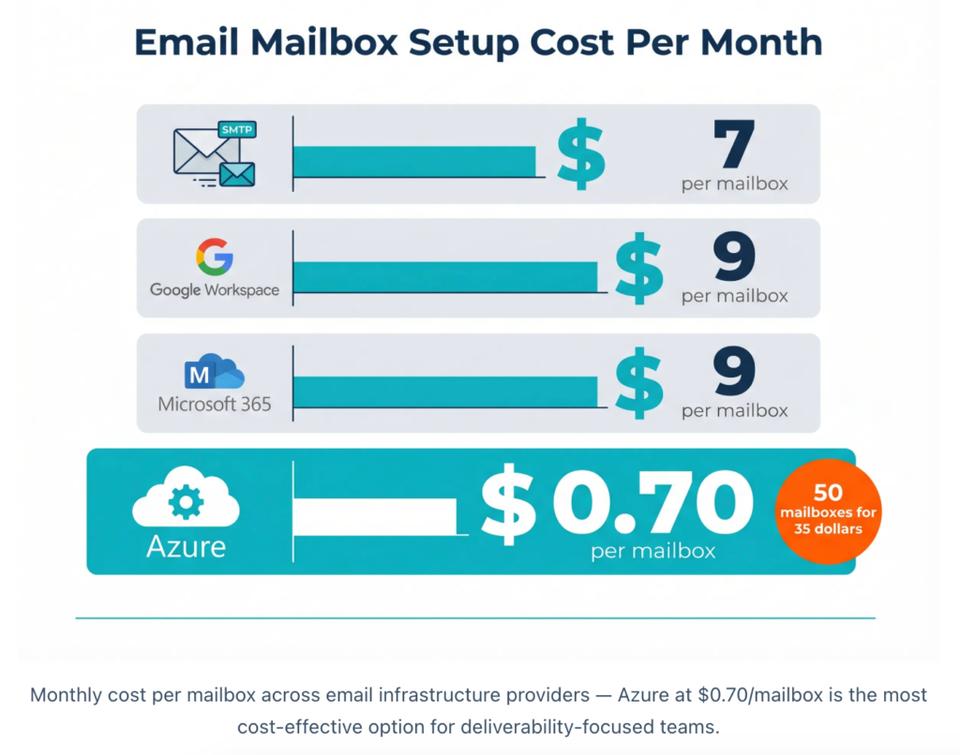
Mailboxes. Both sell infrastructure with SPF, DKIM and DMARC pre-configured. Saleshandy lists Google Workspace, Microsoft 365 and Azure from $2.99 to $3.99 per mailbox per month. We charge $35/month for an Azure tenant that includes 50 mailboxes and a domain, on Plus and above.
Run the arithmetic at 50 mailboxes and it's $149.50 against $35. The catch, and it's a real one: an Azure tenant is designed for sending 2 or 3 emails per mailbox per day, spread thin on purpose. It's a deliverability play for agencies, not a volume play, and it isn't on our Basic plan.
What a team of four actually pays
Jordan runs outbound at a 15-person B2B software company. Three SDRs plus himself, roughly 4,000 new prospects contacted a month, buys contact data rather than scraping it, sends from 20 mailboxes, and wants to know if he's landing in spam.
| What Jordan needs | Saleshandy | SmartReach.io |
|---|---|---|
| Sequencing, 4,000 prospects | Outreach Pro, $99 | Email Outreach Plus, $89 |
| Contact data | Lead Finder Pro, $99 | 1,000 credits in plan |
| Verify a 5,000-row import | $19 | Free |
| 20 mailboxes | $59.80 to $79.80 | $35 Azure tenant, 50 mailboxes |
| Spam placement check | Inbox Starter, $49 | Blacklist monitoring in plan |
| Monthly | $325.80 | $124 |
Two caveats so this stays honest. Jordan's 4,000 contacts a month will chew through 1,000 SmartReach credits, so he'd be topping up or bringing his own data. And if he wants LinkedIn on all four reps, add $116 to our column.
Hiring a fifth SDR changes neither total. Neither platform charges by seat, and that's the one thing both companies get right.
So which one?
My genuine opinion, for whatever a competitor's opinion is worth: if you're a solo founder or a two-person team sending email and nothing else, switching is probably not worth your Tuesday. Saleshandy is good at the thing it's good at.
The math flips when your outbound starts having moments. A prospect goes on leave. A colleague replies. A campaign hits a national holiday in a market you don't live in. A domain gets flagged at 2am. Every one of those is either a setting or a Slack message to a rep, and the number of Slack messages is what you're really choosing between.
If you want to see how that feels on your own campaigns, the trial is 14 days and 200 prospects with no card.
Related reading: the full deliverability feature set, our 7-touch multichannel sequence template, and the same treatment applied to Apollo.io vs SmartReach.io.
Frequently asked questions
Does SmartReach.io include a holiday calendar for international campaigns?
Yes. You build named calendars (US, UK, APAC) and assign one per campaign, and steps landing on a public holiday shift to the next working day. Saleshandy's documented scheduling covers time zone, weekday and hour, with no holiday calendar we could find.
Is LinkedIn automation included in SmartReach.io's base plan?
No. LinkedIn sits on the Sales Engagement plans, which start at $39/month, and full automation is a $29/month add-on per LinkedIn account. The Email Outreach plans have no LinkedIn at all.
What's the cheapest way to scale mailboxes with SmartReach.io?
Azure. An Azure tenant with 50 mailboxes plus a domain is $35/month, available on Plus ($89) and above. Keep each mailbox low-volume: it's built for spreading sends thin, not for pushing 100 emails a day out of one inbox.
Does SmartReach.io's Smart Email AI work on the Basic plan?
No. The Smart Email AI agent and the AI sequence generator are on Pro ($199/month) and Scale ($499/month). Each generation spends one SmartReach credit, and Pro includes 2,000 credits a month.
Which platform is better for a team of 5 people?
Neither charges per seat, so compare on prospects. SmartReach.io Plus is $89/month for 50,000 contacted prospects with free verification. Saleshandy Outreach Pro is $99/month for 30,000, and verification is $19 per 5,000 on top.
How much does Saleshandy actually cost per month?
The advertised $25 is the annual rate. Paid monthly it's $36 for Starter, $99 for Pro, $199 for Scale and from $299 for Scale Plus. Lead Finder is a separate $59 or $99 subscription, verification is $19 per 5,000 recipients, and the dialer starts at $29.
Does Saleshandy have LinkedIn automation?
Partly. Its LinkedIn steps are manual tasks, and its LinkedIn Automation step pushes the prospect into Aimfox or HeyReach, which need their own paid account and API key. The outreach and the replies then live in that third tool, not in Saleshandy.
Which is better for deliverability, Saleshandy or SmartReach.io?
SmartReach.io bundles more: free verification on every plan, ESP matching, Soft Start ramp-up and blacklist monitoring that auto-pauses a flagged domain. Saleshandy's edge is seed testing, with an Inbox Placement Test product from free to $199/month.
Stop juggling tools
Book more meetings on every channel
Join 5,000+ teams running multichannel outreach from one sequence, with deliverability built in.