How to Combine Cold Calling with Email, WhatsApp & LinkedIn

On this page
Are your cold calls going unanswered?
Then, it’s time to combine other channels such as email, WhatsApp, and LinkedIn with your calling workflow to increase engagement and book sales demos faster.
In this guide, we’ll explore how to effectively combine these channels with outbound calling from the POV of B2B sales.
All the tips and strategies in the article will help especially the outbound teams that rely on SDR-based calling to book sales meetings.
But first thing first.
Why combine cold calling with other channels?
Cold calling or any type of outbound calling alone has its limitations.
Many prospects don’t answer unknown numbers or prefer other communication methods.
A multi-channel approach generally increases engagement by reaching them where they are most comfortable.
Prospect preferences usually vary—some respond better to emails, while others engage more on WhatsApp, LinkedIn, or phone calls.
Multiple touchpoints reinforce your message and keep your brand in the prospect’s mind.
So, engaging across different platforms makes outreach feel more natural and less intrusive. Identifying a prospect’s preferred channel helps tailor your approach and improve success rates.
To make this process efficient and automated, use SmartReach.io.
SmartReach automates multi-channel outreach by sending follow-ups via LinkedIn, Email, or WhatsApp based on your call dispositions.
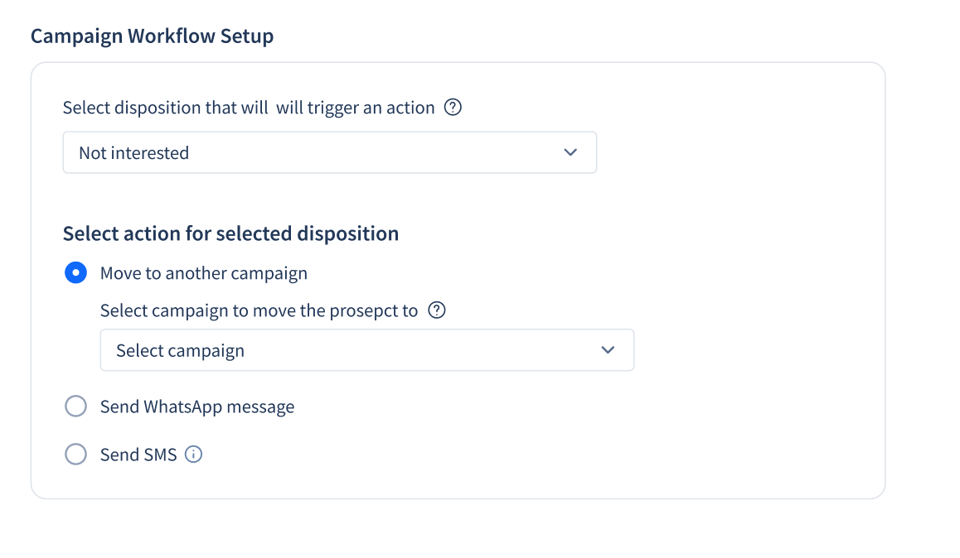
You mark specific dispositions (e.g., not interested, interested, requested a callback) after each call with the prospects.
This creates triggers and sends the follow-up to the respective prospect via channels such as WhatsApp, Email or LinkedIn.
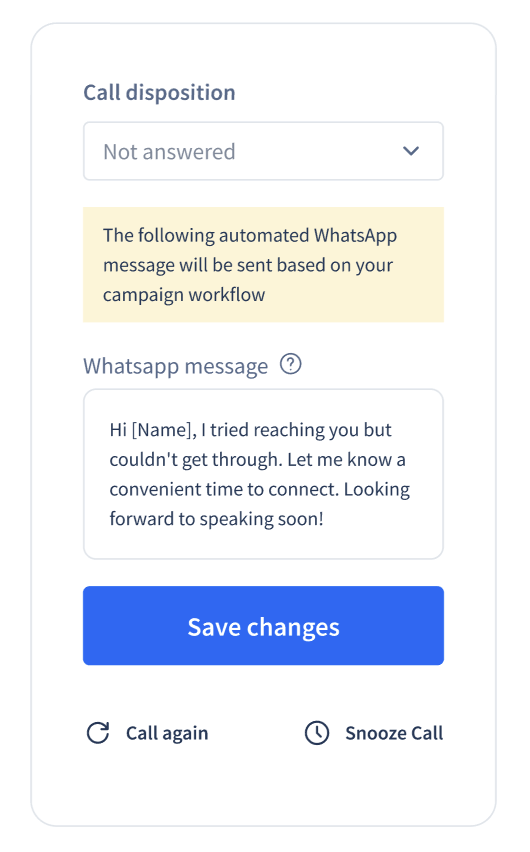
SmartReach will send follow-ups accordingly based on these triggers to the respective prospects saving you time.
This disposition based follow-ups help sales teams to send timely, relevant follow-ups without manual effort, leading to more booked meetings and higher conversions.
How to combine cold calling with Email, WhatsApp & LinkedIn?
Now let’s see if you can integrate all these channels with your outbound calling for effective prospect engagement.
Let’s understand the different scenarios.
Use case #1 → Combining emails with cold calling

Timing is everything when it comes to combining cold calling with email.
You can follow one of these 2 approaches given below to pair outbound calling with emails.
Case 1) Cold Calling before leaving emails
- Start with a cold call to introduce yourself and gauge prospect interest.
- If the prospect is unavailable or uninterested, follow up with a personalized email summarizing your conversation and offering additional value.
- This approach works well for time-sensitive offers or high-priority prospects.
You can use this sample cold calling script ⤵️
| “Hi [Prospect’s Name], this is [Your Name] from [Your Company]. I wanted to discuss how we’ve helped companies like [Their Industry] achieve [Specific Result]. Do you have a few minutes to chat?” |
For more calling scripts, check out this article “23 Cold Calling Scripts for B2B – Elements & Examples”.
Here’s one follow-up email template for your reference ⤵️
| “Hi [Prospect’s Name], It was great connecting with you earlier. As mentioned, we specialise in [Solution] and have helped companies like [Client Example] achieve [Result]. Would you be open to a quick demo?” |
Case 2) Cold calling after emails
- Send a personalised email first to introduce yourself and your value proposition.
- If you don’t receive a response within a few days, follow up with a cold call.
This approach is less intrusive and gives the prospect time to review your email before engaging.
Here’s one email template that you can use ⤵️
| “Hi [Prospect’s Name], I came across [Their Company] and noticed you’re facing [Challenge]. We’ve helped companies like [Client Example] overcome similar challenges. Would you be open to a quick call?” |
For the follow-up call, you can a script like something such as –
| “Hi [Prospect’s Name], this is [Your Name] from [Your Company]. I recently sent you an email about [Topic]. Did you get a chance to review it?” |
Use case #2 → Combining WhatsApp or text messages with calling
WhatsApp and text messaging are highly effective for quick, informal follow-ups. (Many B2B teams use the WhatsApp Business APIs to automate this WhatsApp outreach part)
Here’s how to use them with your cold calling step.
You can use these channels interchangeably. (Since both of them are quite similar and in many cases you can use just 1 one of them)
Again we’ll take 2 scenarios.
Case 1) After a successful call
If the prospect expresses interest during the call, send a quick WhatsApp or text message to share additional resources, schedule a meeting, or confirm next steps.
Here’s an example text/whatsapp message for your reference ⤵️
| “Hi [Prospect’s Name], it was great speaking with you earlier. Here’s the link to [Resource] we discussed. Let me know if you have any questions!” |
Case 2) After an unsuccessful call
If the prospect is unavailable or uninterested, send a polite follow-up message to keep the door open.
Here’s an example text/whatsapp message for your reference ⤵️
| “Hi [Prospect’s Name], I tried reaching you earlier but couldn’t connect. I’d love to discuss how we can help with [Challenge]. Let me know a good time to chat!” |
Use case #3 → Combining LinkedIn outreach with calling
LinkedIn is a powerful tool for building relationships and warming up cold leads.
You can use LinkedIn for both cold and warm outreach.
Here’s how to integrate it with cold calling ⤵️
Case 1) Sending LinkedIn message before cold calling
Research your prospect on LinkedIn to gather insights about their role, company, and interests. Note any information you find interesting and specific about the prospects.
Use this information to personalise your LinkedIn message.
You may use a starter paid plan on LinkedIn sales navigator to make the prospect lookup process easier.
Here’s one example LinkedIn message example that you can use ⤵️
| _“Hi [Prospect’s Name], I noticed on LinkedIn that you’re leading [Project/Initiative]. We’ve helped companies like [Client Example] achieve [Result]. __ _Would you be open to a quick chat?” |
Case 2) Dropping LinkedIn messages after making calls
If the prospect is unresponsive, send a LinkedIn connection request with a personalized message.
This adds a human touch and keeps the conversation going.
💡Practical Tip: View the prospect profiles for a couple of days before you send them a request. This increases the chance of getting your request accepted.
Here’s one sample message for your reference ⤵️
| _“Hi [Prospect’s Name], I recently tried reaching you about [Topic]. _I’d love to connect and explore how we can help with [Challenge].” |
Automate multichannel outreach with drip sequences
Running outreach across multiple channels manually is time-consuming and inconsistent especially if you are doing it at scale. The payoff is worth it: multichannel outreach data shows sequences that pair calls and email with LinkedIn out-reply any single channel.
Use the conditional drip campaign feature by SmartReach.io to reach prospects through email, cold calling, WhatsApp, and text—dynamically.
Here’s how the conditional drip sequences work inside SmartReach.io ⤵️
- Set up conditional triggers to follow up based on call responses, email opens, or message interactions.
- Automatically send a WhatsApp or text if a call goes unanswered.
- Schedule a LinkedIn message if an email is ignored for a few days.
- Personalize every interaction without manual effort, increasing engagement and response rates.
Try the conditional multichannel drip feature inside SmartReach.io for free.
Take a 14-day free trial of SmartReach.io to use it. (No credit card needed)
SmartReach.io is a cold email software whose Sales Engagement plans run email, LinkedIn, calls and WhatsApp inside one sequence, which is what makes the combinations above practical for a small team. The whole thing builds as a visual flow, where channel steps mix freely and conditions route each prospect down the right branch.
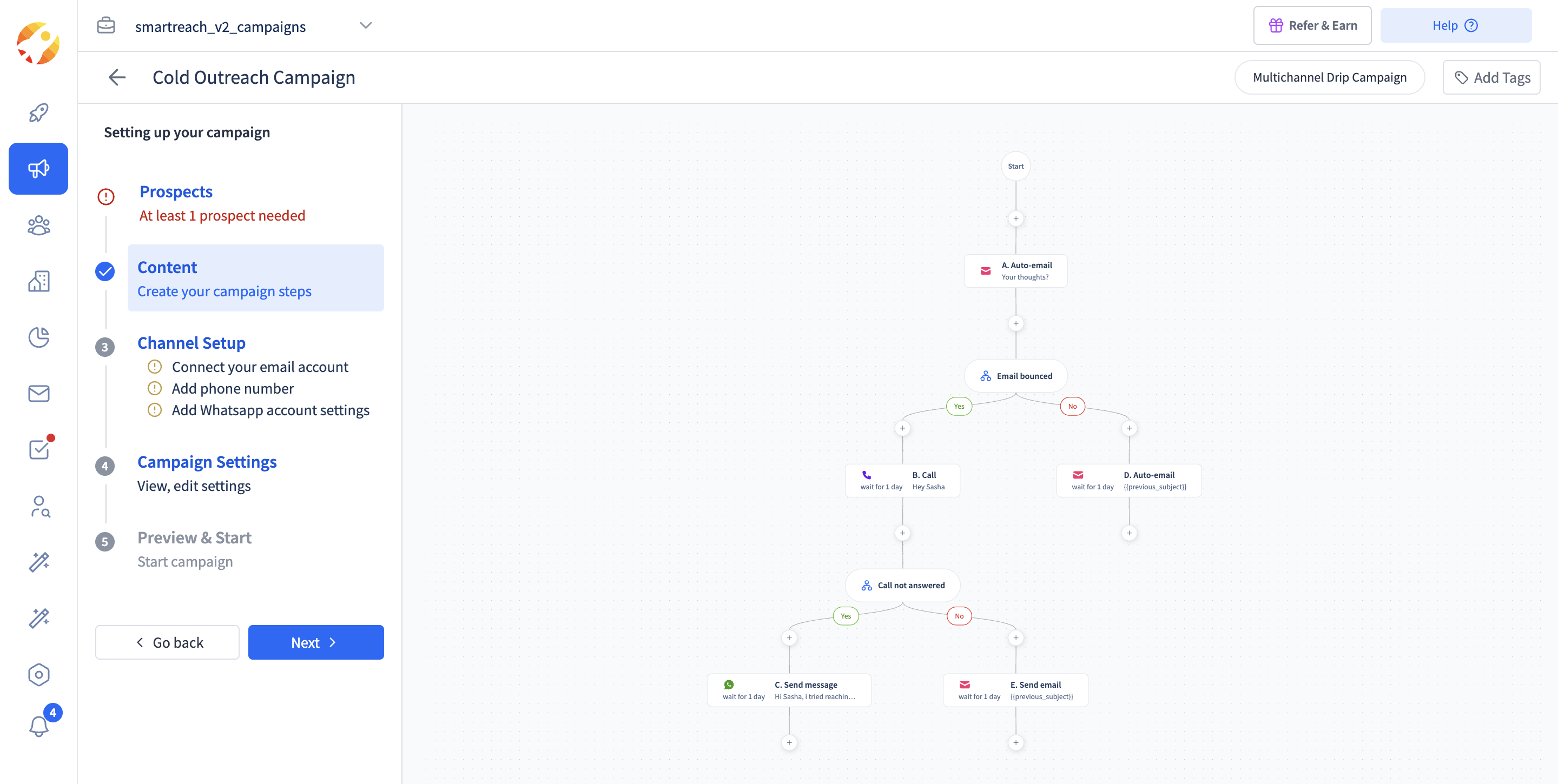 Exactly this article's playbook as a flow. Email first, a call if it bounced, and a WhatsApp message when the call goes unanswered.
Read the branches and you will recognize the use cases above. The opening email goes out, a bounce routes the prospect to a call instead of a dead retry, and an unanswered call falls through to a WhatsApp message. Each pairing from this article becomes a Yes or No branch that runs unattended.
Best practices for combining multiple outbound channels
Here are some best practices to follow if you are using an omnichannel outbound follow-up system –
- Space out touchpoints and avoid overwhelming prospects. 2-3 interactions per week work best.
- Use the prospect’s name, company, and specific pain points in every outreach message across the channels.
- Track response rates and adjust your outreach strategy based on what works best.
- If a prospect engages more on a specific channel, prioritize that for follow-ups.
- Keep messages short, clear, and direct to improve engagement.
- Use a sales automation tool to schedule follow-ups and avoid manual effort.
- Experiment with different messaging styles and formats to optimize responses.
- Respect opt-outs and compliance regulations to maintain credibility and trust.
Read: Email Compliance Laws: How to Stay Legal & Avoid Fines
Real-Life example of a multichannel outreach framework
Let’s say you’re targeting a decision-maker at a mid-sized tech company.
Here’s how your outreach might look ⤵️
| Day 1 → Send a personalised email introducing your solution and offering a case study. Day 3 → Make a cold call to discuss the email and gauge interest. Day 5 → If the call is unanswered, send a WhatsApp message with a quick value proposition. Day 7 → Connect on LinkedIn with a personalized message referencing your previous attempts to reach out. Day 10 → Send a final email with a strong call-to-action, such as a limited-time offer. |
By combining these channels, you increase your chances of connecting with the prospect and moving them through the sales funnel.
Conclusion
Combining cold calling with email, WhatsApp, and LinkedIn makes outreach more effective and increases response rates.
A multi-channel approach engages prospects on their preferred platforms, leading to better conversations and conversions.
SmartReach.io can help in this regard to automate follow-ups, track engagement, and personalize outreach at scale, so no opportunity is missed.
Start using these strategies today to book more client meetings and close more deals.
Stop juggling tools
Book more meetings on every channel
Join 5,000+ teams running multichannel outreach from one sequence, with deliverability built in.