Spam Filter Words: What Makes Emails Look Spammy?

On this page
You write a sharp cold email, send it to 200 prospects, and wait. Three days later the campaign report shows a handful of opens and no replies.
The copy was fine. The subject line was fine. So where did the emails go?
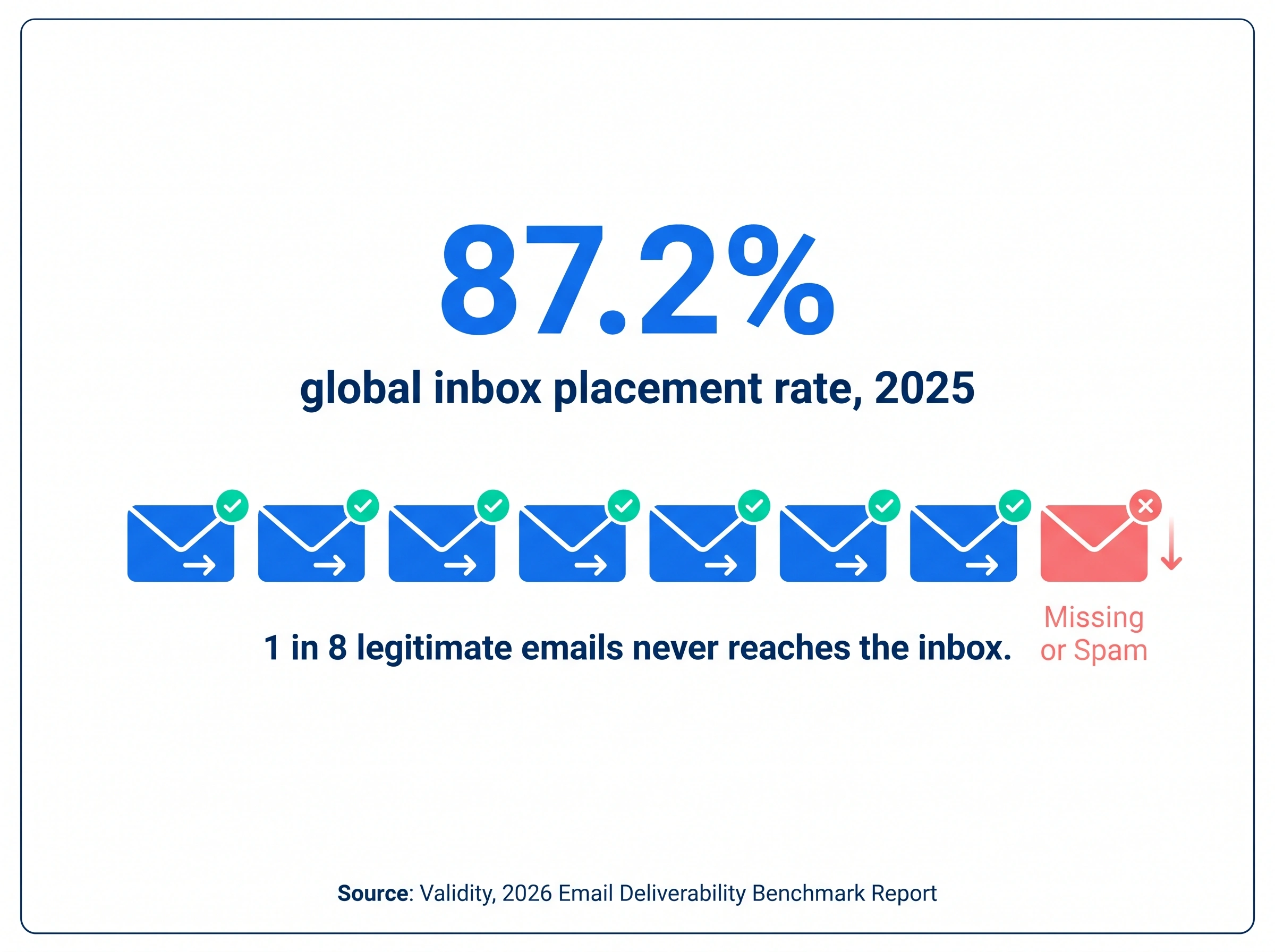
Most of them went where you can't see them. The average global inbox placement rate in 2025 was 87.2%, according to Validity's 2026 Email Deliverability Benchmark Report, which means roughly 1 in 8 legitimate emails never reaches the inbox. Cold email, sent to people who never asked for it, sits at the risky end of that average.
Spam filter words are the part of this problem everyone talks about, because they're the only part you can see from inside your draft. This guide covers which words make emails look spammy, how filters really score them (with real numbers), and what to fix first when the words aren't the real culprit.
What are spam filter words?
Spam filter words, also called spam trigger words, are words and phrases that spam filters weight against a message because spammers have overused them for decades. "Free", "act now", "100% guaranteed", "make money fast" and "winner" are the classic examples. When a filter sees one, it adds a small penalty to the message's score. When it sees several, the penalties stack.
The term is a little misleading, because no modern filter keeps a simple list of forbidden words. Gmail, Outlook and Yahoo run machine-learning classifiers trained on billions of messages, and open-source filters like SpamAssassin run hundreds of weighted rules. A spammy word is one input among many. It never decides the outcome alone, which is exactly why so much advice about it is wrong.
Do spam trigger words really send emails to spam?
Rarely, and almost never on their own. Spam filters weigh who sent the message and how recipients have treated that sender's mail before they weigh what the message says. A fully authenticated domain with a clean complaint history can send "free" in every other line and still land in the inbox. A brand-new domain blasting hundreds of emails a day lands in spam with the cleanest copy on earth.
The clearest evidence is what the mailbox providers themselves ask for. Google's email sender guidelines require SPF, DKIM and DMARC, one-click unsubscribe, and a spam rate kept below 0.3% in Postmaster Tools (0.1% is the level to aim for). Yahoo's requirements mirror them. Neither document publishes a list of words to avoid. The closest Google gets is a formatting rule, which says not to use HTML and CSS to hide content and to keep links visible and easy to understand.
That doesn't make the words irrelevant. It makes them the fifth signal out of five, and the only one of the five you can check without access to DNS records, Postmaster Tools or a seed-list test. Which is why they get all the attention.
How filters actually score spammy words
Nobody outside Google knows the exact weights Gmail's classifier gives to any phrase, and anyone who claims to is guessing. Google did say, in a November 2023 engineering post, that swapping in its RETVec text model improved Gmail's spam detection rate by 38% and cut false positives by 19.4%. The model reads character patterns, so misspellings like "fr33" and look-alike letters from other alphabets no longer slip past it.
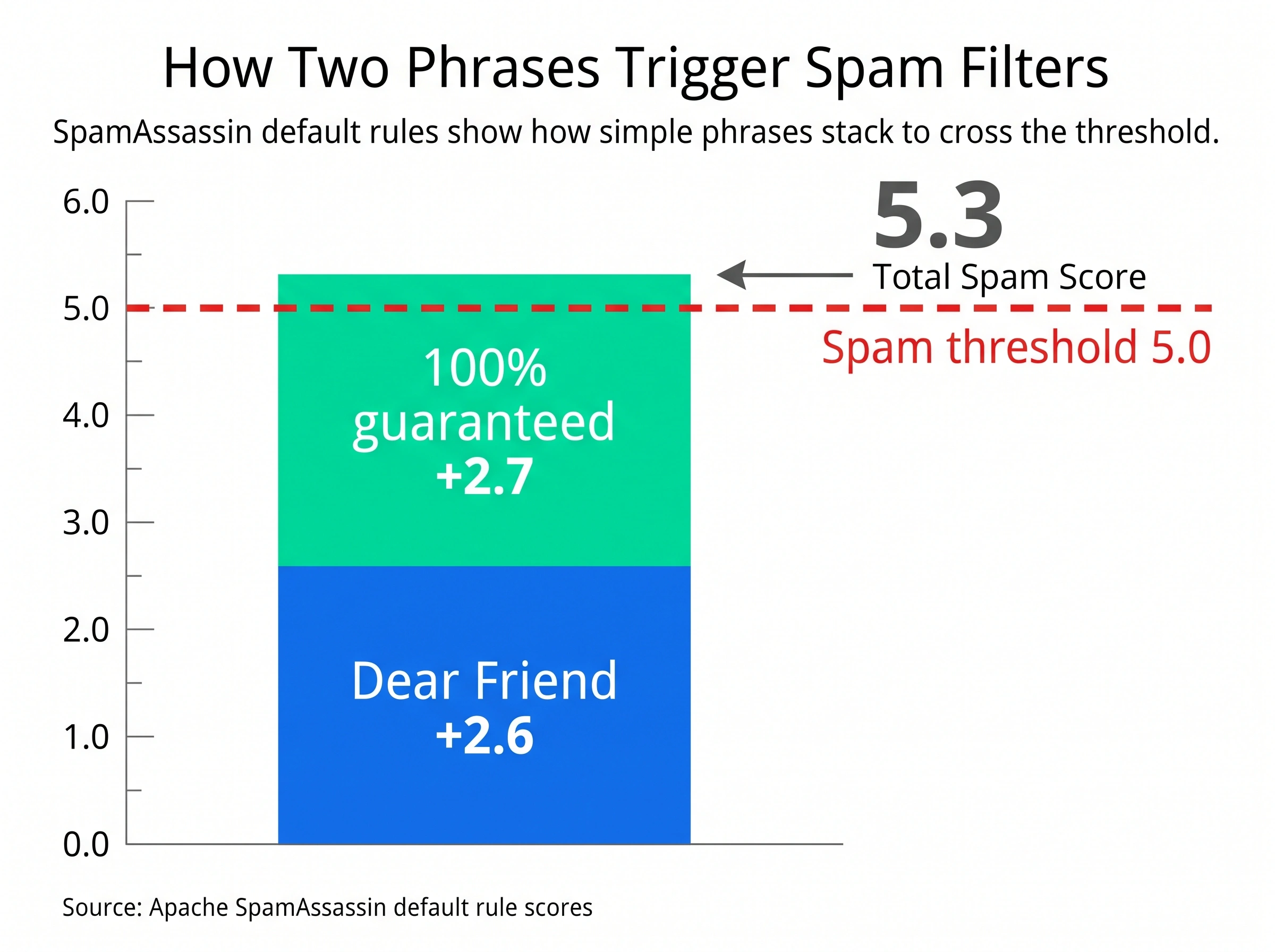
SpamAssassin is the one filter whose weights are public, and it's still widely run on business mail servers. It adds up a score per message and flags it as spam once the total passes 5.0 by default. A few of its content rules, from the 3.3 default ruleset, show how fast the score stacks.
| SpamAssassin rule | What it matches | Score |
|---|---|---|
BANG_GUAR | An emphatic guarantee with an exclamation mark | 2.7 |
GUARANTEED_100_PERCENT | "100% guaranteed" | 2.7 |
DEAR_FRIEND | A "Dear Friend" greeting | 2.6 |
ACT_NOW_CAPS | "ACT NOW" in capitals | 2.2 |
HTML_OBFUSCATE_20_30 | Text hidden behind HTML tricks | 2.0 |
SUBJ_ALL_CAPS | A subject line in all capitals | 1.5 |
FREE_QUOTE_INSTANT | A free, no-obligation quote offer | 1.3 |
MONEY_BACK | A money-back guarantee | 1.2 |
ONE_TIME | "One time" offer phrasing | 0.7 |
URG_BIZ | Urgent business wording | 0.6 |
Source: Apache SpamAssassin tests and default scores, network and Bayes column, rounded.
Read the table and the pattern is obvious. "Dear Friend" plus "100% guaranteed" is already 5.3, over the line, before the filter has looked at a single header. One "free" in a plain sentence scores nothing at all. The words that cost you are the ones that make a promise, manufacture urgency or shout.
Which words make emails look spammy?
The phrases that still carry weight in 2026 fall into seven groups. The lists below are the high-scoring examples, not the whole vocabulary. SmartReach.io's help centre keeps the full reference list of common spam trigger words, and the free spam word checker tests a draft against 209 of them, grouped by why each group is weighted.
1. Guarantees and risk reversal
These score highest in rule-based filters because a guarantee is the signature move of a scam.
- 100% guaranteed
- Satisfaction guaranteed
- Risk-free
- Money back
- No obligation
- No questions asked
Say instead what you can show. "Three of our customers in logistics cut bounce rate under 2% in their first month" beats "guaranteed results" on every filter and with every reader.
2. Manufactured urgency
Filters are trained on decades of fake deadlines, so real deadlines pay the price too.
- Act now
- Urgent
- Don't miss out
- Last chance
- Expires today
- Final notice
- Limited time
- Hurry
Say instead a real date. "I'm holding two slots on Thursday" is specific, honest and scores nothing.
3. Money and get-rich language
Anything that promises income or mentions cash in a promotional frame.
- Make money
- Earn cash
- Financial freedom
- Get rich
- Cash bonus
- Guaranteed income
- Million dollars
- Double your
Say instead a number with a source. "Teams using inbox rotation sent 3x the volume without a new domain" is a claim a filter can't object to and a prospect can check.
4. "Free" constructions
A single "free" is ordinary English and filters mostly ignore it. The constructions are the problem.
- Free trial, free gift, free access
- Free quote, free consultation
- 100% free
- No cost, no fees
Say instead what the thing is. "A 20-minute teardown of your current sequence, no charge" says more than "free consultation" and reads like a person wrote it.
5. Pressure calls to action
Spam shouts its ask. Cold email asks once, politely.
- Click here
- Buy now
- Order now
- Sign up free
- Call now
- Apply now
Say instead one question. "Worth a 15-minute call next week?" is a call to action that doesn't trip anything.
6. Superlatives and hype
Filters can't measure "amazing", so they treat it as noise. Readers do the same.
- Amazing, incredible, fantastic
- Revolutionary, groundbreaking
- Once in a lifetime
- Secret, hidden
- Exclusive deal
Say instead the measurable thing. Cut the adjective and keep the number it was standing in front of.
7. Legacy consumer-spam vocabulary
These are rarely a cold-email mistake, but one of them in a B2B message is a heavy penalty because nothing legitimate uses them.
- Viagra, pills, weight loss, miracle cure
- Casino, lottery, winner, you've been selected
- Password, verify your account, confirm now
- Dear friend, dear beneficiary
Say nothing like this, ever, including in a joke.
Watch the formatting that travels with these words too. A subject line in ALL CAPS, three exclamation marks in a row, bright red text, a link shortener, or a "Re:" on a first-contact email each add to the score on their own.
Why do spam filters flag these words?
Filters flag them because they learned to. Every rule in the SpamAssassin table above started as a pattern that appeared in millions of junk messages and almost never in legitimate mail. The words aren't bad. Spammers poisoned them through overuse, and filters simply keep score.
Four things keep that score current.
- Historical patterns. Bayesian filters compare the words in your email against two corpora, known spam and known good mail, and estimate which pile it belongs to. "Make money fast" sits almost entirely in the spam pile.
- Recipient reports. Every time someone presses the spam button, that message trains the filter. Phrases common in reported mail drift upward in weight, which is why the list shifts over time.
- Context, not counting. Modern classifiers read the whole message. Ten promotional phrases in 60 words, in capitals, with an image and no text, is a signature. One phrase in a conversational paragraph isn't.
- Machine learning that adapts weekly. Gmail's classifier retrains constantly on new spam. A phrase that passed in January can cost you in June, and the reverse. This is the part nobody can list, and the reason no spam-word list is ever complete.
Spam filters aren't random. They're bookkeepers. Keep that image in mind and the next section makes sense.
How do I avoid spammy words in cold emails?
Write like one person emailing one colleague, then test the draft before it goes out. The six steps below take about ten minutes per template and remove nearly all of the word-level risk.
- Swap the heavy phrases first. Use the table below. Guarantees, urgency and money claims carry the most weight, so fix those before anything else.
- Cut the formatting signals. No subject line in capitals, no stacked exclamation marks, no coloured text, one link at most, no link shorteners.
- Make the subject line specific and short. Under 50 characters, no "Re:" or "Fwd:" unless it really is a reply. Our guide to B2B cold email subject lines has 165 examples that clear filters.
- Keep it mostly text. Plain text or light HTML, one image at most, and never an image carrying the message. The image-to-text ratio is its own signal.
- Add the honest signals. A real name, a real signature with a company and location, and a one-line opt-out. Filters reward what spam never includes.
- Run the draft through a checker. Paste the subject and body into the free spam word checker. It marks each match, says why that group is weighted, and gives the rewrite.
| Trigger phrase | Say instead | Why it works |
|---|---|---|
| Free consultation | A 20-minute teardown of your sequence, no charge | Names the thing, drops the construction |
| Guaranteed results | Three customers in your space cut bounces under 2% | A number a reader can check |
| Act now | I'm holding two slots on Thursday | A real deadline scores nothing |
| Limited time offer | The pilot pricing runs until the end of the quarter | Specific and calm |
| Click here | Worth a 15-minute call next week? | One question, no shouting |
| Exclusive deal | Pricing we only run for agencies | Says who, not how special |
| Don't miss out | If this isn't a priority this quarter, no problem | Removes pressure, raises replies |
Here's what the swap looks like on a real email. Tanya, a junior SDR in her first outbound role, sent the first version for two weeks and got one reply.
Dear Friend,
This is a once in a lifetime opportunity to transform your sales with our revolutionary platform. 100% guaranteed results or your money back. Act now, this limited time deal expires today!
CLICK HERE to claim your free trial!
Nine of the phrases above are in the SpamAssassin table, the subject line is in capitals and the greeting alone scores 2.6. The rewrite says the same thing without a single weighted phrase.
Hi Marcus,
Noticed Northwind moved outbound to a new domain last month. The first 30 days on a new domain are where most teams see bounces climb past 5%, which costs the domain its reputation before it has one.
I work with logistics teams on exactly that. Happy to do a 20-minute teardown of your current setup, no charge, and leave you the checklist either way.
Worth 20 minutes on Thursday?
Tanya
Which one would you reply to? The second version is also the one the filter likes, and that's not a coincidence. Spam filters are built to approximate a human reader's reaction, so copy a human would answer is copy a filter will pass.
What matters more than the words?
Four signals outrank wording, and if any of them is wrong, rewriting the copy won't fix placement. It will only get the credit when the records are eventually fixed, which is how the belief that spam words are the whole problem survives.
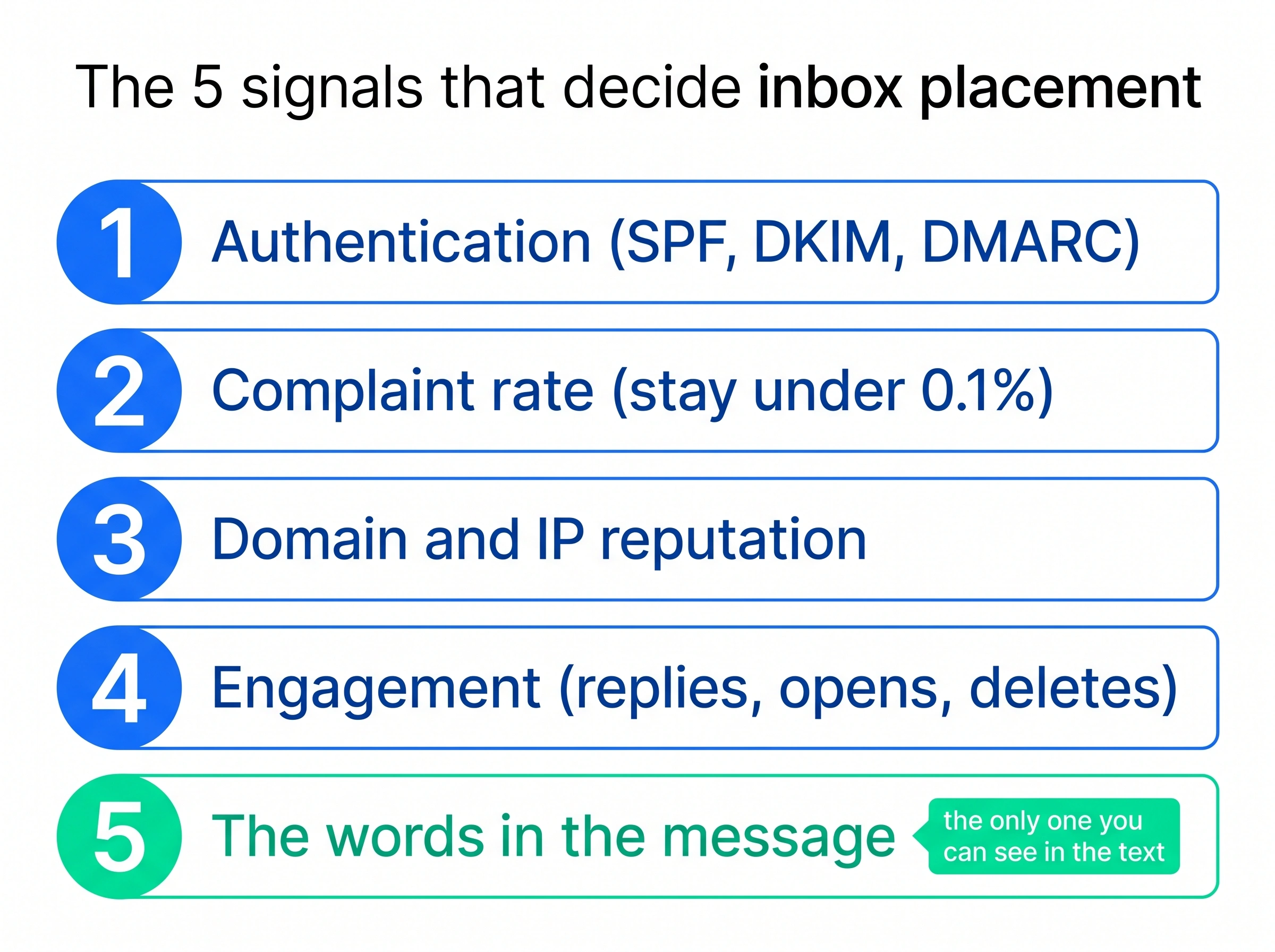
- Authentication. SPF, DKIM and DMARC, aligned and passing. Since February 2024 Gmail and Yahoo require all three from bulk senders, and Microsoft matched them for consumer Outlook in May 2025. A domain that fails them is filtered before a word of the message is read. Check yours in 30 seconds with the free email authentication checker.
- Complaint rate. The share of recipients who press the report button. Google names 0.3% as the ceiling and 0.1% as the target. Nothing else moves placement as fast, in either direction. The spam complaint rate calculator shows where a campaign sits.
- Domain and IP reputation. How long the domain has sent, how much, how steadily, and how people responded. A new domain sending at volume looks like a new domain sending at volume, whatever the copy says. Our email warmup guide covers the ramp, and sender reputation explains how the score is built.
- Engagement. Replies, opens and the absence of deletes-without-reading. Relevance is a deliverability input, not only a conversion one, which is why a smaller, better-targeted list beats a larger one on placement as well as on replies.
Stan, who runs RevOps for a 12-rep team, learned this the expensive way. Two weeks of copy rewrites did nothing. A DMARC record that had never been published fixed placement in a day. Records first, then the words.
How SmartReach.io keeps cold emails out of spam
SmartReach.io is a cold email software that treats deliverability as a setup problem, not a copy problem. Its Sales Engagement plans run email, LinkedIn, calls and WhatsApp from one sequence, and every plan carries the same deliverability checks underneath. Each of the five signals above maps to something the platform does before and during a send.
Spam test on every sender email. When you connect a sending account, SmartReach.io checks its SPF, DKIM and DMARC records and re-checks them whenever DNS changes. The same spam test report scans the sending domain and IP against common blacklists every week, on every plan, with a fix suggested for each failure.
To run it before a launch, open the campaign and follow three steps.
- Go to Channel Setup
- Select Spam Test
- Click Check now beside the sending domain and clear anything that fails
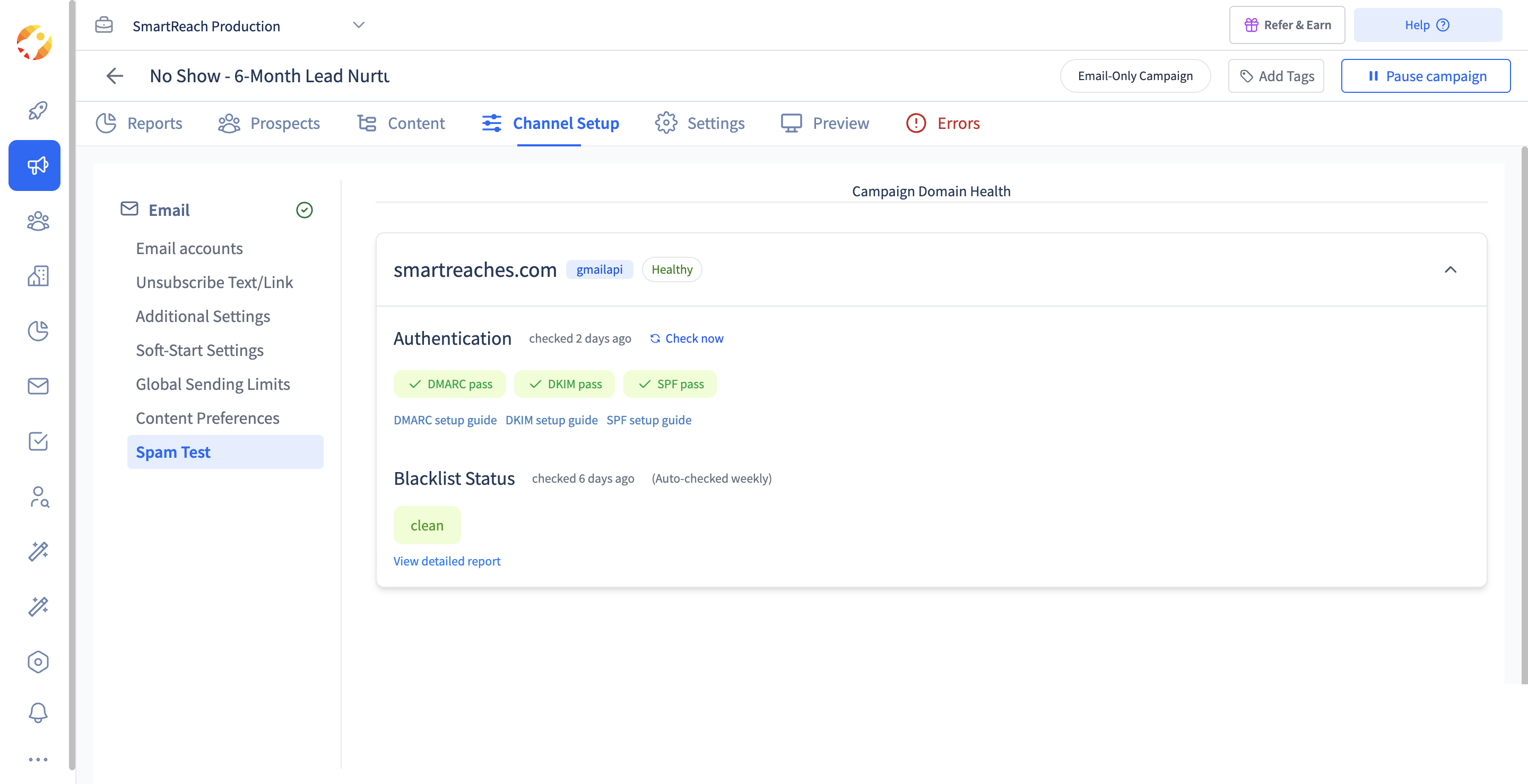 The Spam Test in a SmartReach.io campaign. Clean words on a failing domain still land in spam, so clear these checks first.
Content check before launch. The campaign content checker scores each step for spam probability, broken merge tags and risky HTML before the campaign goes live, so a "100% guaranteed" that slipped into step three is caught before the first send.
Volume that stays safe. Inbox rotation spreads one campaign across several connected email accounts with a daily cap per address. SmartReach.io recommends staying under 40 emails a day per inbox and spreading sends across 5 to 7 mailboxes per domain, which keeps every address well inside the 200-a-day public limit.
Warmup and verification included. Every plan includes free access to WarmupHero for domain warmup, and prospect emails are verified before sending so invalid addresses never bounce against your reputation.
Deliverability protection (Deliver4Sure) bundles all of that, and it's available on the 14-day free trial for up to 200 prospects, with no per-seat pricing on any plan.
Conclusion
Spam filter words are the easiest deliverability problem to see and the smallest one to fix. Swap the guarantees, the fake urgency and the money claims for one specific sentence each, drop the capitals and the exclamation marks, and run the draft through a checker. That removes the word-level risk in ten minutes.
Then spend the rest of the hour on what the filters weigh first. Records, complaint rate, domain reputation and list quality decide where most cold emails land, and no rewrite can outrun a missing DMARC record.
Write the email you'd answer yourself, send it from a domain that's earned the right to be read, and the filters will mostly leave you alone. If you'd rather have the checks run for you, start your 14-day free trial of SmartReach.io and connect your first sender email.
Frequently asked questions
What are spam trigger words?
Spam trigger words are words and phrases that rule-based spam filters weight against a message because spammers have overused them for decades. Common examples are free, act now, 100% guaranteed, make money, risk-free and winner. A filter adds a small score for each match. One match rarely matters, but several in one short email, plus capitals and exclamation marks, can push the total over the spam threshold.
Do spam trigger words really send emails to spam?
Rarely on their own. Mailbox providers weigh authentication, complaint rate, domain reputation and engagement before the words in a message. Google's sender guidelines set a 0.3% spam-rate ceiling and require SPF, DKIM and DMARC, and they publish no list of banned words. Wording is the fifth signal. It still matters, because it is the one signal that can stack on top of the other four.
How many spam trigger words will send my email to spam?
There is no fixed number, but SpamAssassin's default rules show how fast scores stack. The filter flags a message once its total passes 5.0. A Dear Friend greeting scores 2.6 and a 100% guaranteed claim scores 2.7, so those two phrases alone reach 5.3. Two or three heavy phrases in a short email, with capitals or repeated exclamation marks, is usually enough to cross the line.
Can I use words like free and guaranteed in business emails?
Yes, in moderation and in context. A single free in a plain sentence to a business address is fine, and filters are built to ignore ordinary English. The risk comes from stacking. Free trial, 100% guaranteed and act now in one email reads like a promotion. Swap guaranteed for a specific result you can show, and say what the free thing is, such as a 20-minute teardown of their sequence.
How do I check my email for spam words before sending?
Paste the subject line and body into a spam word checker. SmartReach.io's free spam word checker tests a draft against 209 phrases in nine groups, flags capitals, hidden characters, look-alike letters and link shorteners, and suggests a rewrite for each finding. Inside SmartReach.io, the content checker runs the same kind of scan on every campaign step before it goes live, so a risky phrase is caught before the first send.
How do I know if my emails are going to spam folders?
Watch the signals filters watch. A cold reply rate under 1%, a bounce rate above 5% or a spam-complaint rate near 0.3% points to a placement problem, not a copy problem. Check SPF, DKIM and DMARC first. SmartReach.io runs those three checks plus a weekly blacklist scan on every connected sender email, on every plan, and its 14-day free trial includes them for up to 200 prospects.
Stop juggling tools
Book more meetings on every channel
Join 5,000+ teams running multichannel outreach from one sequence, with deliverability built in.