
Multichannel Outreach Strategy Masterclass for B2B Teams

On this page
Multichannel outreach books more meetings than email alone. In SmartReach.io's 2026 campaign data, email-only sequences booked 8 meetings per 1,000 prospects. Adding LinkedIn took that to 14, and adding calls took it to 21.
The data comes from the SmartReach.io State of Cold Email 2026 (40M+ emails, January to June 2026) and State of LinkedIn Outreach 2026. Teams that run multichannel tend to be better resourced, so read these as what a well-run mix can add, not a floor every team will clear.
Multichannel outreach reaches the same prospect on two or more channels, in a planned order, so each touch makes the next one more likely to land. This masterclass is the whole strategy on one page, in eight steps, with copyable sequences, message templates and the KPIs that tell you whether it worked.
What this masterclass covers
| Step | Section | What you come away with |
|---|---|---|
| 1 | Set the goal and the ICP | A target ratio and the data each channel needs |
| 2 | Choose your channels | Two or three channels matched to your buyers |
| 3 | Design the sequence and its rules | Spacing, channel order and the branching rules |
| 4 | Copy a proven sequence | Four day-by-day sequences for different deal sizes |
| 5 | Write each message for its channel | Templates for email, LinkedIn, calls and WhatsApp |
| 6 | Set up the stack and the limits | Tools, per-channel limits and compliance rules |
| 7 | Launch on a pilot batch | A pre-launch checklist and a pilot plan |
| 8 | Measure the right KPIs | The metrics that predict meetings |
| Also | Why stitching separate tools breaks | What goes wrong across tools, and the one-platform fix |
| Also | FAQs | Short answers to the common questions |
What is multichannel outreach?
Multichannel outreach is a sales prospecting method that contacts one prospect on two or more channels, typically email, LinkedIn, phone calls and WhatsApp, in a fixed order and rhythm. A multichannel outreach strategy sets which channel opens, how many days pass between touches, which events switch the prospect to another channel, and which events stop the sequence. The goal is one conversation with the prospect, reached on whichever channel they actually answer.
It differs from running several single-channel campaigns side by side. In parallel campaigns the email tool doesn't know about the LinkedIn message sent yesterday, so prospects get duplicated, contradictory or badly timed touches. In a multichannel sequence every touch knows about the others.
It also differs from omnichannel. Multichannel means you're present on several channels. Omnichannel means the buyer can move between them and the context follows. For outbound prospecting, a well-run multichannel sequence is what most teams need, and the multichannel vs omnichannel comparison covers the difference in detail.
Does multichannel outreach beat email alone?
For most B2B teams it does. Across agency campaigns in SmartReach.io's State of Cold Email 2026, sequences that combined email, LinkedIn and calls booked 21 meetings per 1,000 prospects against 8 for email alone, and LinkedIn steps inside a multichannel sequence replied at 1.6x the LinkedIn-only rate. The reason is that buyers no longer live in one channel. McKinsey's B2B Pulse research found that B2B buyers use an average of ten channels across a purchase journey, and that more than half would switch suppliers after a poor experience moving between them. A prospect who ignores email may accept a LinkedIn connection, and a prospect who ignores both may pick up the phone after seeing your name twice.
Three effects do the work.
- Reach. Some decision-makers never answer cold email but read every LinkedIn message. Others are reachable by phone and nowhere else. A second channel finds the people the first one misses.
- Familiarity. A name seen in the inbox, then on LinkedIn, then on a caller ID reads as a person rather than a campaign, which lifts the response to every later touch.
- Recovery. When an email bounces or a LinkedIn invite is ignored, the sequence still has a path to the prospect instead of a dead end.
There are honest limits. Multichannel outreach costs more time per prospect, it amplifies a bad message rather than fixing it, and it fails when the list is wrong. If your team is new to outbound, get one channel working first, because a sequence of three weak channels does worse than one strong one. The cold email masterclass is the right first step for a team that has not yet made email work.
Set the goal and the ICP before you pick a channel
Start with one measurable goal, usually meetings booked, and one ideal customer profile (ICP). Every later decision, from channel choice to message length, follows from those two.
Write the goal as a number with a time frame, for example 20 qualified meetings from 1,000 prospects in six weeks. Take Alex, a sales director with ten SDRs and a quarterly pipeline target. If the team books two meetings for every 100 prospects today, what would it take to make that three? Writing the number down first is what turns that question into a plan. That sets a target of two meetings per 100 prospects, which is the ratio you will measure in Step 8.
Then define the ICP tightly enough that you can name the channels these buyers use.
- Firmographics. Industry, company size, region and tech stack.
- Persona. The job title you're writing to, what that person is measured on, and the problem your product removes for them.
- Seniority and access. A VP of Sales is busy on email but active on LinkedIn. A clinic owner answers the phone. A founder in Brazil or India may prefer WhatsApp.
- Trigger. A reason to reach out now, such as a funding round, a new hire, a job posting or a technology change.
Collect the data each channel needs
A multichannel sequence is only as wide as the data behind it. For every prospect, record the fields each channel depends on.
| Channel | Data you need | Where it usually comes from |
|---|---|---|
| A verified work email address | Lead database plus email verification | |
| The profile URL | LinkedIn search or Sales Navigator, or an enrichment tool | |
| Calls | A direct dial or mobile number | Lead database or enrichment, then a phone validity check |
| A mobile number plus consent to message | Form fills, events, or an earlier call or LinkedIn conversation |
Missing fields are fine as long as the sequence knows about them. A prospect with no phone number should skip the call steps automatically rather than create a task nobody can complete. Step 3 shows how.
Segment the list before you build anything. Group prospects by persona and by which channels you can reach them on, because a segment with LinkedIn URLs and no phone numbers needs a different sequence from one with both. SmartReach.io includes a B2B lead finder with 300M+ contacts, so the list, the enrichment and the sequence can sit in one product.
Data rules apply from the first record. Collect only what you need for the outreach, keep a source for every contact, honor opt-outs immediately across all channels, and check the rules for each region you sell into (GDPR and PECR in the EU and UK, CAN-SPAM and TCPA in the US).
Choose two or three channels your buyers answer on
Pick the channels your ICP responds on, not the channels your tool supports. For most B2B teams that means email as the base, LinkedIn as the second channel, and calls for accounts worth a conversation.
| Channel | Best for | Role in the sequence | Watch out for |
|---|---|---|---|
| Scale, detail, links and resources | The base layer that carries most touches | Deliverability, sending limits and spam filters | |
| Senior buyers, context and social proof | Familiarity before and between emails | Weekly invite limits and an unfinished profile | |
| Calls | High-value accounts and fast qualification | The conversion touch after earlier contact | Gatekeepers, calling-hour rules and rep confidence |
| Warm or opted-in prospects and some regions | Confirmations, quick follow-ups and resources | Consent, and the feeling of intrusion when cold |
Email is the base layer because almost every decision-maker has a work address and it scales cheaply. It's also the channel that needs the most care. Warm up new sending addresses, keep daily volume low per mailbox, and spread volume across several mailboxes rather than pushing one hard. The email sending limits guide covers the numbers by provider.
LinkedIn adds a face and a professional context to the name in the inbox. Profile visits and connection requests are low-pressure touches that make the next email feel familiar. A complete profile with a clear headline matters more than the message itself, because most prospects check it before accepting. The LinkedIn sales sequence guide goes deeper on this channel alone.
Calls
A call turns interest into a conversation in minutes, and it qualifies faster than any written channel. It works best after the prospect has seen your name at least once, so the opener can reference the email or the LinkedIn message. Keep a short script with a clear reason for calling and answers to the three objections you hear most. These cold calling scripts give worked examples.
WhatsApp messages get read quickly, which makes the channel useful for confirming meetings, sending a resource after a call, or following up with a prospect who has already engaged. It's the default business channel in much of Latin America, India, the Middle East and parts of Europe. Use it only with prospects who shared their number or agreed to chat, and always offer a way to opt out.
Honest caveat. There's no reliable public benchmark for B2B WhatsApp reply rates yet, and the numbers that circulate mostly come from consumer marketing. Treat your own pilot as the benchmark.
How many channels?
Two or three. Each extra channel costs personalization time and adds a way to annoy a prospect. Add one only when the existing channels are producing replies and you can name the prospects the new channel would reach.
Design the sequence and its branching rules
A multichannel sequence is a set of steps, delays and rules. The steps are the touches, the delays set the rhythm, and the rules decide who moves where. The rules matter most and get the least attention.
Set the length and the rhythm
- 8 to 12 touches over two to four weeks is the working range for B2B. Fewer than six rarely reaches a busy buyer. Past four weeks the sequence usually earns unsubscribes, not replies.
- One touch per day at most, and usually one every two to three days. Never send an email, a LinkedIn message and a call on the same day.
- Front-load the variety. Use at least two channels in the first week so the prospect meets your name in more than one place early.
- Match the length to the deal size. A $50 per month product needs a short sequence. A six-figure contract justifies more touches, more research and earlier calls to senior people.
Order the channels by pressure
Start with the lowest-pressure touches and earn the right to the higher-pressure ones. A LinkedIn profile visit costs the prospect nothing. An email asks for a read. A connection request asks for a click. A call asks for their time.
That's why a sequence that opens with a call usually wastes it.
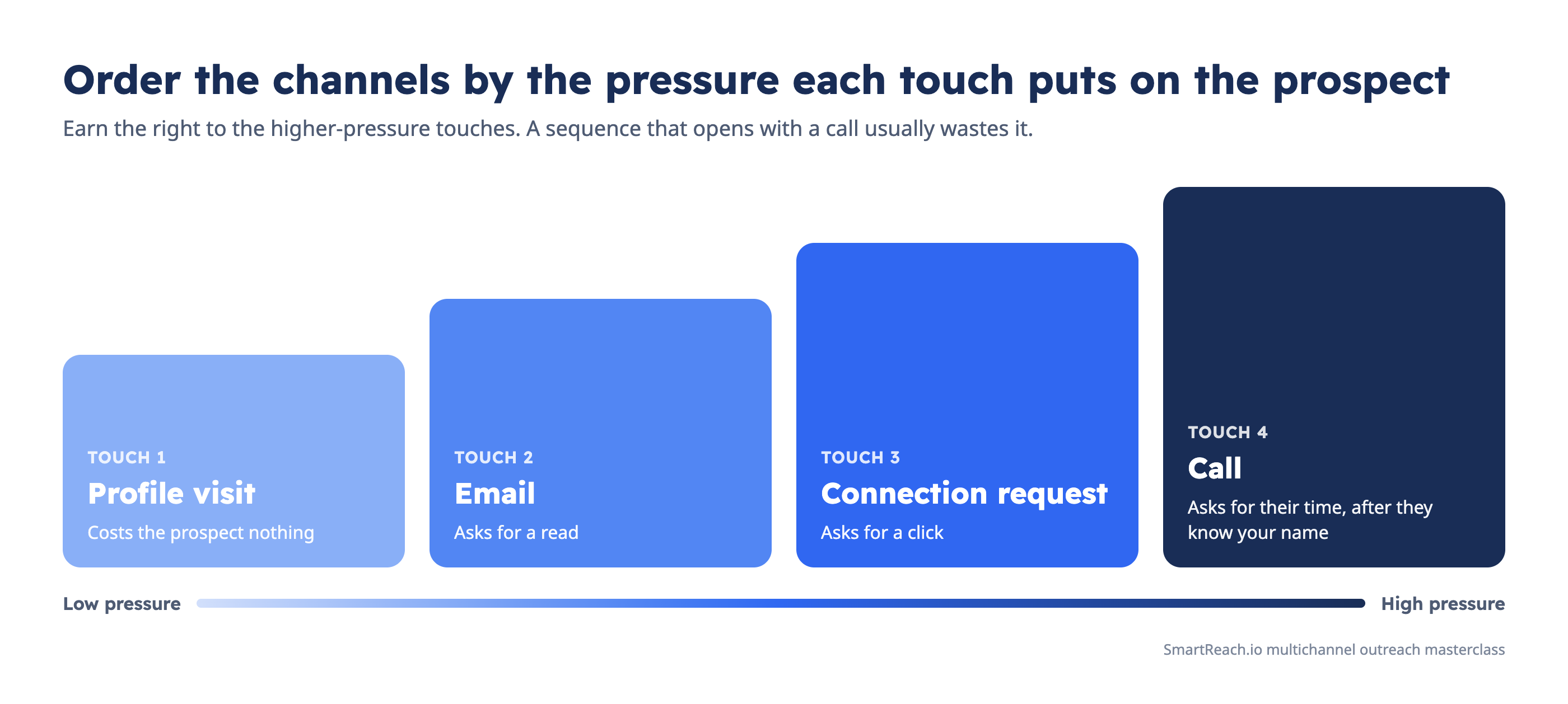 Order the touches from low pressure to high pressure, so the call comes after the prospect knows your name.
Each touch should continue one thread. The call references the email, the LinkedIn message references the call, and the last email closes the loop. A prospect should never feel the pitch restarting on every channel.
Write the branching rules
Branching rules are what make a sequence multichannel rather than a list of steps. Each rule asks a yes or no question about the prospect and sends them down a different path.
| If this happens | Then do this |
|---|---|
| Prospect replies on any channel | Stop every remaining step and hand over to a person |
| Email opened twice, no reply | Add a call step, because interest is likely |
| Email bounced | Switch to LinkedIn or a call instead of more email |
| Prospect has no LinkedIn URL | Skip LinkedIn steps and keep email and calls |
| Prospect has no valid phone number | Skip call steps rather than create dead tasks |
| LinkedIn invite not accepted after 7 days | Withdraw it and continue on email |
| Call not answered | Leave a voicemail, then send a short email that references it |
| Prospect asks to stop | Remove them from every channel immediately |
Doing this by hand across hundreds of prospects is where multichannel outreach breaks. Someone forgets that a prospect replied on LinkedIn, and the next email goes out anyway.
SmartReach.io handles this with conditional drip campaigns, where each condition (Email opened, Linkedin profile available, Phone number available, Email bounced, Call not answered, Linkedin profile is connected and others) splits the sequence into a yes path and a no path. Any reply pauses the remaining steps across email, LinkedIn, calls and WhatsApp. The conditional multichannel drip page shows the builder.
Here's how to build the branch from Sequence B in SmartReach.io.
- Click Create Campaign, select Multichannel Drip Campaign, then click Create.
- Add your prospects, then open the Content tab.
- Add the first step, for example Auto-email or a LinkedIn Auto: View profile step.
- Click the plus icon under it and pick a drip condition, such as Email opened or Phone number available.
- Build the Yes path and the No path, for example a Call step on Yes and a LinkedIn step on No, then review the flow in Preview.
Once the rules exist, the decision left to you is where each path should end. Make sure every branch either reaches a person or reaches a clean exit, because a branch that ends in nothing is a prospect you paid to find and then dropped.
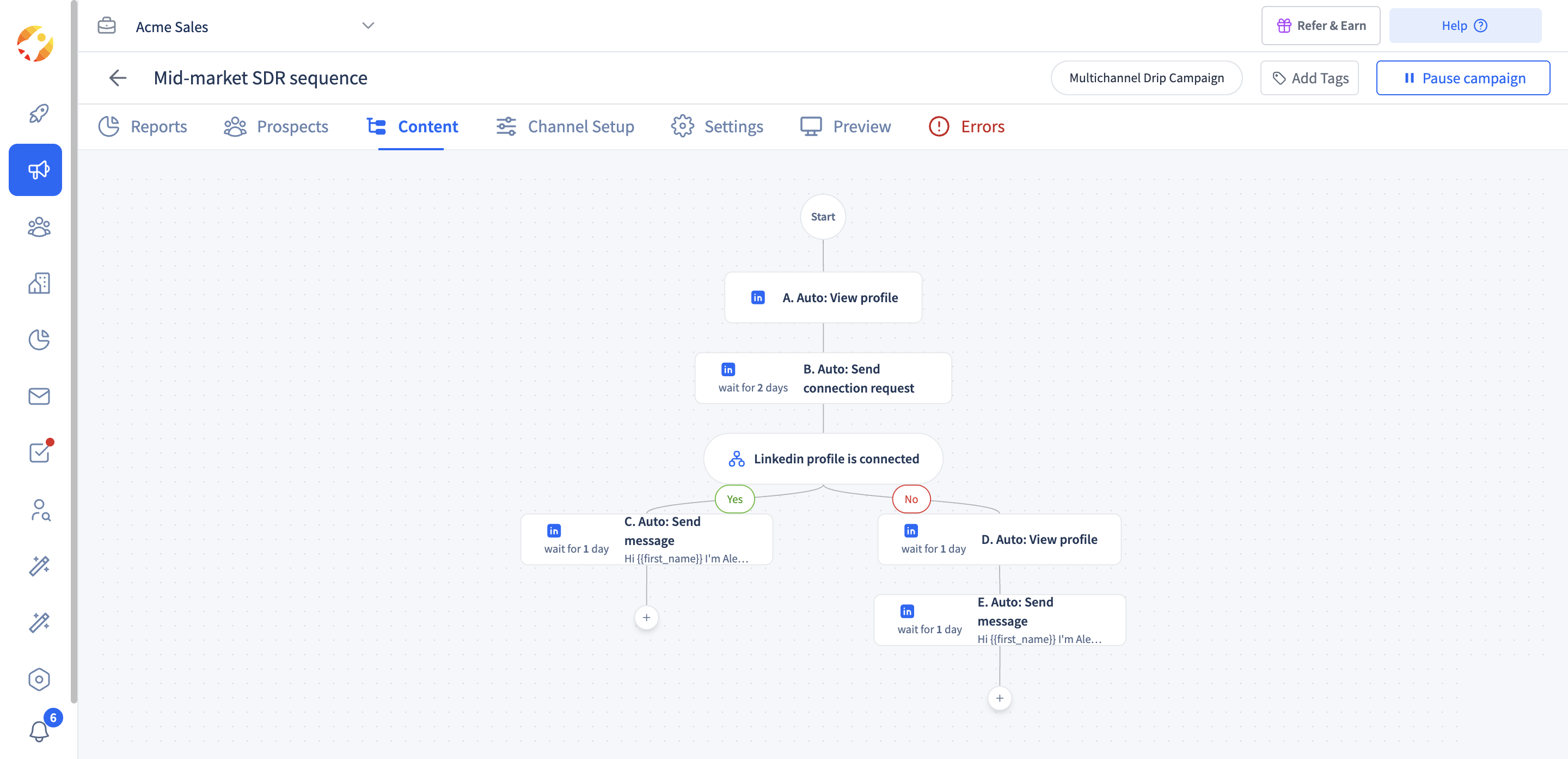 A Multichannel Drip Campaign in SmartReach.io, where the Linkedin profile is connected condition sends connected prospects a message and the rest another profile visit.
Copy a proven multichannel sequence
Use these four sequences as starting points. Each one fits a different deal size and data set. Change the days to fit your market and keep the spacing.
Sequence A. Email and LinkedIn for high-volume SMB outreach
Use it when you have emails and LinkedIn URLs but few phone numbers, and the deal is small enough that calls don't pay.
| Day | Channel | Touch |
|---|---|---|
| 1 | Visit the profile | |
| 2 | First email, one problem and one question | |
| 4 | Connection request with no pitch | |
| 7 | Follow-up with a short proof point | |
| 10 | If connected, a message that adds one new idea | |
| 14 | Break-up email that makes it easy to say no |
Sequence B. Email, LinkedIn and calls for mid-market accounts
The default for most B2B sales teams. Calls arrive only after the prospect has seen your name twice.
| Day | Channel | Touch |
|---|---|---|
| 1 | First email tied to a trigger | |
| 2 | Profile visit, then connection request | |
| 4 | Call | Call that references the email, voicemail if no answer |
| 4 | Two-line note that you just called, sent only if the call was missed | |
| 7 | Message if connected, otherwise skip | |
| 9 | Case study or data point relevant to their role | |
| 11 | Call | Second call at a different time of day |
| 15 | Break-up email |
Branch it. Prospects with no phone number skip days 4 and 11, and prospects who open the day 1 email twice get the first call on day 3 instead.
Sequence C. LinkedIn-first for enterprise and account-based outreach
For a short list of large accounts where a misstep costs more than a slow week.
| Day | Channel | Touch |
|---|---|---|
| 1 | Profile visit, then engage with a recent post | |
| 3 | Connection request with a specific, non-sales reason | |
| 6 | First email that builds on the shared context | |
| 9 | Call | Call to the direct dial, voicemail if missed |
| 12 | Message with a resource made for their company | |
| 16 | Follow-up that names a second stakeholder you could include | |
| 20 | Call | Final call, then a short closing email |
Sequence D. Warm follow-up with WhatsApp
For inbound leads, event contacts and prospects who already agreed to talk on WhatsApp.
| Day | Channel | Touch |
|---|---|---|
| 1 | Recap of what they asked for, plus the resource | |
| 1 | Short note that the email is in their inbox | |
| 3 | Call | Call to book the meeting |
| 5 | Meeting link or a two-option time suggestion | |
| 8 | Final follow-up with a clear next step |
For a fully written single version, the 7-touch multichannel sequence template has every message filled in, and the guide on how to combine cold calling with email, WhatsApp and LinkedIn builds a call-led version.
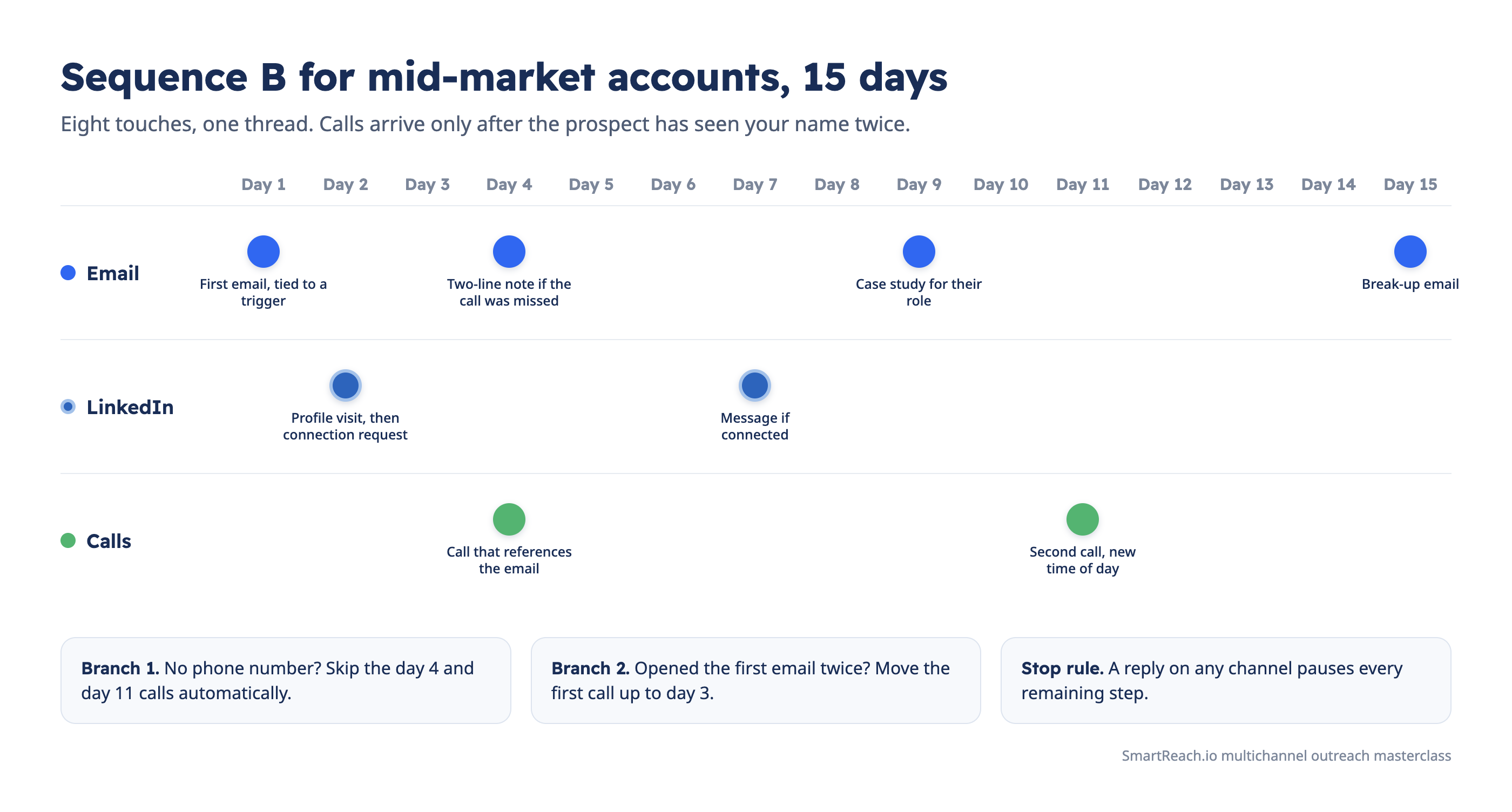 Sequence B on one timeline, with the two branches and the stop rule that keep it from piling on.
Write each message for its channel
The idea stays the same across channels and the format changes. Pick one problem, one proof point and one ask for the whole sequence, then write each touch in the format its channel expects.
| Channel | Length | Tone | The ask |
|---|---|---|---|
| 50 to 120 words | Plain and specific, no images in the first email | One question or a 15-minute call | |
| LinkedIn connection note | One or two sentences | Peer to peer, no pitch | Accept the connection |
| LinkedIn message | 40 to 80 words | Conversational | A reply, not a meeting yet |
| Call | A 20-second opener | Calm and direct | Permission to ask two questions |
| One to three short lines | Casual and brief | A time or a yes |
Four rules hold across every channel.
- Talk about them. Lead with their situation, not your company. The first sentence should name a problem they recognize.
- Personalize the reason, not just the name. A merge field fills in a first name. The reason you're writing to this person, this week, is what earns the reply.
- Reference the earlier touch. "I emailed on Tuesday about…" makes the call or message part of one conversation.
- One ask per touch. Two calls to action halve the response to both.
Templates you can adapt
Subject: [Company]'s new SDR team

Hi [First name],

Saw [Company] is hiring four SDRs this quarter. Teams at that stage usually find the second month harder than the first, when the easy accounts run out and reply rates drop.

[Customer] had the same problem and moved from email-only to a sequence that adds LinkedIn and calls. Their reps now book [result] without adding headcount.

Worth 15 minutes to see if the same approach fits your team?

[Your name]
Hi [First name], I work with sales leaders scaling SDR teams and sent you a note by email this week. Would be glad to connect here too.
Thanks for connecting, [First name]. One thing I left out of my email. Most teams we see lose the most replies between touch three and five, when the same email gets resent instead of a new channel being tried. Happy to share the sequence that fixed it for [Customer] if useful.
Opener
Hi [First name], it's [Your name] from [Company]. I sent you an email on Tuesday about ramping your new SDRs. Did I catch you at a bad time, or can I ask two quick questions?

Voicemail
Hi [First name], [Your name] from [Company]. I'm calling about the email I sent on Tuesday on ramping new SDRs. I'll send a two-line note now so you have my number. Thanks.
Hi [First name], [Your name] from [Company]. The guide you asked for is in your inbox. Would Thursday 11am or Friday 3pm work for a 15-minute walkthrough?
For more message ideas by channel, use the LinkedIn connection message templates and this guide on writing a follow-up email.
Writing a channel version of every message for every segment is slow. SmartReach.io is powered by AI that drafts a first version of each step from the prospect's details and your use case, which the rep then edits before it goes out. Treat the draft as a starting point and keep the reason for writing in your own words.
Set up the stack, the limits and compliance
A multichannel sequence needs four jobs done together, which are data, sequencing, task handling and reporting. You can assemble them from separate tools or run them in one product. The fewer handoffs between tools, the fewer prospects fall through the gaps, and the section on stitching tools together explains where those gaps open.
| Job | What it covers | Typical separate tools |
|---|---|---|
| Data | Finding, verifying and enriching contacts | Lead databases, email finders, phone validators |
| Sequencing | Steps, delays, branching and reply detection | Cold email and sales engagement software |
| Task handling | LinkedIn actions, calls and WhatsApp messages | LinkedIn tools, a dialer, a task queue |
| Records and reports | Every touch logged, results by channel | A CRM plus the sequencing tool's reports |
The best multichannel outreach tools roundup compares the products that cover these jobs, and the multichannel sales CRM guide covers the CRM side.
Respect the limits of each channel
- Email. Keep each mailbox to about 40 cold emails per day, spread larger volumes across several mailboxes and domains, warm up every new address, and keep the daily volume steady. Inbox rotation spreads sends across mailboxes automatically.
- LinkedIn. LinkedIn limits connection requests to roughly 100 per week for most accounts, and less for new or inactive profiles. Stay under it and space actions through the day. Free accounts can message only first-degree connections, and InMail needs a paid plan.
- Calls. Respect local calling hours and do-not-call lists, tell prospects when a call is recorded where the law requires it, and use a local number where you can.
- WhatsApp. Message only prospects who opted in, include a way to stop, and avoid bulk sending from a personal number.
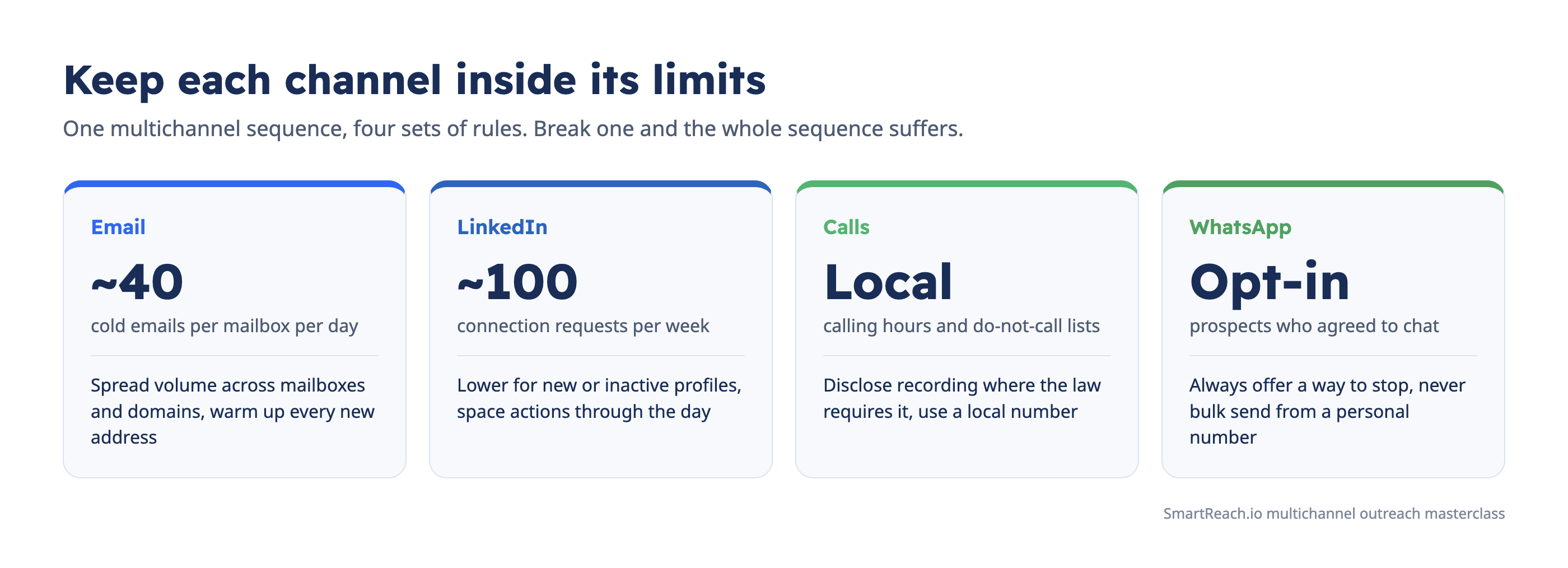 The limits that keep each channel healthy inside one multichannel sequence.
Make opt-outs global
An opt-out on one channel is an opt-out on all of them. A prospect who unsubscribes from email and then gets a LinkedIn message and a call is the fastest route to a complaint, so set up one opt-out to stop every channel.
Launch on a pilot batch, then scale
Never launch a new sequence to the whole list. Send it to a pilot batch of 50 to 100 prospects from one segment, read the results, fix the weakest step, then scale.
Run this checklist before the first send.
- The goal and the target ratio (meetings per 100 prospects) are written down.
- The list is verified, segmented, and free of existing customers and open opportunities.
- Every channel has the data it needs, and steps without data are set to skip.
- Sending mailboxes are warmed up, authenticated, and inside their daily limits.
- The LinkedIn profile is complete and the weekly invite volume sits inside LinkedIn's limit.
- Callers have the script, the objection answers, and a calendar link ready.
- A reply on any channel stops every channel, and so does an opt-out.
- Each message has been read aloud once, on the device the prospect will use.
- One person owns the replies and the tasks each day.
During the pilot, check two things daily. First, are the tasks getting done on the day they're due? A LinkedIn or call step that slips by three days breaks the rhythm of the whole sequence.
Second, are replies being answered within a working day? A fast answer to a reply is worth more than any template change.
After two weeks, compare the pilot against the goal. If replies are low on every channel, the problem is the list or the message. If one channel lags, fix that channel's step or drop it. Then scale to the rest of the segment.
Measure the KPIs that predict meetings
Judge a multichannel sequence on meetings, not activity. Start with meetings booked per 100 prospects, then find out which step earned each reply, then check the health of each channel.
Sequence-level KPIs
| KPI | What it tells you |
|---|---|
| Meetings booked per 100 prospects | Whether the sequence meets the goal from Step 1 |
| Positive reply rate | Whether the message and the targeting work |
| Reply rate by step | Which touches earn replies and which only add volume |
| Reply rate by channel | Whether a channel deserves its place in the sequence |
| Time to first reply | Whether the sequence is too long or too slow |
| Opt-out rate | Whether the pressure is too high |
Channel health KPIs
| Channel | KPIs to watch |
|---|---|
| Bounce rate, spam complaints, reply rate, positive reply rate | |
| Acceptance rate, message reply rate, profile views after outreach | |
| Calls | Connect rate, conversations per 100 dials, meetings per conversation |
| Reply rate, meetings confirmed, opt-outs |
Treat email open rate with care. Mail privacy features open messages automatically, so open rates now read high and say little. Use opens as a branching signal, never as the measure of success.
Attribution is the hard part. A prospect who replies to the third email after accepting a LinkedIn invite and missing a call was moved by all three. Record the step that earned the reply and the steps before it, and judge channels over a few hundred prospects rather than one deal.
In SmartReach.io, the Prospects overview report breaks prospects contacted down by channel (email, LinkedIn, calls and WhatsApp), and the Call activity, Call disposition, Linkedin activity and Reply sentiment reports go one level deeper, so a team can confirm its LinkedIn and call steps actually ran before judging whether they worked. The reports and analytics page lists what each report covers.
Common multichannel outreach mistakes
- Adding channels to fix a bad list. More channels reach the wrong people faster. Fix targeting first.
- Pasting one message into every channel. A cold email pasted into a LinkedIn note reads as spam in both places.
- No reply detection across channels. A prospect who replied on LinkedIn and then gets a follow-up email won't reply again.
- Same-day pile-ons. Email, LinkedIn and a call in one afternoon feels like pressure, not persistence.
- Manual steps that never get done. A sequence whose LinkedIn and call tasks sit for days is an email sequence with gaps.
- Judging by opens. Open rate rewards subject lines, not meetings.
- Never pruning. If a channel earns no replies after a few hundred prospects, remove it and give the time to the channels that work.
Who runs multichannel outreach
- SDR and BDR teams run it to book meetings for account executives, usually with Sequence B.
- Account executives use LinkedIn and calls to keep a deal moving with several stakeholders after the first meeting.
- Agencies run it for many clients at once, with one sequence and one report per client.
- Recruiters reach passive candidates on LinkedIn first, then email and a call to book the screen.
- Founders selling into a small number of large accounts use Sequence C with heavy research per account.
Why stitching separate tools breaks multichannel outreach
Multichannel outreach run across separate tools, an email sender, a LinkedIn tool, a dialer and a CRM, breaks in the handoffs between them. Each tool sees only its own channel, so no single system knows that a prospect replied, opted out or took a call, and the sequence keeps going as if nothing happened.
| What breaks | With separate tools | With one platform |
|---|---|---|
| Replies | A prospect replies on LinkedIn and the email tool still sends the next follow-up | A reply on any channel pauses every remaining step |
| Opt-outs | An unsubscribe in the email tool never reaches the dialer | One do-not-contact list covers every channel |
| Branching | An email open can't create a call task in a separate dialer | Conditions move prospects between channels inside one sequence |
| Prospect data | CSV exports between tools go stale within days | One prospect record feeds every channel |
| Reporting | Each tool reports its own channel, so nobody sees which touch earned the reply | Results by channel in one place |
| Cost | Every tool bills separately, often per user, so costs multiply as the team grows | One subscription for the whole sequence |
The quiet cost is the rep. When the tools don't talk to each other, a person becomes the integration layer, checking four inboxes before every touch and copying status by hand. That's the work that slips first on a busy week, and it's exactly the work that decides whether a sequence feels coordinated or careless.
The fix is to give every channel the same goal and the same record. One sequence decides the order, one prospect record carries the data, and one stop rule ends the conversation everywhere at once. SmartReach.io runs email, LinkedIn, calls and WhatsApp on that single record, so a reply, an opt-out or a booked meeting on any channel stops every other channel automatically, and there's no per-seat pricing to multiply as the team grows.
How SmartReach.io keeps every channel on one goal
SmartReach.io is a cold email software that puts email, LinkedIn, calls and WhatsApp into one sequence, and on its Sales Engagement plans it works as a full sales engagement platform. Teams use it to run every step of this masterclass in one product, from the lead list to the booked meeting.
| Masterclass step | How SmartReach.io handles it |
|---|---|
| Step 1. List and data | A lead finder with 300M+ contacts, email verification, and import from CSV or a CRM |
| Step 3. Branching | Conditional drip campaigns with yes and no paths on conditions such as email opened, email bounced, LinkedIn profile available, LinkedIn profile connected, phone number available and call not answered |
| Step 3. Stopping | A reply pauses every remaining step across all four channels |
| Step 5. Messages | Merge fields, A/B testing, and draft suggestions for each step |
| Step 6. Email | Connected mailboxes, warmup, inbox rotation and sending limits per mailbox |
| Step 6. LinkedIn | Profile visits, connection requests, messages and InMail as sequence steps |
| Step 6. Calls | A built-in dialer with call scripts, recording, local numbers in 200+ countries, and live listen and whisper coaching |
| Step 6. WhatsApp | WhatsApp messages as task steps in the same sequence |
| Step 7. Daily work | One task manager that queues the day's LinkedIn, call and WhatsApp steps for each user |
| Step 8. Reporting | A prospects overview broken down by channel, plus call activity, call disposition, LinkedIn activity and reply sentiment reports |
Pricing follows the plan family. Email Outreach plans start at $29 per month and cover email.
Sales Engagement plans start at $39 per month and add calling and LinkedIn steps, and full LinkedIn automation is an add-on at $29/month per LinkedIn account. There's no per-seat pricing. Plans scale by active prospects, and every plan above Basic includes unlimited users and unlimited sending email accounts.
SmartReach.io is rated 4.6 on G2 from 60 reviews.
See the full feature set on the multichannel outreach platform page, or the cold calling software page for the dialer.
FAQs on multichannel outreach
What is multichannel outreach?
Multichannel outreach is a planned sequence that reaches one prospect on two or more channels, usually email, LinkedIn, calls and WhatsApp, where each touch builds on the last. The plan fixes the channel order, the spacing and the rules that stop or switch the sequence. SmartReach.io runs all four channels in one sequence, with a 14-day free trial to test the plan.
Does multichannel outreach get better results than email alone?
In SmartReach.io's State of Cold Email 2026, sequences that added LinkedIn to email booked 14 meetings per 1,000 prospects and sequences that also added calls booked 21, against 8 for email alone. LinkedIn steps inside a multichannel sequence also replied at 1.6x the LinkedIn-only rate. Better-resourced teams run more multichannel, so treat these as what a well-run mix can add.
How many touches should a multichannel outreach sequence have?
Most B2B multichannel sequences run 8 to 12 touches over two to four weeks, spaced at least a day apart so each touch lands on its own. Fewer than six rarely reaches a busy buyer, and more than four weeks usually adds unsubscribes, not replies. In SmartReach.io, every step carries its own delay and the whole sequence pauses the moment a prospect replies.
In what order should you use email, LinkedIn and calls?
A reliable order is a LinkedIn profile visit, then the first email a day later, a connection request, a call once the prospect has seen your name twice, then follow-ups that alternate email and LinkedIn. Never use all three on the same day. SmartReach.io can branch the order automatically, for example calling only prospects who opened an email or have a valid phone number.
How many channels should a B2B outreach sequence use?
Two or three channels is the working range for most B2B teams, usually email plus LinkedIn, with calls added for accounts worth a conversation. A fourth channel such as WhatsApp fits warm or opted-in prospects. Every extra channel costs personalization time, so add one only when the current ones are working. SmartReach.io Sales Engagement plans start at $39 per month with calling included.
Is WhatsApp a good channel for B2B outreach?
WhatsApp works for B2B outreach once a prospect has shared a number or agreed to chat, and it's weak as a first cold touch. Use it to confirm meetings, send a resource after a call, or reach buyers in markets where WhatsApp is the default business channel. SmartReach.io adds WhatsApp messages as task steps inside the same sequence as email, LinkedIn and calls.
Which KPIs measure a multichannel outreach campaign?
Measure positive replies and meetings booked per 100 prospects first, then the step that earned each reply, then channel health such as bounce rate, LinkedIn acceptance rate and call connect rate. Open rate alone misleads, because privacy features inflate it. SmartReach.io breaks prospects contacted down by channel, so a team can see whether its email, LinkedIn, call and WhatsApp steps actually ran.
Stop juggling tools
Book more meetings on every channel
Join 5,000+ teams running multichannel outreach from one sequence, with deliverability built in.