What Makes a SAAS Homepage Convert Visitors into Leads?

Your homepage is your digital storefront and for SAAS companies, it’s often the first (and sometimes only) chance to convert visitors into qualified leads. Research shows that 60% of users prefer beautifully designed pages, yet 33% will abandon a site if it’s not optimized for their device.
The challenge? Creating a homepage that balances aesthetic appeal with conversion optimization while addressing the specific pain points of B2B buyers.
In this guide, we’ll break down seven proven strategies that top SAAS companies use to transform their homepages into high-converting lead generation engines.
First impressions drive 60% of homepage conversions
First impressions happen in milliseconds; research from Adobe indicates users form opinions about your site in just 50 milliseconds. But here’s what many SAAS teams miss: first impressions aren’t just about visual design.
Technical performance matters as much as aesthetics
Technical performance matters equally. Google’s data shows that a 10-second load time increase raises bounce rates by 123%. For SAAS buyers comparing multiple solutions simultaneously, a slow homepage signals poor product quality and unreliable infrastructure.
What high-converting SAAS homepages get right:
- Load times under 3 seconds (compress images, minify CSS/JS, use CDNs)
- Mobile-responsive design (33% of users abandon sites with poor mobile display)
- Clear value proposition within the first fold
- Immediate trust signals (customer logos, security badges, certifications)
Real example: Navan’s speed-optimized homepage
The Navan homepage loads in under 2 seconds despite featuring high-quality visuals and interactive elements. They achieve this through aggressive image compression, lazy loading for below-the-fold content, and a CDN that serves assets from geographically distributed servers.
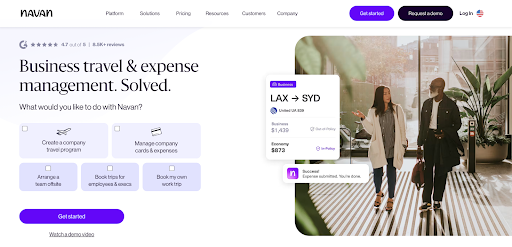
Their headline “One platform for travel, corporate cards, and expense management” immediately addresses the core frustration of business travelers: fragmented booking systems. The accompanying visual shows a unified interface, demonstrating the solution rather than just describing it. The result? A 40% lower bounce rate compared to industry averages.
Tracking homepage performance with multi-channel analytics
Tools like SmartReach.io help SAAS teams understand how homepage performance correlates with actual pipeline growth. Through its detailed analytics feature, you can track which traffic sources convert best, monitor prospect engagement across email touchpoints, and identify which value propositions resonate most.
SmartReach’s analytics don’t stop at website behavior, they connect homepage visits to email opens, LinkedIn interactions, and call outcomes through multichannel tracking, giving you a complete picture of your buyer’s journey from first impression to closed deal.
Prioritize user-centric design over flashy claims
According to PwC research, 73% of B2B buyers want brands to demonstrate an in-depth understanding of their pain points. Generic homepage claims like “Industry-leading solution” or “best-in-class platform” don’t resonate because they lack specificity.
Replace generic claims with outcome-driven messaging
Before (Generic):
“Our platform helps sales teams close more deals.”
After (User-Centric):
“Close 35% more deals by automating follow-ups and prioritizing hot leads, no manual data entry required.”
The difference? The second version addresses specific pain points (manual work, lead prioritization) and quantifies the outcome (35% increase).
How to gather user-centric intelligence
Conduct Customer Interviews
Identify the top 5 pain points your solution addresses. Ask customers: “What specific problem were you trying to solve when you found us?”
Analyze Support Tickets
Review common objections and questions. These reveal real friction points your homepage should address upfront.
Track Behavioral Signals
Use data to understand what prospects actually care about. SmartReach’s Reply Sentiment Analysis automatically categorizes prospect responses as positive, negative, or neutral, revealing which messaging approaches work and which fall flat.
Real Example: Somewhere’s user-caentric Approach
The Somewhere homepage features a rotating carousel of video testimonials from remote team leaders. Each testimonial addresses a specific use case” managing distributed teams across 12 time zones” rather than generic praise.
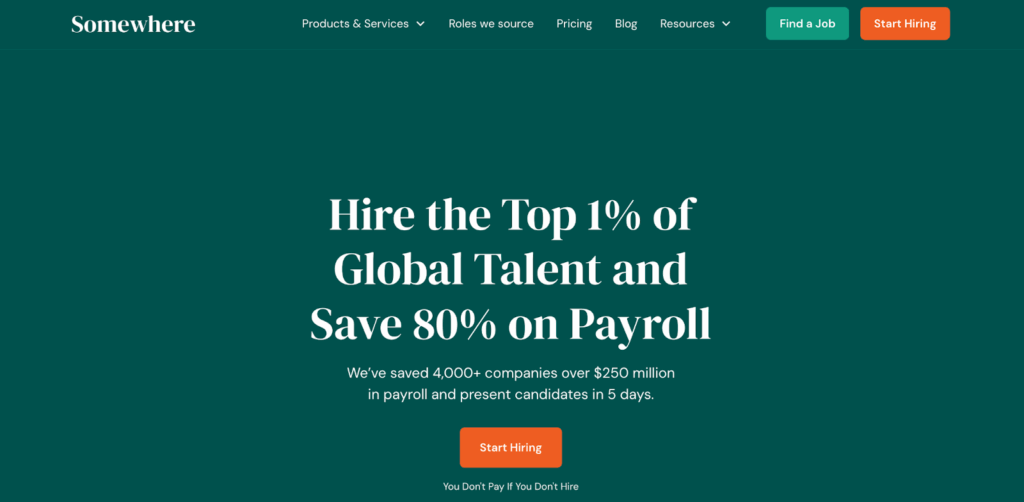
This specificity helps prospects self-identify and builds confidence that Somewhere solves their unique challenges. The homepage copy mirrors language used in customer interviews, creating immediate resonance with visitors experiencing similar pain points.
Personalizing follow-up based on homepage behavior
SmartReach’s Magic Content feature takes user-centricity to the next level by auto-generating personalized email copy for each prospect based on their homepage interactions. If a prospect visits your pricing page multiple times but doesn’t convert, SmartReach can trigger automated sequences addressing budget concerns with relevant case studies and ROI calculators.
This AI-powered personalization ensures every touchpoint reflects deep understanding of individual prospect needs not just generic messaging blasted to your entire list.
How to add social proof to your SAAS homepage
Harvard Business Review reports that 88% of B2B buyers consider brand trust a top-three purchase factor. For SAAS companies without established reputations, social proof bridges the credibility gap.
Most effective social proof formats for SAAS
Customer Ratings (5-Star Reviews)
Best for immediate credibility. Place prominently in the header or above the fold.
Impact: +15-20% CTR
Video Testimonials
Ideal for B2B SAAS and high-ticket products. Position in the hero section for maximum engagement.
Impact: +30-40% time on page
Case Studies with ROI Data
Critical for enterprise buyers. Link to detailed case studies mid-page.
Impact: +25-35% demo requests
Client Logos
Universal trust signal. Include in a “Trusted by” section near the footer.
Impact: +10-15% perceived authority
Scaling social proof collection with automation
Gathering authentic testimonials at scale is challenging for fast-growing SAAS companies. SmartReach automates this process through advanced campaign scheduling that triggers feedback requests at strategic milestones, 30 days post-onboarding, after achieving first ROI, or following successful campaign completion.
Using conditional merge tags and custom columns, you can personalize these testimonial requests based on:
- Industry vertical
- Specific features used
- ROI achieved
- Team size
The responses sync directly to your CRM through SmartReach’s native integrations with Salesforce, HubSpot, and Pipedrive, making it easy to showcase fresh, relevant social proof on your homepage.
Real example: R.E. Cost Seg’s trust-building strategy
R.E. Cost Seg embeds a smart chatbot that qualifies leads based on property type and investment size before connecting them with tax specialists. But what really builds trust is their strategic use of social proof throughout the homepage.
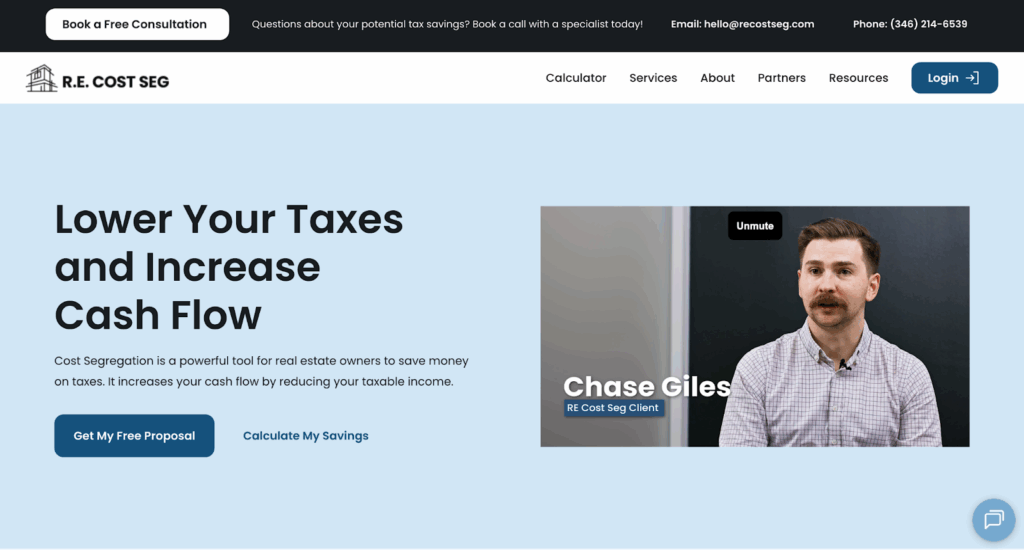
They feature specific ROI numbers from recent clients (“Saved $247,000 in Year 1 tax liability”), industry certifications, and video testimonials from CPA firms that refer clients to them. This multi-layered social proof addresses different buyer concerns at different stages of evaluation.
The company uses SmartReach’s Shared Team Inbox to ensure every sales inquiry receives rapid responses, often within minutes, which itself becomes a form of social proof as prospects share their positive experiences.
Best practices for on-site customer support
Live chat has become table stakes for SAAS homepages, but implementation matters. According to Forrester, 53% of online customers will abandon a purchase if they can’t quickly find answers to questions.
High-converting customer support elements
- Proactive Chat Triggers
Don’t wait for visitors to initiate. Trigger chat prompts after 30 seconds on pricing pages or when users show exit intent.
- Self-Service Knowledge Base
Embed a searchable FAQ widget in your footer. Reduces support tickets by 20-30% while keeping visitors on-site.
- Callback Scheduling
For enterprise SAAS, offer calendar integration for immediate demo bookings. Reduces friction compared to form-based scheduling.
- Chatbot + Human Handoff
Use AI for qualification, then route hot leads to sales reps in real-time.
Bridging homepage engagement to multi-channel nurturing
Once leads are captured through on-site chat, the real work begins. SmartReach’s multichannel sequences automatically nurture these prospects based on their homepage interactions:
- Email Follow-Up
Visitors who clicked “Pricing” receive targeted emails addressing budget objections with ROI calculators and flexible payment options.
- LinkedIn Outreach
High-value prospects get personalized LinkedIn connection requests from your sales team, with messaging that references their specific homepage interests.
- Smart Calling
SmartReach’s Power Dialer feature enables sales reps to efficiently call through qualified leads captured via homepage chat, with automatic logging of call outcomes and sentiments.
- Task Manager Coordination
The Task Manager creates a structured workflow for sales development teams, ensuring manual follow-ups (calls, LinkedIn messages, WhatsApp outreach) happen at optimal times without prospects falling through the cracks.
Improving response times with Shared Team Inbox
SmartReach’s Shared Team Inbox ensures no sales inquiry goes unanswered. When a prospect reaches out via homepage chat:
- Unified View: All team members see the inquiry in real-time
- Quick Assignment: Leads can be assigned to specific reps based on territory, industry, or product expertise
- Sentiment Tracking: AI automatically categorizes reply sentiment to prioritize hot leads
- Collaboration: Team members can add internal notes and collaborate on responses without leaving the inbox
- Faster Sales Cycles: Full conversation history accessible to entire team accelerates handoffs and approvals
This level of coordination transforms homepage chat from a lead capture tool into a full conversion engine.
Cross-channel consistency: The secret to SAAS brand trust
Consistency across touchpoints isn’t just about logos and color schemes, it’s about delivering unified messaging that reinforces your value proposition at every stage of the buyer journey.
Why consistency matters for SAAS conversions
- Reduces cognitive load for prospects evaluating multiple solutions
- Increases brand recall by 3.5x (Lucidpress research)
- Signals professionalism and operational maturity
- Prevents mixed messaging that creates buyer confusion
Maintaining brand consistency across all channels
- Homepage Messaging
Your core value proposition should appear consistently in headlines, CTAs, and product descriptions.
- Email Campaigns
Subject lines and email copy should echo homepage messaging using identical terminology and value propositions.
- LinkedIn & Social Media
Posts, updates, and ads should reinforce the same pain points and solutions highlighted on your homepage.
- Sales Calls
Talking points should align with homepage promises, what you claim on the site should match what reps discuss on calls.
While exploring modern homepage design tactics that drive conversions and assist with lead-generation, understand that building a strong business is impossible without a proper omnichannel branding strategy.
Ultimately, your business’s primary calling card may be your website. However, the chances of your target audience’s first brand interaction being via your site are pretty slim.
It’s much more likely that prospects will discover your organization through SERPs or social media. (In fact, research suggests that most consumers actively go on social media to discover new brands and products to resolve their pain points.)
So, to ensure a seamless buyer’s journey, build brand trust and familiarity among your ideal customers, and elevate prospects’ purchase intent, it’s crucial that you practice visual (and tonal) consistency across all of your brand’s distribution channels.
What’s great is that implementing this tactic is super easy. All you have to do is take your visuals, color palettes, value propositions, and overall communication style and integrate them across all of your marketing channels for a successful branding strategy that drives conversion results.
Vendavo’s YouTube channel, for example, perfectly reflects the brand’s homepage design and visual identity, thus creating an excellent mechanism for boosting brand familiarity that can easily translate into sales.
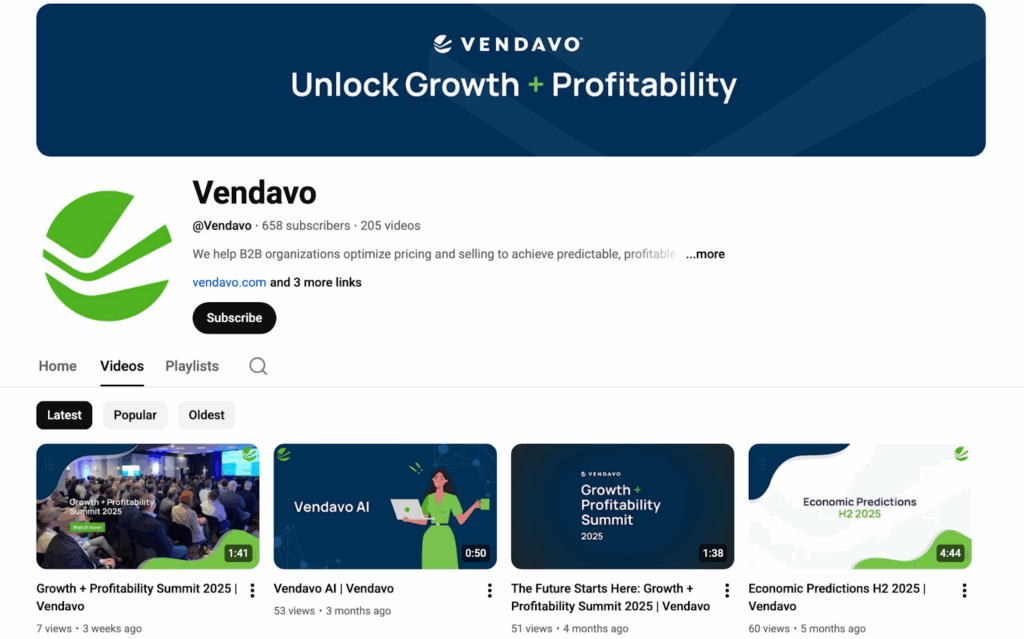
Source: youtube.com
Consistency with SmartReach’s Multi-Channel Platform
For SAAS teams managing email, LinkedIn, and calling simultaneously, consistency is operationally complex. SmartReach’s multichannel outreach capabilities solve this challenge:
- Unified Campaign Creation
Build sequences that automatically coordinate messaging across email, LinkedIn, WhatsApp, and calling, all from a single interface.
- Template Library
Store approved messaging templates that sales reps can use across all channels, ensuring everyone communicates the same value propositions.
- ESP Matching
SmartReach’s unique ESP Matching feature intelligently pairs your email sending to recipients’ email providers (Gmail to Gmail, Outlook to Outlook), achieving 15% higher deliverability while maintaining brand consistency.
- Account-Based Coordination
When running account-based sales campaigns, SmartReach ensures multiple stakeholders from the same company receive coordinated messaging, preventing contradictory outreach from different team members.
This orchestration ensures prospects encounter a unified brand experience whether they’re reading your homepage, receiving an email, connecting on LinkedIn, or answering a sales call.
Mobile optimization checklist for SAAS homepages
With 60% of B2B research now happening on mobile devices, mobile optimization directly impacts your pipeline. Yet many SAAS homepages still prioritize desktop experiences.
Essential mobile optimization elements
- Responsive Design
Layouts must adapt seamlessly to all screen sizes without horizontal scrolling or pinch-to-zoom requirements.
- Short Paragraphs
Limit to 2-3 sentences maximum on mobile for improved readability and reduced bounce rates.
- Tappable CTAs
Buttons need ample spacing with minimum 44×44 pixel dimensions to prevent mis-clicks.
- Fast Load Times
Target under 3 seconds on 4G networks through image compression and code minification.
- Simplified Forms
Enable autofill and reduce required fields to 3-5 maximum. Every additional field decreases mobile conversion by 5-10%.
Mobile-first campaign scheduling
SmartReach’s Advanced Campaign Scheduling recognizes that mobile users browse at different times than desktop users. You can:
- Schedule emails based on prospects’ timezones for optimal open rates
- Set up holiday calendars to avoid sending during weekends or regional holidays
- Configure send-time optimization to hit mobile users during commute hours (7-9 AM, 5-7 PM)
Technical SEO elements that drive organic SAAS traffic
Your homepage isn’t just a conversion tool, it’s also your highest-authority page for SEO. Optimizing technical elements can increase organic traffic by 40-60% within 90 days.
Critical technical SEO components
- Page Speed Optimization
Use Google PageSpeed Insights to identify issues. Compress images with TinyPNG, minify CSS/JS, and enable browser caching. Target load times under 3 seconds.
- Schema Markup Implementation
Add Article, FAQ, and Organization schema using JSON-LD format. This increases featured snippet chances by 30%.
- Core Web Vitals
- Optimize for:
Largest Contentful Paint (LCP <2.5s)
First Input Delay (FID <100ms)
Cumulative Layout Shift (CLS <0.1)
- Optimize for:
- Mobile-Friendly Testing
Use Google’s Mobile-Friendly Test to catch responsive design issues before they impact rankings.
- Strategic Internal Linking
Link to your highest-value pages (pricing, product features, case studies) from your homepage to distribute link equity effectively.
Email Deliverability
While not directly related to homepage SEO, your email deliverability impacts how many prospects actually reach your homepage from email campaigns. Poor deliverability = fewer homepage visitors = lower engagement signals to Google.
SmartReach’s Email Deliverability Suite ensures maximum inbox placement:
- Built-in Email Verification
All prospect emails are verified for free before sending, maintaining low bounce rates that protect your sender reputation.
- Email Warmup
Gradually build email reputation through SmartReach’s integration with WarmupHero, ensuring new domains and inboxes don’t trigger spam filters.
- Spintax Technology
Generate dynamic message content so every email is slightly different, avoiding spam pattern detection while maintaining your core messaging.
- Inbox Rotation
Send from multiple email accounts within a single campaign, distributing volume and preventing any single inbox from hitting sending limits.
- Spam Test Reports
Run free spam tests before launching campaigns to identify authentication issues (SPF, DKIM, DMARC) that could hurt deliverability.
The result? More emails reach inboxes, more prospects visit your homepage, stronger engagement signals boost SEO rankings.
Your SAAS homepage optimization
Designing a high-converting SAAS homepage requires balancing aesthetics, technical performance, and user psychology. The strategies above aren’t theoretical, they’re backed by data from top-performing B2B SAAS companies.
- Audit page speed and compress all images over 200KB
- Rewrite your headline to address a specific pain point with a quantified outcome
- Add 3-5 customer testimonials with video or detailed case studies
- Install live chat with proactive triggers on high-intent pages
- Test mobile experience on at least 3 devices
Long-term optimization strategy
Quarterly A/B Testing
Test headlines, CTAs, and value propositions every 90 days. SmartReach’s A/B testing capabilities let you test multiple email variations that drive traffic to different homepage versions.
Monthly Social Proof Updates
Refresh customer testimonials with recent wins. Use SmartReach’s automated feedback collection to gather fresh testimonials monthly.
Semi-Annual Content Refresh
Update data, examples, and screenshots every 6 months. Add “Updated [Date]” to titles for freshness signals.
Continuous Core Web Vitals Monitoring
Fix performance issues within 30 days of detection. Monitor how homepage speed correlates with email campaign conversion rates.
Want to see these strategies in action? SmartReach’s homepage combines user-centric design with seamless conversion optimization. Start your 14-day free trial to experience how thoughtful multi-channel coordination drives measurable results.
Frequently Asked Questions
What makes a SAAS homepage design effective?
An effective SAAS homepage combines fast load times under 3 seconds, mobile responsiveness, clear value propositions, and high-quality social proof. Include intuitive CTAs and trust signals like customer logos and certifications to boost credibility and conversion intent.
How important is page speed for SAAS homepage conversions?
Page speed is critical, a 10-second load increase raises bounce rates by 123%. Target under 3 seconds through image compression, code minification, and CDNs to signal product reliability and maintain visitor engagement throughout the evaluation process.
What role does social proof play in SAAS homepage design?
Social proof is essential, 88% of buyers consider brand trust a top purchase factor. Use video testimonials, ROI-focused case studies, and recognizable client logos positioned near value propositions to immediately reinforce credibility and conversion intent.
How do I optimize my SAAS homepage for mobile users?
Use responsive design, short 2-3 sentence paragraphs, tappable CTAs with 44×44 pixel dimensions, and fast load times. Simplify forms with autofill and test across multiple devices to ensure seamless experiences for on-the-go decision-makers.
What is the ideal word count for a SAAS homepage?
Most high-converting B2B SAAS homepages range from 800-1,500 words. Balance clarity with comprehensive information using collapsible sections, bullet points, and prominent CTAs to maintain scannability while addressing all key buyer concerns.