Why Does a Poorly Maintained Email List Cause Spam Issues?

On this page
Amy rewrote her subject lines three times in one week. Her copy was sharp, her offer was clear, and her open rate kept falling anyway.
So what was sending her email to spam? It wasn't anything she'd written. It was the list she'd been handed, a two-year-old export nobody had touched since the day it was built.
That's the pattern behind most cold email spam problems. A poorly maintained email list holds dead addresses, people who've moved on, contacts who never engage and, sometimes, spam traps. Every send to those addresses tells Gmail and Outlook you don't know who you're emailing, and they move your mail out of the inbox.
The rules have also tightened. Gmail started ramping up enforcement on non-compliant senders in November 2025, with temporary and permanent rejections. Here's how a bad list triggers spam filtering in 2026, and what to fix first.
What is a poorly maintained email list?
A poorly maintained email list is one that nobody has verified, pruned or re-checked since it was built. It usually carries five kinds of bad rows, namely invalid addresses that hard bounce, people who left the company, contacts who've never engaged, shared role-based inboxes, and spam traps picked up from scraped or bought data.
None of these look wrong in a spreadsheet, which is why list problems are so often misread as a copy problem.
Why does a bad email list send emails to spam?
A bad email list sends emails to spam because every bad address produces a negative signal that mailbox providers record against your sending domain. Once those signals add up, Gmail and Outlook filter your mail to everyone, including the good contacts on the same list.
Dead addresses produce bounces. People who don't recognize you produce spam complaints. Old and scraped data contains spam traps. Uninterested contacts delete without reading.
1. Hard bounces from dead email addresses
A hard bounce is a permanent failure. The address doesn't exist, the domain is gone, or the mailbox was deleted when the person left. A soft bounce is temporary, such as a full mailbox.
One hard bounce means nothing. A steady stream of them tells providers you're sending to data nobody checks.
Google's sender guidelines tell senders to "automatically unsubscribe recipients who have multiple bounced messages". Ignore that and bounces can lead to a blacklisted email domain. The guide to why emails bounce explains each SMTP error code.
2. Spam complaints from people who don't recognize you
A spam complaint happens when a recipient clicks "Report spam" or "Junk", and it's the strongest negative signal a sender can get. Outdated and irrelevant lists produce them, because people report email from senders they don't recognize or don't remember.
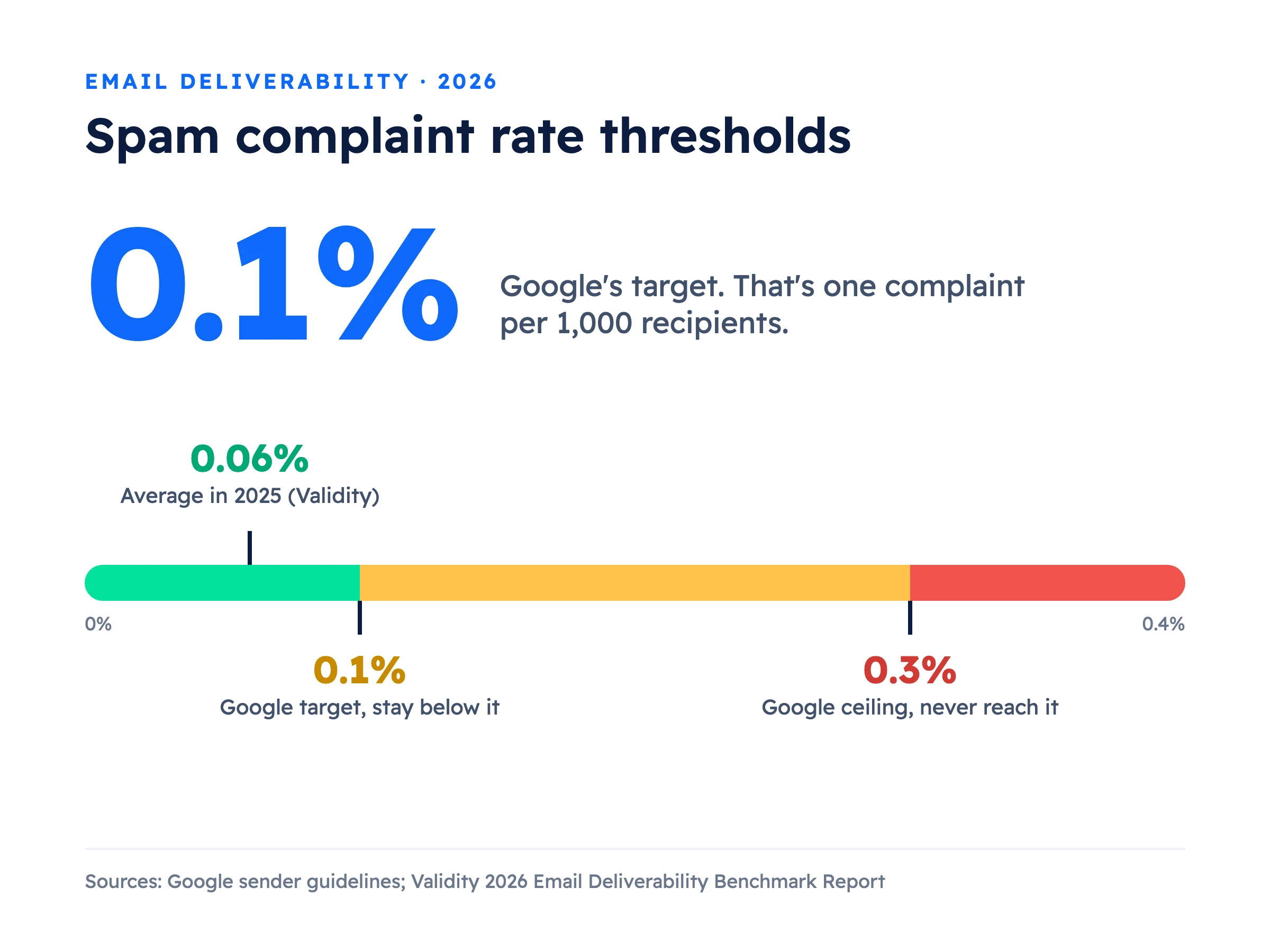
The line is thin. Google asks senders to keep the spam rate in Postmaster Tools "below 0.10%" and to "avoid ever reaching a spam rate of 0.30% or higher." That's one complaint per 1,000 recipients.
According to Validity's 2026 Email Deliverability Benchmark Report, the average complaint rate across 2025 was 0.06%, and "under 0.1 percent is now the expectation." You can check your own campaigns with the free spam complaint rate calculator, and the guide to spam complaint metrics shows where to find them.
3. Low engagement from contacts who never reply
Contacts who never open, read or reply drag down the engagement signals that spam filters weigh more each year. Validity lists "user engagement as a primary trust signal" among its 2026 findings. Google goes as far as suggesting senders consider unsubscribing recipients "who don't open or read your messages."
A list full of the wrong people produces exactly this silence. The guide to inactive recipients covers how that silence lowers inbox placement.
4. Spam traps hidden in old, scraped or bought lists
A spam trap is an email address that a mailbox provider or blocklist operator runs to catch senders with bad list practices. It never signs up for anything, so any email it receives proves the sender didn't get permission. There are three common types.
| Trap type | What it is | How it gets on your list | Severity |
|---|---|---|---|
| Pristine | An address no real person ever used | Scraped websites, bought lists | Highest, hits can lead to blocklisting |
| Recycled | An old address that bounced for months, then was reactivated as a trap | Lists that were never cleaned | Medium, a sign of poor hygiene |
| Typo | A misspelled domain, such as gmial.com | Manual entry, form typos | Lowest, but still counted |
Pristine traps are built to look valid, so no verification tool catches every one. How many trap hits does it take to get listed? Nobody outside the trap operators knows, because they don't publish a threshold, and I'd distrust any guide that quotes one. The only reliable protection is not using data you didn't build yourself.
5. List decay turns good data bad
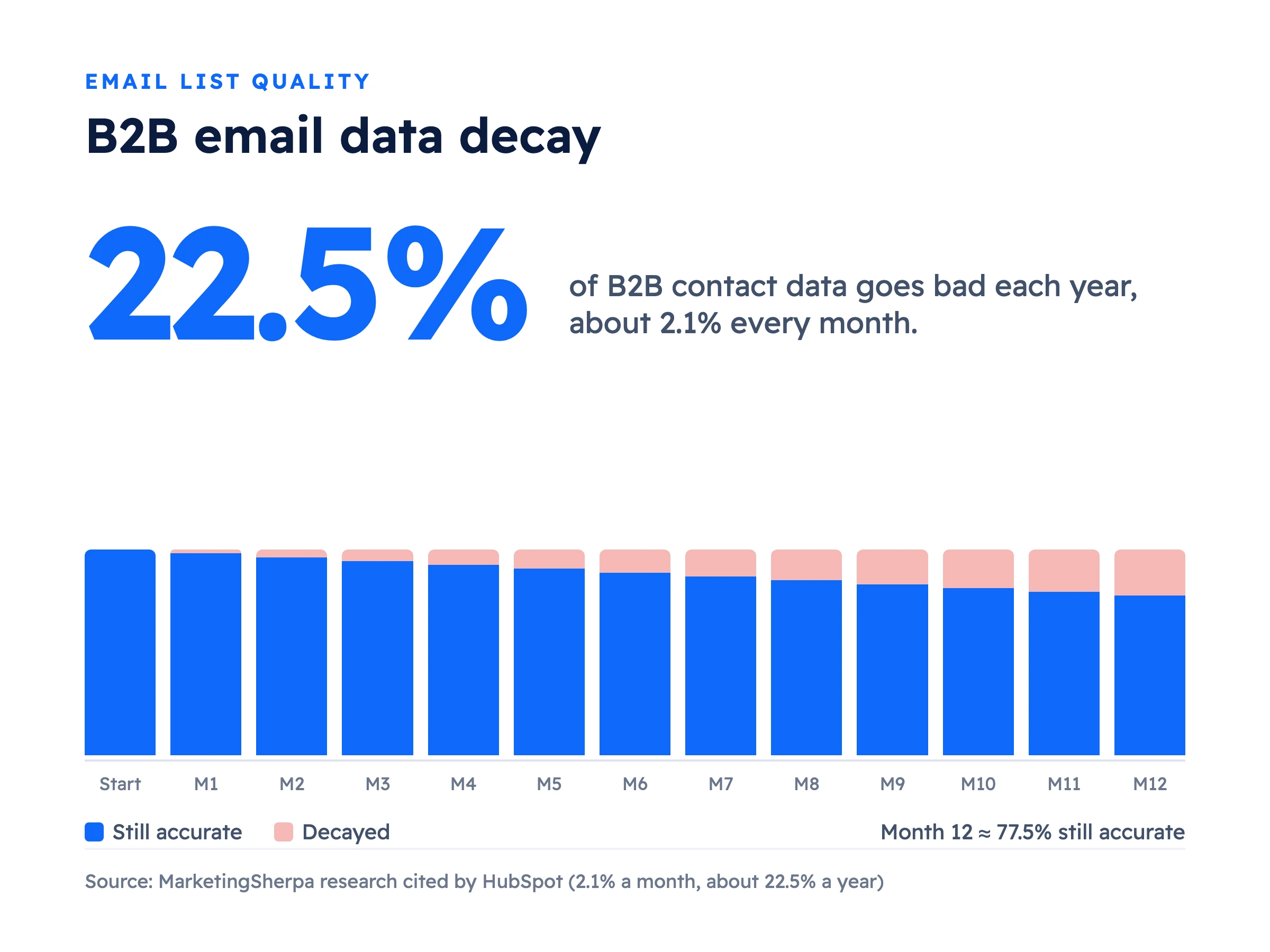
Email data loses accuracy every month as people change jobs, companies rebrand and domains expire. MarketingSherpa research cited by HubSpot puts B2B data decay at 2.1% a month, an annualized rate of about 22.5%. The figure is older, but the mechanism hasn't changed.
How old is the list you're about to send? One that verified cleanly in January has quietly picked up dead rows by June. Send to it without re-checking and those rows turn into hard bounces, and some of the oldest become recycled spam traps. That's how a list damages your sender reputation without anyone changing a thing.
6. Role-based addresses that nobody owns
Role-based addresses such as info@, support@, sales@ or hello@ go to a shared inbox or a group, not a person. Nobody feels the email was written for them, anyone can report it as spam, and few reply. For cold outreach, swap a role address for a named decision-maker at the same company whenever you can.
Which list problems hurt deliverability most?
Spam complaints and pristine spam traps do the most damage, because each one is direct evidence that the recipient never wanted your email. Hard bounces and decay do slower damage that builds with every send. Low engagement and role accounts erode placement gradually.
| List problem | What the mailbox provider sees | How fast it hurts | First fix |
|---|---|---|---|
| Spam complaints | "Report spam" clicks | Fast, the line is 0.1% at Gmail | Tighter targeting, plain opt-out |
| Pristine spam traps | Mail to an address that never opted in | Fast, can trigger blocklisting | Stop using scraped or bought data |
| Hard bounces | Permanent delivery failures | Medium, builds with each send | Verify before every campaign |
| List decay | Rising bounces on an older list | Medium, about 2% of rows a month | Re-verify lists older than a quarter |
| Low engagement | Deletes without reading, no replies | Slow, compounds over weeks | Stop sending to non-engagers |
| Role-based addresses | Shared inboxes, few replies | Slow | Replace with named contacts |
Can verifying a bought email list make it safe?
No. Verification checks whether an address exists and accepts mail, not whether the person wants your email. A verified bought list still produces high complaint rates, still contains pristine traps that look valid, and still sends to people who've never heard of you. Google's guidance is short on this point, "Don't purchase email addresses from other companies."
The safer route is building your own list from a defined ideal customer profile, which the email list building guide walks through step by step.
How do I know a bad list is causing my spam problem?
Check the list signals before you touch the copy. A list problem shows up as bounce rates that differ by list source, a spam rate creeping toward 0.1% in Google Postmaster Tools, or a new blocklist listing. A copy problem shows up evenly across every list you send.
- Compare bounce rates by list source. If one import bounces far more than the rest, the list is the cause.
- Check your spam rate. Open Google Postmaster Tools for the sending domain. Anything near 0.1% means pausing that campaign today.
- Run a blocklist check. The free blacklist checker shows whether a spam trap hit has already listed your domain or IP.
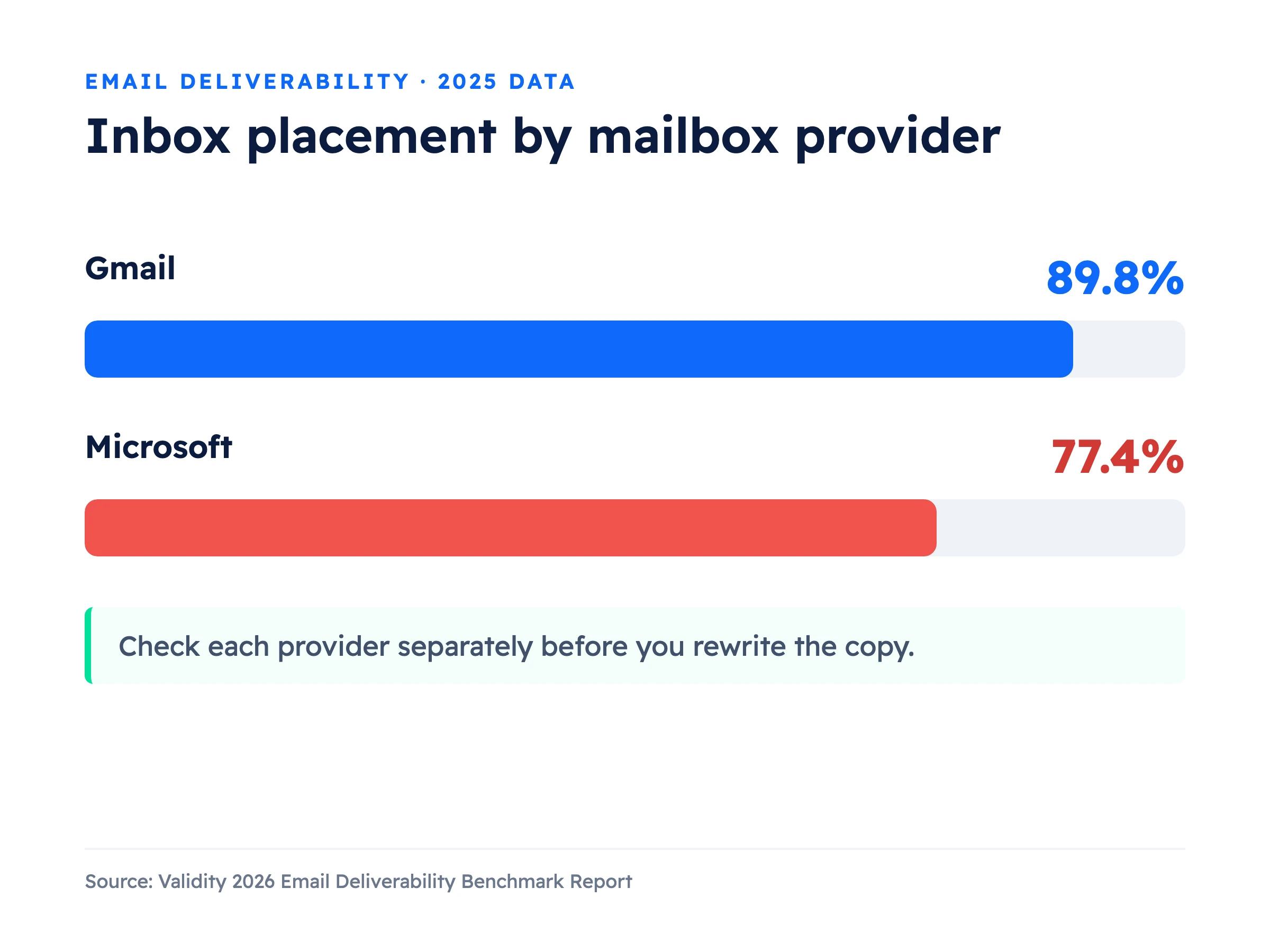
- Split results by provider. If Outlook collapses while Gmail holds, it's placement at one provider, not your subject line. Validity measured inbox placement at 77.4% for Microsoft against 89.8% for Gmail in 2025.
- Rule out authentication. Confirm SPF, DKIM and DMARC pass with the email authentication checker. Outlook has rejected non-compliant mail from domains sending over 5,000 emails a day since May 5, 2025.
Stan, a RevOps lead with 10 SDRs, ran this check after a month of falling replies. Authentication passed, but one domain showed a 0.2% spam rate, and the complaints traced back to a single purchased list an SDR had imported.
How to fix a poorly maintained email list
Fix the rows that hurt fastest first, starting with hard bounces and any scraped or bought data, because those trigger spam complaints and blocklisting soonest. Then make verification a step before every send. The full process, with a cleaning schedule, is in the guide to keeping an email list clean and up to date.
- Suppress every hard bounce after each send, permanently.
- Stop using scraped and bought data, even if it's verified.
- Verify before every campaign, not once a year. The guide to verifying email addresses covers the checks.
- Stop the sequence for non-engagers after a few steps, before they reach for the spam button.
- Replace role-based addresses with named decision-makers.
- Add a plain opt-out line so leaving is easier than reporting you.
How SmartReach.io stops bad data from reaching the inbox
SmartReach.io is a cold email software that checks the list before a single email goes out. Its Sales Engagement plans add LinkedIn, calls and WhatsApp to the email sequence, so you're not stuck sending a fourth email to someone who's ignored three. SmartReach.io is rated 4.6 on G2 from 60 reviews as of November 2026.
Verification before every send. SmartReach.io runs domain validation, MX record and syntax checks on every campaign email address, and auto-pauses sending on problematic campaigns. It also pauses an inbox when its bounce rate crosses the threshold you set.
Contacts you didn't have to buy. The B2B Lead Finder searches 300M+ contacts across 50M+ companies by role, company and location, and sends verified leads straight into a campaign.
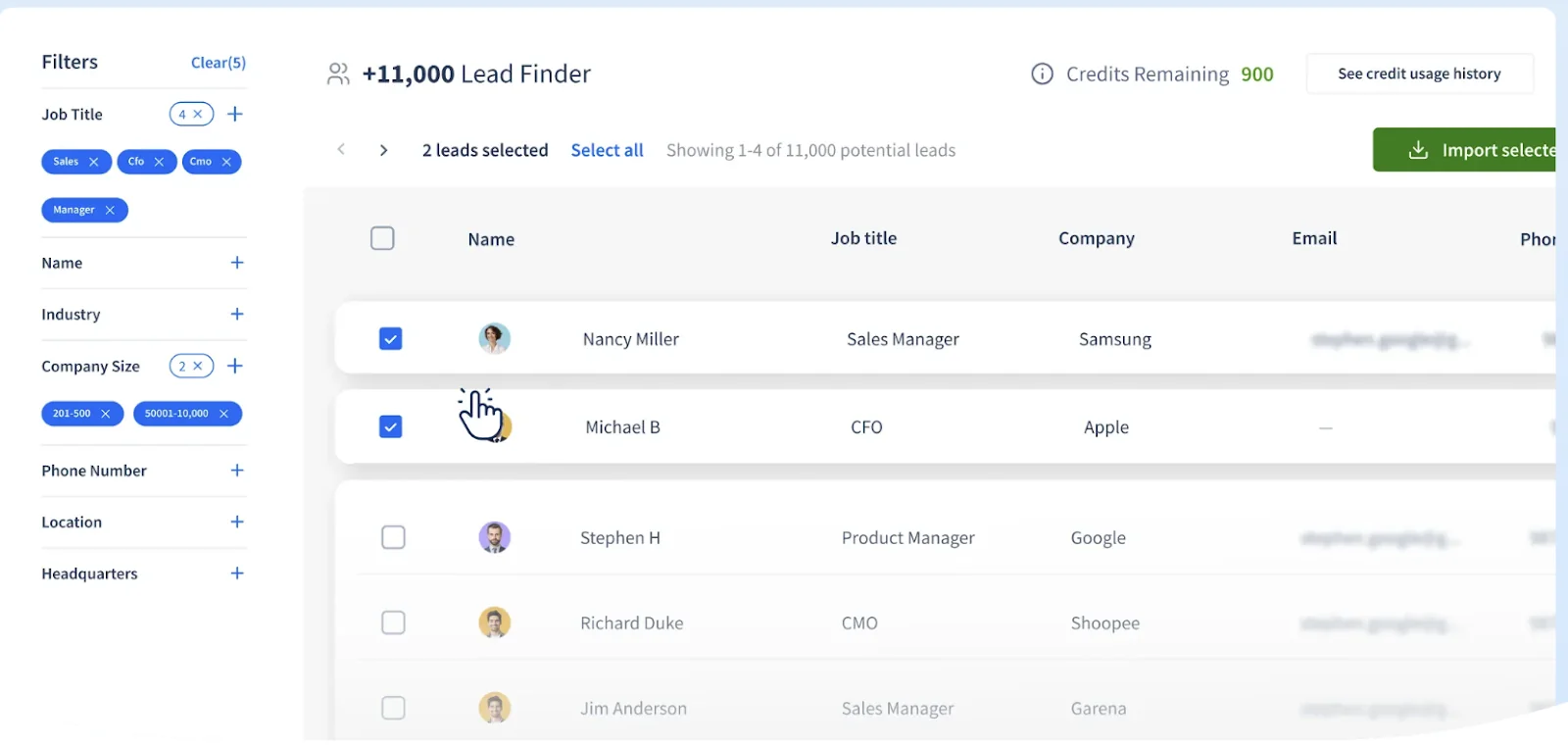 The SmartReach.io Lead Finder. Build the list instead of buying it.
Volume that protects reputation. Inbox rotation spreads one campaign across several connected email accounts. SmartReach.io recommends staying under 40 emails a day per inbox, well inside its 200-a-day limit per account.
These checks are bundled as deliverability protection (Deliver4Sure), and they're part of the 14-day free trial for up to 200 prospects.
Conclusion
A poorly maintained email list ruins good cold email. Dead addresses bounce, strangers complain, bought data hides spam traps, and Gmail and Outlook record every one of those signals against your domain. So check the list before you rewrite the copy. If you'd like those checks running automatically, start your 14-day free trial of SmartReach.io.
FAQs about poorly maintained email lists
What is a poorly maintained email list?
A poorly maintained email list is one that nobody has verified, pruned or re-checked since it was built. It holds addresses that no longer exist, people who changed jobs, contacts who never engage, shared inboxes like info@, and sometimes spam traps. Each of those sends a negative signal to Gmail and Outlook, so the list itself lowers inbox placement even when the email copy is good.
Why does my email go to spam even if the content is good?
Because mailbox providers judge the sender more than the message. Gmail and Outlook look at bounces, spam complaints, spam trap hits and how recipients treat your mail. Google asks senders to keep their spam rate under 0.1% and never reach 0.3%. A list full of dead or uninterested contacts breaks those lines, and good copy can't make up for it.
Can a single bounce really affect my deliverability?
No. One hard bounce won't hurt you, because every list has a few. The damage comes from a pattern. Repeated bounces from the same sender tell Gmail and Outlook that nobody is cleaning the list, and Google's sender guidelines tell senders to automatically unsubscribe recipients who have multiple bounced messages. Remove every hard bounce after each send and the pattern never forms.
Are bought email lists safe to use if I verify them?
No. Verification only proves that an address exists and accepts mail. It can't prove the person wants your email, and it can't reliably detect every spam trap. Bought lists produce high complaint rates because the recipients never heard of you. Google's sender guidelines say it directly, "Don't purchase email addresses from other companies." Build your own list from a defined ideal customer profile instead.
What is a spam trap and how does it get on my list?
A spam trap is an email address run by a mailbox provider or blocklist operator to catch senders with bad list practices. Pristine traps were never used by a real person and turn up in scraped or bought lists. Recycled traps are old addresses that bounced for months and were later reactivated as traps. Typo traps catch misspelled domains. Hitting pristine traps can get a sending domain or IP blocklisted.
What’s the best way to reduce spam complaints?
Email only people with a clear reason to hear from you, and make leaving easy. Target a tight ideal customer profile, personalize the first line, add a plain opt-out sentence, and stop the sequence for anyone who hasn't engaged after a few steps. Then watch the spam rate in Google Postmaster Tools. Validity measured a 0.06% average complaint rate in 2025, and staying under 0.1% is the expectation.
Stop juggling tools
Book more meetings on every channel
Join 5,000+ teams running multichannel outreach from one sequence, with deliverability built in.