Why You Need a Physical Address in Emails to Avoid Spam Filters

On this page
Including a physical address in your email footer is required for U.S. marketing emails (CAN-SPAM) and helps reduce spam complaints.
This short guide shows what counts as a valid address, quick footer templates, privacy-friendly alternatives, and a simple deliverability checklist you can follow today.
Is a physical address legally required in marketing emails?
Yes, if you send marketing emails to U.S. recipients, the CAN-SPAM Act makes it mandatory.
This requirement applies to any commercial message promoting products or services. The law states you must include a valid postal address where recipients can reach you by mail.
Failing to include it:
- Risks FTC fines (up to $51,744 per email violation in 2025)
- Increases the chance of your emails being flagged as spam
- Damages trust with recipients
Pro tip: Don’t wait for a warning. Update all email templates with your physical address today.
Why having a physical address in emails helps you avoid spam filters
Adding a postal address to every email is one of the easiest ways to show you’re a legitimate sender.
Here’s why adding an address in the emails can help you improve the email deliverability.
#1. Spam filters check for identity elements
Email services like Gmail, Yahoo, Outlook etc. have built-in email spam filters that score incoming emails based on dozens of signals.
When an email lacks basic identity information, such as sender information, physical address, and opt-out link, automated rules are more likely to label it as suspicious and push the email into SPAM.
Including a one-line postal address ensures automated parsers and human reviewers can quickly identify you.
Action steps:
- Add a single, consistent address line to all marketing emails.
- Keep the address text identical across variants so parsing tools recognize it reliably.
- Run a spam-scan (GlockApps, Mail-Tester) and confirm the scanner detects your address in the footer.
#2. A physical address is required in several jurisdictions
Some email compliance laws specifically require physical addresses in business emails.
For U.S. recipients, CAN-SPAM requires a valid postal address in commercial emails.
Other countries have similar identification rules (for example, CASL in Canada or Australia’s Spam Act).
Including an address reduces regulatory risk and demonstrates transparency to both email recipients and providers.
Action steps:
- Audit the countries you email to
- Keep documentation proving control of the address (rental receipt, PS-1583 form for CMRAs, or lease/membership record).
- Standardize the address in your email footer & on your website’s contact page.
#3. An address reduces email spam complaints
Humans also decide report email as spam or not.
Seeing a legitimate business address at the end of the email answers the recipient’s “where can I contact them?” question and reduces the impulse to hit “report spam.”
Lower spam complaint rates support better email sender reputation and higher inbox placement over time.
Action steps:
- Use a professional label like “Mailing address” or “Business address” to make the footer feel official.
- Place the address next to the unsubscribe link so recipients can easily find contact and opt-out options.
- Monitor spam complaint rates after adding the address.
#4. A physical address complements email authentication
Technical measures such as SPF, DKIM, and DMARC carry the most weight with mailbox providers.
A footer address doesn’t substitute for authentication but strengthens your overall trust profile when paired with proper DNS records and healthy email engagement metrics.
Action steps:
- Verify SPF and DKIM for your sending domain; publish a DMARC record to start collecting reports.
- Run a combined audit: check authentication status, then check footer presence – fix whichever is missing first.
- If deliverability remains poor after adding an address, prioritize fixing authentication and list quality next.
How to add an address in emails without exposing personal details?
If you want privacy for your home address, you can choose a legal alternative that satisfies email compliance:
- PO Box – Affordable, easy to set up, widely accepted.
- Virtual Mailbox – Provides a professional street address with mail forwarding.
- Coworking Space Address – Often allowed for registered business use; check terms.
If you are a start-up, always go for a virtual mailbox for balancing privacy and professionalism.
How to format an email address footer correctly?
A clean, consistent emil footer avoids parsing errors and improves readability on mobile:
- Use one short line: Company Name — Street address or PO Box — City, ST ZIP — Unsubscribe: [link]. Ensure the unsubscribe link is visible and tappable on mobile.
- Avoid hidden text, clipped HTML, or unusual characters that spam filters flag.
- Use plain text and a readable font size for mobile (12px+ recommended in HTML).
- Update your ESP’s default footer template with this format.
- Preview the email footer in desktop and mobile clients; check the raw HTML for broken tags.
- Run a spam-scoring tool to confirm no footer-related warnings appear.
Here’s one example of an email footer that you may try –
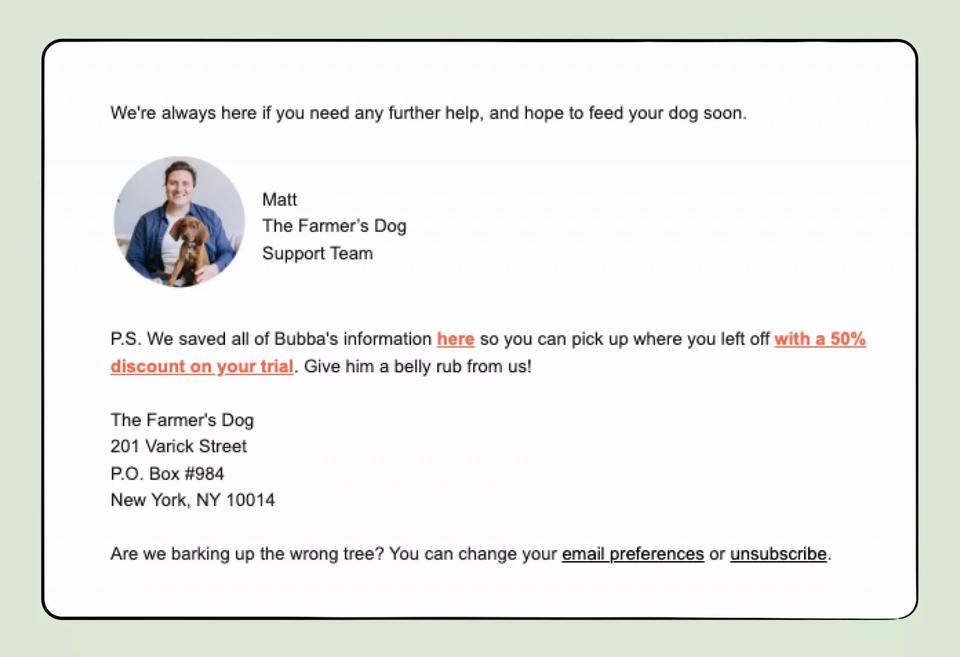
To avoid spam filters, apart from the right formatting of email footers, use a reputable email automation platform like SmartReach.io.
It has a built-in premium email deliverability suite that combines technical set-up checks (DKIM, DMARC, SPF) with email compliance best practices to send your emails in the primary inbox of the recipients.
The platform offers a credit card free trial for 14-days. (Try it now!)
F.A.Qs
Do I need a physical address in marketing emails?
Yes. In the U.S., it’s legally required under CAN-SPAM.
Can I use a PO Box instead of my home address?
Yes, as long as you can receive mail there.
Will adding an address stop spam filtering?
No, but it reduces suspicion and helps trust.
What’s the best address type for privacy?
A virtual mailbox balances professionalism and privacy.
Does GDPR require a postal address?
Not explicitly, but transparency rules make it best practice.
Where should I place my address in the email?
In the footer, in plain text, next to the unsubscribe link.
Will my address affect engagement rates?
Yes, clear sender identity often improves trust and reduces complaints.
Stop juggling tools
Book more meetings on every channel
Join 5,000+ teams running multichannel outreach from one sequence, with deliverability built in.