How to Build an Email List: Source, Verify & Send

On this page
Here’s a confession most marketing guides won’t make. The phrase “email list” is quietly doing two completely different jobs.
Learning how to build an email list really means picking which job you’re hiring it for. One kind is a crowd of people who raised their hand: they found your blog, liked it, and traded their email for a checklist.
The other kind is a roomful of strangers who match your ideal buyer and have no clue you exist yet. You found them. Both get called an “email list,” and they’re built in opposite directions.
Marketing teams grow the first one inbound, with magnets and forms and patience. Sales teams build the second one outbound, by sourcing the exact people they want and earning the first reply.
Most articles teach the first and skip the second. That leaves anyone running B2B cold outreach to wing it.
This guide refuses to pick a side. You’ll get both builds end to end, the 2026 numbers that hold up, and the parts nobody likes to discuss: deliverability rules with teeth, whether cold email is even legal, and the cold math on buying a list.
TL;DR for how to build an email list
Where these numbers come from
Quick note on sourcing, because a stats post that hand-waves its data deserves the side-eye.
SmartReach.io is a cold email software with multichannel outreach capabilities via channels like email, LinkedIn, calls and WhatsApp. It also works as a sales engagement platform that B2B teams use to find prospects, send cold email and multichannel sequences, and keep their domains out of the spam folder. A lot of email moves through it.
Tens of thousands of messages leave the platform on a normal day, which adds up to millions over a year. When a line below says “we see this in practice,” that’s the well it’s drawn from. It’s rough scale, never invented precision.
Everything else is credited to whoever measured it: Litmus and the DMA for email ROI, Validity for deliverability, Statista and Radicati for user counts, HubSpot and Sumo for conversion and decay data, ON24 for webinars. Vendor-report figures are credited generically (“a 2026 analysis of more than 100 million cold emails”).
One caveat shapes the whole post. Apple’s Mail Privacy Protection inflates open rates, so the benchmarks here lean on replies, clicks, and conversions wherever possible.
Two lists, one skill: marketing lists vs cold B2B lists
Before any tactics, get the vocabulary straight. Mixing these up is how teams waste a quarter.
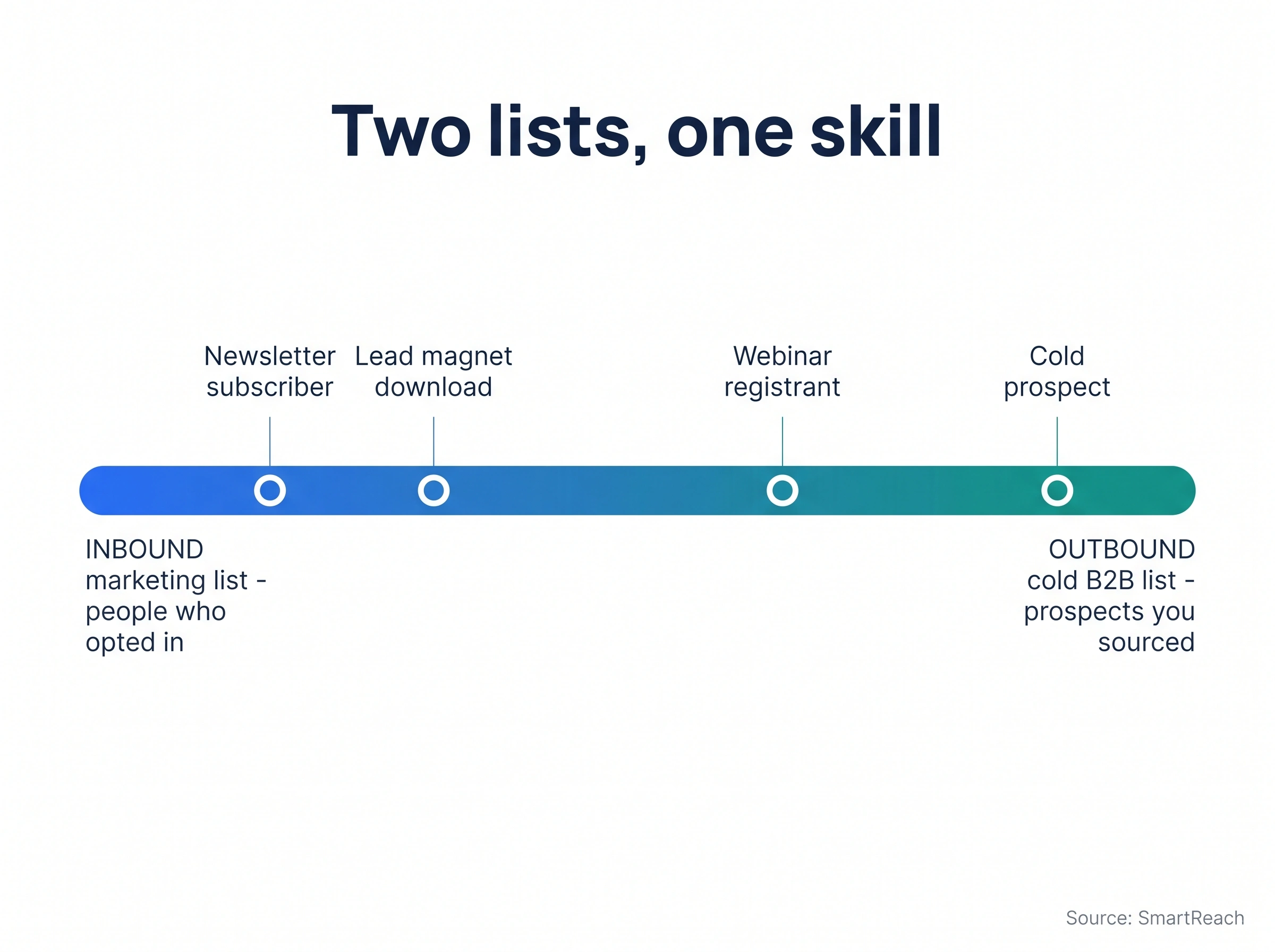
A subscriber list (the marketing kind) is built from people who opted in. They downloaded something or signed up for a newsletter, so consent is explicit and the relationship starts warm.
A sales lead list or prospect list (the cold kind) is built from people who fit your buyer profile but never asked to hear from you. You found them, consent runs on a different legal basis, and the relationship starts at zero. Here’s the split at a glance:
| Dimension | Inbound marketing list | Cold B2B list |
|---|---|---|
| Who’s on it | People who opted in | ICP-matched prospects you sourced |
| Consent basis | Explicit opt-in | Legitimate interest / CAN-SPAM |
| How you build it | Magnets, forms, content, webinars | Source, enrich, verify, segment |
| First message | Welcome email (warm) | Personalized cold open (earn it) |
| Relationship starts | Warm | At zero |
Two terms get muddled constantly. A lead has shown some interest already (filled a form, replied, clicked), while a prospect is someone you’ve identified as a fit but haven’t heard from yet.
So every cold contact starts as a prospect and becomes a lead the moment they engage. A serious revenue team runs both lists at once, which is why this guide does too.
What a high-quality list actually contains
A list is only as good as the fields inside it. A spreadsheet of bare email addresses is a liability, not an asset.
Here’s the full anatomy of a list that earns replies, merged into one spec so you’re not chasing fields across ten tabs.
Contact data (the foundation):
- Full name, job title, and seniority
- Business email address (verified)
- Phone number and LinkedIn profile URL
Firmographic data (who they work for):
- Company name, website, and industry
- Company size, revenue band, and funding stage
- Geographic location
Intent and timing signals (when to strike):
- Buyer-intent data (research behavior, pricing-page views)
- Selling triggers (funding, hiring sprees, leadership changes)
- Technographics (the stack they already run)
Operational fields (how you’ll work the list):
- Lead source, segmentation tags, and a BANT-style lead score
- Notes (a pain point, a recent post, anything human)
- Communication preference (email, phone, or LinkedIn)
You don’t need every field on day one. Contact plus firmographic gets you sending.
Intent signals and scoring are what separate a list that converts at 2% from one that converts at 18%. The richer the row, the more personal the first line.
A scenario makes it concrete. Priya sells a compliance tool to fintech.
A bare list tells her “email Marcus at a bank.” A rich list tells her “Marcus is Head of Risk at a Series B fintech that just hired three compliance analysts and visited a pricing page twice last week.” Which first line gets a reply?
How to build a cold email list from scratch?
This is the part the internet keeps skipping, so we’ll go slow. Building a cold email list is a repeatable five-move sequence.
Run it once and you can run it forever.
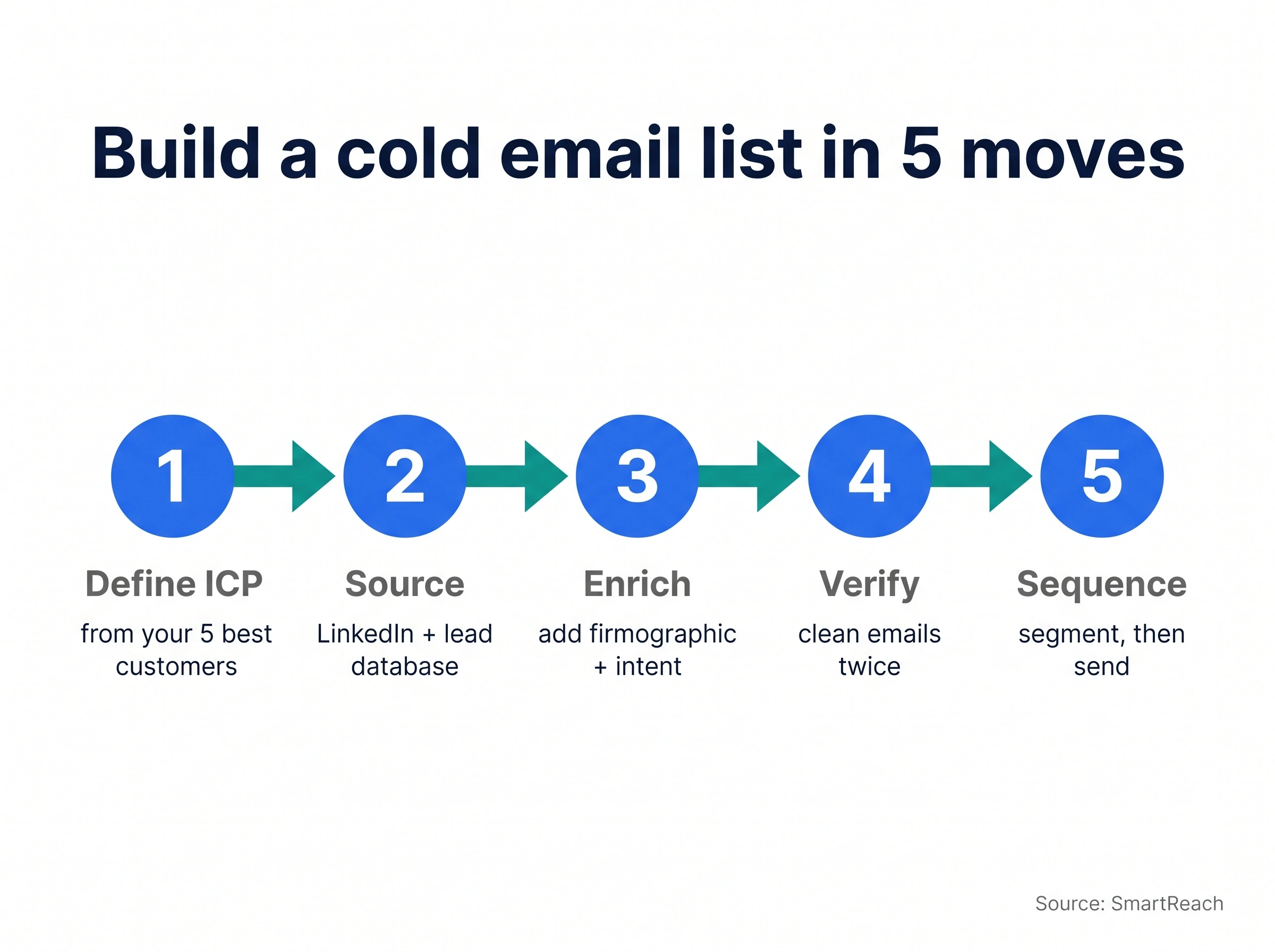
Move 1: Define your ICP from real customers
Don’t start with a database. Start with your own best customers.
Pull your top five accounts: the ones with the fastest sales cycles, highest retention, and loudest referrals. Then find what they share.
Ask three questions of that group:
- What industry and company size keeps showing up?
- What job title actually signed off on the purchase?
- What event or pain pushed them to buy when they did?
Two shortcuts speed this up:
- Analyze your current user base and look for the overlap. The pattern is usually obvious once you line them up.
- Study the customer base of competitors you respect. Their case studies and reviews reveal who keeps buying solutions like yours.
Now write the profile as filters you can actually search. Something like: “Heads of Sales at US-based SaaS companies, 50 to 500 employees, using a CRM but no dedicated sequencer.”
Vague ICPs produce vague lists. The tighter this is, the easier every other move becomes.
Move 2: Source the contacts
Now find people who match. You have three honest options, and the smart play is a blend.
Option A: build it manually (free, slow). With a LinkedIn profile, Sales Navigator, a spreadsheet, and an email extractor, you can assemble a list by hand.
A Chrome tool like ProspectDaddy, which comes with a SmartReach.io subscription, pulls business emails straight from LinkedIn profiles. Search your target keywords, grab the addresses, drop them into a sheet, and clean it up.
Option B: buy from a database provider (fast, risky). This can make sense at the very start when you have zero inbound.
The catch is real. Bought data goes stale fast, contact details often aren’t verified, and you inherit whatever spam traps the provider missed. If you go this route, pick a provider that follows GDPR and CCPA, and never treat the file as final.
Option C: blend the two (the actual answer). Use a B2B lead database to gather pre-qualified contacts fast, then verify and enrich them yourself.
This gives you the speed of a database with the quality of a hand-built list. The next section walks through exactly how that looks inside one platform.
Move 3: Enrich the rows
A name and email is the floor, not the ceiling. Add the firmographic and intent fields from above so every contact carries a reason to be reached.
This is where you note the trigger event, the tech stack, the recent LinkedIn post. Enrichment is what makes personalization possible at scale.
A practical rule: every contact should have at least one true, specific detail you can open with. If a row has nothing personal, it isn’t ready to send.
Move 4: Verify twice
Say it with me: higher list accuracy equals more engagement equals more booked meetings. A single send to a dirty list can torch your domain reputation for months.
Run every address through verification before the first email goes out. Then run it again before any big campaign.
Tools like SmartReach.io validate emails continuously in the background the moment you upload a list. Each address gets flagged as passed, needs-a-live-check, or failed.
That keeps your bounce rate low and your messages out of spam filters. For the manual methods too, here’s the guide on how to check if an email is valid.
Move 5: Segment, then sequence
Don’t blast 300 people the same email. Tag the list (the framework is a few sections down) and load each segment into its own sequence with follow-ups.
Cold lists live and die on the follow-up. Most replies arrive across the first few touches, not the first email.
A platform that handles multichannel drip and adds a LinkedIn touch alongside email does measurably better than email alone. That’s the whole build: ICP, source, enrich, verify, segment.
How to build an email list using SmartReach.io (start to send)
The five moves above are the manual version. Here’s the same build done in one place, without stitching five tools together.
This is the fastest path from “I know my ICP” to “my sequence is live.”
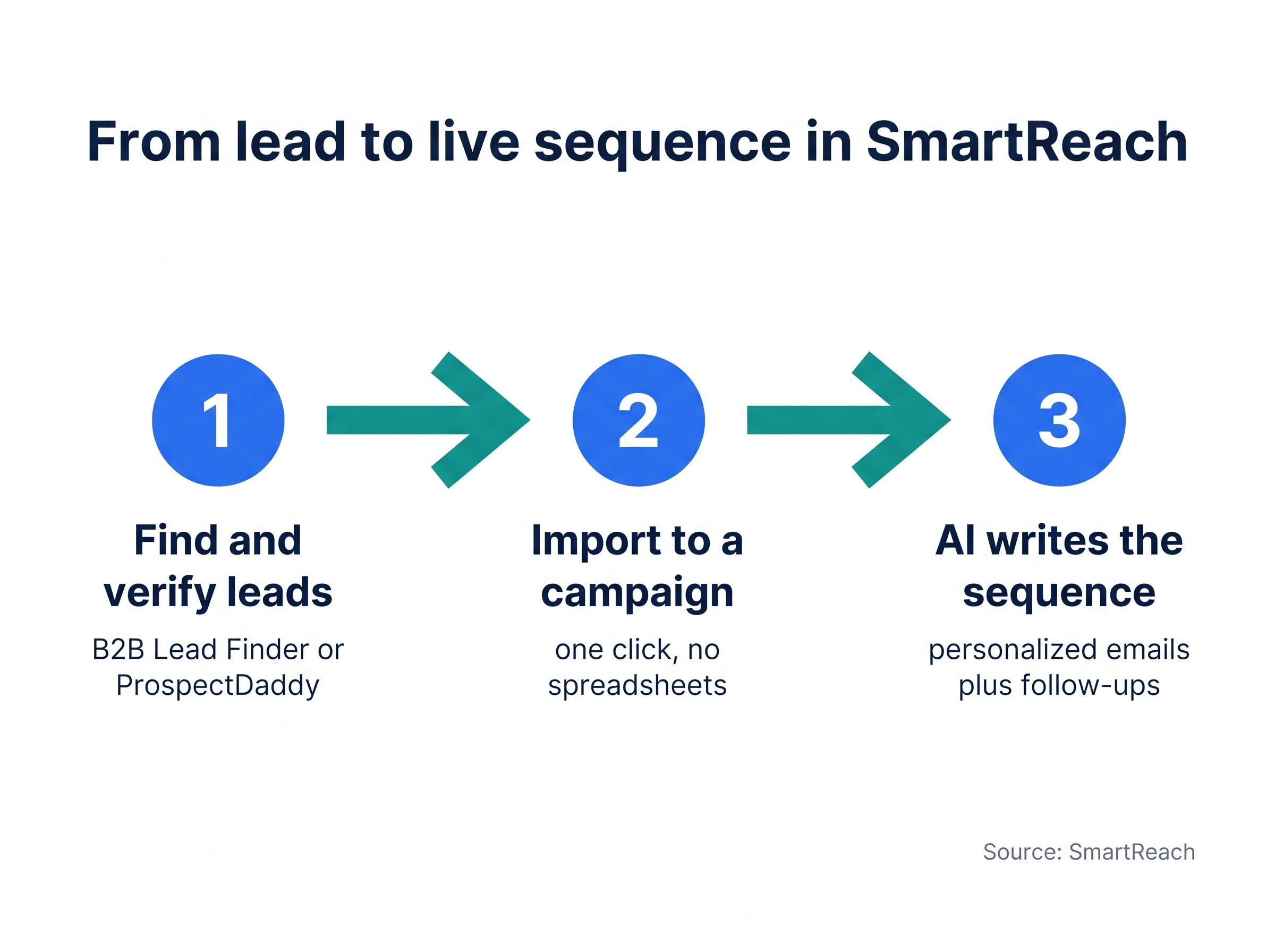
Step 1: Find and verify the leads
Start inside the B2B Lead Finder. It holds a large pool of verified business contacts (think hundreds of millions).
Filter to your ICP using the same criteria you wrote in Move 1:
- Job title and seniority
- Industry and company size
- Location and tech stack
Prefer to pull straight from LinkedIn? Use the ProspectDaddy Chrome extension to grab business emails from profiles and Sales Navigator searches.
Either way, the emails are verified as you go. No separate verification tool, no exporting to a spreadsheet just to clean it.
Step 2: Add the leads straight to a campaign
This is the step that usually eats an afternoon. Here it’s one click.
Select the leads that match, then import them directly into a campaign. There’s no CSV export, no reformatting columns, no re-uploading.
Each lead carries its firmographic fields with it. So the data you’ll personalize on (company, role, industry) is already attached to the row.
Step 3: Let AI write and run the sequence
Now the outreach. The Smart Email AI Agent drafts a personalized sequence using each prospect’s details.
A typical cold sequence looks like this:
- Email 1: a short, personalized opener tied to a real detail
- Email 2 (day 3): a value-add or quick proof point
- Email 3 (day 6): a different angle on the same problem
- A LinkedIn touch woven in for the prospects who haven’t replied
You can layer a conditional multichannel drip so the path adapts to behavior. Someone who opens twice gets a different next step than someone who went quiet.
Hit start, and the sequence sends on each prospect’s schedule with verification and follow-ups on autopilot. That’s a built, verified, segmented list moving to live outreach in an afternoon, not a week.
How to build an inbound (marketing) email list
Cold lists start conversations with strangers. Inbound lists turn your own traffic into subscribers who already trust you.
Here are the channels that pull their weight. Each gets the depth it deserves, with examples, and exactly one home so nothing repeats.
Lead magnets that people actually want
A lead magnet is something valuable you give away for an email address. It’s the single highest-impact move for fast list growth, because it gives a visitor a real reason to subscribe.
The formats that convert:
- Checklists and cheat sheets: quick wins, consumed in two minutes (“The 50-Point Cold Email Checklist”).
- Templates and swipe files: copy-paste shortcuts (“10 Cold Email Templates That Get Replies”).
- Original research or benchmark reports: data they can’t find elsewhere, which also earns backlinks.
- Free tools or calculators: interactive and instant (“Email Deliverability Score Checker”).
- Mini-courses: high perceived value, delivered automatically over a few days.
The rule: solve one specific, painful problem in under 30 minutes of the reader’s time. A CEO wants a strategy brief; a rep wants a template they can paste today.
Example in action. A post titled “How to write cold emails” offers a downloadable pack of ten proven templates. The reader trades an email to skip the blank page, and you’ve earned a warm subscriber.
Build different magnets for different segments. Here’s the deeper breakdown of lead magnets if you want the full menu.
Signup forms, and where to put them
Your form is the conversion point, so design and placement both matter. On design, keep it ruthless.
Ask only for what you need: email alone for top-of-funnel, name plus email for mid-funnel. The old “every field costs you 11% of conversions” line oversimplifies, but the direction is real.
HubSpot found three-field forms convert best, and one bloated form cut from eleven fields to four saw conversions jump around 120%. Fewer fields, more signups.
Three quick upgrades to any form:
- Benefit-driven headline: “Get Weekly Cold Email Teardowns,” not “Subscribe.”
- Action CTA: “Send Me the Templates,” not “Submit.”
- A trust line: “Join 12,000 reps, no spam.”
Placement matters as much as design. Put forms where attention peaks.
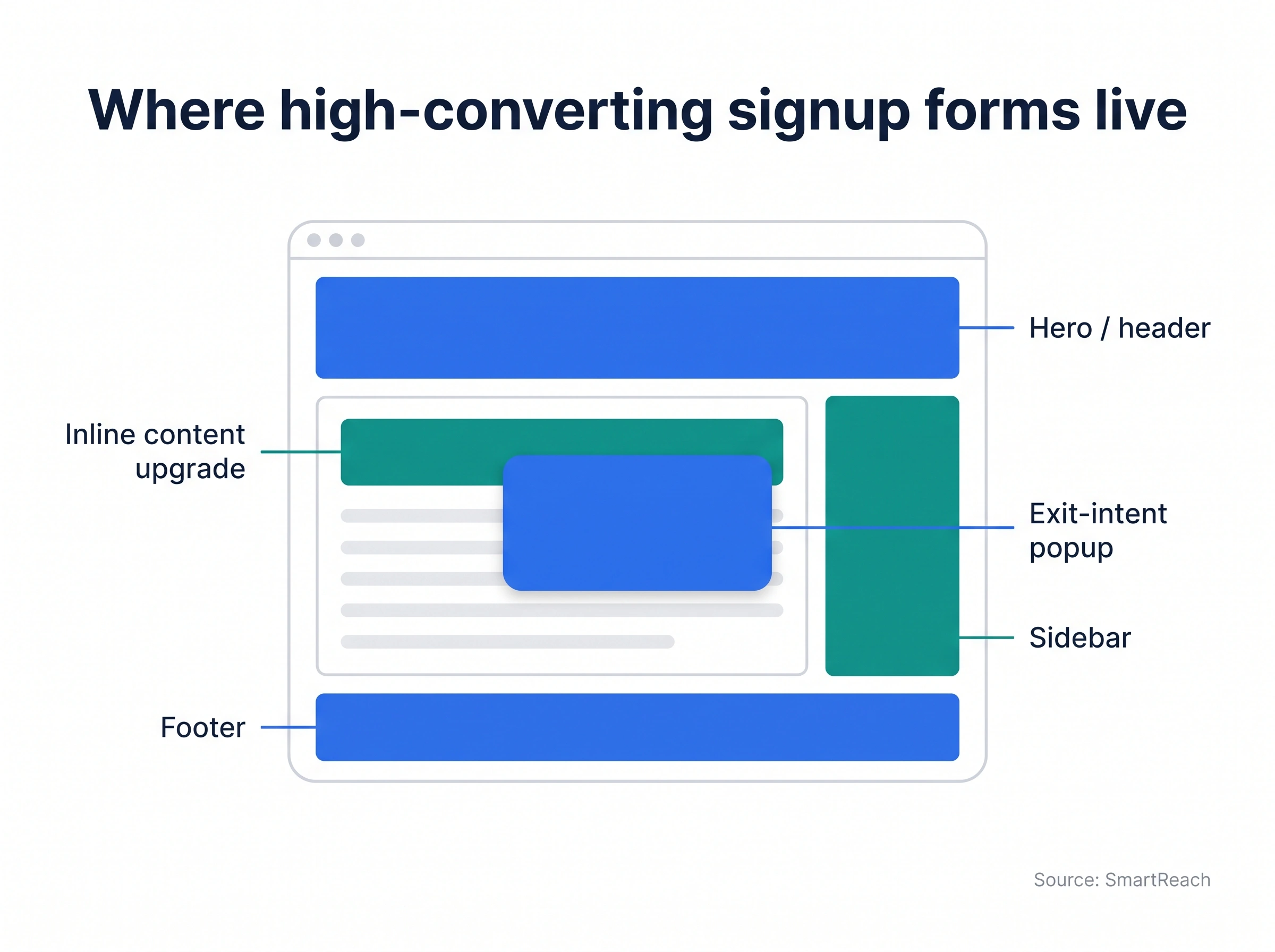
- End of blog posts: readers who finished are your warmest. A huge share of content-site signups happen here.
- Inline content upgrades: a bonus tied to the exact article, embedded mid-read. These convert several times better than a generic sidebar box.
- Exit-intent popups: the last-chance catch when a cursor heads for the close button (here’s a gallery of exit-intent popup examples).
- Dedicated landing pages: strip the nav, single focus, one ask. These convert highest of all.
- Sticky bar or hero: always visible without being a popup.
- Footer: low expectations, but every page should carry one.
Don’t run five popups at once. Pick the two or three spots that fit your traffic and test from there.
Content and SEO as a subscriber engine
High-quality content pulls in organic traffic you can convert later. It compounds: a guide that ranks keeps collecting emails for years.
The trick is matching a content upgrade to each piece. A post on subject lines offers “100 Subject Line Templates.” A post on automation offers “Workflow Templates.”
This targeted swap beats a generic newsletter ask by a wide margin. Build pillar guides, answer the questions people actually search, and put a relevant magnet in every post.
Webinars and virtual events
Webinars are one of the highest-converting list-building plays in B2B. ON24’s research found webinar-driven demo requests rising 56% year over year.
Registration captures email, company, and role in one shot. Roughly 40 to 50% of registrants attend live, and the replay extends your capture window indefinitely.
Pick a topic that promises one tangible outcome, like “Write Cold Emails That Hit 30% Reply Rates.” Keep registration to name and email, and follow up with the recording within 24 hours.
Social media that drives to a landing page
Social alone doesn’t own anyone. The goal is to convert followers into subscribers you control.
- LinkedIn (the B2B workhorse): post a carousel like “10 B2B Sales Plays,” then CTA to grab the full guide. Add a signup link in your bio and headline.
- Instagram and YouTube: a single bio link to a landing page, link stickers in stories, and signup links in video descriptions.
- The universal rule: always send people to a dedicated landing page, never your homepage.
Example: a founder posts a teardown thread, ends with “want the full 12-step checklist?”, and links a one-field landing page. The thread does the selling; the form just collects.
Quizzes, free tools, and interactive content
Interactive content converts because it gives instant, personal value. People trade an email to see their own result.
- Graders and calculators: “Score my cold email” or “What’s my deliverability risk?”
- Quizzes: “Which outreach style fits your team?” with results sent by email.
- Free micro-tools: a subject-line tester or a send-time checker.
A tool that solves a real problem also earns links and shares, so it doubles as an SEO play.
Communities, partnerships, and referrals
Three engines that scale faster than going solo:
- Run a community: a Slack group or LinkedIn community where joining captures an email and exclusive content keeps them in.
- Co-marketing: co-host a webinar or co-create a report with a complementary (non-competing) business. Each side promotes to its audience.
- Referral programs: turn customers into advocates with a real incentive. Peer recommendations carry serious weight in B2B buying.
Free trials and product-led signups
If you sell software, a no-credit-card trial is a list-building machine. People who sign up are actively shopping for what you sell.
SmartReach.io itself runs this play. A free trial captures business email, company size, and industry from people evaluating sales automation, which seeds the list with decision-makers, not tire-kickers.
That’s the inbound engine. Now let’s talk about whether any of it is working.
The KPI scoreboard: what “good” actually looks like
Most guides tell you to “track your metrics” and leave you guessing what a good number even is. Here’s the scoreboard. Bookmark this section.
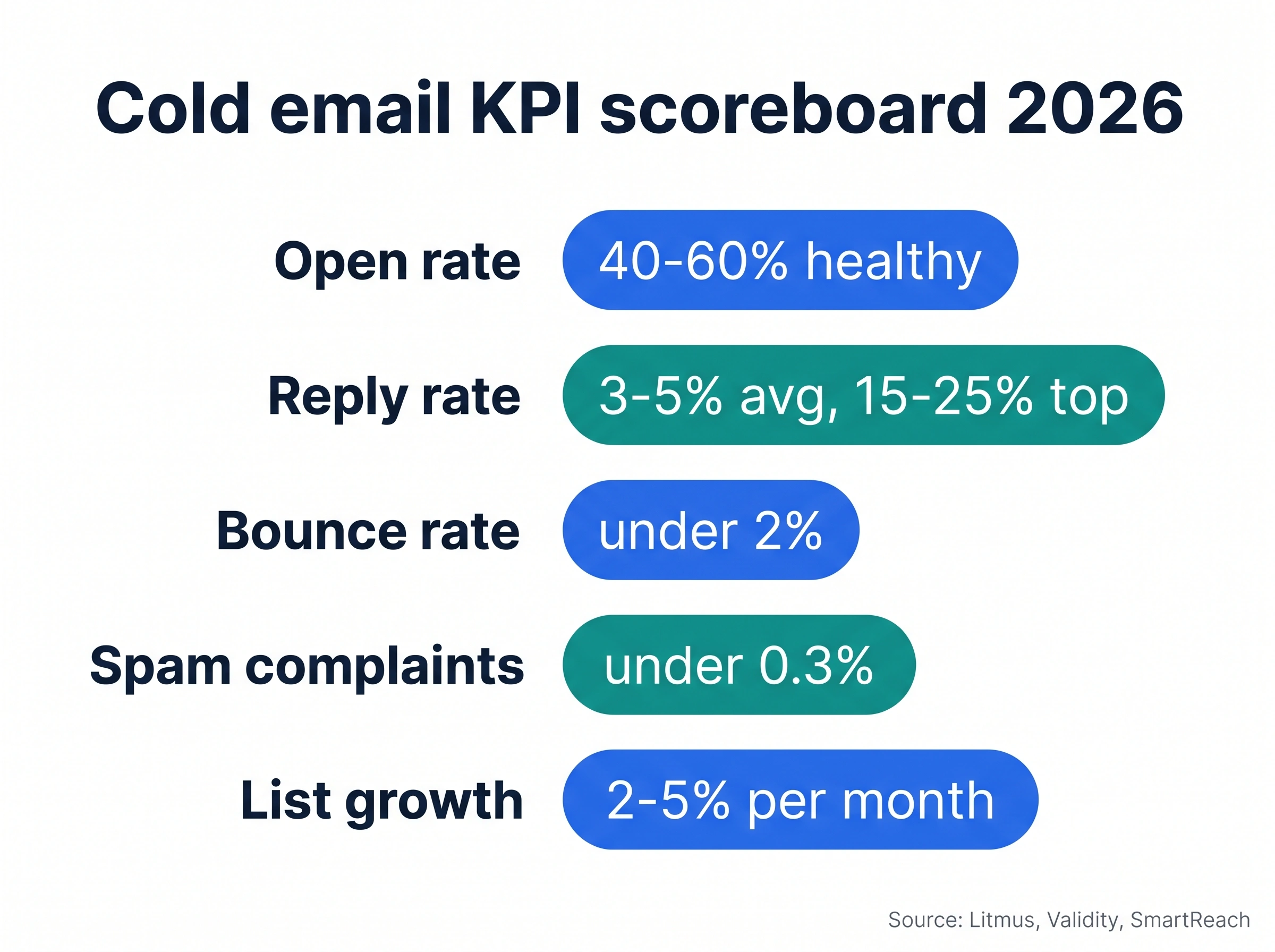
| Metric | Healthy benchmark | Excellent |
|---|---|---|
| Open rate (cold) | 40-60% | 65%+ |
| Reply rate (cold) | 3-5% avg | 15-25% |
| Bounce rate | Under 2% | Under 1% |
| Spam complaints | Under 0.3% | Under 0.1% |
| List growth (monthly) | 2-5% (new) | 6-10% (mature) |
A good cold open rate is 40 to 60%, but it lies to you
Average cold open rates land around 36 to 44%, with 40 to 60% healthy and 65%+ excellent. The asterisk: Apple Mail Privacy Protection auto-opens emails, so this number is the least trustworthy on the board.
Why yours is low: weak subject lines, a sending domain with poor reputation, or you’re landing in spam. A “low open rate” is often a deliverability problem in disguise.
How to fix it:
- Warm up the sending domain before volume sending, using a tool like AI email warmup.
- Test short, curiosity-driven subject lines against plain ones.
- Check your spam placement directly instead of trusting the open rate as a proxy.
A good reply rate is 3 to 5%, and personalization roughly doubles it
This is the metric that pays rent. Average cold reply rates sit at 3 to 5%; the top quartile hits 15 to 25%.
The single biggest lever is personalization. A 2026 analysis of more than 100 million cold emails found deeply personalized messages reply at roughly double the rate of generic ones.
Why yours is low: spray-and-pray copy, no research per prospect, or a list so loosely targeted that no first line could feel personal.
Keep your bounce rate under 2% or your domain pays for it
Bounce rate should stay under 2%, ideally under 1%. Cross that line and mailbox providers start treating you as a careless sender.
Why yours is high: an unverified or aging list. Roughly 22.5 to 30% of B2B contact data goes stale every year as people change jobs, so a list that was clean in January isn’t clean in June.
How to fix it:
- Verify every address before sending, with a continuous validator so it never drifts.
- Re-clean quarterly at minimum.
- Remove role-based addresses (info@, sales@) that bounce and complain at higher rates.
Spam complaints must stay under 0.3%, full stop
This one isn’t a suggestion anymore. Since the 2024 Google and Yahoo bulk-sender rules, complaint rates above 0.3% get you throttled or blocked. Target under 0.1% to be safe.
Why yours is high: irrelevant content, hidden unsubscribe links, or a list that didn’t really opt in.
How to fix it:
- Make unsubscribing one click, honored immediately.
- Send only relevant, segmented content.
- Authenticate your domain (SPF, DKIM, DMARC), which Validity found makes inboxing roughly 2.7x more likely.
A healthy list grows 2 to 5% a month when new, 6 to 10% when mature
Net growth, not gross. The formula: (new subscribers minus unsubscribes and bounces) divided by total list size.
Why yours is flat: you’re adding the front door (new signups) but ignoring the back door (churn and decay eating the list faster than you fill it).
How to fix it:
- Audit which channels actually drive engaged subscribers, then double down.
- Run re-engagement campaigns before people fully disengage.
- Track growth by source so you stop pouring effort into channels that bring tourists.
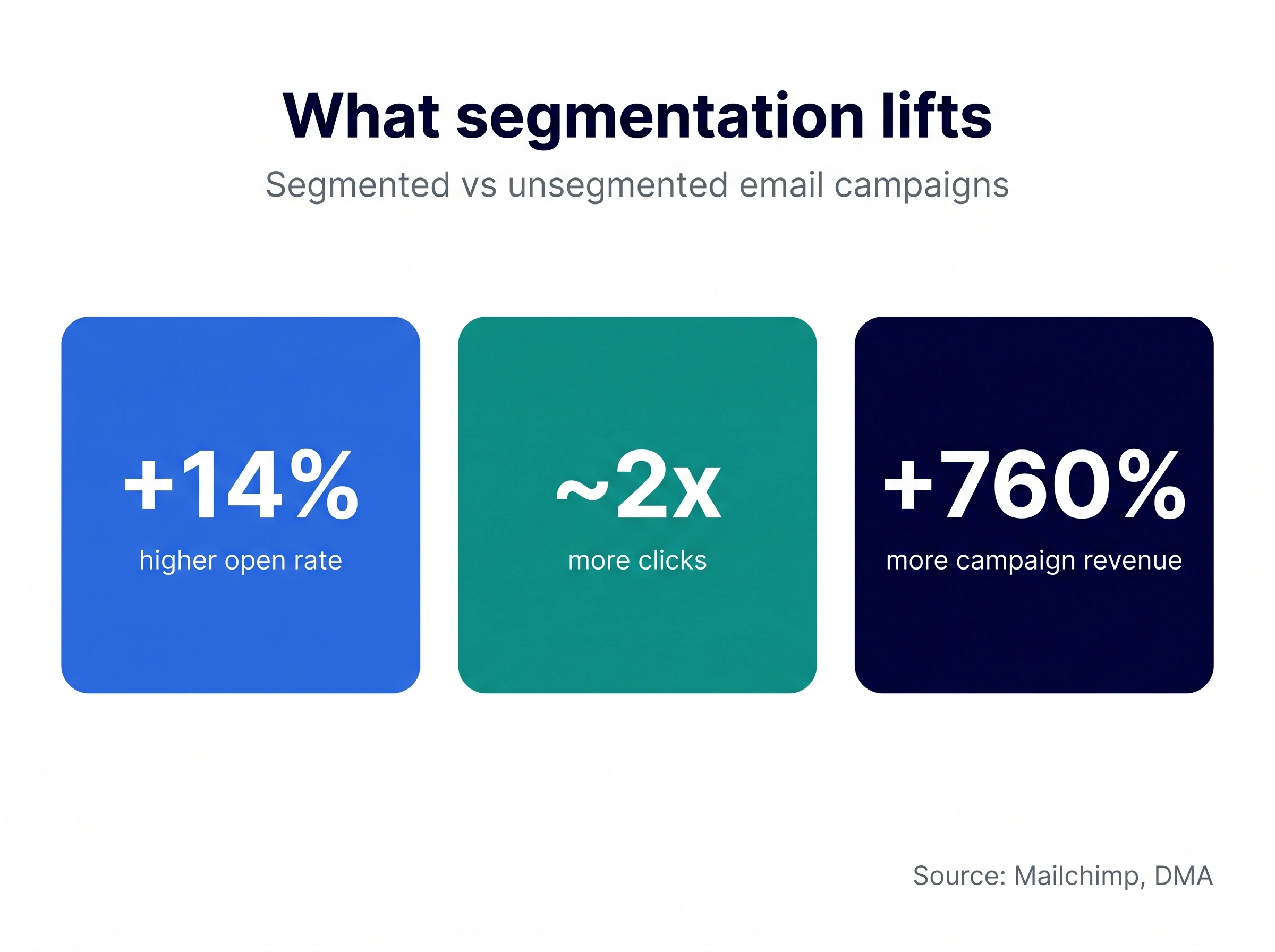
A few more numbers worth knowing. Segmented campaigns earn roughly 14% higher opens and about double the clicks of unsegmented ones, with the DMA crediting segmentation and personalization for as much as 760% more campaign revenue (recycled benchmarks, so treat them as directional).
Signup popups convert about 3% of visitors on average, with the top 10% of forms hitting around 9%. Welcome emails open at roughly four times the rate of regular campaigns, so the first automated email after signup is the most valuable one you’ll ever send.
Segmentation: a simple B2B framework
Segmentation isn’t an advanced move you graduate into. Start on day one, even with three buckets.
The lift is real: segmented sends consistently beat the one-blob blast on opens, clicks, and revenue.
Here’s a B2B-first way to cut your list. Tag every contact across five axes:
- Role and seniority: a VP gets strategy, a practitioner gets tactics. The same email can’t serve both.
- Company size: a 20-person startup and a 5,000-person enterprise have nothing in common except your product.
- Tech stack: “since you’re running [tool]” is one of the strongest opening lines in cold email, because it’s provably true.
- Intent or buying signal: anyone showing a trigger (funding, hiring, pricing-page visits) jumps the queue.
- Source tag: how they entered (webinar, lead magnet, cold list, referral) tells you how warm they are.
Worked example: the segment “Heads of Marketing at US SaaS companies, 50 to 200 staff, using HubSpot, visited pricing last week” practically writes its own first line.
That’s the point. Good segmentation makes personalization fast instead of heroic. You can let it drive the next message automatically with conditional multichannel drips.
List hygiene: the maintenance nobody brags about
Building the list is the fun part. Keeping it healthy is what protects everything you built.
A neglected list doesn’t just underperform. It actively damages your sender reputation and drags your good contacts down with the bad.
Run a simple cadence:
- Monthly: remove hard bounces immediately. They’re the fastest way to look like a spammer.
- Quarterly: archive subscribers with no engagement in 90+ days, and re-verify the list against decay.
- Annually: run a reconfirmation campaign for anyone long inactive, then cut the non-responders.
Then layer in these habits:
- Keep a suppression list. Unsubscribes, complainers, and hard bounces should never get emailed again, across every campaign.
- Segment by engagement. Separate active openers from quiet contacts so one dead segment can’t drag your whole reputation down.
- Sunset the truly inactive. After two or three ignored re-engagement attempts, let them go. A smaller engaged list beats a big silent one.
- Watch your blocklists. Monitor whether your domain or IP lands on a blocklist, and act fast if it does.
- Warm back up after a gap. If you’ve paused sending for weeks, ramp volume gradually instead of blasting from cold.
- Strip role-based and catch-all addresses. info@ and sales@ inflate complaints and bounces.
Two practices pay for themselves outright:
Double opt-in. A confirmation click after signup means smaller list growth but dramatically cleaner data. With mailbox providers tightening enforcement, confirmed lists routinely beat the roughly 83 to 85% industry inbox-placement average.
An easy exit. One-click unsubscribe, honored within a day, link visible in every send. A clean exit beats a spam complaint every time, and complaints are what get you blocked.
Tie it together with the best email verification tools running continuously, and hygiene becomes a background process instead of a chore you forget.
Is cold email legal? CAN-SPAM, GDPR, and the buy-vs-build verdict
Two questions sit under every cold list, and most guides duck both. Let’s answer them straight.
Short version: yes, cold B2B email is legal, with conditions. The rules differ by region. Here’s the side-by-side:
| Rule | US (CAN-SPAM) | EU & UK (GDPR / PECR) |
|---|---|---|
| Prior opt-in? | No | Not for B2B, but need “legitimate interest” |
| Sender identity | Must be accurate | Must be clearly identified |
| Physical address | Required in every email | Required |
| Unsubscribe | Honored within 10 days | Easy opt-out, honored promptly |
| Targeting | Commercial email allowed | Defensible reason to contact that person |
The line you don’t cross in either regime is the same: buying and blasting lists without consent or a legitimate basis.
Should you buy an email list? No.
Here’s the math, so you can stop wondering:
- Stale on arrival. A fifth to a third of B2B data rots every year.
- Spam traps. Mailbox providers plant them to catch list-buyers, and one hit can tank your domain for months.
- Unverified contacts. High bounces signal “careless sender” and hurt deliverability.
- Legal exposure. Blasting EU contacts with no basis is a GDPR risk.
Mistakes that quietly kill a list
You won’t see these on a dashboard until the damage is done. Avoid all five.
- Buying lists from unverified sources. It’s the number-one way to destroy a sending domain.
- Ignoring mobile. A large share of B2B email gets opened on a phone, and a layout that breaks on mobile loses readers in seconds.
- Sending the same email to everyone. Generic content trips spam filters and trains people to ignore you.
- Flying blind on analytics. If you’re not watching reply, bounce, and complaint rates, you can’t tell a healthy list from a dying one.
- Overloading subscribers. Too many emails feels like spam; too few and they forget you.
Notice the pattern. Every mistake is a shortcut that feels efficient and quietly costs more than it saves.
What 2026 changed while you weren’t looking
The fundamentals of how to build an email list haven’t moved. The rules around it have, and ignoring the shifts is how good lists suddenly stop landing.
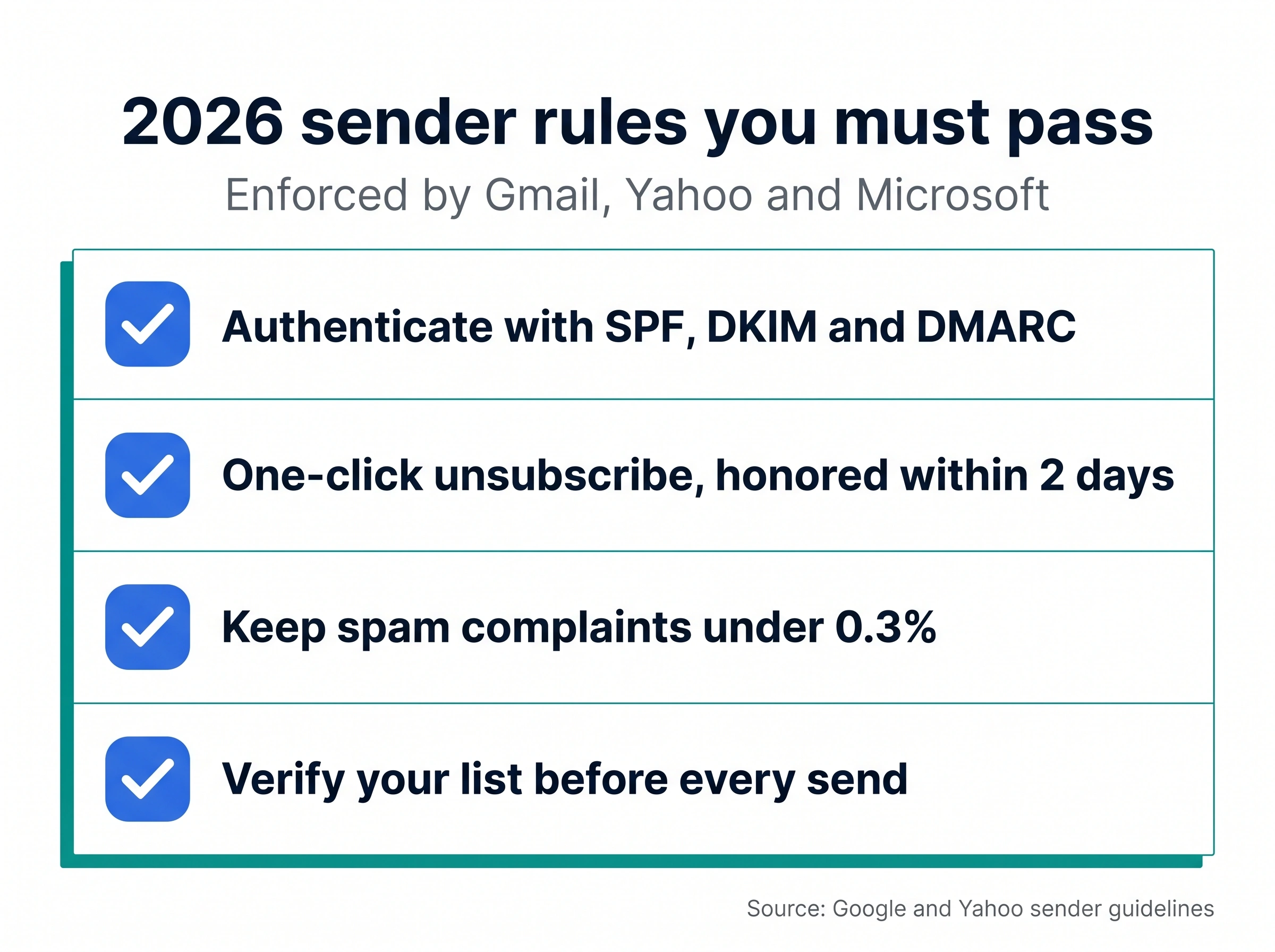
Mailbox providers grew teeth. The 2024 Google and Yahoo rules for bulk senders (5,000+ messages a day to Gmail) are now table stakes: SPF, DKIM, and DMARC authentication, one-click unsubscribe honored within two days, and spam complaints under 0.3%.
Microsoft adopted the same thresholds in 2025 and began rejecting non-compliant mail. Gmail tightened to SMTP-level rejection later that year.
Translation: deliverability is no longer a dark art, it’s a compliance checklist. A spam test and deliverability check before you scale is now basic hygiene.
AI moved from gimmick to default. Prospecting, enrichment, and first-line personalization that used to eat a rep’s morning now run in seconds.
The teams pulling ahead aren’t using AI to send more generic email faster. They’re using it to make every message more specific.
First-party data is the only data worth owning. As third-party cookies fade and bought data gets riskier, the lists you build yourself are the durable asset.
Everything rented can be taken away. A list you built and keep clean is yours.
The throughline: the winners in 2026 aren’t sending more email. They’re sending email that’s better targeted, properly authenticated, and genuinely wanted.
A list only earns its keep once it is live in a sequence, and the import is where quality either holds or leaks.
- Open Prospects and use Add prospects to import the verified list
- Open the campaign and go to Content, then add the steps the list will receive
- Watch Email activity for bounce share on the first send, which tells you whether the verification held
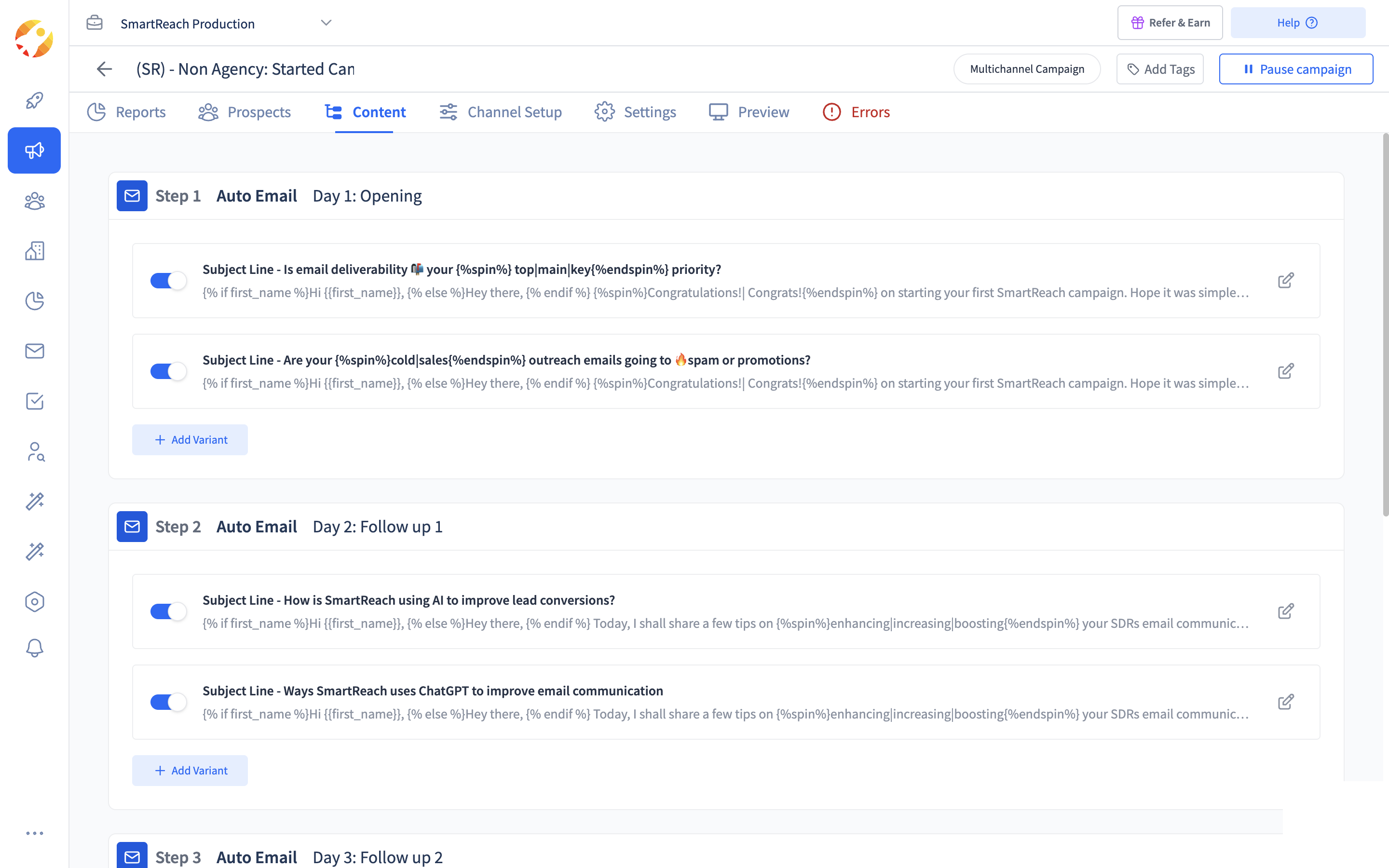 A sequence in SmartReach.io. Each step carries its own day and its own variants.
The bottom line
Building an email list comes down to one decision and a lot of discipline. Decide whether you’re growing inbound subscribers or assembling a cold B2B list, then run the playbook without cutting the corners that feel optional.
Define the ICP. Source real contacts. Verify the data, twice for cold. Segment from day one. Protect deliverability like it’s the product, because in a real sense it is.
The teams that win aren’t the ones with the biggest lists. They’re the ones with the cleanest, best-targeted lists and the patience to keep them that way.
A focused list of a few hundred verified, well-matched contacts will out-earn ten thousand random addresses every time. Quality wins, full stop.
Frequently asked questions
How do I build an email list from scratch for free?
Start with your ICP, then source contacts with what you already pay for: LinkedIn and Sales Navigator filters, an email extractor like ProspectDaddy if you are on SmartReach.io, and website forms plus lead magnets for inbound. Verify every address before sending. It’s slower than paying for a database, but you keep full control over quality, and free tools plus consistent content can build a genuinely strong list over a few months.
How do I build a cold email list for B2B sales?
Run the five-move play: define your ICP from your best current customers, source matching contacts (LinkedIn, a B2B lead database, an email finder), enrich each row with firmographic and intent data, verify the addresses twice, then segment and load them into a sequence with follow-ups. The difference between a 2% and an 18% reply rate is almost always how tightly targeted and well-researched the list is, not how big it is.
Should I buy an email list?
No. Purchased lists are stale (a fifth to a third of B2B data decays yearly), packed with unverified addresses and spam traps, and one send can wreck your domain reputation for months. Buying also creates GDPR exposure on EU contacts. A self-built, verified list outperforms a bought one every time. If you need speed, use a verified B2B database and clean the data yourself rather than blasting a raw file.
Is cold email legal?
Yes, with conditions. In the US, CAN-SPAM allows cold commercial email if you use accurate sender details, include a physical address, and offer a working one-click unsubscribe honored promptly. In the EU and UK, GDPR requires a legitimate-interest basis and easy opt-out, with corporate addresses given more latitude than personal ones. Buying and blasting lists without consent is the line that’s not legal anywhere.
How big should my email list be?
Quality beats size by a mile. A few hundred verified, ICP-matched contacts outperform thousands of generic ones, and reply rates actually fall as list size grows and targeting loosens. Start with 200 to 400 tightly matched contacts for cold outreach, or aim for 500 to 1,000 engaged subscribers as a solid inbound foundation. Then grow deliberately rather than chasing a vanity number.
What’s a good cold email open, bounce, and reply rate?
Open rates average 36 to 44% (40 to 60% is healthy, 65%+ excellent), but treat them skeptically since Apple Mail Privacy inflates them. Keep bounce under 2% (ideally under 1%) to protect your domain, and hold spam complaints under 0.3% to stay onside with Gmail and Yahoo. Reply rates average 3 to 5%, with the top quartile at 15 to 25%; deep personalization roughly doubles whatever your baseline is.
What’s a healthy email list growth rate?
Around 2 to 5% net growth per month for a new list, and 6 to 10% for a mature one with strong channels. Measure net, not gross: subtract unsubscribes and bounces from new signups before dividing by total list size. Flat growth usually means churn and data decay are emptying the list as fast as you fill it, so fix the back door (re-engagement and hygiene) alongside the front door.
Stop juggling tools
Book more meetings on every channel
Join 5,000+ teams running multichannel outreach from one sequence, with deliverability built in.