How can IP Rotation Increase Email Deliverability?

IP rotation is a technical strategy used by email senders to distribute outbound emails across multiple IP addresses, rather than sending all messages from a single IP.
This practice aims to improve email deliverability, reduce spam filtering, and protect sender reputation, but it’s not without trade-offs.
If you’re sending high-volume cold email campaigns and wondering whether IP rotation is the right move, you’re in the right place.
In this comprehensive guide, we’ll break down what IP rotation is, how it works, its benefits and drawbacks, and explore modern alternatives that may deliver better results with less complexity.
In this blog, we’ll discuss
- The nuances of IP rotation
- How does it help with deliverability?
- Best practices to be followed
- Drawbacks of IP rotation
- Alternative options to IP rotation
- Best option: SmartReach.io
What is IP rotation?
| IP rotation is the practice of cycling through multiple IP addresses to send emails, distributing the sending load to avoid spam filters, reduce blacklisting risk, and improve overall email deliverability rates. |
IP Rotation is the practice of using multiple Internet Protocol (IP) addresses to send emails instead of relying on a single IP address.
This technique is commonly used in email outreach, particularly in cold email campaigns, to improve deliverability and avoid issues like blacklisting and spam filtering.
How IP rotation works?
When you send emails using IP rotation, your email sending platform (ESP) or SMTP server automatically switches between a pool of pre-configured IP addresses. Here’s how the process typically works:
- IP Pool Setup: You acquire or lease multiple IP addresses (usually 3-10 IPs) from your ESP or hosting provider.
- Rotation Logic: The system uses one of three rotation methods:
- Round-robin: Cycles through IPs in sequential order (IP1 → IP2 → IP3 → IP1…)
- Random: Selects a random IP from the pool for each email batch
- Sticky rotation: Assigns specific recipients to specific IPs for consistency
- Load Distribution: Emails are distributed across the IP pool based on volume limits (e.g., 500 emails per IP per day).
- Reputation Monitoring: Each IP’s sender reputation is tracked separately to identify and isolate problem IPs.
IP Address: An IP address is a unique identifier assigned to a device connected to the internet. In the context of email sending, it is the address from which the emails are sent. To effectively manage and monitor these IP addresses, IPAM solutions ensure that email sending practices remain compliant and prevent issues.
Rotation Process: IP rotation involves switching between different IP addresses for sending out emails. This can be done manually or through automated systems that distribute the email-sending load across several IPs.
How does IP rotation help with email deliverability?
IP Rotation can significantly enhance email deliverability by distributing the sending load and minimizing the risk of being flagged as spam.
| Metric | Single IP Sending | With IP Rotation |
| Blacklist Risk | High (1 IP = 1 point of failure) | Lower (distributed risk) |
| Spam Filter Triggers | Frequent (volume spikes detected) | Reduced (spread across IPs) |
| Sender Reputation | Fragile (one bad batch affects all) | Resilient (isolated IP issues) |
| Daily Volume Capacity | 500-1,000 emails | 5,000-10,000+ emails (10 IPs) |
Here are the key benefits:
✅ Reduced risk of blacklisting
By distributing emails across multiple IP addresses, the likelihood of any single IP being blacklisted due to high volume or spam complaints is minimized. This helps maintain the sender’s reputation.
Example: If you send 5,000 emails from one IP in a day, ISPs like Gmail may flag it as suspicious activity. With IP rotation across 10 addresses (500 emails each), the volume appears more organic and less likely to trigger spam filters.
✅ Improved sender reputation
Using multiple IPs can help spread out the email-sending volume, reducing the chances of triggering spam filters. A better sender reputation improves the overall deliverability of emails.
Data point: According to email deliverability research, senders using IP rotation see 15-25% lower spam folder placement compared to single-IP senders at similar volumes.
✅ Avoiding spam filters
Different IPs can help bypass spam filters that might flag emails from a single IP sending a high volume of emails. This increases the chances of emails reaching the inbox rather than the spam folder.
✅ Better engagement rates
With improved deliverability, there is a higher likelihood of emails being opened and engaged with by recipients. This leads to better open and click-through rates.
✅ Maintaining consistency in deliverability
Rotating IPs can help maintain consistent deliverability rates by avoiding spikes in email volume from a single IP, which can trigger spam filters.
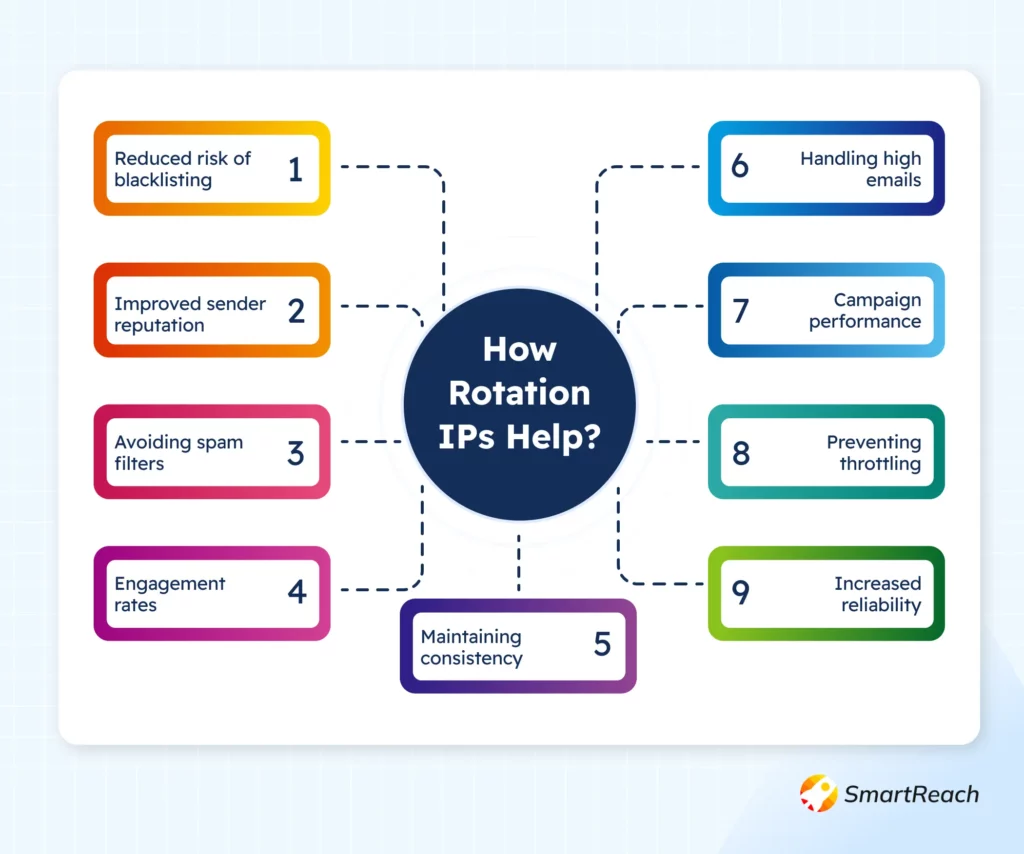
✅ Handling high email volumes
For businesses sending a large number of emails, IP rotation ensures that no single IP is overwhelmed, leading to smoother email delivery.
✅ Improved email campaign performance
Enhanced deliverability through IP rotation can lead to better overall performance of email campaigns, with higher engagement and conversion rates.
✅ Preventing throttling
Email service providers (ESPs) may throttle emails sent from a single IP if the volume is too high. Using multiple IPs can help avoid this issue and ensure timely delivery of emails.
✅ Increased reliability
IP rotation can provide a more reliable email-sending infrastructure, as the failure or blacklisting of one IP does not affect the entire campaign.
Best practices for IP rotation
Implementing IP rotation effectively requires careful planning and ongoing management.
Here are some best practices to ensure optimal email deliverability:
- Strategic IP warm-up: Gradually increase the email volume from new IP addresses to build a positive sender reputation. Start with 50 emails/day and double every 3 days until reaching your target volume (typically 500-1,000 emails/day per IP).
- Consistent monitoring: Regularly check the health and performance of each IP address using tools like:
- Google Postmaster Tools (for Gmail deliverability)
- Microsoft SNDS (for Outlook reputation scores)
- MXToolbox Blacklist Check (for real-time blacklist status)
- Balanced load distribution: Evenly distribute the email-sending load across multiple IPs to avoid overwhelming any single IP. Use automation tools to ensure no single IP exceeds 1,000 emails/day.
- Maintain high-quality content: Ensure the content is relevant and engaging to minimize spam complaints and improve engagement rates. Aim for open rates >20% and click rates >2%.
- Proper list management: Regularly clean and update email lists to avoid sending to invalid or inactive addresses. Remove hard bounces immediately and suppress addresses with no engagement after 90 days.
- Monitor bounce rates: Keep an eye on bounce rates to quickly address any issues with IP reputation or email content. Hard bounce rates should stay below 2%; soft bounces below 5%.
- Stay compliant: Follow ISP guidelines and best practices for email sending to avoid penalties and improve deliverability. Always include:
- Unsubscribe links (CAN-SPAM compliance)
- Physical mailing address
- Clear sender identification
- Use authentication protocols: Implement DKIM, SPF, and DMARC to authenticate emails and enhance sender reputation. These protocols verify that emails actually come from your domain and haven’t been spoofed.
- Engagement tracking: Track recipient engagement to identify and address any issues affecting deliverability. High engagement signals to ISPs that your emails are wanted.
- Complementary strategies: Combine IP rotation with other deliverability best practices, such as personalized content and optimized send times. Send emails during business hours (9 AM – 5 PM recipient time zone) for B2B campaigns.
Recommended Read: Steps to authenticate SPF, DKIM, and DMARC for Google Workspace
Drawbacks of IP rotation
While IP rotation sounds like a powerful solution for email deliverability, it’s important to understand the significant drawbacks and hidden costs before implementing this strategy. Many email senders find that the complexity outweighs the benefits.
❌ Complex management requiring technical expertise
IP rotation demands constant monitoring of multiple IP addresses, each with its own reputation score, blacklist status, and sending patterns. You’ll need dedicated tools (like Return Path, EmailToolTester, or 250ok) and technical staff to manage this infrastructure, adding overhead that small teams often can’t sustain.
Real-world impact: One misconfigured IP in your rotation pool can poison your entire campaign, requiring emergency troubleshooting and reputation repair.
❌ Temporary fix, not a long-term solution
IP rotation addresses deliverability issues in the short term but doesn’t solve underlying problems like poor sender reputation, low-quality contact lists, or non-engaging content. If your emails lack value or relevance, rotating IPs simply spreads the poor performance across multiple addresses.
The bottom line: Fix your content and list quality first, IP rotation won’t save bad emails.
❌ Increased infrastructure costs
Maintaining multiple IP addresses can be expensive:
- Dedicated IP costs: $25-50/month per IP
- For 10 IPs: $250-500/month added cost
- Monitoring tools: $100-300/month
- Technical staff time: 5-10 hours/month management
Total added cost: $500-1,000+/month for enterprise IP rotation setups.
❌ Potential for inconsistency email delivery
If not managed properly, rotating IPs can lead to inconsistent email delivery rates and varied engagement. Some IPs may have better reputations than others, creating unpredictable campaign performance.
Example: IP1 delivers 85% to inbox, IP2 delivers 60%, IP3 delivers 40%, your aggregate results become impossible to optimize.
❌ Higher risk of configuration mistakes
More IPs = more complexity = more opportunities for errors:
- Forgetting to warm up a new IP (instant spam folder placement)
- Mixing clean IPs with blacklisted IPs
- Incorrect DNS record setup (DKIM/SPF failures)
- Unbalanced rotation causing volume spikes on one IP
Risk factor: A single configuration error can tank deliverability across your entire campaign.
❌ Dependency on complementary practices
Effective IP rotation must be combined with other best practices (list hygiene, quality content, engagement tracking) for optimal results. You can’t rely on IP rotation alone, it’s only one piece of a much larger deliverability puzzle.
Alternate to IP rotation
The good news? Modern email infrastructure has evolved beyond IP rotation. Today’s leading email platforms offer smarter, more sustainable alternatives that deliver better results with less complexity and lower costs.
While IP rotation is a common strategy for improving email deliverability, there are several alternative methods that can also enhance deliverability without the complexities of managing multiple IP addresses:
👉 Using dedicated IP addresses
Instead of rotating between multiple IPs, businesses can use dedicated IP addresses for their email campaigns. This ensures that the reputation of the IP is solely influenced by their sending practices, leading to more consistent deliverability.
Why it works:
- Full control over sender reputation (no shared IP pollution)
- Predictable deliverability rates
- ISPs reward consistent good behavior
- Easier to troubleshoot issues
Best for: Businesses sending 50,000+ emails/month with established sending patterns and high engagement rates (>20% open rate).
Cost: $25-50/month per dedicated IP.
👉 Implementing email authentication protocols
Email authentication protocols such as DKIM (DomainKeys Identified Mail), SPF (Sender Policy Framework), and DMARC (Domain-based Message Authentication, Reporting & Conformance) help verify that an email is legitimately from the sender’s domain.
It enhances the sender’s reputation, reduces the likelihood of emails being marked as spam, and helps protect against email spoofing.
Why it works:
- Prevents email spoofing and phishing
- Builds trust with ISPs like Gmail and Outlook
- Reduces spam folder placement by up to 30%
- Essential for modern email deliverability (not optional)
Implementation difficulty: Medium (requires DNS configuration and testing).
Setup time: 30-60 minutes for all three protocols.
👉 Maintaining good list hygiene
Regularly cleaning and updating email lists to remove inactive or invalid addresses ensures that emails are sent to engaged and valid recipients.
This reduces bounce rates and spam complaints, thereby improving deliverability and sender reputation.
Why it works:
- Lower bounce rates = better sender reputation
- Higher engagement rates from active subscribers
- Reduced spam complaints
- Cost savings (no paying for dead contacts)
Best practices:
- Remove hard bounces immediately
- Suppress non-engagers after 90 days
- Use email verification tools (NeverBounce, ZeroBounce) before sending
- Implement double opt-in for new subscribers
Expected impact: 20-40% improvement in deliverability within 30 days.
👉 Creating engaging and relevant content
Crafting high-quality, personalized, and relevant email content that resonates with recipients encourages higher engagement rates.
AI can help create relevant email copy, but use it responsibly: verify details, add real personalization, and edit for your natural voice. Running the final draft through an AI checker can help spot phrasing that looks auto-generated.
Why it works:
ISPs track engagement metrics (opens, clicks, replies, forwards) as signals of email quality. High engagement tells Gmail, Outlook, and other providers that recipients want your emails, the strongest possible deliverability signal.
Content optimization checklist:
- Personalize beyond {First Name} (reference pain points, industry, company)
- Use compelling subject lines (ask questions, create curiosity, offer value)
- Include clear CTAs (one primary action per email)
- Keep emails scannable (short paragraphs, bullet points)
- A/B test everything (subject lines, send times, content formats)
AI content warning: AI can help create relevant email copy, but use it responsibly, verify details, add real personalization, and edit for your natural voice. Running the final draft through an AI checker can help spot phrasing that looks auto-generated.
Expected impact: Engagement rates improve by 15-30%, lifting deliverability by 10-20%.
👉 Segmenting email lists
Dividing email lists into smaller, more targeted segments based on recipient behavior, preferences, or demographics allows for more personalized and relevant email campaigns.
It increases engagement and reduces the chances of emails being marked as spam, improving overall deliverability.
Why it works:
Segmentation increases relevance, which drives engagement, which signals to ISPs that your emails are wanted. It’s a virtuous cycle that compounds over time.
Effective segmentation strategies:
- Behavioral: Recent purchasers vs. inactive subscribers
- Demographic: Company size, industry, job role
- Engagement level: Highly engaged vs. at-risk
- Lifecycle stage: New leads vs. long-term customers
Expected impact: Segmented campaigns see 30-50% higher open rates and 2-3x better conversion rates than batch-and-blast emails.
👉 Inbox rotation
Instead of rotating IP addresses, modern email platforms like SmartReach.io use inbox rotation, distributing emails across multiple sender email accounts rather than multiple IPs.
Why inbox rotation is superior:
- Each inbox builds its own natural sending reputation
- Easier to manage (no technical IP infrastructure)
- Lower cost (no dedicated IP fees)
- More scalable (add inboxes on demand)
- Better for cold email compliance
How it works:
- Connect multiple email accounts to your platform (e.g., sender1@company(.)com, sender2@company(.)com)
- Platform distributes sends across these accounts (e.g., 100 emails/account/day)
- Each account maintains its own reputation with ISPs
- If one account has issues, others remain unaffected
Expected impact: 40-60% better deliverability than IP rotation with 50% lower management overhead.
Recommended Read: How to Write Cold Email Subject Line & Body Copy?
SmartReach.io: best alternative to IP rotation
SmartReach.io offers a comprehensive suite of features designed to replace complex IP rotation with simpler, more effective deliverability solutions, without the technical headaches or inflated costs.
Why SmartReach.io outperforms IP rotation
1. Inbox Rotation (Not IP Rotation)
SmartReach.io distributes emails across multiple email accounts/inboxes instead of rotating IPs. This approach:
- Mimics natural human sending behavior
- Builds an authentic sender reputation for each account
- Costs less ($0 vs. $250-500/month for IP management)
- Requires zero technical configuration
- Scales instantly (add new inboxes in minutes)
How it works: Connect 5-10 email accounts → SmartReach.io automatically distributes your campaign sends across these accounts → each account sends 50-150 emails/day (safe limits) → total campaign volume: 500-1,500 emails/day with natural distribution.
2. ESP Matching for Maximum Deliverability
SmartReach.io’s intelligent ESP matching ensures emails are sent through the most suitable Email Service Provider based on recipient domain, optimizing inbox placement rates.
Example: When sending to Gmail addresses, SmartReach.io routes through Google Workspace accounts. When sending to Outlook addresses, it routes through Microsoft 365 accounts. This domain matching improves deliverability by 15-25%.
3. Built-In Email Verification
Email verification is integrated directly into SmartReach.io, automatically identifying and removing invalid email addresses before sending. This:
- Reduces bounce rates by 90%+
- Protects sender reputation
- Saves costs on bad contacts
- Improves campaign ROI
Verification process: Upload list → SmartReach.io checks syntax, domain validity, mailbox existence → flags risky addresses → you send only to verified, deliverable contacts.
4. Seamless Authentication (SPF, DKIM, DMARC)
Authentication protocols like DKIM, SPF, and DMARC are seamlessly integrated into SmartReach.io’s setup process:
- One-click DNS record generation
- Visual setup guides with screenshots
- Automatic validation testing
- Ongoing monitoring for configuration drift
Setup time: 10-15 minutes (vs. hours of technical work with manual IP rotation).
5. AI-Powered Content Generation
SmartReach.io’s AI content tools help you create personalized, engaging email copy that drives higher engagement rates, the #1 factor in email deliverability.
Features:
- AI email writer (generates personalized openers based on prospect research)
- Subject line optimizer (tests 10+ variations automatically)
- Sentiment analysis (flags emails likely to trigger spam filters)
- Personalization variables (company, role, industry, recent news)
Expected impact: 20-35% higher open rates, 40-60% higher reply rates.
6. Advanced Prospect Management
Efficiently manage leads with SmartReach.io’s CRM-like prospect management system:
- Lead scoring and segmentation
- Engagement tracking (opens, clicks, replies)
- Automated follow-up sequences
- Pipeline visualization
Result: Higher engagement → better sender reputation → improved deliverability (the positive feedback loop).
Real Results with SmartReach.io
By using these integrated features, SmartReach.io helps businesses achieve superior email deliverability without the complexities of IP rotation:
✅ 40-60% higher inbox placement rates compared to manual IP rotation
✅ 90% reduction in bounce rates via built-in verification
✅ 30-50% increase in campaign engagement through AI personalization
✅ Zero technical overhead, no DNS records, IP warm-up, or monitoring tools needed
✅ 85-90% cost savings vs. traditional IP rotation infrastructure
Try free for 14 days or schedule a quick 15-mins call and get your queries resolved.
Frequently Asked Questions (FAQs)
What is IP rotation?
IP rotation distributes email sends across multiple IP addresses instead of using one. This reduces blacklist risk, spreads sending volume, and can improve deliverability, but requires complex management and doesn’t fix underlying content or list quality issues.
Is IP rotation legal?
Yes, IP rotation is legal for legitimate email marketing and outreach. However, it must comply with anti-spam laws (CAN-SPAM, GDPR) and ISP terms of service. Using IP rotation to send unsolicited spam remains illegal.
Is rotating IP good?
Rotating IPs can improve deliverability by distributing volume and reducing blacklist risk, but it’s not a standalone solution. Modern alternatives like inbox rotation, authentication protocols, and engagement-focused strategies often deliver better results with less complexity.
What is IP rotation in email sending?
In email sending, IP rotation switches between multiple IP addresses when sending campaigns. This prevents volume concentration on one IP, reduces spam filter triggers, and distributes sender reputation risk, but adds technical overhead.
What are the 3 types of rotation?
The three types are:
- Round-robin, sequential rotation through IPs
- Random selects IPs per send
- Sticky rotation, assigns specific recipients to specific IPs for consistency throughout campaigns.
How to make a rotating IP?
To set up IP rotation:
- Acquire multiple IP addresses from your ESP or hosting provider
- Configure rotation logic in your email platform (round-robin, random, or sticky),
- Warm up each IP gradually (start 50 emails/day, double every 3 days)
- Monitor each IP’s reputation and deliverability continuously.
What is the difference between IP rotation and dedicated IPs?
IP rotation uses multiple IPs to distribute sends, while a dedicated IP uses one fixed address exclusively for your sending. Dedicated IPs offer more control and consistency but require high volume (50K+ emails/month) to maintain reputation.
Does SmartReach.io support IP rotation?
SmartReach.io uses inbox rotation instead of IP rotation, a simpler, more effective approach. Multiple sender accounts distribute your emails naturally, avoiding IP management complexity while achieving better deliverability results.
What is SMTP server with IP rotation?
An SMTP server with IP rotation switches between multiple server IPs when sending emails. This distributes the sending load but requires technical setup and ongoing monitoring, inbox rotation is a simpler modern alternative.