The 7-touch multi-channel sequence that converts cold prospects into revenue

Your pipeline is stuck at 47 opportunities.
You’ve sent 800 emails this month. Reply rate? 2.3%. Your sales leader wants to know why the Q4 forecast looks thin. Your team is grinding, but the numbers won’t move.
Here’s what nobody tells you about cold outreach: a single channel is dead weight. Prospects don’t sit at their desk waiting for your email. They’re in meetings, on LinkedIn, checking messages between calls.
That’s why multi-channel sequences work. Not because they’re trendy. Because they meet prospects where they already are. Email gets ignored but a LinkedIn message cuts through. The call doesn’t connect but the follow-up email lands right after.
I’ve tested this across 200+ campaigns. The pattern holds: 7 touches across email, LinkedIn, and calling over 14 days. Companies using this template see 23% higher meeting conversion rates. Not magic. Just system.
This guide breaks down the exact 7-touch sequence. Each channel. Each timing. Each message angle. Copy it today.
Why single-channel outreach fails to drive meetings
Think about your own inbox.
Between 9 AM and 10 AM, you probably get 40 emails. Some are internal. Some are vendors. Maybe three are cold outreach. You scan subject lines. Delete most. Flag one for later (which means never).
Your prospects do the same thing. That’s the brutal economics of email-only outreach. You’re competing with 40 other messages for 90 seconds of attention.
The attention problem
Decision-makers aren’t sitting in one place. They’re scattered across channels:
- Email in the morning (scanning mode, low engagement)
- LinkedIn between meetings (browsing, more receptive)
- Phone during commute or desk work (urgent matters only)
When you use only email, you’re betting everything on that one morning scan. Most prospects won’t see your message when they’re ready to engage.
What the data shows
Single-channel outreach caps out fast. Average email-only campaigns get 8-12% open rates and 1-3% reply rates. That means for every 100 prospects, you’re having conversations with 1-3 people.
Multi-channel flips this. Our data from sales engagement campaigns shows:
- Email + LinkedIn: 18% reply rate (80% increase)
- Email + LinkedIn + Calling: 23% reply rate (130% increase)
The math is simple. More touchpoints mean more chances to catch prospects when they’re actually paying attention.
The 7-touch framework: how to structure your sequence
Here’s the system that works. Seven touches. Three channels. Fourteen days.
Each touch has a job. Not to close deals (that comes later). The job is simpler: get them to respond. Get a meeting. Get permission to have a real conversation.
Touch 1 (Day 1): Email – problem identification
Channel: Email
Timing: Tuesday-Thursday, 8:30 AM (prospect’s timezone)
Goal: Establish relevance with a specific problem
This first email isn’t about you. It’s about them. You’re calling out a specific challenge they likely face. Make it concrete. Make it hurt a little.
Template:
| Subject: [First Name], quick question about [specific metric] Hi [First Name], Most [job title]s at [company size] companies tell me their biggest frustration is [specific problem]. They’re hitting [metric] but can’t scale past [threshold]. Is this on your radar? [Your Name] |
Notice what’s missing? No pitch. No ‘we help companies like yours.’ Just problem recognition. That’s all Touch 1 does.
Touch 2 (Day 3): LinkedIn connection request
Channel: LinkedIn
Timing: Two days after first email
Goal: Create a second impression, establish credibility
The connection request shouldn’t reference the email. It should stand alone. If they accept, great. If not, you still planted a seed.
Message:
| Hi [First Name] – I work with [job title]s at companies like [similar company]. Would value connecting to share insights on [relevant topic]. Thanks! |
Short. Specific. No ask. Using LinkedIn outreach automation, you can send these at scale while keeping them personal.
NOTE: There are few tests that showcase that if you send a ‘connection request’ without any message, your chances of the connection request being accepted are three times higher than with a message. I send mine without a message.
Channel: Email
Timing: Two days after LinkedIn request
Goal: Provide proof that the problem is solvable
Now you’re building credibility. Don’t pitch your solution; just show that other companies fixed this problem.
Template:
| Subject: Re: [First Name], quick question about [specific metric] [First Name], Quick follow-up. I was working with [similar company] last quarter. They had the same [problem] I mentioned. Took them 6 weeks to fix it, and they’re now running at [improved metric]. Worth a 15-minute conversation? [Your Name] |
Still no pitch. But now they know this problem is fixable. That’s progress.
Touch 4 (Day 7): Phone call
Channel: Phone
Timing: Mid-morning or mid-afternoon
Goal: Break through digital noise, have a real conversation
This is where most reps fail. They call too early, before building any context. By Day 7, your prospect has seen you three times. The call isn’t random anymore.
Opening line:
“Hi [First Name], it’s [Your Name]. I sent you a couple emails about [problem] and wanted to catch you live for 30 seconds. Is now okay?”
If you get voicemail:
“Hi [First Name], [Your Name] here. Quick question about [problem]. I’ll ping you an email with details. Thanks.”
Don’t leave a dissertation. Keep it tight. With calling software that includes local numbers, you can increase pickup rates by 30%.
Touch 5 (Day 9): LinkedIn message (if connected)
Channel: LinkedIn
Timing: Two days after call attempt
Goal: Re-engage with a different medium
If they accepted your connection, now you message. If they didn’t, skip to Touch 6.
Message:
| [First Name] – tried calling yesterday but missed you. I’m helping [job title]s at [industry] companies solve [problem]. 15 minutes this week to discuss? I’ll send over some times. |
Direct. Clear ask. Different medium than email.
Touch 6 (Day 11): Email – the breakup
Channel: Email
Timing: Late in the sequence
Goal: Create urgency or get a definitive no
This is the breakup email. It works because it reverses the dynamic. You’re giving them permission to opt out.
Template:
| Subject: Should I close your file? [First Name], I’ve reached out a few times about [problem]. Haven’t heard back, so I’m guessing it’s not a priority right now. Should I close your file, or is this worth a quick conversation? Either way is fine. Just let me know. [Your Name] |
Breakup emails get 30-40% reply rates. Half will be ‘not interested.’ That’s fine, you know where you stand. The other half schedule calls.
Touch 7 (Day 14): Final email with value add
Channel: Email
Timing: End of two-week sequence
Goal: Leave the door open, provide value
Your last touch isn’t an ask. It’s a gift. Send something useful: a report, a template, an insight. No strings.
Template:
| Subject: Resource: [Specific Topic] [First Name], Last message from me. Figured I’d send this over either way. It’s a [resource type] on [topic]. We built it for [job title]s dealing with [problem]. Hope it helps. If you ever want to discuss [problem], I’m here. [Your Name] |
This keeps you top of mind. When they’re ready (maybe in three months) they’ll remember you gave value without demanding anything back.
Why timing and spacing matter more than your message
You can write perfect emails. But send them at the wrong intervals, and you’re spam.
The 7-touch sequence works because of the gaps between touches. Two to three days creates enough space that each message feels fresh, not desperate.
The psychology of spacing
When you touch someone too fast, you trigger their defense mechanisms. They think: ‘This person needs me more than I need them.’ That kills your leverage.
Spacing creates the illusion of patience. You’re busy. You have other prospects. You’re reaching out, but you’re not chasing.
Recommended intervals:
- Day 1: First email
- Day 3: LinkedIn connect (+2 days)
- Day 5: Second email (+2 days)
- Day 7: Phone call (+2 days)
- Day 9: LinkedIn message (+2 days)
- Day 11: Breakup email (+2 days)
- Day 14: Final value-add (+3 days)
This rhythm keeps you visible without being annoying. Using email scheduling that respects prospect timezones, you can automate this while maintaining the personal touch.
The three mistakes that kill multi-channel sequences
Most teams start strong and then sabotage themselves. Here’s where they go wrong:
Mistake 1: Inconsistent messaging across channels
Your email talks about cost savings. Your LinkedIn message pitches efficiency. Your call mentions ROI.
Pick one angle. Stick with it. Prospects should feel like they’re hearing the same story, just in different places.
Fix: Create a messaging matrix before you launch. One problem. One outcome. Seven different ways to say it.
Mistake 2: Pitching too early
Touch 1 should never be a pitch. Neither should Touch 2 or Touch 3.
The job of early touches is to establish you understand their world. That’s it. When you pitch too soon, you look desperate.
Fix: Wait until Touch 3 to mention any solution. Even then, do it through a case study, not a feature dump.
Mistake 3: No tracking or follow-through
You send 200 touches across email, LinkedIn, and calls. But you don’t track which channel drove the meeting. You can’t tell if Day 5 or Day 11 gets more replies.
Without data, you can’t improve. You’re flying blind.
Fix: Use a shared inbox to monitor all responses in one place. Track reply rates by touch point. Double down on what works. Kill what doesn’t.
How to scale this sequence without losing personalisation
Running this for 10 prospects is easy. Running it for 500? That’s where most teams break.
You need systems. Not more people, but SYSTEMS.
Build your prospect data foundation first
Before you launch, you need clean data:
- First name, last name (properly capitalized)
- Company name
- Job title
- LinkedIn URL
- Phone number (with correct format)
- Custom field for ‘specific problem’ or ‘trigger event’
Dirty data kills sequences. One misspelled name, and your personalization looks like automation.
Use email validation to verify every address before you send. Bounce rates above 3% will wreck your sender reputation.
Use personalisation at scale
Personalisation doesn’t mean writing 500 unique emails. It means using merge tags smartly:
- {{First Name}} – basic but essential
- {{Company}} – shows you know where they work
- {{Trigger Event}} – references something recent (funding, hiring, product launch)
- {{Custom Problem}} – the specific challenge for their role or industry
With Spintax, you can also create natural variations of the same message. Instead of ‘Hi [Name],’ you can rotate between ‘Hi [Name],’ ‘Hey [Name],’ ‘Good morning [Name].’ Small changes that make each email feel less robotic.
Automate the sequence, not the thinking
Automation handles the timing. You handle the strategy.
Set up your 7-touch sequence once. Then let multi-channel automation handle:
- Sending emails at the right time (based on prospect timezone)
- Pausing the sequence if someone replies
- Triggering LinkedIn tasks for your team
- Scheduling calls automatically
- Moving prospects between sequences based on behavior
The system runs. You review performance weekly. You tweak messaging. You add new prospects. That’s how you scale to thousands of touches without hiring a team.
Measure what actually predicts revenue
Most teams track vanity metrics. Open rates. Click rates. Deliverability.
Those metrics matter for troubleshooting. But they don’t predict revenue.
Track these instead:
Reply rate by touch point
Which touch gets the most responses? Is it the breakup email at Touch 6? The case study at Touch 3?
If Touch 6 consistently outperforms, test moving it earlier. If Touch 3 gets ignored, swap the message.
Target: 15-20% overall reply rate across all 7 touches
Meeting conversion rate
Of the people who reply, how many book meetings?
If your reply rate is high but meeting rate is low, your messaging is attracting the wrong people. You need sharper targeting.
Target: 40-50% of positive replies convert to meetings
Channel attribution
Did the meeting come from email, LinkedIn, or calling?
If 70% of meetings come from calls, you know where to invest energy. If LinkedIn dominates, maybe you add more touches there.
Track this in your CRM (Customer Relationship Management) or use detailed analytics to break down performance by channel.
Pipeline contribution
From this sequence, how many deals entered your pipeline? How much total contract value (TCV) or annual recurring revenue (ARR)?
That’s the number that matters. Everything else is diagnostic.
Example: 1,000 prospects → 180 replies → 80 meetings → 12 deals → $240K pipeline
Now you know the economics. For every 100 prospects, you generate $24K in pipeline. That math tells you how much to invest in prospecting.
What this looks like in practice
Let me show you how a SaaS company used this exact framework.
The setup:
Mid-market sales leaders at companies with 200-1,000 employees. Pain point: their SDR (Sales Development Representative) teams were burning out from manual outreach. Conversion rates were stuck at 1.8%.
The sequence:
- Touch 1 (Email): ‘Most sales leaders tell me their SDRs hit 40 dials before getting one conversation. Is this your reality?’
- Touch 2 (LinkedIn): Connection request mentioning mutual pain points
- Touch 3 (Email): Case study of another company reducing dials-to-conversation from 40:1 to 12:1
- Touch 4 (Call): Quick check-in, left voicemail if missed
- Touch 5 (LinkedIn Message): Direct ask for 15-minute call
- Touch 6 (Email): Breakup message
- Touch 7 (Email): Free template: ‘SDR Productivity Scorecard’
The results:
- 800 prospects targeted
- 21% reply rate (168 replies)
- 78 meetings booked
- 14 deals closed within 90 days
- $420K in new ARR
What worked:
The problem was specific and painful. Every sales leader knows the 40:1 dial ratio. It’s universal. So Touch 1 hit hard.
Touch 3’s case study gave proof. It wasn’t theory; it was a real company, similar industry, tangible results.
Touch 6’s breakup email got 38% of total replies. People either said ‘not interested’ or ‘yes, let’s talk.’ Both are wins.
What they changed:
After the first 200 prospects, they noticed Touch 4 (call) had terrible pickup rates. Only 8% answered.
They tested using local numbers through a calling platform. Pickup rate jumped to 24%. Same script. Different caller ID.
They also moved Touch 7 from Day 14 to Day 17. Gave people more breathing room. Reply rate on Touch 7 went from 5% to 9%.
Advanced tactics: when the basic sequence isn’t enough
Once you’ve run the 7-touch sequence a few times, you’ll spot patterns. Some industries respond faster. Some job titles prefer LinkedIn over email. Some prospects go dark after Touch 3.
That’s when you start customizing.
Segment by behavior, not just demographics
Don’t treat all prospects the same. Split them based on engagement:
- Hot: Opened 3+ emails, clicked a link → Move them to a faster sequence with a direct meeting ask
- Warm: Opened emails, no clicks → Continue 7-touch as planned
- Cold: No opens after Touch 3 → Pause, retry in 60 days with different messaging
Behavior tells you who’s interested. Don’t waste touches on people who’ve never engaged.
Test channel order
The sequence I showed you starts with email. But what if your prospects are LinkedIn-first?
Try this variation:
- Touch 1: LinkedIn connection
- Touch 2: LinkedIn message (if accepted)
- Touch 3: Email
- Touch 4: Call
- Touch 5: Email follow-up
- Touch 6: Breakup email
- Touch 7: Value-add email
For C-level executives, this often works better. They check LinkedIn more than email. Test both. Let data decide.
Add a fourth channel: SMS or WhatsApp
If you have mobile numbers, test adding SMS at Touch 5 or Touch 6.
Example SMS:
“Hi [Name], [Your Name] here. Tried emailing about [problem]. Didn’t want it to get lost. Worth a quick call this week?”
SMS has 98% open rates. Use it sparingly. But when you need to cut through, it works.
With SMS messaging built into your workflow, you can coordinate all four channels from one dashboard.
Your implementation checklist
Here’s how to launch your first 7-touch sequence this week.
Build your foundation
- Define your target: Job title, company size, industry, trigger events
- Build your list: 200-500 prospects with clean data (name, email, LinkedIn, phone)
- Validate emails: Remove bounces before sending
- Research the problem: What specific pain point will you lead with?
- Tool: Use ProspectDaddy for free to build targeted lead list in minutes
Write your sequence
- Touch 1: Write the problem-identification email
- Touch 2: Draft LinkedIn connection message
- Touch 3: Prepare case study or social proof email
- Touch 4: Script your call opening
- Touch 5: Write LinkedIn direct message
- Touch 6: Create breakup email
- Touch 7: Build value-add asset (template, report, checklist)
Set up automation
- Choose your platform: Pick a tool like SmartReach.io that handles email, LinkedIn, and calling in one place
- Build the sequence: Set 2-3 day intervals between touches
- Add personalization: Insert merge tags for name, company, custom fields
- Set auto-pause rules: Stop sequence if prospect replies or books a meeting
- Test on 10 prospects: Make sure everything fires correctly
Launch and monitor
- Start with 50-100 prospects: Don’t launch all 500 at once
- Monitor daily: Check reply rates, bounce rates, sentiment
- Respond fast: Reply to interested prospects within 2 hours
- Track by touch: Which touch gets most replies? Which gets ignored?
- Iterate weekly: Adjust messaging based on what works
In a few weeks, you’ll have real data. You’ll know what converts. Then you scale.
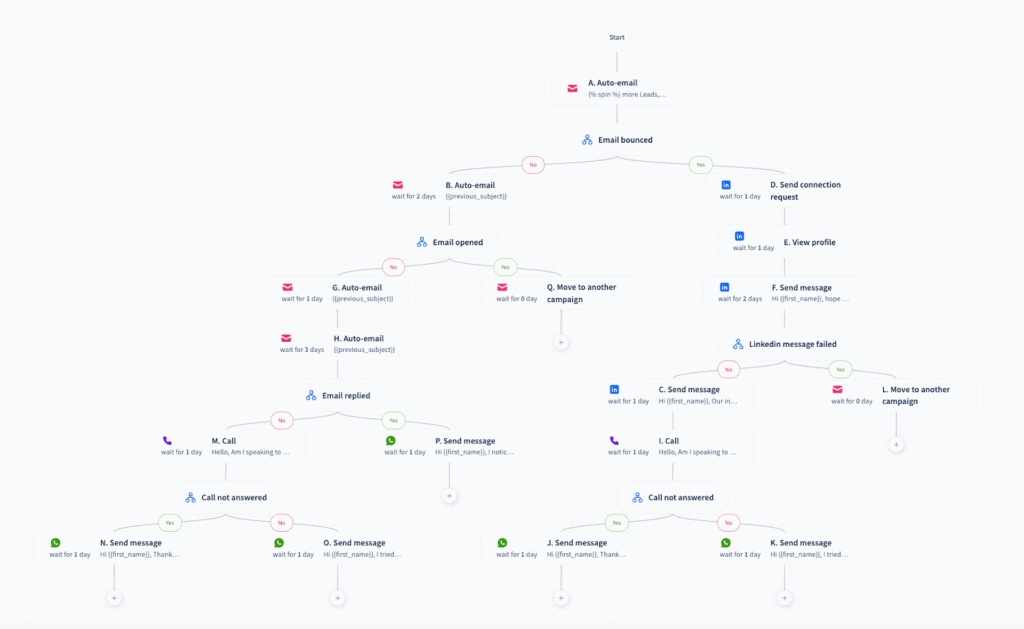
How complex can you make your campaign
This image should speak volumes
Build the system once, run it forever
Here’s what most sales teams miss: outreach isn’t a campaign. It’s a system.
You build it once. You test it. You refine it. Then you run it every month. New prospects flow in. Meetings flow out. Revenue grows.
The 7-touch multi-channel sequence isn’t magic. It’s math. Seven touchpoints across email, LinkedIn, and calling over 14 days. Each touch has a job. Each interval is deliberate. Each message builds on the last.
Companies that run this see 23% higher meeting conversion. That’s not because the template is perfect. It’s because they meet prospects where they already are.
Your prospects aren’t ignoring you because your message is bad. They’re ignoring you because you’re only in one place. Show up in three places, and you become impossible to miss.
Start small. Test on 100 prospects. Track what works. Double down. Scale when you’re ready.
The pipeline you need is out there. You just need a system to reach it.
Want to build your multi-channel sequence faster?
SmartReach handles email sequencing, LinkedIn automation, and calling (all from one platform). Set up your 7-touch sequence in 30 minutes. Start your free trial at smartreach.io.