LinkedIn Automation Proxies: Do You Need Them?
On this page
If you have searched for LinkedIn automation proxies, you have probably read that proxies are the secret to running outreach "safely" at scale. It is worth slowing down on that claim, because it is mostly wrong, and acting on it is one of the faster ways to get a LinkedIn account restricted.
Here is the honest version of how proxies fit into LinkedIn outreach in 2026, when they actually matter, and what really keeps an account healthy while it books meetings.
What is a LinkedIn proxy, really?
A proxy is a server that sits between your computer and LinkedIn and routes your traffic through a different IP address, so your activity appears to come from somewhere other than your real location. The three types you will see marketed are residential proxies (IP addresses from real internet providers), datacenter proxies (faster and cheaper, but easier to spot), and mobile proxies (routed through mobile networks).
That is the entire mechanism. A proxy changes the address your request appears to come from. It does not change anything about how you behave once you are on the platform, and that distinction is the whole story.
Do you need proxies to run LinkedIn automation?
For almost everyone, no.
If you use a modern, cloud-based LinkedIn outreach tool, it already handles this for you. Good tools assign your account a single, stable IP address matched to your region and run your outreach from there, so your location stays consistent and there is nothing for you to buy, install, or rotate. You never touch a proxy setting because the tool is designed so you do not have to.
People generally go looking for proxy services for one reason: they want to run several LinkedIn accounts from one place, or operate accounts that are not really theirs, without it being obvious that the accounts are connected. That is not a growth tactic. It is the exact pattern LinkedIn's security systems are built to detect, and it is what turns a manageable risk into a likely restriction.
Why proxies do not make automation "safe"
This is the claim worth retiring for good. LinkedIn does not decide whether an account looks automated mainly by its IP address. It looks at behavior:
- How many connection requests you send, and how fast
- Your acceptance rate, low acceptance is a strong signal that you are contacting the wrong people
- Whether your activity follows human rhythms or fires in perfectly even bursts
- How new the account is and how quickly it ramped up
A proxy does nothing for any of these. If you send 300 requests a day to a poorly targeted list, a pristine residential IP will not save the account, and rotating between several IP addresses to look like different people is itself one of the patterns LinkedIn flags. Masking your address does not make robotic behavior look human. It just adds a second thing that looks suspicious.
Where LinkedIn draws the line
It helps to separate the tools from the tactics. LinkedIn's User Agreement and its list of prohibited practices are clear about the behaviors that get accounts and companies into trouble: using software to operate multiple accounts, disguising who is behind an account, and scraping member data at scale.
Those are not edge cases LinkedIn ignores. Its automated defenses block tens of millions of fake accounts every year, and it has pursued and won legal action against large scraping operations. Proxies are marketed almost entirely as the way to do those prohibited things without being noticed, which is why "LinkedIn proxies" and "avoid detection" so often appear in the same sentence. Steer clear of that framing and the risk mostly disappears.
None of this means outreach itself is off-limits. Reaching out to relevant people, at a sensible pace, from your own real account, is normal professional networking. The problems start with volume, deception, and scraping, not with sending a thoughtful connection request.
What actually keeps your account healthy and books meetings
The unglamorous truth is that the things which protect your account are the same things that generate leads. None of them involve a proxy.
- Target people who are actually on LinkedIn. Acceptance rates swing more by audience than by anything else, some roles live on the platform, others barely open it. A tightly targeted list keeps your acceptance rate high, which is the single healthiest signal your account can send. If acceptance drops below about 20%, fix the targeting before you touch anything else. Our LinkedIn outreach benchmarks show how sharply acceptance swings by audience industry.
- Respect the limits. LinkedIn allows roughly 100 connection invitations per week on every tier, including Premium and Sales Navigator. Start new accounts at 3 to 4 requests per day and ramp over four to six weeks; a steady pace of about 15 per working day sits comfortably under the ceiling.
- Follow through after the connection. Most accepted connections never hear from the sender again. The reply, not the connection, is where conversations start, so a good first message matters far more than any sending trick.
- Use more than one channel. LinkedIn's weekly cap is a hard ceiling on volume. Pairing it with email in a single multichannel sequence lets you reach the same prospects more often without pushing any one account past its limits, which is both safer and more effective than leaning on LinkedIn alone.
The sustainable version is limits, not disguises. SmartReach.io gives every connected LinkedIn account its own daily caps on profile views, InMails, messages and connection requests, and its own guidance warns that sudden activity spikes damage an account's reputation. That is the opposite bet from proxies, and it is the one that ages well.
- Open Settings and select Linkedin accounts
- Set the daily caps per connected account for profile views, messages and connection requests
- Raise them gradually rather than in steps a human would never make
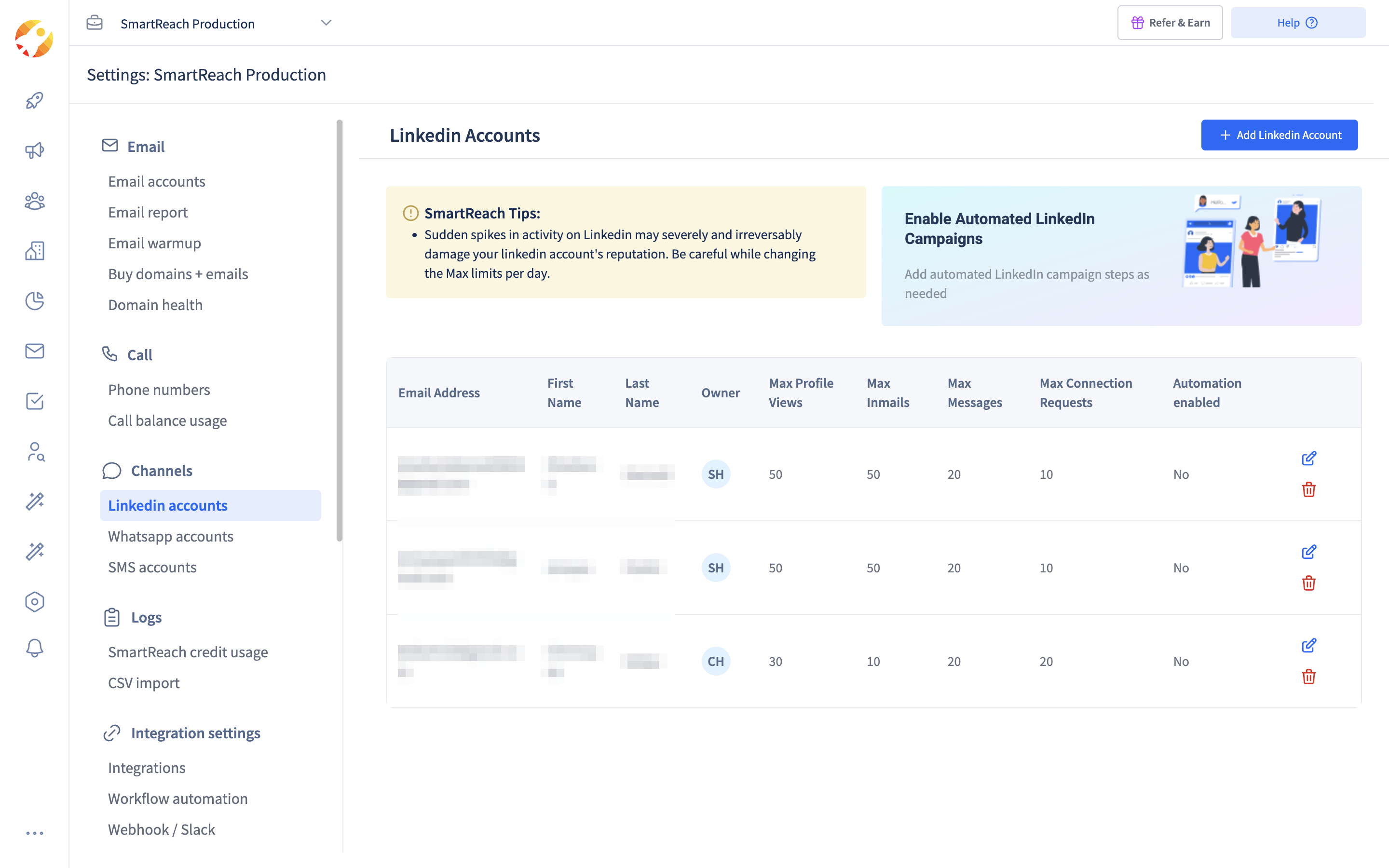 The anti-proxy approach. Daily activity caps per LinkedIn account in SmartReach.io.
Doing it the sustainable way
If your goal is a steady flow of conversations rather than a burst of activity that ends in a restriction, the setup is straightforward: one real account, a reputable LinkedIn automation tool that handles infrastructure for you, careful targeting, human pacing, and email running alongside LinkedIn so you are never depending on a single channel.
SmartReach.io is built around exactly that model, LinkedIn, email, calls, and WhatsApp in one sequence, with semi-automated and full-automation options per step so you keep control of high-value prospects. There is no proxy to configure, because the responsible version of LinkedIn outreach does not need one.
Frequently asked questions
Do I need a proxy to use LinkedIn automation?
Usually not. A reputable cloud-based outreach tool runs your account from one stable, location-matched IP address on your behalf, so there are no proxies for you to buy or configure. People generally start shopping for proxy services only when they want to run several accounts at once or hide their identity, which is exactly the pattern LinkedIn's systems are built to catch.
Do proxies keep my LinkedIn account safe from restrictions?
No. LinkedIn's detection is mostly behavioral, based on how many requests you send, your acceptance rate, and how human your activity looks, not just your IP address. A proxy cannot fix a low acceptance rate or an unnatural sending pace, and rotating IP addresses to look like several different users is itself a signal LinkedIn watches for.
Is it against LinkedIn's rules to use proxies for automation?
Using proxies to operate multiple accounts, disguise your identity, or scrape data at scale goes against LinkedIn's User Agreement. LinkedIn blocks tens of millions of fake accounts every year with automated defenses and has taken legal action against large scraping operations, so the risk is real, not theoretical.
Should I disable two-factor authentication for LinkedIn automation?
Never. Two-factor authentication protects your account from takeover and has nothing to do with legitimate outreach. Any guide that tells you to switch it off is optimizing for evasion at the expense of your security, and you should not follow it.
What actually keeps a LinkedIn account healthy?
Reaching people who are genuinely active on LinkedIn, staying within roughly 100 connection requests per week, ramping new accounts up slowly, keeping your acceptance rate healthy, and spreading outreach across channels like email and LinkedIn so no single account is pushed past its limits.
How many LinkedIn connection requests can I send per week?
LinkedIn allows roughly 100 connection invitations per week on every account tier, including Premium and Sales Navigator. Start new accounts at 3 to 4 per day and ramp up over four to six weeks; a realistic steady pace is about 15 per working day, comfortably under the weekly ceiling.
Stop juggling tools
Book more meetings on every channel
Join 5,000+ teams running multichannel outreach from one sequence, with deliverability built in.