Formal Email Format: 34 Templates That Get Replies

On this page
Every day, roughly 376 billion emails move around the planet, and the number keeps climbing toward 392 billion in 2026, according to The Radicati Group. Your formal email is one drop in that ocean. The recipient decides whether to open it, read it, or bin it in about the time it takes to blink.
So the format isn’t decoration. It’s the difference between a reply and the archive folder.
A formal email format is the structure you use when the stakes are real: a first message to a prospect, a proposal after a meeting, a note to a hiring manager, a request that needs a yes. Get the structure right and you respect the reader’s time, signal that you’re credible, and make the next step obvious. Get it wrong and even a strong offer reads as careless.
This guide gives you the full anatomy, a seven-step writing workflow, 34 copy-paste templates (each with a one-click Copy button), the 2026 data on what actually gets answered, and the mistakes that quietly cost you replies. In a hurry? Jump straight to the 34 templates and pick the one that matches your situation.
TL;DR for formal email format
The anatomy of a formal email format
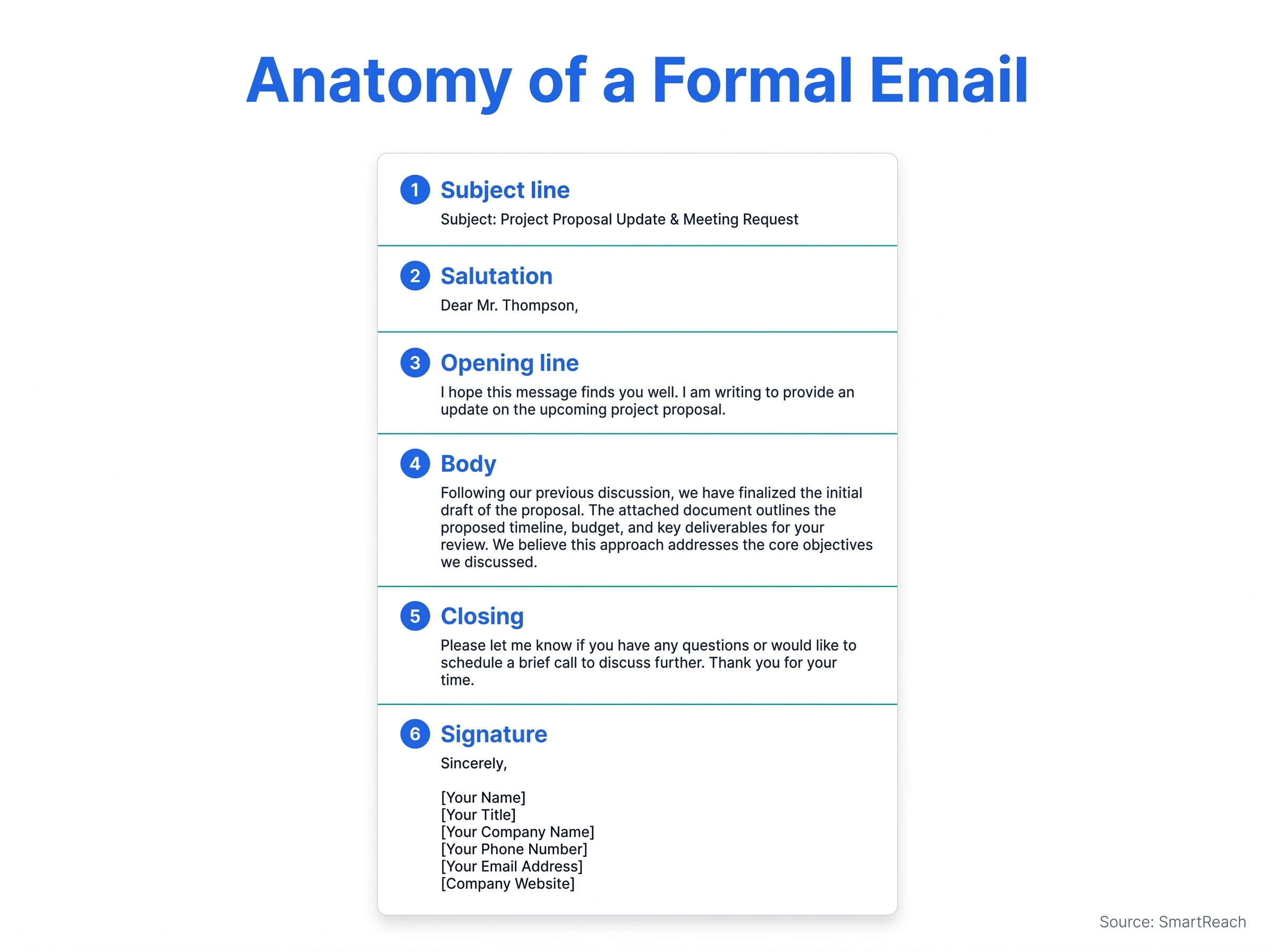
A formal email is built from six components. Each one has a job, and each one has a rule that 2026 data backs up. Master these and you can write any formal message without staring at a blank screen.
Source: SmartReach.io analysis of 2025-2026 industry benchmarks.
1. Subject line
The subject is the only part that’s guaranteed to be read, because it decides whether the rest gets opened. Make it specific and make it short.
Aim for roughly 40 characters, or 6 to 9 words. AWeber’s analysis points to around 44 characters as a sweet spot, and Marketo and Mailchimp both land on 6 to 10 words. The reason to keep it tight is mechanical: the Gmail app cuts subjects off near 37 characters and the iPhone Mail app near 48, so anything important has to come first.
There are really only four subject-line jobs in formal email, and each has a shape that works:
- State an action and a deadline. “Budget approval needed for Q2 campaign by Friday.” The reader knows the ask and the clock before they open.
- Ask a specific question. “Question about your onboarding timeline for new hires.” Curiosity plus relevance.
- Reference a shared event. “Following up on our call yesterday.” Context does the opening for you.
- Name a concrete outcome. “Cutting your team’s reporting time by an afternoon a week.” Benefit, not feature.
Now compare a weak subject with a strong one:
- Weak: “Quick question”
- Strong: “Budget approval needed for Q2 campaign by Friday”
The strong version states the action and the deadline. The reader knows what you want before they open.
Three things quietly kill a formal subject line. Vagueness (“Touching base,” “Hello”) gives the reader nothing to act on. Hype and spam triggers (“FREE,” “URGENT,” all caps, three exclamation marks) get you filtered before a human sees it. And clickbait that the body doesn’t deliver burns trust on the one part people remember. Write the subject last, after the body, so it actually summarizes what you wrote. For more on this, see our guide to cold email subject lines.
2. Salutation
The greeting sets the tone in three words. Match it to how well you know the reader:
- Know the name: “Dear Mr. Sharma,” or “Dear Ms. Johnson,”.
- Know the title, not the name: “Dear Dr. Rao,” or “Dear Hiring Manager,”.
- Group: “Dear Team,” or “Dear All,”.
- Last resort only: “Dear Sir or Madam,”. It reads as impersonal, so spend two minutes finding the actual name first.
A few finer points that trip people up. Use a comma after the name in most business email (“Dear Ms. Johnson,”); a colon (“Dear Ms. Johnson:”) reads as more formal and is common in legal or US cover-letter contexts. When you’re not sure of someone’s gender or preferred title, use their full name (“Dear Jordan Lee,”) rather than guessing “Mr.” or “Ms.” and getting it wrong, which is a worse first impression than a neutral greeting. And in a reply thread that’s already friendly, matching the other person’s level (“Hi Sara,”) is fine; the formality should track the relationship, not freeze at maximum.
Skip “Hey,” “Hiya,” and “What’s up” in a formal email. They undercut the rest before the reader reaches it. Whatever greeting you choose, your sign-off should match its formality, so the email feels of a piece from top to bottom.
3. Opening line
Your first two sentences answer two questions: who are you, and why are you in my inbox? If the reader doesn’t know you, introduce yourself in one line (“I’m Priya Nair, a partnerships lead at [Company]”). Then state your purpose. Don’t bury it under “I hope this email finds you well” and three sentences of throat-clearing.
The opener changes shape depending on the situation:
- Cold first contact: one line of who you are, then the reason, then the relevance. “I’m Priya Nair from [Company]. We help finance teams close their books faster, and I noticed your team is hiring two more analysts.”
- Replying in a thread: acknowledge the last message in half a sentence, then move. “Thanks for sending the scope over. Two quick questions before I draft the quote.”
- Warm or referred: name the connection first. “Sam Okafor suggested I reach out about your reporting project.”
The mistake to avoid is the throat-clear: “I hope this email finds you well. I wanted to reach out because I was thinking that perhaps we might be able to…” By the time the reader hits the verb, they’ve decided you’re going to waste their time. Lead with the point; warmth can come after it.
4. Body
This is where you make your case. The rules are simple and the discipline is hard:
- One main point per email. If you have three asks, you probably need three emails or a call.
- Short paragraphs, two to four sentences each. Mailchimp’s own guidance is one to two short paragraphs for the core message.
- Bold or bullet the one thing you want the reader to do.
- Write for the reader’s interest, not yours. What’s in it for them comes first.
People don’t read business email, they scan it. Eye-tracking studies show readers move through a screen in an F-shaped pattern: the first line, the start of each paragraph, then a quick vertical skim down the left edge. Structure for that. Put the most important sentence first, start paragraphs with the word that carries the meaning, and never hide the ask in the middle of a dense block where the scan will skip it.
End the body with a single, explicit call to action. “Are you free Tuesday at 3pm?” gives the reader one decision to make. “Let me know your thoughts when you get a chance” gives them homework with no deadline, which is how emails die in the drafts of someone else’s intentions. One ask, phrased as a yes-or-no or a pick-one, gets answered.
If a paragraph runs long, you can run it through a summarizing tool to tighten it before you send. And if you’re sending similar formal emails on repeat, email automation tools can handle the personalization and scheduling so each one still goes out looking hand-written.
5. Closing
The closing does two small jobs: a courtesy line, then a sign-off. The courtesy line points forward, not backward. “I look forward to your reply,” or “Thank you for your time,” beats trailing off with nothing.
Then the sign-off, matched to formality:
- Most formal: “Yours faithfully,” (when you opened with “Dear Sir or Madam,”) or “Yours sincerely,” (when you used a name).
- Standard professional: “Sincerely,” “Best regards,” “Kind regards,”.
- A notch warmer, still fine: “Best,” “Thanks,”. Use these once the relationship has thawed, not in a cold first email.
Avoid “Cheers,” “Talk soon,” “Ciao,” or an emoji in a strictly formal message. We break down the close calls in our guides to “Kind regards” and “Best regards”, and there’s a fuller list in our roundup of email sign-offs.
6. Signature
The signature tells the reader who you are and how to reach you. A clean formal signature has four lines and stops there:
- Full name
- Title, Company
- Phone (and a calendar or website link if it earns its place)
- Optional small logo
That’s it. The inspirational quote, the five social icons, the “sent from my iPhone,” and the legal paragraph nobody reads all add noise. The exception is regulated industries (legal, finance, healthcare) where a confidentiality footer is required: keep it, but keep it small and below your real details. A logo is fine, and you can make one with a company logo maker if you don’t have one yet.
One more thing most people miss: your signature is read on a phone as often as a desktop, so a six-line block with a giant banner image looks broken on mobile. Test it on your own phone. If you send outreach at any volume, a consistent, tested block matters more than you’d think, which is why we built a free email signature generator.
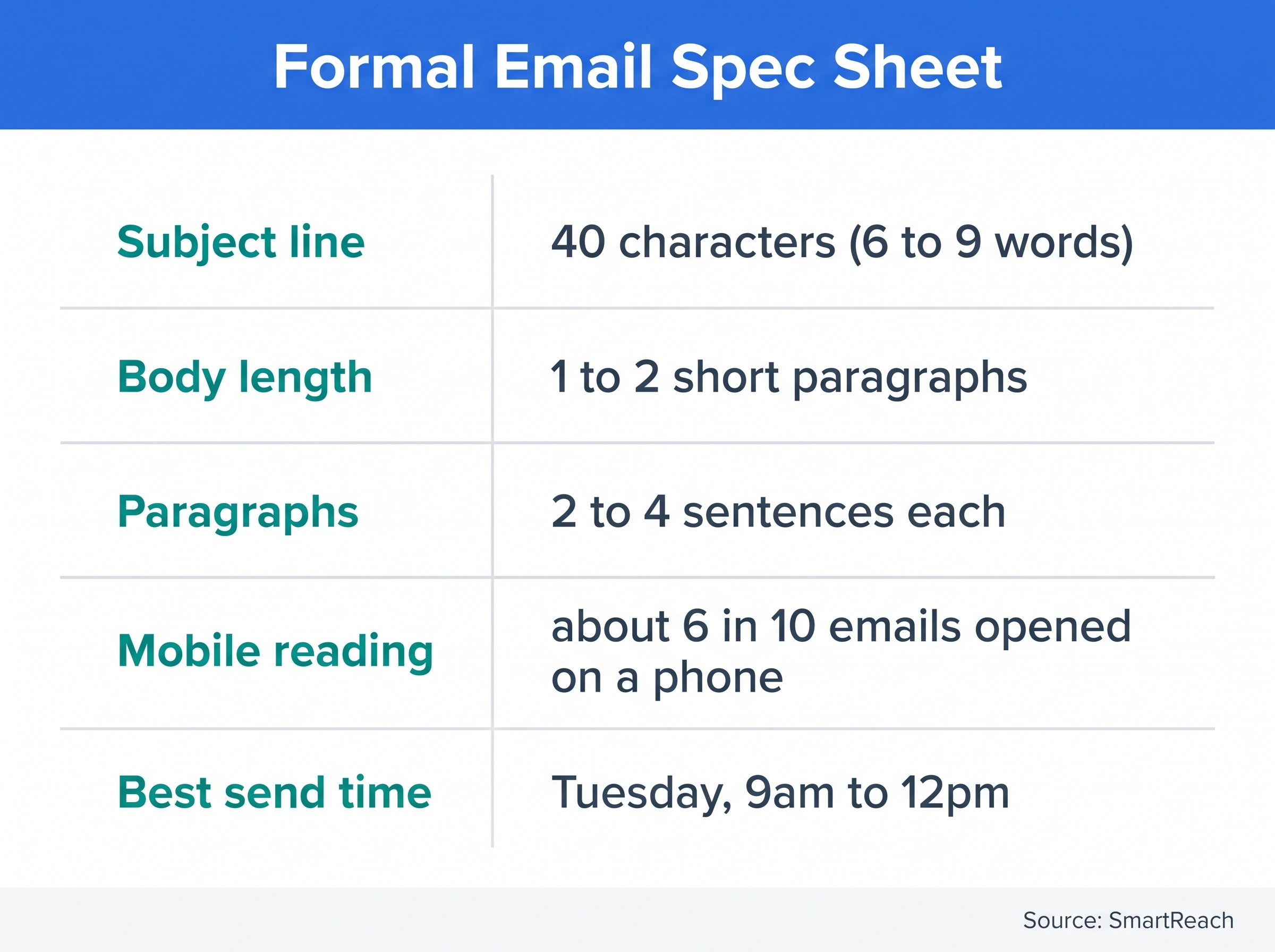
The formal email spec sheet
Here’s every rule from above in one scannable table.
| Element | The rule | Why |
|---|---|---|
| Subject length | ~40 characters / 6 to 9 words | Mobile truncates near 37 to 48 chars (Gmail, iPhone) |
| Greeting | “Dear Mr./Ms. [Last name],” | Sets a respectful tone |
| Opening | Purpose by sentence two | ~6 in 10 emails read on mobile; readers skim |
| Body length | 1 to 2 short paragraphs, one topic | Long blocks lower replies |
| Paragraphs | 2 to 4 sentences each | Readability on small screens |
| Closing | “Sincerely,” / “Best regards,” | Formal, expected |
| Signature | Name, title, company, contact | Lets the reader follow up |
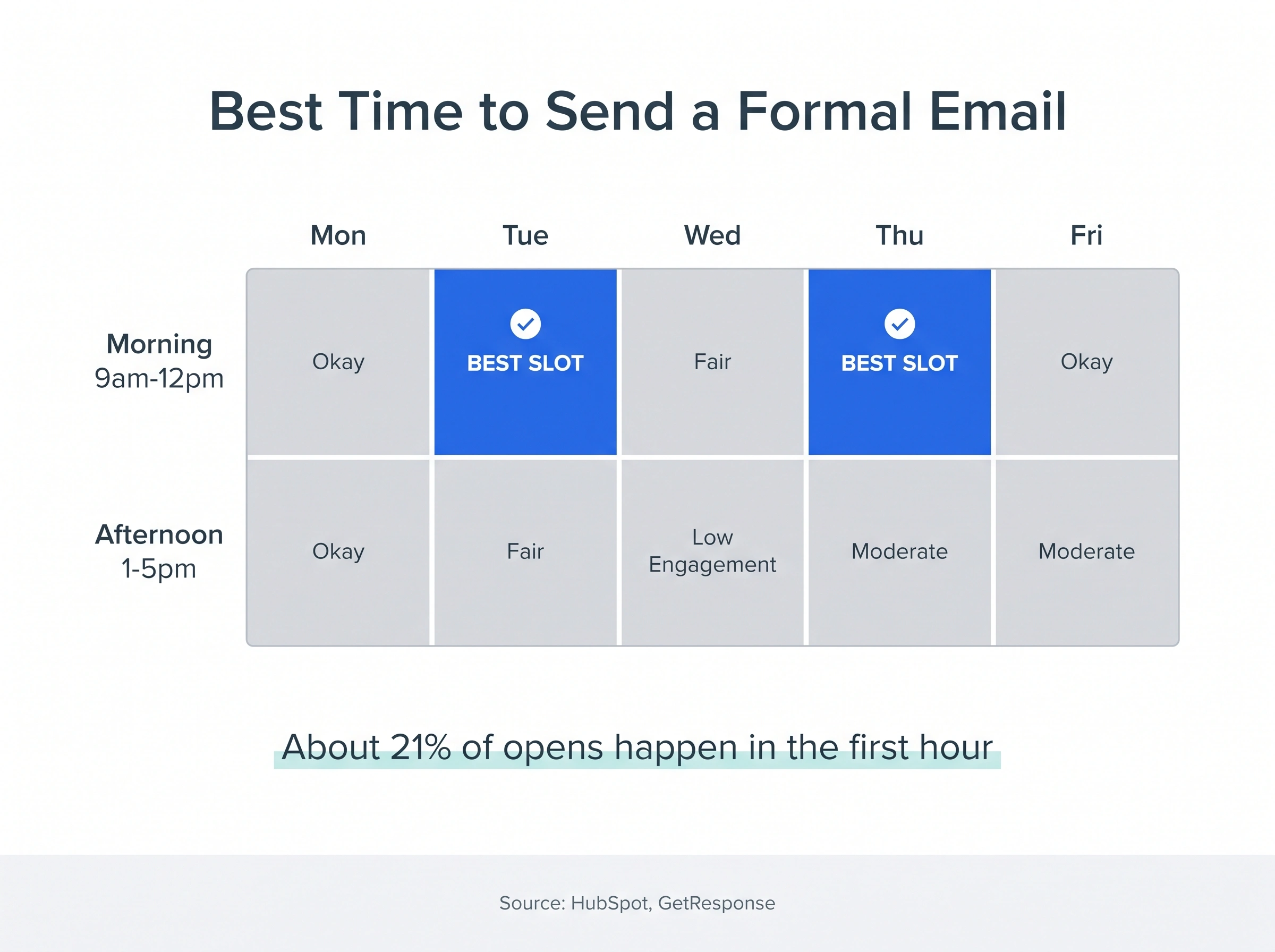
| Send time | Tuesday, 9am to 12pm local | Highest engagement window (HubSpot, GetResponse) |
Source: SmartReach.io analysis of 2025-2026 industry benchmarks.
How to write a formal email, step by step
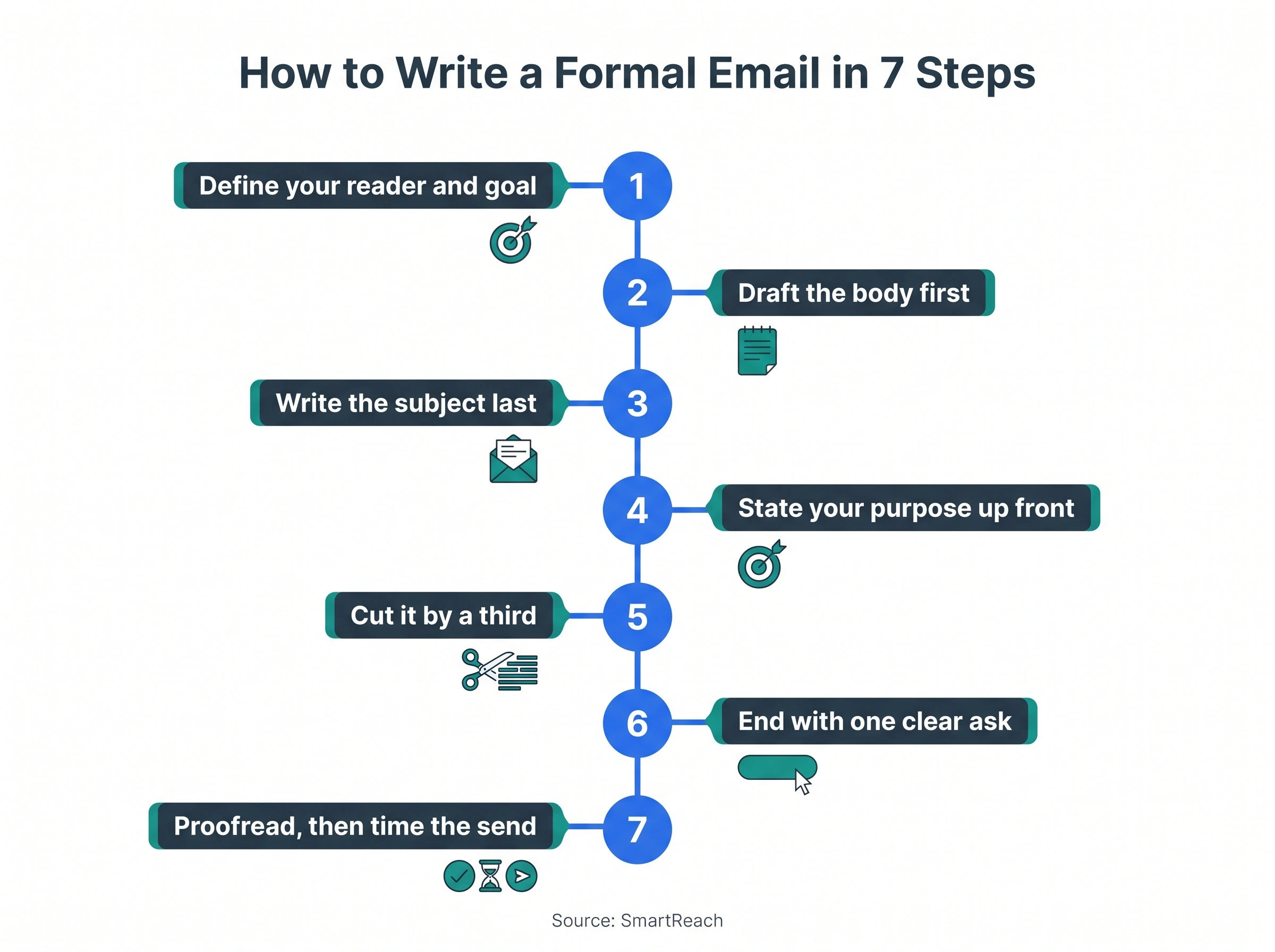
The anatomy tells you what goes where. This is the workflow that turns a blank screen into a sent email without second-guessing. It’s seven steps, and the order matters as much as the steps, because most people write in the wrong sequence (subject first, body last) and wonder why the subject never fits the message.
Source: SmartReach.io analysis of 2025-2026 industry benchmarks.
Step 1: Name your reader and your goal. Before you type a word, finish this sentence: “I want [person] to [action] by [when].” If you can’t fill in all three blanks, you’re not ready to write, you’re ready to think. A vague goal (“touch base with the client”) produces a vague email; a sharp goal (“get Maria to approve the Q3 budget by Thursday”) writes half the message for you.
Step 2: Draft the body first, subject last. You can’t summarize a message you haven’t written. Get the ask down in plain language, even messily, then go back and name it in the subject line. Writing the subject first is why so many subjects promise one thing while the body delivers another.
Step 3: State the purpose in paragraph one. Lead with why you’re writing. The reader should know what you want by the end of the first short paragraph. Background, context, and pleasantries come after the point, not before it, and only if the reader actually needs them to act.
Step 4: Cut it by a third. Write your draft, then delete a third of it. The warm-up sentence, the hedging (“I was just wondering if maybe…”), the second example you don’t need, the paragraph restating what they already know: all of it goes. A formal email that respects the reader’s time gets answered faster than one that shows off how thorough you are.
Step 5: Make the next step a single, clear action. End with one decision, framed so it’s easy to say yes to. “Are you free Tuesday at 3pm or Wednesday at 11am?” beats “Let me know your availability,” which beats “Let me know your thoughts.” The more specific the ask, the faster the reply, because you’ve done the thinking for them.
Step 6: Proofread out loud. Typos and clumsy sentences read as carelessness, and carelessness lowers trust on a formal message. Read the whole thing aloud once: your ear catches what your eye skims. For a high-stakes note (a proposal, a complaint, a job application), have a colleague look first, or bring in a professional editor.
Step 7: Time the send. If it isn’t urgent, schedule it for mid-morning on a Tuesday or Thursday in the reader’s timezone, not yours. GetResponse found about 21% of opens happen in the first hour after delivery, so good timing mostly buys you a spot in that first-hour rush instead of being buried under the overnight pile.
That’s the whole workflow. The same seven steps produce a cold sales pitch, a leave request, a complaint, or a thank-you note. Once it’s muscle memory, a formal email takes five minutes instead of twenty-five.
Formal vs informal email: the real difference
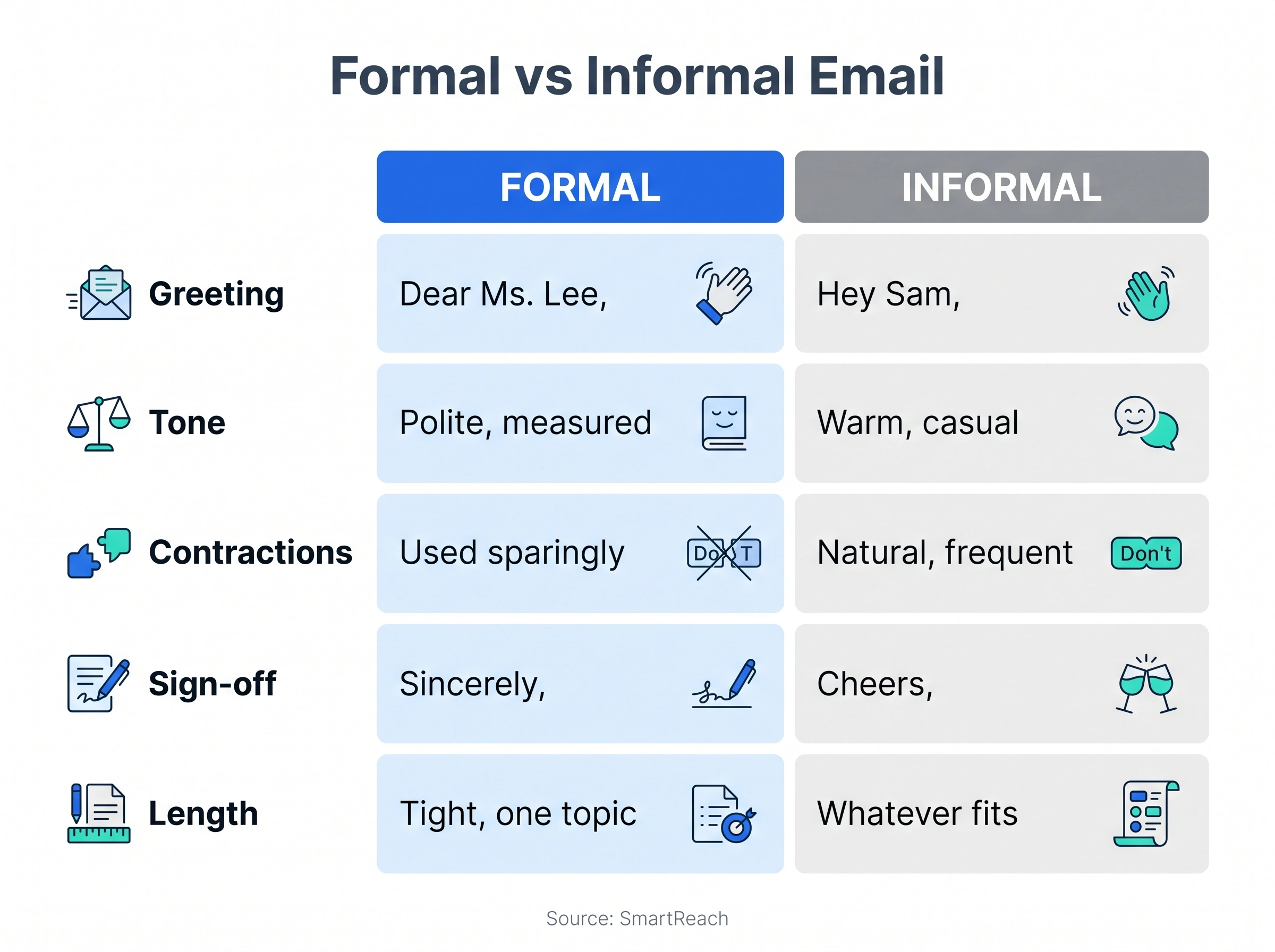
The line between formal and informal isn’t about being stiff. It’s about who you’re writing to and what’s at stake. Here’s the side-by-side, with concrete examples in each cell so you can feel the difference.
| Feature | Formal email | Informal email |
|---|---|---|
| Recipient | Client, prospect, professor, exec you don’t know well | Friend, close colleague, teammate |
| Purpose | Win a reply, a meeting, a decision | Stay in touch, coordinate quickly |
| Greeting | “Dear Ms. Lee,” | “Hey Sam,” |
| Contractions | Used sparingly; full sentences | Natural, frequent |
| Tone | Polite, measured | Warm, casual |
| Structure | Subject, greeting, body, closing, signature | Often a line or two, no signature |
| Sign-off | “Sincerely,” / “Best regards,” | “Cheers,” / “Talk soon,” |
| Length | Tight, one topic | Whatever fits |
| Follow-up | Planned cadence, 2 to 3 nudges | Whenever |
Source: SmartReach.io analysis of 2025-2026 industry benchmarks.
When you’re not sure which to use, go formal. It’s easier to warm up a too-formal email than to recover from one that read as too casual.
Formal email format by scenario: 34 copy-ready templates
This is the part you came for. Below are 34 templates covering the situations that actually fill a working inbox, weighted toward sales and business development. Each one uses the six-part format, each one is debranded so you can drop in your own details, and each one has a Copy button so it goes straight into your draft.
Three of them (the cold intro, the post-meeting proposal, and the meeting request) include a short teardown of why each line works, so you can adapt the thinking, not just the words.
Jump to a group: Sales & BD · Client success · Internal · Career · Vendor & admin
Every template below doubles as a formal email example: a finished message you can send, not a skeleton to fill in. If you came here looking for an example of a formal email to copy, start with the cold introduction under Sales & BD, then the meeting request. Both are annotated line by line, so you get the reasoning along with the wording.
Sales & business development
Subject: Cutting [Company]’s onboarding time by 20%

Dear Ms. Lee,

I’m [Your Name] from [Your Company]. We help [industry] teams shorten customer onboarding without adding headcount.

One company like yours cut onboarding from six weeks to four after switching. I’d like to show you how in a 15-minute call.

Are you open to a quick call next Tuesday or Wednesday?

Best regards,
[Your Name], [Title], [Company], [Phone]
Subject: Following up on my voicemail, [Your Company]

Dear Ms. Lee,

I left you a voicemail earlier about [topic] and wanted to put it in writing in case email is easier.

We’ve helped companies in your space [specific result, e.g. lift qualified leads 20%]. I’d value 15 minutes to see if it’s a fit.

Would next week work for a short call? You can reach me at [Phone].

Sincerely,
[Your Name]
Subject: Re: [original subject]

Dear Mr. Khan,

I know inboxes get busy, so I’m floating this back to the top.

Is improving [outcome] a priority this quarter? If it’s not the right time, just let me know and I’ll close the loop.

Best regards,
[Your Name]
Subject: Should I close your file?

Dear Mr. Khan,

I’ve reached out a few times about [topic] and haven’t heard back, which usually means the timing’s off or it’s not a fit.

I’ll stop here so I’m not crowding your inbox. If things change, my door’s open: [Phone] or this thread.

Wishing you a strong quarter,
[Your Name]
Subject: Proposal for [Project], as promised

Dear Mr. Jones,

Thank you for the time yesterday to talk through [Company]’s goals for [project].

I’ve attached a proposal built around what we discussed: [point 1], [point 2], and [point 3]. It maps to your goal of [specific goal from the meeting].

Please review it when you get a moment. I’m happy to walk through it on a call this week if that’s useful.

Sincerely,
[Your Name]
Subject: Re: Request for quote, [Service]

Dear Mr. Khan,

Thank you for the RFQ and for considering us for [project]. We’ve reviewed it and have two quick questions so the quote is accurate:

1. [Question about scope]
2. [Question about timeline or budget]

Once we have those, we’ll send a full quote within [number] business days.

Best regards,
[Your Name]
Subject: Your quote for [Service], [Your Company]

Dear [Customer Name],

Thank you for reaching out about [service]. Based on what you shared, I’ve attached a quote covering [scope].

If you’d like to adjust the scope or add anything, tell me and I’ll send a revised version the same day.

Sincerely,
[Your Name], [Title]
Subject: 20 minutes on [outcome] for [Company]?

Dear Ms. Garcia,

I’m [Your Name] from [Your Company]. We work with [role] leaders at companies like [peer example] on [specific outcome].

I’d like to borrow 20 minutes to share what’s working for them and see if it’s relevant to you.

Would Thursday at 11am or Friday at 2pm suit you better?

Best regards,
[Your Name], [Title], [Phone]
Subject: A quick look at how [Company] could [outcome]

Dear Ms. Garcia,

Thanks for your interest in [product]. I’d be glad to set up a short demo to show how it can help your team [specific benefit].

Would [date] at [time] work? I’ll keep it to 25 minutes and focus it on [their use case].

Sincerely,
[Your Name]
Subject: Your [Product] renewal and what’s new

Dear Mr. Garcia,

Your subscription to [Product] renews on [date], so I wanted to set up a short call to review how your team is using it and what’s changed since you started.

We’ve shipped [new capability] that fits your goal of [goal]. Let’s make sure your plan still matches your needs.

What does your calendar look like over the next two weeks?

Best regards,
[Your Name]
Subject: Worth a fresh look, [Company]?

Dear Ms. Lee,

We spoke a while back about [topic] and the timing wasn’t right. A few things have changed since then: [update, e.g. new feature, new pricing, new result].

If [outcome] is back on your radar, I’d be glad to reconnect for 15 minutes.

Best regards,
[Your Name]
Subject: A partnership idea for [Their Company] and [Your Company]

Dear Mr. Patel,

I’m [Your Name] from [Your Company]. We serve a similar audience to yours without competing, and I think there’s a clean way to help each other reach more of it.

The short version: [one-line idea]. I’d love to explore it on a call.

Are you open to 20 minutes next week?

Sincerely,
[Your Name]
Subject: A quick intro to [Name], if you’re comfortable

Dear [Contact Name],

I hope you’re well. I’m trying to reach [Target Name] at [Company] about [reason], and I saw you’re connected.

Would you be comfortable introducing us? I’ve written a short blurb below you can forward as-is, and no worries at all if it’s not a fit.

[2-line forwardable blurb]

Thank you,
[Your Name]
Subject: Next steps after today’s demo

Dear Ms. Garcia,

Thank you for your time today. As discussed, here’s where we landed:

– [Recap point 1]
– [Recap point 2]
– Next step: [clear action, e.g. a trial, a pilot, a proposal]

I’ll [your commitment] by [date]. If anything’s unclear, reply here or call me at [Phone].

Best regards,
[Your Name]
Turn the sales templates into a sequence. A single email rarely gets the reply. Templates 1, 3 and 4 already form a three-touch cold sequence you can send as is.
| Day | Send | Template |
|---|---|---|
| 1 | The introduction | #1 Cold introduction |
| 4 | The bump, in the same thread | #3 Follow-up after no reply |
| 7 | A LinkedIn connection or a short call | Optional, for your top prospects |
| 10 | The polite close | #4 Breakup email |
Stop the sequence the moment someone replies. Backlinko’s data (covered below) shows one follow-up alone lifts replies by 65.8%, so the bump on day 4 is the step you can least afford to skip.
Client and customer success
Subject: Welcome aboard, [Client Company]

Dear [Client Name],

I’m [Your Name], your main point of contact at [Your Company]. I’ll be looking after [account/project] and making sure you get full value from day one.

To kick off, I’d like to schedule a short call to align on goals and timelines. Does [date] at [time] work?

Looking forward to working together,
[Your Name], [Title]
Subject: Getting you set up with [Product]

Dear [Client Name],

Welcome to [Product]. Here’s what happens next so you’re up and running quickly:

1. [Step one]
2. [Step two]
3. [Step three]

I’ve attached a short guide, and I’m one reply away if you hit a snag.

Best regards,
[Your Name]
Subject: [Project] update, week of [date]

Dear [Client Name],

A quick update on [project]. We’re on track for [milestone] by [date].

– Done: [item]
– In progress: [item]
– Needs your input: [item]

Could you confirm [the one thing you need] by [date]? That keeps us on schedule.

Sincerely,
[Your Name]
Subject: Two minutes to share your experience?

Dear [Client Name],

Thank you for working with us on [project]. We’d value your honest take so we can keep improving.

Would you mind sharing a few words here: [link]? It takes about two minutes, and it genuinely helps.

With thanks,
[Your Name]
Subject: An apology and how we’re fixing it

Dear [Client Name],

I’m sorry for [specific issue]. It fell short of what you should expect from us, and I take that seriously.

Here’s what we’re doing about it: [concrete action]. To make it right, I’d also like to [gesture, if appropriate].

I’m available to talk it through whenever suits you.

Sincerely,
[Your Name], [Title]
Subject: Would you share your [result] story?

Dear [Client Name],

Since you saw [specific result] with us, I wondered if you’d be open to a short case study or a quote we could share.

It would take about 20 minutes of your time, and we’d send everything for your approval before anything goes live.

Would that be alright?

Best regards,
[Your Name]
Internal and workplace
Subject: [Issue] and a proposed fix

Dear [Manager Name],

I want to flag an issue with [project/situation] and bring you a path forward, not just the problem.

What’s happening: [brief, factual summary]. The impact: [consequence]. My recommendation: [proposed fix].

Could we take ten minutes to align? I’m free [times].

Thank you,
[Your Name]
Subject: [Project] progress, on track for [date]

Dear [Manager Name],

A quick update on [project]. We’re on track to finish by [date].

Remaining tasks:
– [Task 1]
– [Task 2]

No blockers on my end. I’ll flag it early if that changes.

Best regards,
[Your Name]
Subject: Apology regarding [event]

Dear [Manager Name],

I want to apologize for [specific mistake] on [date]. It was my error, and I understand the impact it had.

To stop it recurring, I’ve [corrective step]. I’m happy to discuss it further if you’d like.

Sincerely,
[Your Name]
Subject: Reviewing my compensation

Dear [Manager Name],

Over the past [time period], I’ve taken on [responsibilities] and delivered [specific results, e.g. metrics, projects].

Given that growth, I’d like to discuss adjusting my compensation to reflect my current contribution. Could we find time this week or next?

Thank you for considering it,
[Your Name]
Subject: Leave request, [date range]

Dear [Manager Name],

I’d like to request leave from [start date] to [end date], returning on [date].

Before I go, I’ll [handover plan, e.g. brief X, document Y]. [Colleague] has agreed to cover anything urgent.

Please let me know if you need anything else to approve it.

Best regards,
[Your Name]
Job search and career
Subject: Application for [Job Title], [Your Name]

Dear [Hiring Manager Name],

I’m applying for the [Job Title] role at [Company]. My background in [field] lines up closely with what you’re looking for.

In my last role at [Company], I [relevant accomplishment with a number]. I’d bring the same focus to your team.

My resume is attached. I’d welcome the chance to talk.

Best regards,
[Your Name]
Subject: Thank you, [Job Title] conversation

Dear [Interviewer Name],

Thank you for the time today to discuss the [Job Title] role. Our conversation about [specific topic] confirmed how well the position fits what I’m looking for.

I’m glad to share anything else that would help. I look forward to next steps.

Best regards,
[Your Name]
Subject: Accepting the [Job Title] offer

Dear [Name],

I’m delighted to accept the offer for [Job Title] at [Company]. Thank you for the opportunity.

As discussed, I confirm the salary of [amount] and a start date of [date]. Please let me know what you need from me before then.

With thanks,
[Your Name]
Subject: Resignation, [Your Name]

Dear [Manager Name],

I’m writing to formally resign from my role as [Job Title], with my last day on [date], in line with my notice period.

I’m grateful for the opportunities here, and I’ll do everything I can to hand over smoothly.

Sincerely,
[Your Name]
Subject: A quick question about your work in [field]

Dear [Name],

I admire your work in [field], especially [specific thing]. I’m exploring a move into the space and would value 15 minutes of your perspective.

No agenda beyond learning. Would a short call in the next couple of weeks be possible?

Thank you,
[Your Name]
Vendor and admin
Subject: Question about [Service/Product]

Dear [Name],

I’m interested in your [service] and would like a few more details before we move ahead.

Specifically: [question 1] and [question 2]. Pricing and scope would also help.

Thank you for your time.

Best regards,
[Your Name], [Title]
Subject: Pricing for a long-term order, [Your Company]

Dear [Supplier Name],

Thank you for your catalog. We’re interested in [products] and expect to order on a regular basis.

Given the ongoing volume, could you share your best pricing? We’re keen to build a long-term relationship.

Best regards,
[Your Name], [Title]
Subject: Issue with [order/service] on [date]

Dear [Name],

I’m writing about [specific issue] with [order/service] on [date]. [One factual sentence on what went wrong.]

To put it right, I’d appreciate [specific resolution, e.g. a replacement, refund, or credit].

I look forward to your response.

Best regards,
[Your Name]
Subject: Thank you for your work on [project]

Dear [Name],

I want to recognize the work you put into [project]. Your [specific contribution] made a real difference to the outcome.

On behalf of [team/company], thank you. It’s genuinely valued.

Best regards,
[Your Name], [Title]
The data: what actually gets a formal email answered
Most formal-email advice is opinion. This section is numbers. The benchmarks below come from named, neutral sources (Radicati, Backlinko, SoPro, Campaign Monitor, Validity, HubSpot, GetResponse, MailerLite, Litmus, and others), reconciled where they disagreed.
Each benchmark below gets the same treatment: the number, why yours might be lower, and how to fix it.
Cold business emails average about a 5% reply rate, and it’s falling
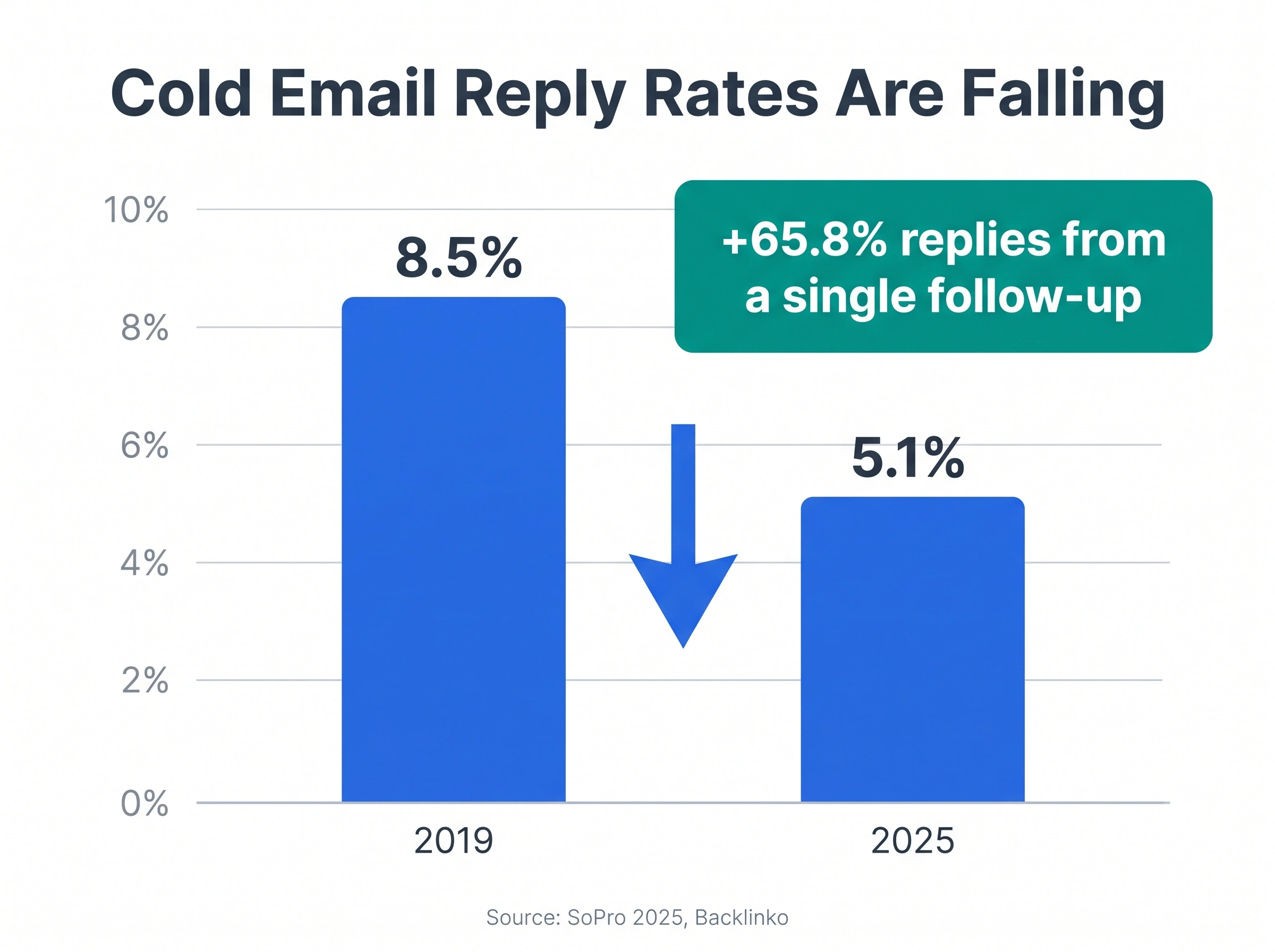
SoPro’s 2025 State of Prospecting, built on 97.9 million emails, puts the average cold email reply rate at 5.1%. That’s down from the 8.5% Backlinko measured back in 2019. Well-targeted campaigns still hit 5 to 10%, and the best clear 10 to 15%.
Why your number is low: you’re emailing the wrong people, your subject is vague, the message is about you instead of them, or you never follow up.
How to improve it:
- Tighten your list before you write a word. A smaller list of the right people beats a big list of the wrong ones. (This is the job a B2B Lead Finder and a LinkedIn Email Finder do: find and verify the right contacts so you’re not emailing dead addresses.)
- Lead the subject with the reader’s outcome.
- Cut the email to one ask.
- Add at least one follow-up (see the next stat).
Source: SmartReach.io analysis of 2025-2026 industry benchmarks.
A single follow-up can lift replies by 65.8%
Backlinko’s 12-million-email study found one follow-up raised replies by 65.8%, and multiple touches lifted them by 160%. Roughly 4 in 10 replies arrive after the first email, not from it. Yet most senders stop after one try.
Why your number is low: you’re treating the first email as the whole campaign.
How to improve it: plan a sequence of 1 initial email plus 2 to 3 follow-ups, spaced a few days apart. Returns flatten after the third, and 4-plus messages start raising spam and unsubscribe risk, so stop there. Doing this by hand across a list is painful, which is why sequence automation exists: it sends the follow-ups for you and stops the moment someone replies. Our guide to writing a follow-up email covers the wording.
Personalized subject lines lift opens about 26%, but only 31% of senders do it
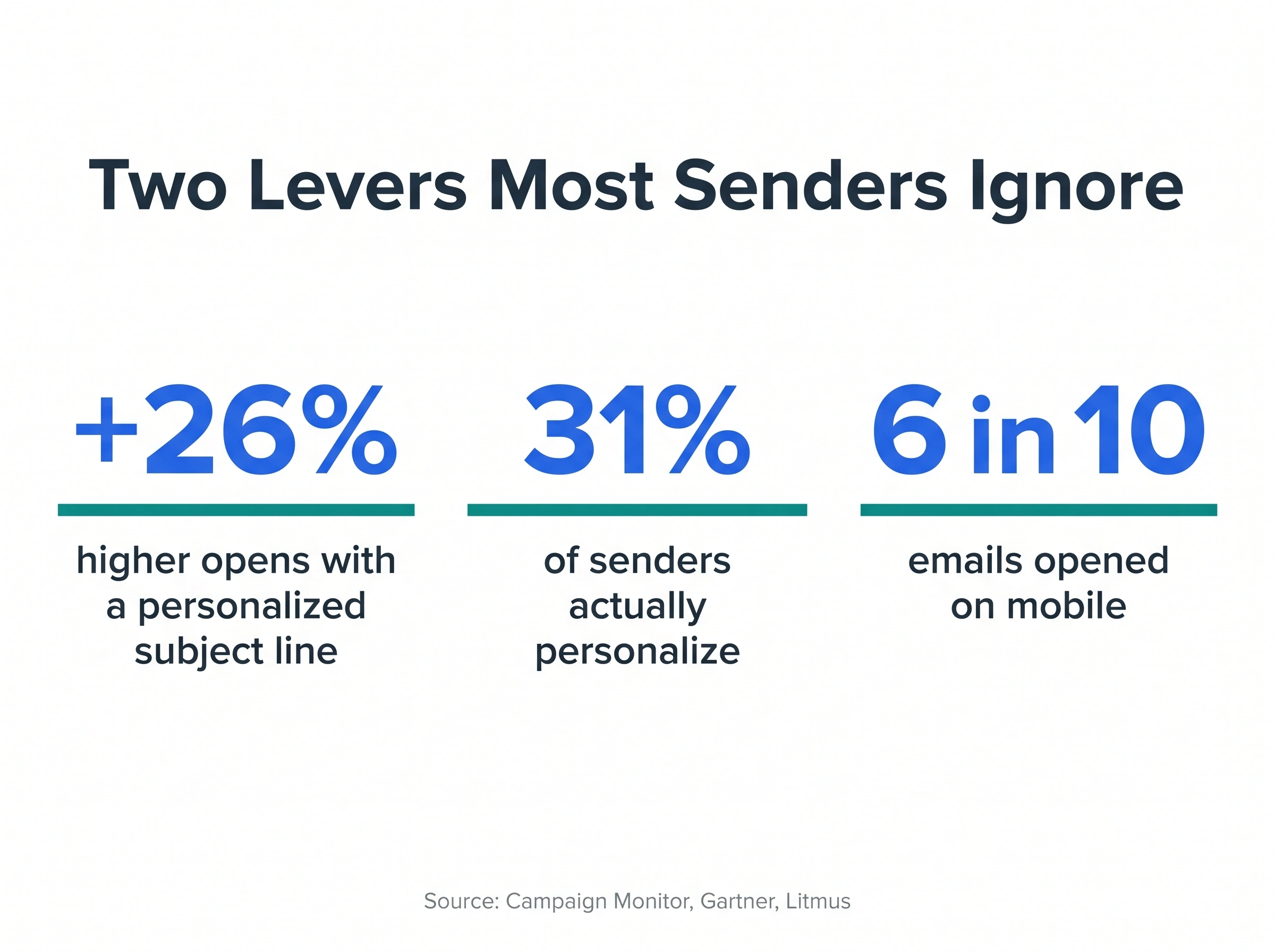
Campaign Monitor’s classic finding still holds: personalized subject lines lift open rates by 26%, and Backlinko’s 2025 data shows specific subject lines earn 24.6% more responses. The kicker, per Gartner: only 31% of brands actually personalize the subject. So this is a lever most of your competition leaves on the table.
Why your number is low: you’re sending the same subject to everyone.
How to improve it: reference something true about the reader (their company, role, a recent event) in the subject or first line. At scale, a Smart Email AI Agent writes that personalization per prospect instead of you doing it 200 times by hand.
About 6 in 10 emails are opened on mobile
Litmus’ 2025 to 2026 data puts mobile opens at 55 to 60% of all opens. That changes how you write: the subject truncates near 37 characters on the Gmail app, and a wall of text is brutal on a phone.
Why your number is low: your emails are built for a desktop monitor.
How to improve it: front-load the subject, keep paragraphs to two or three lines, and put the ask high. Read your own draft on your phone before sending.
Source: SmartReach.io analysis of 2025-2026 industry benchmarks.
Tuesday, mid-morning, is the consensus best time to send
HubSpot’s 2025 survey points to Tuesday and the 9am-to-12pm window; GetResponse, across 4.4 billion messages, agrees Tuesday and Thursday lead, and found about 21% of opens and 44% of clicks happen in the first hour. The effect is modest: timing mostly decides whether you catch that first-hour rush.
Why your number is low: you’re sending whenever you finish writing, often late afternoon.
How to improve it: send in the recipient’s mid-morning, not yours. Tools that send by prospect schedule handle the timezone math so a 9am send lands at the reader’s 9am, not yours.
Source: SmartReach.io analysis of 2025-2026 industry benchmarks.
Keep your bounce rate under 2%, and your spam complaints near zero
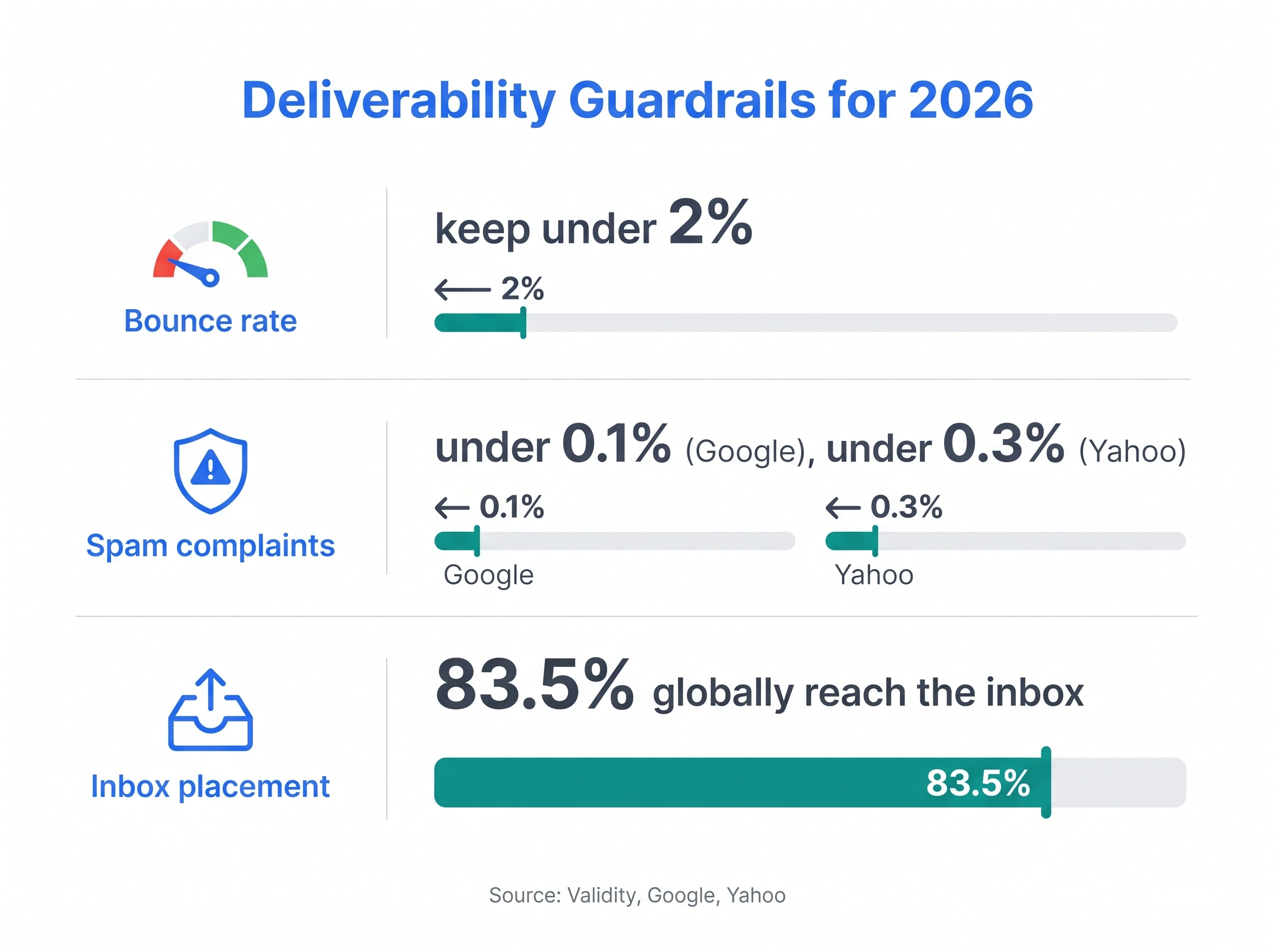
Validity’s 2025 Email Deliverability Benchmark puts global inbox placement at 83.5%, meaning roughly 1 in 6 emails never reaches the inbox. Clean permission lists bounce under 1% (Mailchimp data) to about 2% (Selzy). Since February 2024, Google wants bulk senders below a 0.1% spam-complaint target (never past 0.3%), and Yahoo enforces a 0.3% ceiling, both with SPF, DKIM, DMARC, and one-click unsubscribe.
Why your number is low: stale lists, no authentication, or spammy copy is sending you to the spam folder before anyone reads a word.
How to improve it: verify addresses before you send, warm up new sending domains, and run a spam test on your copy. SmartReach.io’s deliverability suite and email warmup exist for exactly this.
Source: SmartReach.io analysis of 2025-2026 industry benchmarks.
Multichannel outreach gets answered 2 to 3 times more often
SoPro’s 2025 data found email-only campaigns generate about 30% fewer leads year on year, while mixing email with LinkedIn and phone delivers the strongest results. Decision-makers, in particular, rarely reply to a single channel.
Why your number is low: you’re betting everything on email.
How to improve it: add a LinkedIn touch, a call or a WhatsApp message to your sequence for high-value prospects. A multichannel platform runs those steps in one flow instead of three disconnected tools, and a shared inbox keeps the replies from all channels in one place.
Email volume keeps growing, so attention keeps shrinking
The Radicati Group counts about 376 billion emails sent and received daily in 2025, rising past 392 billion in 2026. Every inbox is more crowded each year, which is the backdrop to every falling open and reply rate above.
Why this matters: your email isn’t competing with silence. It’s competing with hundreds of others that day.
How to win anyway: be the clearest, shortest, most specific message in the inbox. The data in this whole section rewards exactly that.
What “good” looks like: the KPIs to track
None of the competitor guides define these, so here’s the quick glossary that ties technique to outcome:
| Metric | What it measures | A healthy target |
|---|---|---|
| Open rate | % who opened (inflated by Apple MPP) | ~20 to 30% true; ~42% headline |
| Reply rate | % who replied | 5%+ good, 10 to 15% excellent (cold) |
| Response time | How fast people reply | Faster = clearer email |
| Bounce rate | % that didn’t deliver | Under 2%, ideally under 1% |
| Spam complaints | % marked as spam | Under 0.1% (Google) / 0.3% (Yahoo) |
One honesty note: that ~42% average open rate (MailerLite, HubSpot) is inflated because Apple’s Mail Privacy Protection auto-fires opens for roughly half of all clients. Pair open rate with the ~2% click rate for a truer read, and lean on reply rate as your real scoreboard.
What to avoid in a formal email
Knowing what to cut matters as much as knowing what to write. Each mistake below comes with the cost, because these aren’t style nits, they’re reply-killers.
| Mistake | What it costs you | Do this instead |
|---|---|---|
| Vague subject (“Quick question”) | Lower opens; you’re skipped | State the action and any deadline |
| Burying the ask | Reader gives up before finding it | Purpose in paragraph one |
| Reply-all when one person needs it | Annoys everyone; reads as careless | Reply to the sender only |
| Sending while angry | Permanent record of a bad moment | Draft it, sleep on it, send tomorrow |
| Assuming shared context | Reader can’t act; asks you to re-explain | Give the background up front |
| The endless thread | Wastes a week on what a call solves | After 3 exchanges, suggest a call |
| Too many questions | Overwhelms; you get none answered | Ask one or two, not five |
| Slang, emoji, “Hey” | Undercuts a formal ask | Match tone to the stakes |
| Walls of text | Unread on mobile | Short paragraphs, one topic |
| Typos | Reads as careless; lowers trust | Proofread out loud, every time |
| Sharing sensitive data | Email isn’t a secure channel | Use a secure link instead |
| Unvetted links or attachments | Looks like spam; hurts deliverability | Name attachments clearly, see our note on safe attachments |
Formal email format by industry and role
The six-part format holds everywhere, but the tone dials shift depending on your field and your seniority. Here’s how to adjust.
By industry
- Legal. The most formal of all. Use full names and titles, reference matter or case numbers in the subject, cite specific dates and documents, and avoid abbreviations. “Thank you for your prompt response dated [date]” over “Thanks for the quick reply.”
- Healthcare. Professional with empathy. Protect patient privacy (HIPAA), keep language jargon-free for non-clinical readers, and add the standard confidentiality note where relevant.
- Technology. Direct and efficient. Get to the point in the first line, use bullets for specs, and bring data (“at ~200ms average response time, we should discuss scaling”). Tech readers reward brevity.
- Finance. Precise and compliance-aware. Use exact figures, reference relevant regulations, and keep an audit-friendly paper trail. Vague numbers read as red flags here.
- Creative. Professional with room for personality. You can let brand voice through, reference portfolio work, and loosen up slightly, as long as the structure stays intact.
By role
- Job seeker. Lead with the role and your single strongest, most relevant proof point. Attach the resume, keep it to a screen.
- Student or fresher. Slightly more formal than you think you need. Introduce yourself and your program, state your ask plainly, and don’t over-apologize.
- Manager. Clarity and brevity signal respect for everyone’s time. Lead with the decision or update, then the detail. Make the action obvious.
- Founder. You’re often the face of the brand, so warmth plus precision works. Short, human, specific. People reply to founders who sound like people.
- Sales rep. Every email earns the next one. Outcome-led subject, one proof point, one clear ask, a planned follow-up. The templates above are built for you. For more, see our sales email templates.
The 12-point pre-send checklist
Run this before you hit send on anything that matters. Copy it, keep it by your desk.
- Subject states the point in under ~40 characters.
- The right person is in “To,” the right people in “Cc,” and you’ve checked twice.
- Greeting uses the correct name and spelling.
- Your purpose is clear by the end of paragraph one.
- There’s one main ask, and it’s a single clear action.
- The email reads cleanly on a phone (you checked).
- No blocked-tone words: no “Hey,” no slang, no emoji in a formal note.
- Every attachment is named clearly and actually attached.
- No sensitive data (passwords, account numbers) in the body.
- Links are relevant and safe, and there aren’t too many.
- You proofread it out loud.
- Reply-to is correct, your signature is complete, and the send is timed for the reader’s morning.
How to write formal emails at scale with SmartReach.io
Writing one great formal email is a craft. Writing hundreds a week, to the right people, personalized, followed up, timed correctly, and landing in the inbox instead of spam, is an operations problem.
SmartReach.io is a cold email software built for exactly that problem, and one SmartReach.io sequence can mix email with LinkedIn steps, calls through the built-in dialer, and WhatsApp messages. It also works as a sales engagement platform on its Sales Engagement plans. Email Outreach plans start at $29 per month with no per-seat pricing, and every new account starts with a 14-day free trial with no credit card required.
The benchmarks in this guide (reply rates, follow-up lift, send-time windows, deliverability thresholds) are the same ones SmartReach.io is built around. Here’s how each part of the formal-email workflow you just read maps to something SmartReach.io does for you.
Find and verify the right recipient
A formal email only works if it reaches the right person at a real address. SmartReach.io’s B2B Lead Finder searches a database of 300M+ contacts so you can build a list by role, industry, and company, and it verifies each address before you send. That’s the single biggest lever on reply rate. A tight list of the right people beats a big list of the wrong ones, and verified addresses keep your bounce rate under the 2% line that protects your sender reputation.
Write and personalize every email
The data is blunt. Personalized subject lines lift opens about 26%, yet only 31% of senders bother. SmartReach.io’s Smart Email AI Agent writes genuine personalization per prospect, referencing their company, role, or a recent trigger, instead of you hand-editing 200 emails. The AI content generator drafts the body in your voice and stores your best formal templates (including the 34 above) as reusable, auto-personalizing snippets. You write the formula once; SmartReach.io fills it in for each reader.
Follow up automatically, without nagging
A single follow-up can lift replies by 65.8%, and most senders never send one. SmartReach.io’s AI automations and sequences send your follow-ups on the cadence you set (one initial email plus two or three nudges), and stop the instant someone replies, so nobody gets a follow-up to an email they already answered. That’s the discipline that’s nearly impossible to keep by hand across a real pipeline.
Send at the right time, in the reader’s timezone
Tuesday and Thursday mornings win, but only in the reader’s local time, not yours. SmartReach.io’s sending schedule and holiday calendar handles the timezone math so a 9am send lands at the prospect’s 9am, and it holds your formal emails back from landing on a public holiday when they’d be buried.
Land in the inbox, not the spam folder
Roughly 1 in 6 emails never reaches the inbox, and since Google and Yahoo’s 2024 sender rules, getting there means SPF, DKIM, DMARC, a clean spam-complaint rate, and a warm sending domain. SmartReach.io’s deliverability suite runs a spam-test report on your copy and setup before you send, AI email warmup builds and protects your sender reputation, and inbox rotation spreads volume across multiple sending accounts so no single inbox gets flagged. This is the part of formal email that has nothing to do with wording and everything to do with whether your perfect email is ever seen.
Go multichannel for the prospects that matter
Email-only outreach generates about 30% fewer leads year on year, and decision-makers rarely reply to a single channel. SmartReach.io’s multichannel platform lets you add a LinkedIn touch, a call (through its built-in cold calling software) or a WhatsApp message into the same sequence as your formal email, so your top prospects hear from you in more than one place without you juggling three tools.
Keep every reply in one place
When formal outreach works, the replies come back, and across a team they scatter fast. SmartReach.io’s shared inbox pulls every response from email, LinkedIn, and calls into one view, so nothing slips and the whole team can see who said what. Pair it with the platform’s reporting to track reply rate, response time, and which templates actually earn answers, then double down on what works.
That’s the difference between knowing how to write a formal email and running formal email as a system. The craft in this guide makes each message good; SmartReach.io makes the whole operation repeatable.
The bottom line
A formal email format isn’t about sounding stiff. It’s a structure that respects the reader’s time and makes saying yes easy: a sharp subject, a fast purpose, one clear ask, and a clean sign-off. The six parts give you the frame, the 34 templates give you the starting words, and the 2026 data tells you which habits actually move replies (follow up, personalize, keep it short, send in the morning, and protect your deliverability).
Do that consistently and you’ll stand out in inboxes that get more crowded every year.
If you send formal emails at any real volume, doing all of this by hand stops scaling. That’s the gap SmartReach.io closes, and you can test every template and benchmark in this guide on your own list during a 14-day free trial.
Frequently asked questions
What are the 5 parts of a formal email?
Most formal emails are described as having five core parts: the subject line, the salutation (greeting), the body, the closing line, and the signature. Many guides split the body into an opening line plus the main message, giving six parts. Either way, the order stays the same and each part has a distinct job.
What is the correct format for a formal email?
Start with a clear, specific subject line (around 40 characters). Open with a formal greeting like “Dear Mr./Ms. [Last name],”. State who you are and why you’re writing in the first two sentences. Keep the body to one topic in short paragraphs with a single clear ask. Close with “Sincerely,” or “Best regards,” and a full signature with your name, title, company, and contact details.
How do you start a formal email?
Begin with a salutation that matches your relationship to the reader: “Dear Mr./Ms. [Last name],” when you know the name, or “Dear [Title] [Last name],” when you know the role. Then use your first sentence to say who you are (if they don’t know you) and your second to state your purpose. Skip long warm-ups like “I hope this email finds you well” followed by three sentences of preamble.
How do you end a formal email?
Close with a courteous line (“Thank you for your time,” or “I look forward to your reply,”), then a formal sign-off such as “Sincerely,” “Best regards,” “Kind regards,” or “Yours faithfully,”. Follow it with your full signature: name, title, company, and contact information. Avoid casual closings like “Cheers” or “Talk soon” in a strictly formal email.
What should you avoid in a formal email?
Avoid vague subject lines, slang and emoji, walls of text, typos, and burying your ask. Don’t send while you’re angry, don’t reply-all when one person needs the message, and never put sensitive data (passwords, account numbers) in the body, since email isn’t a secure channel. Keep it to one topic and one or two questions at most.
How long should a formal email be?
Shorter than you think. Aim for one to two short paragraphs for the core message, with your purpose visible without scrolling on a phone. Since about 6 in 10 emails are read on mobile, a long block of text often goes unread. If you can make your point in five sentences, don’t use ten.
Is “Dear Sir or Madam” still appropriate for a formal email?
It’s acceptable as a last resort when you genuinely can’t find the recipient’s name, but it reads as impersonal and dated, and it tells the reader no one looked. Spend two minutes on LinkedIn or the company site first. At scale, SmartReach.io’s built-in lead finder returns named contacts and verified addresses across 300M+ contacts and 50M+ companies, so the greeting is personal by default.
What is a formal email example?
A formal email example is a complete, sendable message with all six parts in place: subject line, salutation, opening, body, closing and signature. This guide carries 34 of them, debranded and copy-ready, weighted toward sales and business development. Three are annotated line by line, so you can see why each sentence earns its place before you adapt it.
What is a professional email address example?
A professional email address uses your own name on your company domain, such as firstname@company.com or firstname.lastname@company.com. Avoid nicknames, numbers and free providers for business mail. For cold outreach specifically, SmartReach.io recommends sending from a secondary domain that mirrors your main one, so a deliverability problem never reaches your primary company mailbox.
How do I send a formal email to many people at once?
Use a cold email software instead of BCC or a mail merge. SmartReach.io sends each formal email one by one from your own inbox, fills in every recipient’s name and company from your list, sends follow-ups on a schedule and stops them when someone replies. The same sequence can add LinkedIn, call and WhatsApp steps, and new accounts start with a 14-day free trial with no credit card required.
Stop juggling tools
Book more meetings on every channel
Join 5,000+ teams running multichannel outreach from one sequence, with deliverability built in.