25+ LinkedIn Connection Message Templates That Get Accepted

Your LinkedIn connection request sits unopened.
Days pass. Still nothing.
Here’s why: Generic connection requests get ignored 80% of the time.
The default “I’d like to add you to my professional network” message? It’s invisible.
But personalized LinkedIn connection messages change everything. They boost acceptance rates from 20% to 70% or higher.
This guide gives you 25+ proven LinkedIn connection message templates that actually work. These aren’t random examples, they’re tested strategies professionals use daily for sales, recruiting, and networking.
Whether you’re building relationships, generating leads, or expanding your network, these LinkedIn message templates will help you stand out.
What You’ll Find in This Guide:
- What makes LinkedIn connection messages work
- How to personalize your connection requests
- 25+ copy-paste templates by category
- Automation tools to scale your outreach
- FAQs about LinkedIn messaging
Let’s understand LinkedIn connection message templates
A LinkedIn connection request message is the personalized note (up to 200 characters) that appears when someone receives your invitation.
This message shows alongside your profile photo and headline, giving you roughly 40 words to explain why you want to connect. Personalized messages achieve 2.5-3.5x higher acceptance rates than generic requests.
LinkedIn gives you two options when sending connection requests:
Click “Connect” and then “Send without a note” to send a generic request.
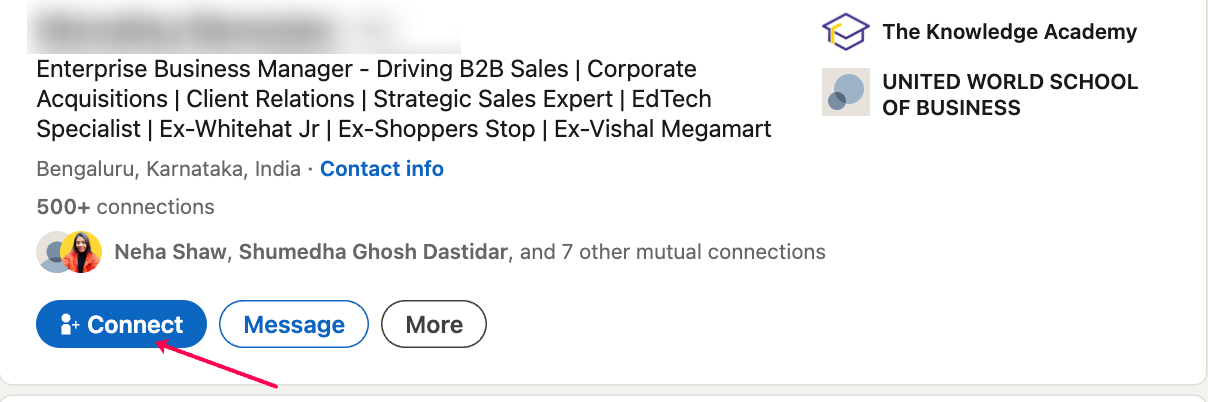
Or choose “Add a note” and write a personalized message.
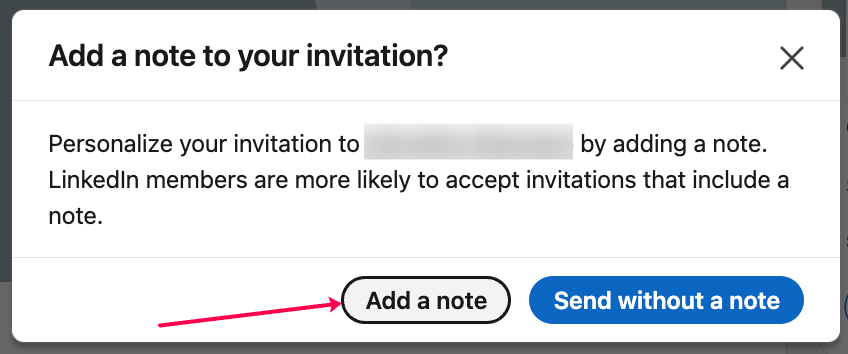
The difference is huge.
Generic requests get accepted about 20% of the time.
Personalized messages can reach 70% or higher.
LinkedIn connection message character limit
LinkedIn limits connection request messages to 200 characters (approximately 40 words). This restriction forces you to be concise and intentional with every word.
Best practices for the 200-character limit:
- Lead with their name or company (builds instant recognition)
- State one specific reason you’re connecting
- Skip lengthy introductions or your full background
- End with a simple call-to-action like “Would love to connect”
- Avoid filler words like “just,” “really,” or “I was wondering if”
What is a LinkedIn connection request message?
A LinkedIn connection request message is the text that appears when someone considers accepting your invitation.
You have 200 characters to make your case for the connection request.
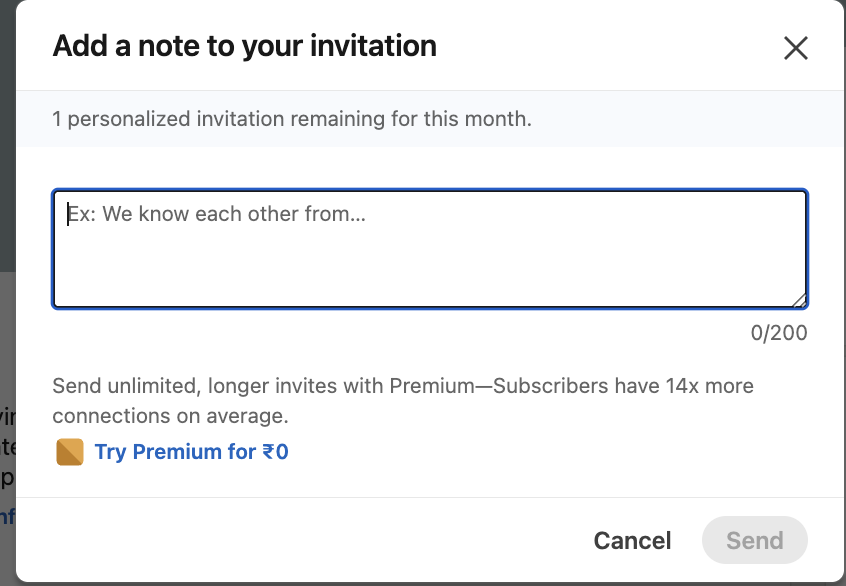
That’s roughly 40 words.
Not much space, but enough to show you’re a real person with genuine intent.
The message appears alongside your profile photo and headline.
Recipients see this information before deciding whether to connect or ignore your request.
Why personalized connection message templates work better?
LinkedIn personalization works because it shows effort.
According to LinkedIn’s 2024 State of Sales report, personalized connection requests achieve 2.5x higher acceptance rates than generic invitations.
When someone sees their name, company, or recent activity mentioned, they know you took time to research them.
Psychology plays a big role here.
People connect with those who show genuine interest. A personalized message triggers the reciprocity principle.
You’ve invested time in them, so they’re more likely to respond positively.
LinkedIn connection templates provide structure while allowing customization.
You get the efficiency of a proven format with the personal touch that makes connections happen.
How to send LinkedIn connection requests effectively?
The technical process is simple.
The strategy behind it makes all the difference.
A. Step-by-step guide to sending LinkedIn connection requests
Step 1: Visit the person’s LinkedIn profile
Step 2: Click the blue “Connect” button near their headline
Step 3: Select “Add a note” (not “Send now”)
Step 4: Write your personalized message in the 200-character text box
Step 5: Review your message once
Step 6: Click “Send invitation”
❗️Note: you can only send upto 10 personalized connections per month with a free LinkedIn account. (The one you get without paying anything)
The person receives your request in their LinkedIn notifications and via email (if they have notifications enabled).
B. Timing and targeting your outreach
Timing matters more than you might think.
✅ Tuesday through Thursday, between 9 AM and 11 AM, typically see higher response rates.
Times to avoid:
- Late evenings (appears less professional)
- Monday mornings (people catch up on weekend messages)
- Friday afternoons (they’re wrapping up the week)
- Weekends (lower platform activity)
Target active LinkedIn users. Look for recent posts, comments, or profile updates. These signals indicate they regularly check the platform and are more likely to see your request quickly.
Focus on quality over quantity. Ten well-researched, personalized requests outperform 50 generic messages every time.
How to craft personalized LinkedIn connection messages?
Great connection messages start with research.
Spend ~2 minutes learning about each person before writing and sending them an actual connection request on LinkedIn.
Which information to target for personalizing the connection notes?
Current role and company: Recent job changes make excellent conversation starters.
Recent activity: Reference their posts, comments, or shared articles. This shows you’re genuinely interested in their content.
Mutual connections: Mentioning someone you both know creates instant trust and credibility.
Previous experience: Well-known former employers provide natural connection points.
Education background: Alumni connections typically see higher acceptance rates.
Shared interests: Industry groups, conferences, or content themes you both engage with.
4 Essential elements of effective LinkedIn connection messages
Every good connection message has these 4 elements ⤵️
- Personal greeting: Use their first name. Avoid “Dear Sir/Madam” or other formal language.
- Connection point: Explain why you’re reaching out. Reference something specific about them or their work.
- Value proposition: What’s in it for them? This could be industry insights, potential collaboration, or shared experiences.
- Clear next step: Keep it simple. Most connection messages end with “I’d love to connect” or similar phrasing.
- Performance insight: Use HubSpot LinkedIn message tracking to monitor responses and optimize future outreach based on what resonates most.
💡Practical tip: Keep the tone conversational. Write like you’re talking to a colleague, not giving a presentation.
25+ LinkedIn connection message templates (by category)
Here are some of the proven templates organized by use case.
Remember to customize each one for your specific situation.
Use case → Networking and relationship-building templates
Template 1) Industry peer connection
| “Hi [First Name], I noticed we both work in [industry] and share an interest in [specific topic]. Would love to connect and exchange insights about [industry trend]. Looking forward to connecting!” |
Template 2) Event attendee follow-up
| “Hi [First Name], great meeting you at [event name] yesterday. Enjoyed our conversation about [specific topic discussed]. Would love to stay connected and continue the discussion!” |
Template 3) Content engagement
| “Hi [First Name], saw your recent post about [specific topic]. Your insights on [specific point] really resonated with me. Would love to connect and follow your content!” |
Template 4) Mutual connection reference
| “Hi [First Name], [Mutual connection name] suggested I reach out to you. They mentioned your expertise in [area] and thought we should connect. Looking forward to learning more about your work!” |
Template 5) Company research
| “Hi [First Name], been following [Company name]’s work in [specific area]. Really impressed by [specific achievement/project]. Would love to connect and learn more about your role there!” |
Template 6) Geographic connection
| “Hi [First Name], noticed we’re both based in [city/region]. Always excited to connect with local professionals in [industry]. Would love to expand my network here!” |
Template 7) Career transition
| “Hi [First Name], saw you recently joined [Company] as [Role]. Congratulations! I’m exploring opportunities in [similar field] and would love to connect with someone with your experience.” |
Template 8) Industry group member
| “Hi [First Name], noticed we’re both members of [LinkedIn group name]. Love connecting with fellow [industry] professionals. Your background at [Company] looks really interesting!” |
Use case → Sales and business development templates
Template 9) Prospect research
| “Hi [First Name], noticed [Company name] is expanding into [market/area]. We’ve helped similar companies in [industry] with [specific challenge]. Would love to connect and share some insights!” |
Template 10) Technology reference
| “Hi [First Name], saw that [Company] uses [specific technology/tool]. We work with several companies using similar tech stack. Would love to connect and share best practices!” |
Template 11) Industry challenge
| “Hi [First Name], many [job title]s I work with mention challenges with [specific problem]. Curious about your experience at [Company] and would love to connect!” |
Template 12) Growth mention
| “Hi [First Name], congratulations on [Company]’s recent [achievement/funding/expansion]. Impressive growth! Would love to connect and learn more about your journey there.” |
Template 13) Content value offer
| “Hi [First Name], your role at [Company] is really interesting. I recently wrote about [relevant topic] that might be useful for [job title]s like yourself. Happy to share if you’d like to connect!” |
Template 14) Similar client reference
| “Hi [First Name], we recently helped [similar company] with [specific outcome]. Given your role at [Company], thought you might find it interesting. Would love to connect and share the story!” |
Use case → Recruiting and job search templates
Template 15) Recruiter to candidate
| “Hi [First Name], your experience in [specific skill/area] at [Company] is impressive. We’re working on a [job title] role that might interest you. Would love to connect and share details!” |
Template 16) Candidate to recruiter
| “Hi [First Name], noticed you recruit for [specific roles/companies] in [location]. Currently exploring new opportunities in [field]. Would love to connect and learn about your openings!” |
Template 17) Internal referral
| “Hi [First Name], saw you work at [Company] in [department]. Really interested in opportunities there, especially in [specific area]. Would love to connect and learn about the culture!” |
Template 18) Hiring manager outreach
| “Hi [First Name], your team at [Company] is doing amazing work in [specific area]. I have [X years] experience in [relevant field] and would love to connect to learn about potential opportunities!” |
Template 19) Career advice
| “Hi [First Name], your career progression from [previous role] to [current role] is inspiring. Would love to connect and learn about your journey in [industry/field]!” |
Use case → Industry-specific and niche templates
Template 20) Alumni connection
| “Hi [First Name], fellow [University] alum here! Noticed you’re working in [industry] at [Company]. Would love to connect with another [school mascot/nickname] and hear about your experience!” |
Template 21) Conference speaker
| “Hi [First Name], watched your presentation on [topic] at [conference name]. Your insights on [specific point] were really valuable. Would love to connect and follow your future content!” |
Template 22) Local business leader
| “Hi [First Name], [Company name] has quite a reputation here in [city/region]. As someone building their network locally, would love to connect with established leaders like yourself!” |
Template 23) Industry publication mention
| “Hi [First Name], saw your recent article in [publication] about [topic]. Your perspective on [specific point] was spot-on. Would love to connect and stay updated on your insights!” |
Template 24) Partnership opportunity
| “Hi [First Name], [Company name] and our company serve similar markets. Wondering if there might be opportunities for collaboration. Would love to connect and explore possibilities!” |
Template 25) Skill-based connection
| “Hi [First Name], your expertise in [specific skill] is exactly what I’m trying to develop. Would love to connect and learn from someone with your experience in [area]!” |
Template 26) Recent achievement
| “Hi [First Name], congratulations on [specific achievement/award/promotion]! Really impressive work. Would love to connect and follow your continued success!” |
Generic vs. personalized LinkedIn messages
| Message Type | Acceptance Rate | Time to Accept | Response Quality |
| Generic (“I’d like to add you…”) | 20% | 5-7 days | Low engagement |
| Personalized with research | 70%+ | 1-3 days | High engagement |
| Template with customization | 50-60% | 2-4 days | Medium-high engagement |
Best practices for sending LinkedIn connection requests
Here are some of the best practices that you should follow while sending connection request messages on LinkedIn.
A) Do’s and don’ts of LinkedIn connection messaging
✅ Do’s:
- Research the person before writing – Spend 2 minutes reviewing their profile
- Keep messages under 180 characters – Leave buffer room (200 is the max)
- Mention specific details – Reference their recent post, company, or shared connection
- Use a friendly, professional tone – Write like you’re talking to a colleague
- Follow up after connecting – Send a thank-you message within 24 hours
- Test different templates – Track which approaches get the best acceptance rates
❌ Don’ts:
- Don’t send generic template messages – “I’d like to add you to my network” gets ignored
- Don’t pitch immediately – Avoid selling services in the first message
- Don’t use overly formal language – Skip “Dear Sir/Madam” or “To Whom It May Concern”
- Don’t make it about yourself – Focus on them and shared interests
- Don’t send identical messages – Customize each request with specific details
- Don’t ignore their content – If they post regularly, reference their latest update
LinkedIn networking is about building relationships, not making immediate sales.
B) Common LinkedIn Connection Request Mistakes to Avoid
Mistake 1: Hitting the Character Limit
Stay under 180 characters. Hitting exactly 200 often means your message gets cut off in previews.
Mistake 2: Focusing Only on What You Want
“I want to pick your brain” or “I’d love to learn from you” centers the conversation on your needs. Instead, offer value or find common ground.
Mistake 3: Over-Explaining Your Background
Your profile contains your background. The connection message should explain why you want to connect, not repeat your resume.
Mistake 4: Sending Requests Without Profile Optimization
People check your profile before accepting. Ensure your headline, photo, and summary are professional and complete.
Mistake 5: Ignoring Response Timing
If someone accepts but you don’t follow up within 48 hours, you’ve wasted the opportunity.
Focus on connection first, business second.
C) Optimize your LinkedIn profile to support LinkedIn outreach
Your profile is the first thing people check after receiving your connection request.
A weak profile kills even the best connection message.
Your LinkedIn profile is the first thing people check after receiving your connection request.
A weak profile kills even the best connection message.
Profile optimization checklist:
Professional photo: Use a high-quality headshot with a clean background. Avoid group photos, pets, or low-quality images.
Clear headline: Explain what you do. “Sales Manager at TechCorp” beats “Passionate about Growth.”
Complete summary: This is where people learn about your background and expertise. Include your value proposition in the first 2 sentences.
Detailed experience: Add recent roles with descriptions. Empty profiles look suspicious and reduce trust.
Recommendations: Request 3-5 recommendations from colleagues. Social proof significantly increases connection acceptance rates.
Active engagement: Post or comment regularly. Active profiles appear more credible and professional.
Scale LinkedIn connection outreach with automation
Manual outreach works for small number of connection requests on LinkedIn.
But when you need to connect with hundreds of prospects, automation becomes essential.
With automation you can send 10x more prospects personalized connection requests with notes.
And tracking becomes easier too.
SmartReach.io is one such platforms that provide you a full end-to-end LinkedIn automation platform.
SmartReach’s LinkedIn automation lets you create fully automated LinkedIn campaigns through a task manager.
You can schedule connection requests with notes, send personalized messages and InMails, and view profiles automatically.
The platform helps you stay within LinkedIn’s daily limits while reaching more prospects.
SmartReach gives you flexibility to choose between manual and end-to-end automation for your LinkedIn outreach activities.
For example, you can automate connection requests but manually send follow-up messages after prospects accept.
This helps teams coordinate outreach without account restrictions or duplicated efforts.
You can monitor acceptance rates, response rates, and optimize your approach based on data.
Try the Smartreach LinkedIn automation today.
Final thoughts
LinkedIn connection message templates are tools, not magic bullets.
The real magic happens when you combine proven frameworks with genuine research and personalization.
Start with the templates that match your situation.
Customize them based on your prospect’s background. Track your results and keep improving.
Remember: LinkedIn networking is about building relationships first, business second.
Focus on providing value and genuine connection. The business results will follow.
Ready to scale your LinkedIn outreach?
Consider tools like SmartReach.io that help you manage personalized multichannel campaigns that drive real business results.
Frequently Asked Questions About LinkedIn Connection Messages
Q: How long can a LinkedIn connection request message be?
A: LinkedIn connection messages have a 200-character limit, which equals approximately 40 words. This restriction applies to all connection requests sent with a personalized note. The 200-character count includes spaces and punctuation, so messages should be concise and focused.
Q: Why are my LinkedIn connection requests being ignored?
A: Connection requests get ignored when they’re generic, don’t explain why you’re connecting, or look like spam. Personalized messages mentioning specific details about the recipient (their company, content, or mutual connections) achieve 50-70% higher acceptance rates than generic requests.
Q: What should I say in a LinkedIn connection request?
A: Start with their name, mention one specific reason you’re connecting (shared interest, recent post, mutual connection), and end with a simple call-to-action. Keep it under 180 characters for optimal display. Example: “Hi Sarah, loved your post on content marketing. Would love to connect!”
Q: Can I send LinkedIn connection requests without a message?
A: Yes, you can send connection requests without a note by clicking “Send now” instead of “Add a note.” However, generic requests have only 20% acceptance rates compared to 50-70% for personalized messages. Always add a note for better results.
Q: How many connection requests can I send on LinkedIn per day?
A: LinkedIn limits free accounts to approximately 100-200 connection requests per week, with a monthly cap on personalized invitations (around 10 per month for free users). LinkedIn Premium removes the personalized message limit and increases overall weekly connection request allowances.
Q: What is a good LinkedIn connection acceptance rate?
A: A good acceptance rate for personalized LinkedIn connection requests is 40-60%. Top performers with highly targeted, well-researched messages achieve 60-80% acceptance rates. Generic connection requests typically see 15-25% acceptance rates. Track your rates to optimize messaging approaches.
Q: Should I send a follow-up message after someone accepts my connection?
A: Yes, send a brief thank-you message within 24-48 hours after someone accepts your connection request. This establishes the relationship and opens the door for future conversations. Keep it simple and genuine without immediately pitching products or services.
Q: What’s the best time to send LinkedIn connection requests?
A: Send connection requests Tuesday through Thursday between 9-11 AM in the recipient’s time zone. Avoid Monday mornings when people catch up on messages and Friday afternoons when they’re finishing the week. Weekday business hours see the highest acceptance rates.